AP Invoice Exceptions: Types, Owners and How to Resolve Them
AP invoice exceptions explained: the common types, who should own each one, how to resolve and document them, and the metrics that show your process improving.

An AP invoice exception is any invoice that cannot move through your normal approval and payment flow without a person stepping in. The cause is usually a mismatch (price, quantity, missing PO), a data problem (vendor record, tax, bank details) or a possible duplicate. The fix is rarely hard. The cost comes from how long exceptions sit, who they sit with, and how little record they leave behind.
This guide covers the common exception types, who should own each one, a repeatable resolution routine, the documentation auditors expect, and the metrics that show whether you are improving.
TL;DR
- An invoice exception is any invoice that stops short of payment because it fails a check: a match, a validation or a policy rule.
- The usual causes fall into eight groups: incomplete invoices, missing POs, price mismatches, quantity or receipt mismatches, duplicates, vendor master issues, bank-detail changes and tax discrepancies.
- AP should own the queue. The business, procurement or the supplier should own the resolution, depending on the cause.
- Track exception rate by reason, not just overall, and keep your touchless-rate definition fixed so improvement is real.
- Automation helps most at the front of the process, where fields are captured and checked before an invoice reaches the queue.
Table of Contents
- What counts as an AP invoice exception
- The eight most common exception types
- Who should own an invoice exception
- A resolution routine your team can repeat
- Documentation that holds up in an audit
- Measuring whether your exception handling is improving
- How automation reduces exceptions
- Perspective
- Fewer exceptions starting at the invoice
- Practical ways to prevent exceptions upstream
- A worked example
- FAQ
- Sources
What counts as an AP invoice exception
Every AP team runs checks before it pays. Does the invoice have the required fields? Does it match a purchase order? Was the goods receipt recorded? Is the vendor known and active? When a check fails, the invoice drops out of the straight-through path and into a queue where someone has to decide what happens next.
That queue is what people mean by exceptions. It matters for three reasons:
- Cycle time. An invoice waiting for an answer is not being paid. Late payment can cost early-payment discounts and strain supplier relationships.
- Labor. Each exception takes emails, system lookups and follow-ups that a clean invoice never needs.
- Control. The exception queue is where overrides happen. Weak documentation here is what auditors tend to find.
University finance offices publish their own rules, and they show how concrete these triggers are. Ohio State’s business and finance office says invoice details must match the purchase order and, for goods, the goods received. In its published guidance, freight over $300 for UNIV or $750 for HS, an invoice total more than $50 above the PO total, and an invoice quantity above the received quantity each trigger a match exception. Your thresholds will differ, but the pattern is the same: a written tolerance, and anything outside it goes to a person.
The eight most common exception types
Most exceptions fit into eight groups. The table pairs each with its typical trigger, a likely owner and the first move.
| Exception type | Typical trigger | Usual owner of the resolution | First move |
|---|---|---|---|
| Incomplete or misaddressed invoice | Missing invoice number, date, remit-to or bill-to entity | Supplier | Request a corrected invoice; do not edit the original |
| Missing purchase order | Invoice references no PO or an invalid one | Requester or procurement | Identify the requester; decide whether a retroactive PO or non-PO approval applies |
| Price mismatch | Unit price or total differs from PO beyond tolerance | Procurement | Compare to PO and contract; confirm the agreed price |
| Quantity or receipt mismatch | Billed quantity exceeds received quantity, or no receipt exists | Receiving or the requester | Confirm what arrived and when; record the receipt |
| Possible duplicate | Same vendor, amount or invoice number already in the system | AP | Check paid and pending items before releasing anything |
| Vendor master issue | Vendor inactive, missing tax form, or details differ from the record | AP with vendor management | Verify against the master record and onboarding file |
| Bank-detail change | Invoice or email asks to pay a new account | AP with treasury or controller | Verify by calling a known contact before changing anything |
| Tax discrepancy | Sales tax or VAT missing, wrong rate or wrong jurisdiction | Tax or AP | Check taxability and ship-to; request correction if needed |
This grouping follows a common industry taxonomy of invoice exception types. The ownership column is our own working suggestion, not a standard, so adjust it to your org chart.
Why these keep recurring
The causes sit upstream of AP. Suppliers send invoices in dozens of formats. Requesters buy before a PO exists. Receiving gets recorded days late, or not at all. Vendor records drift as suppliers change addresses and banks. AP sees all of it, because AP is where the checks run, so AP gets blamed for problems it did not create.
The practical consequence: reducing exceptions means fixing inputs, and resolving them quickly means routing each to the person who can actually answer.
Who should own an invoice exception
The cleanest rule is a split: AP owns the queue, and someone else owns each resolution.
AP owns:
- Triage and classification of every exception
- Aging, reminders and escalation
- Duplicate checks
- The record of what was decided and why
The business (requester or budget owner) owns:
- Confirming goods or services were received
- Coding and approval for non-PO invoices
- Deciding whether an overage is acceptable
Procurement owns:
- Price and terms disputes against the PO or contract
- Retroactive POs and PO changes
- Supplier performance conversations when one vendor causes repeat exceptions
The supplier owns:
- Corrected invoices for missing or wrong header data
- Credit memos for overbilling
- Confirming any bank-detail change through a verified channel
Yale’s procurement toolkit shows the same division in practice. Price or quantity variances and PO overages are among the match exceptions routed to departments for review. Non-PO invoices go to the Workday departmental inbox once the cost center is identified, and they may need charging instructions or approval before payment. It also requires confirmation of receipt for PO-matched invoices of $5,000 or more. Departments answer the business questions, and central AP keeps the process moving.
When to pull in procurement, the business or the supplier
- Pull in the business when the question is “did we get it?” or “should this be charged here?”
- Pull in procurement when the question is “what did we agree?”
- Pull in the supplier when the invoice itself is wrong, incomplete or asks for a change to payment details.
- Pull in the controller or treasury for bank-detail changes, repeated duplicates or anything that looks like fraud.
A resolution routine your team can repeat
A consistent routine beats heroics. Here is a six-step version.
- Capture and classify. Record the invoice with its reason code the moment it fails a check. Use a fixed list of reasons. Free-text reasons make reporting useless.
- Check for duplicates first. Before anyone chases a supplier, confirm the invoice is not already paid or pending. It is the quickest check and the most expensive to skip.
- Route to the owner. Send the exception to the person named for that reason code, with the PO, receipt and invoice image attached. A message that needs three more lookups will wait.
- Set a clock. Give each reason a target response time, such as one business day for receipt confirmation. Escalate to a manager when it lapses.
- Resolve and release. Once resolved, the invoice returns to the normal flow. Do not pay outside the system.
- Document the decision. Record who resolved it, what they decided, what evidence they relied on and when.
Escalation rules worth writing down
Three rules prevent most quarrel and confusion:
- Dollar thresholds. Small variances within tolerance post automatically. Mid-size variances go to the budget owner. Large ones go to a manager or the controller.
- Aging thresholds. An exception untouched for a set number of days moves up one level.
- Risk triggers. Bank-detail changes, new vendors and possible duplicates always get a second set of eyes, whatever the amount.
Documentation that holds up in an audit
An auditor reviewing exceptions wants to see that the control worked and that overrides were reasoned. Keep, for every exception:
- The original invoice image and any corrected version
- The PO, receipt and contract references used in the match
- The reason code and the date it was raised
- The name and role of the person who resolved it
- The decision and the evidence behind it (for example, a receiving note or a supplier credit memo)
- Any approval over the threshold
Two habits matter most. First, never overwrite the original data; add to it. Second, make the record part of the workflow so people do not have to write it up afterward. Notes taken after the fact are the ones that go missing.
Measuring whether your exception handling is improving
Counting exceptions alone tells you little. A rising count may mean more invoices came in. Use rates and break them down.
Metrics to track
Wise’s guide to touchless invoice processing defines the touchless invoice rate as eligible invoices completed without manual intervention, divided by eligible invoices received, times 100. It suggests a dashboard that also covers first-pass match rate, exception rate by reason, receipt-to-posting time, approval turnaround, rework, duplicate and fraud incidents, and cost per invoice. Its prevention list is a useful checklist: PO compliance, supplier data, receipt records, approval routing, invoice-field quality and integrations.
One caution from the same source applies to every team. If you change which invoices count as eligible, your touchless rate can move without any real improvement. Write the exclusions down once and keep them fixed from quarter to quarter.
What benchmarks say
In WEX’s summary of Ardent Partners’ 2025 research, the average invoice takes 9.2 days to process, with exception rates averaging 14% across organizations. Best-in-class teams process in 3.1 days and hold a 9% exception rate, against 22% for the industry average. Treat these as a reference point, not a target to copy. Your mix of PO and non-PO spend, suppliers and industries will shape your own baseline.
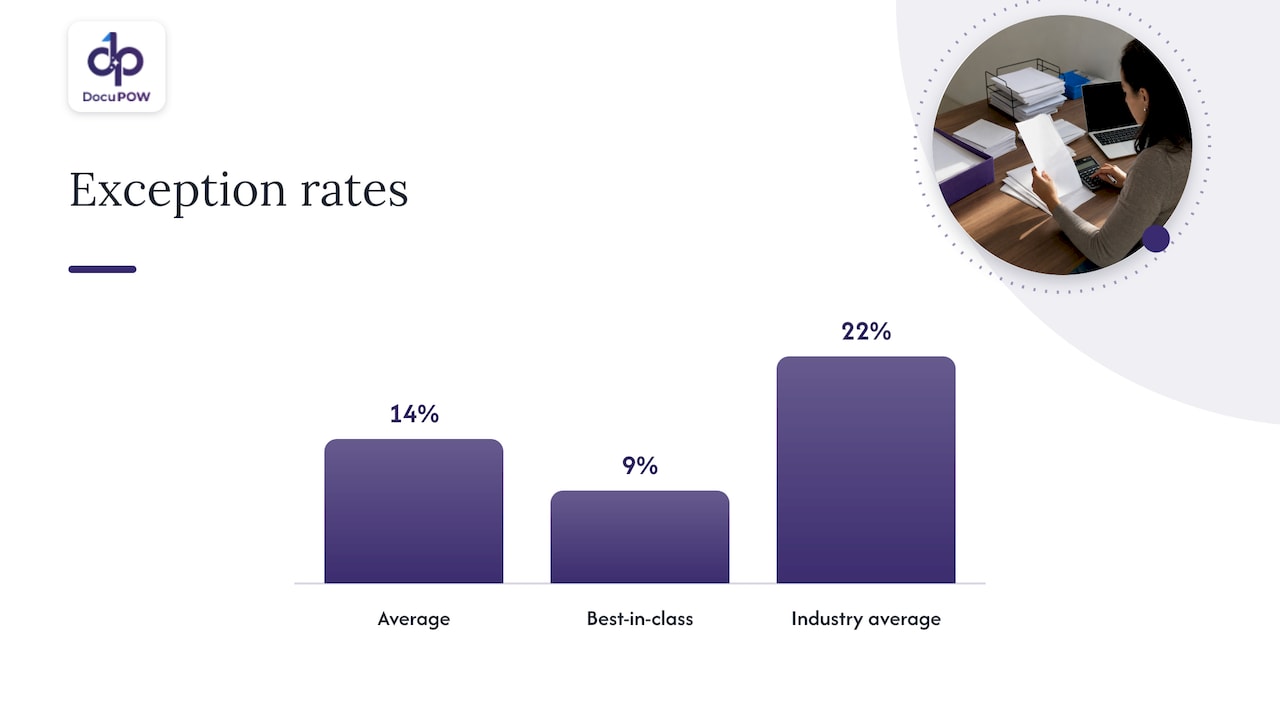
A practical way to use them: measure your own exception rate by reason for one quarter. The largest reason is where to act first.
How automation reduces exceptions
Manual teams find problems late, after an invoice is keyed and a match has failed. Automation moves the check earlier and makes the routing automatic. Four places it helps:
- Capture. Reading header and line-item data accurately from varied invoice layouts, so missing or misread fields do not create false exceptions.
- Validation. Checking extracted data against schema rules, the vendor master and the PO before the invoice posts.
- Routing. Sending each exception to the right owner with context attached, instead of through a shared inbox.
- Posting and integration. Writing approved data to the ERP through an API, so the record in the accounting system matches what was approved.
What to look for in any approach: it should keep a human reviewer in the loop for judgment calls, show where each extracted value came from, and leave an audit trail. Speed without traceability just moves risk around.
Perspective
Most exception queues are really data-capture problems wearing a different label. When a price is read wrong, a line item is missed or a vendor name is keyed differently, the invoice fails a match that it should have passed. The team then spends hours proving the invoice was fine.
That is why we built DocuPOW around template-free, agentic extraction. It is designed to read invoices it has never seen before, without a template for each supplier, so fewer invoices fail for reasons that have nothing to do with the supplier or the purchase.
We also think exceptions deserve a person, not a black box. Our human-in-the-loop audit review is built for the cases that need judgment, and conversational document querying returns answers with source citations so a reviewer can see where a value came from. The goal is not zero humans. It is humans spending their time on real decisions rather than retyping.
Finally, we see extraction as the start, not the end. Validation against strict schemas, multi-step workflow orchestration and ERP or CRM integration through APIs are how clean data becomes a posted, auditable transaction.
Syed Naveed Abbas
Fewer exceptions starting at the invoice
If your exception queue is driven by misread fields, unfamiliar invoice layouts or slow routing, DocuPOW’s accounts payable automation is built for that work. It extracts data without templates, validates it before posting, routes items for human audit review where needed and integrates with ERP systems through its API.
Plans start with Starter at 99 USD per month and Professional at 499 USD per month. Enterprise pricing is not published. You can compare them on the pricing page or start a free trial with your own invoices.
Practical ways to prevent exceptions upstream
Resolution is the cure. Prevention is cheaper. Start with the causes that show up most often in your own data, and consider these moves:
- Publish an invoice submission guide to suppliers. State the required fields, the PO number format, the bill-to entity and the address for sending invoices. Many incomplete-invoice exceptions disappear once suppliers know what you need.
- Make receipts timely. Set an expectation for how soon after delivery the receipt is recorded. Late receipts create quantity-mismatch exceptions out of invoices that are correct.
- Tighten the PO-first rule. Track spend that arrives without a PO by requester and department, and share the numbers with budget owners.
- Clean the vendor master. Remove duplicates and inactive vendors, and keep tax forms and remit-to details current.
- Lock down bank changes. Require verification through a known contact, never through details on the invoice or email requesting the change.
- Tune tolerances. If most price exceptions are a few cents of rounding, a modest tolerance saves time. If they are large, the issue is the PO or the contract, not the tolerance.
- Feed findings back. Review the top reason codes monthly with procurement and the business, and name one fix per quarter.
If you want to see how metrics tie to this work, our resources on touchless invoice processing and document processing analytics cover the measures in more depth.
A worked example
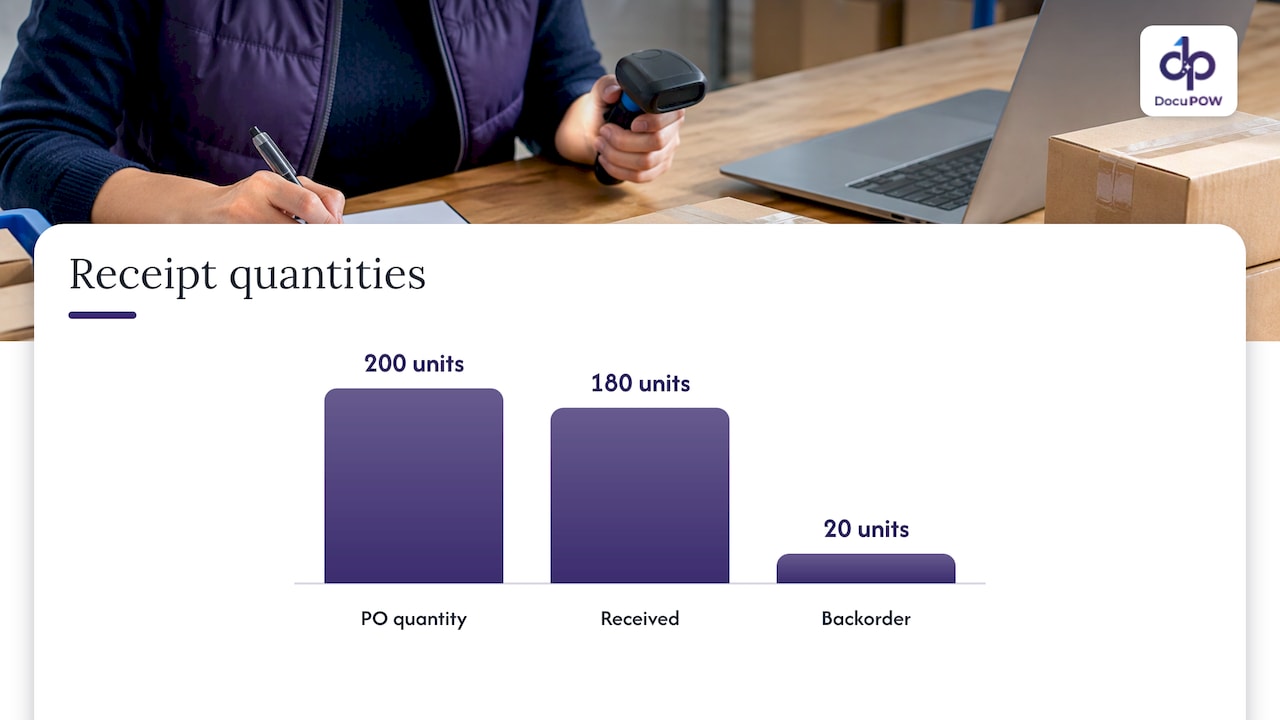
Suppose an invoice arrives for 200 units at $12.50, a total of $2,500. The PO says 200 units at $12.00, and the receipt shows 180 units received.
The system flags two exceptions: a price variance of $0.50 per unit and a quantity variance of 20 units.
- AP classifies it with two reason codes and checks that it is not a duplicate. It is not.
- The price question goes to procurement. They find the contract allowed a price adjustment from the first of the month, which the PO did not reflect. They update the PO.
- The quantity question goes to the requester. Receiving confirms that 20 units are on backorder. The supplier is asked for a corrected invoice for 180 units or a credit memo.
- The corrected invoice arrives and matches. It posts and is paid on schedule.
- The record shows both reasons, both owners, the evidence and the dates.
Nothing here is complicated. What makes it work is that each question reached the person who could answer it, and that the answers were kept.
FAQ
What is the difference between an invoice exception and an invoice error?
An error is something wrong with the invoice or its data. An exception is any invoice that fails a check and needs manual attention, whether or not the invoice itself is wrong. A correct invoice can become an exception because a receipt was recorded late or a PO was missing.
Who is responsible for resolving AP invoice exceptions?
AP should own the queue, meaning triage, aging and documentation. The resolution belongs to whoever can answer the question: the requester for receipt and coding, procurement for price and terms, and the supplier for corrected invoices. Bank-detail changes and suspected fraud go to the controller or treasury.
How long should it take to resolve an exception?
Set a target for each reason code rather than one number for everything. A receipt confirmation might have a one-business-day target, while a supplier credit memo takes longer. Review aging weekly and escalate anything past its target.
What is a good exception rate?
In the 2025 Ardent Partners research as summarized by WEX, exception rates average 14% across organizations, with 9% for best-in-class teams. Your own rate depends on your PO coverage and supplier mix, so use these as context and track your own trend by reason.
Can software eliminate invoice exceptions?
It can reduce them by capturing data accurately, validating before posting and routing automatically. Some exceptions, such as price disputes and receipt questions, need a person to decide. Good tooling keeps that decision fast, documented and auditable.
Sources
- Match Exceptions: Tips and Tricks, Ohio State Business and Finance
- Invoice Match Exceptions and Invoices Requiring Remediation, Yale
- How Does Touchless Invoice Processing Work?, Wise
- What does it cost to process an invoice? AP benchmarks, WEX
- Invoice Exceptions in AP: 8 Types and How to Fix Them, Staunch Fintech
Recommended
See DocuPOW on your documents.
Stop building templates. Start extracting data.


