SAP Document Processing Integration: How to Connect Documents to SAP
How document data gets into SAP: the extraction, validation and posting steps, integration methods, invoice automation criteria and audit controls for US teams.


SAP document processing integration means three things working together: a tool that reads a document and returns structured fields, an integration layer that maps those fields to SAP APIs or IDocs, and a validation and review step that keeps bad data out of your ledger. Extraction alone never creates anything in SAP. The integration is what turns a PDF into a posted invoice, a sales order or a linked record.
This guide walks through how that flow works, the methods teams use to connect it, what to check when you pick an invoice automation approach, and how to keep the process auditable.
TL;DR
- Document extraction returns fields with confidence scores. A separate integration layer (ABAP, CAP or SAP Integration Suite) calls the SAP API that creates the object.
- Design validation against live SAP master data before posting, and route low-confidence fields to a human reviewer.
- When you assess invoice automation, test supplier layout diversity, exception visibility and integration effort, not only headline accuracy.
- Build audit evidence (who approved what, and when) into the workflow before you build the automation.
- DocuPOW is a template-free document intelligence platform that connects to ERP systems through API. Plans start at $99 per month.
Table of Contents
- How document data actually moves into SAP
- Integration methods and prerequisites
- A typical architecture, step by step
- How invoice automation extracts, validates and posts
- What to assess when choosing an SAP invoice automation approach
- Security, access control and audit readiness
- Where DocuPOW fits
- Try it on your own documents
- A practical rollout plan
- FAQ
- Sources
How document data actually moves into SAP
A common misunderstanding is that the extraction tool “posts to SAP.” It does not. According to a SAP integrator’s explanation of SAP Document AI, the service reads a document and returns its data as structured fields, and an integration layer then reads those fields and calls the appropriate SAP API.
The same source describes five stages every document passes through:
- Upload: the file is sent with its document type and a schema or template.
- Extraction: asynchronous processing returns header and line-item fields, each with a value and a confidence score.
- Review: a person compares the result with the original and corrects fields.
- Confirmation: the document is marked final.
- Consumption: the integration layer reads the confirmed result through an API and creates the object in SAP.
This pattern is not specific to one product. Any document processing system you connect to SAP needs the same hand-off points: a clean, confirmed payload on one side and a mapping to SAP business objects on the other.
A worked example: purchase orders to sales orders
A Proclus Group implementation write-up shows the pattern end to end. The extraction service performs OCR and uses AI to pull fields, storing the result as JSON that can be queried through an API. SAP Integration Suite then retrieves confirmed documents and maps the extracted information to an IDoc of type ORDERS05 to trigger sales order creation. An alert service notifies the responsible team if documents sit unhandled beyond a defined time.
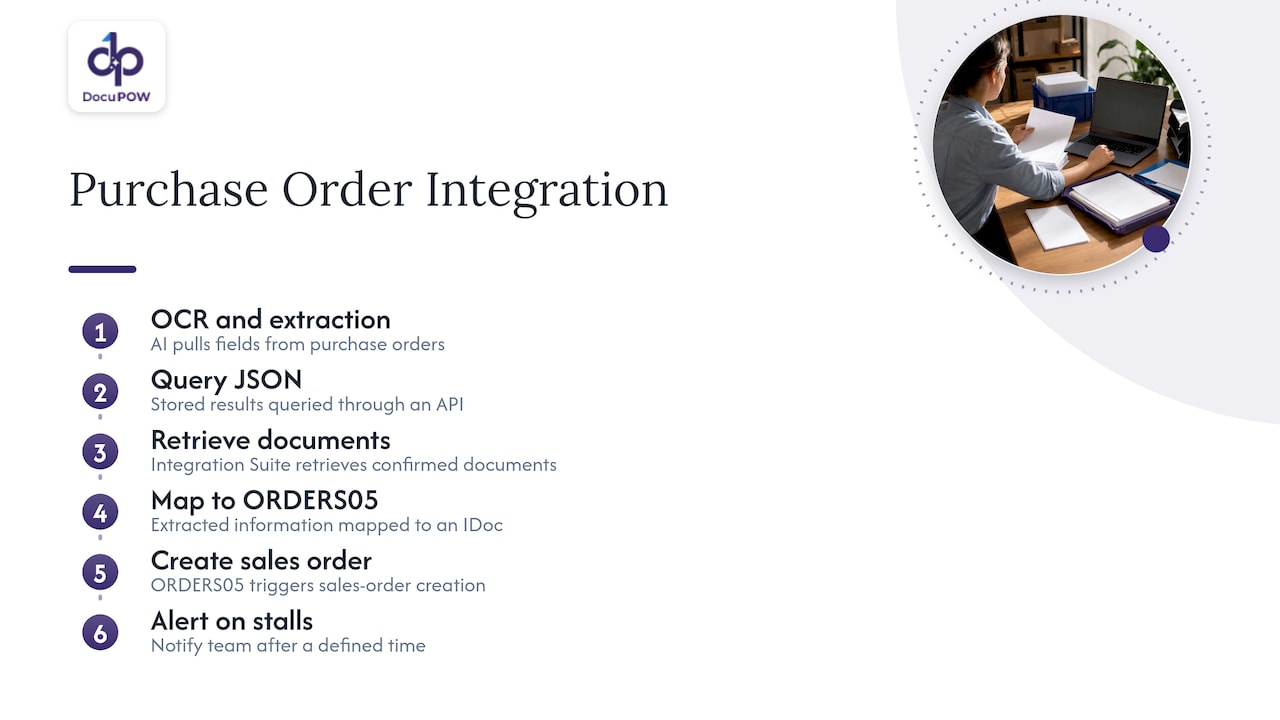
The lesson is in the last step. Integrations fail quietly when documents stall, so the stuck-document alert is as important as the mapping.
Integration methods and prerequisites
Teams connect document processing to SAP in a handful of ways. Which one fits depends on your SAP landscape, your in-house skills and how many document types you handle.
| Method | How it works | Best fit |
|---|---|---|
| SAP Integration Suite iFlow | A flow monitors a folder or API, calls extraction, maps results to IDocs or OData APIs | Teams already on SAP BTP with integration skills |
| Workflow automation on BTP | A process automation layer watches inboxes, triggers extraction and validates against master data | Business-led automation with inbox-driven documents |
| Custom ABAP or CAP code | Developers read extraction results and call SAP APIs directly | Specific, unusual logic or tight control |
| External platform via API | A document intelligence platform extracts, validates and pushes data to ERP through REST APIs | Multi-system environments, many document types, SAP plus other tools |
What to have in place before you start
Whatever method you choose, settle these items first:
- Target objects. Decide which SAP object each document type creates: a supplier invoice, a sales order, a goods receipt, an attachment linked to an existing record.
- A field schema per document type. List the header fields, line-item fields and required values SAP expects.
- Technical access. You need API credentials, a service user with the narrowest workable authorizations, and network connectivity. One production framework described on SAPInsider reuses existing identity and access management and a secure Cloud Connector so validation can run in real time against live S/4HANA master records.
- Master data quality. Vendor, customer and material records must be clean enough to match against. Extraction cannot fix a duplicated vendor master.
- An exception owner. Name who handles documents that fail validation, before go-live.
A typical architecture, step by step
An SAP Document AI proof of concept from Inclusion Cloud illustrates a sound layout. Incoming PDFs land in monitored SFTP folders. An Integration Suite iFlow watches for files and orchestrates the process. The extraction service pulls out sales order numbers, vendor details, dates, amounts and business references. Validation layers on BTP then check for matching SAP business objects, data consistency, missing fields, confidence thresholds and exception scenarios. Only after that are documents linked to the right sales orders in S/4HANA.
You can reuse this shape for almost any document type:
- Intake: email, SFTP, API upload or a shared drive.
- Classification: identify the document type so the right schema applies.
- Extraction: capture fields with confidence scores.
- Validation: compare against SAP master data, purchase orders and business rules.
- Review: send low-confidence or failed items to a person.
- Posting: call the SAP API or send the IDoc.
- Monitoring: alert on stalled items and log every action.
For a deeper look at the routing logic in steps 2 and 5, see our guide to document routing with AI.
Why templates become the bottleneck
SAP’s preconfigured content helps with common cases. Inclusion Cloud reports that SAP Document AI ships with more than 30 preconfigured templates, including purchase orders, payslips and I-9 forms, and that the standard invoice schema covers taxes, payments, delivery details, suppliers, materials, descriptions and quantities. That gets a standard invoice flow moving quickly.
The harder problem is layout diversity. The same write-up notes that when a company receives one document type in many layouts, it helps to give the system context about what a field means rather than only where it sits on the page. That is the same principle behind template-free extraction, and it is why layout variety deserves a line in your evaluation plan.
How invoice automation extracts, validates and posts
Invoice automation is the most common reason teams look into SAP integration. The flow follows the stages above, with finance-specific checks.
Extract. Capture supplier name and tax ID, invoice number, dates, currency, totals, tax amounts, payment terms, PO reference and line items.
Validate. Typical checks include:
- Does the supplier exist in the vendor master, and do the bank details match?
- Is the invoice number a duplicate?
- Does the PO reference exist and have open quantity?
- Do line items multiplied out equal the stated totals, and do tax amounts add up?
- Do price and quantity fall within your tolerance against the PO and goods receipt (three-way match)?
Post or park. Clean invoices post automatically or are parked for approval. Anything that fails goes to an exception queue with the reason attached.
Handle exceptions. Each exception should carry a cause code (missing PO, price variance, unreadable field, unknown vendor), an owner and an age. Without causes, teams cannot fix root problems. Our piece on invoice data extraction for finance teams covers how to catch errors before they post.
What to assess when choosing an SAP invoice automation approach
Search results for this topic are dominated by vendor feature lists. A more useful approach is to score each option against the problems that actually hurt in production. An academic study of vendor invoice management using SAP and OCR found that, even with strong performance, the main obstacles to enterprise-wide reliability are integration complexity, diversity in supplier document formats and poor transparency into the causes of exceptions.
Use those three obstacles as your core criteria, then add the practical ones:
| Criterion | What to ask | Why it matters |
|---|---|---|
| Integration fit | Which SAP versions, APIs and IDoc types are supported? Is there an API for other systems too? | Determines build effort and future flexibility |
| Layout handling | How does it treat a supplier layout it has never seen? Is setup per supplier needed? | Drives ongoing maintenance as your vendor base changes |
| Exception transparency | Can you see why each document failed and who owns it? | Lets you reduce exceptions over time |
| Document coverage | Invoices only, or also POs, delivery notes, contracts, forms? | Avoids buying a second tool in a year |
| Human review | Is there a review step with the original side by side? | Keeps control over low-confidence fields |
| Security and audit | Encryption, access control, logs, retention | Required for finance and compliance sign-off |
| Total effort | Who builds and maintains mappings and rules? | Often the largest hidden cost |
Run a pilot on your own documents, including your ugliest supplier formats, and measure straight-through rate, correction rate per field and time per exception. Report them by supplier, not as one average.
Security, access control and audit readiness
A document pipeline into SAP touches financial and personal data, so treat it as a controlled process.
- Least privilege. Give the integration user only the authorizations needed for the specific APIs and objects it writes.
- Separation of duties. The person who corrects an extracted bank detail should not be the person who releases payment.
- Evidence by design. One SAP consulting practitioner frames the shift well: the question moves from whether the AI is accurate to whether you can show in an audit that the right person approved the right action. Decide what evidence you need before the build, as this BTP governance guide argues.
- Log retention. The same guide notes that the BTP Audit Log Service defaults to 90 days of retention, with longer retention available through premium options or log export. Confirm your own retention requirement with your auditors and check SAP’s current documentation before you rely on a default.
- Review trail. Store the original file, the extracted values, any human corrections, the reviewer and the timestamp together.
For a control framework you can map to this workflow, see our NIST-aligned controls for secure AI document processing, and our guide to document approval workflow design for the human step.
Where DocuPOW fits
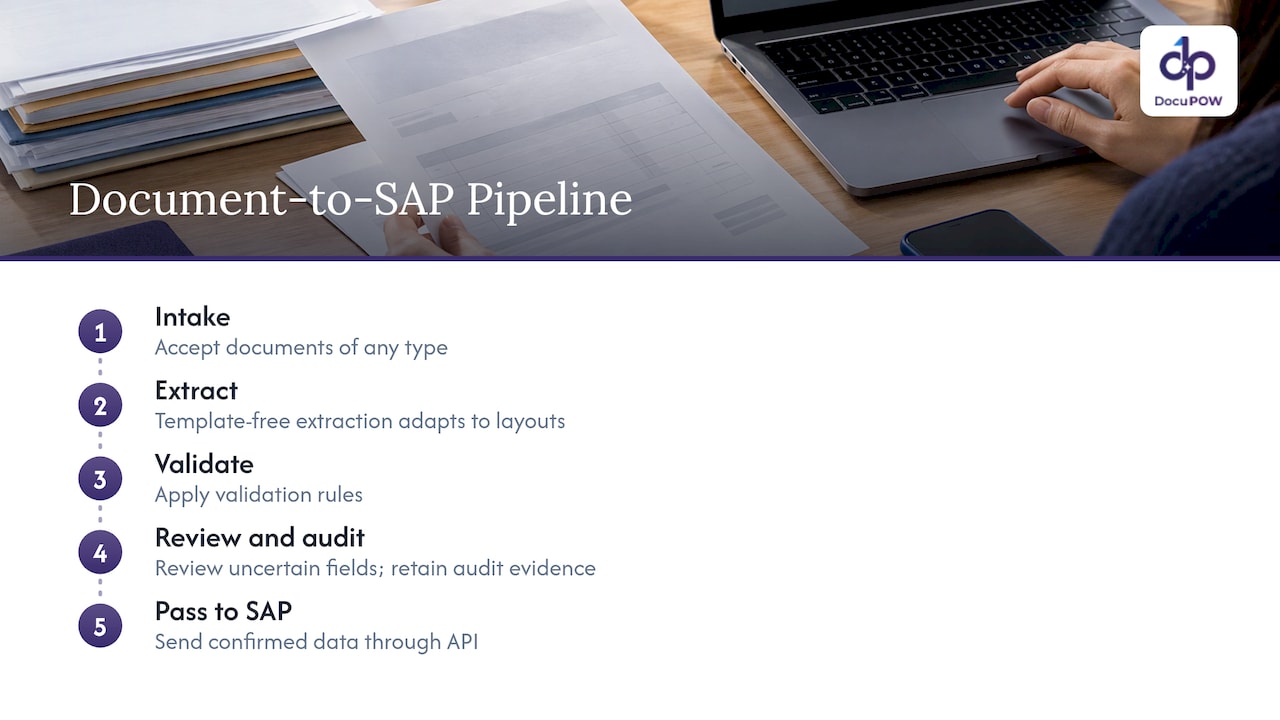
DocuPOW is an agent-based document automation platform. It extracts data from any document type without templates, orchestrates multi-step workflows, includes human-in-the-loop audit review, and integrates with ERP and CRM systems through API, with developer tools for your IT team. Its zero-shot extraction is designed to adapt to layouts it has not seen before, which targets the supplier-format problem described above.
In an SAP landscape, that means DocuPOW handles the front half of the pipeline: intake, extraction, validation rules, review and audit trail. Your integration layer, whether Integration Suite, custom code or our AI integration service, then passes confirmed data to SAP. Conversational document querying with source citations also lets teams look up what a contract or invoice says without opening the file.
Our perspective
Most failed SAP document projects do not fail at extraction. They fail in the gaps around it: a supplier sends a new layout, a field comes back with low confidence and nobody owns it, or an auditor asks who approved a correction and the answer lives in someone’s inbox.
That is why we built DocuPOW around the whole path, not just the read. Template-free, agentic extraction means a new supplier format does not become a new setup project. Human-in-the-loop review means uncertain fields go to a person with the source document in view. Workflow orchestration means the validated result moves on to your ERP through API instead of waiting for someone to rekey it.
Our advice is to treat SAP as the system of record and put the intelligence in front of it. Decide your schema and validation rules first, keep review and audit evidence attached to every document, and measure exceptions by cause. Teams that do this get faster posting and, just as important, a process they can defend in an audit.
Syed Naveed Abbas
Try it on your own documents
If you are mapping documents to SAP and want to see template-free extraction on your real supplier formats, DocuPOW offers Starter at $99 per month and Professional at $499 per month, with Enterprise available for larger deployments. See the pricing page for what each plan includes.
For a closer look at how the pieces fit together, explore the DocuPOW platform.
A practical rollout plan
Start narrow and widen.
- Pick one document type and one SAP object. Supplier invoices to a parked document is a common first target.
- Collect 200 to 500 real samples, weighted toward your messiest suppliers.
- Define the schema and validation rules with finance and the SAP team together.
- Set confidence thresholds per field. Amounts and bank details deserve stricter thresholds than descriptions.
- Run in shadow mode next to manual entry for a few weeks and compare results.
- Go live with review on, then relax review only where correction rates stay low.
- Review exception causes monthly and fix the biggest ones at the source, such as vendor master gaps.
Once invoices are stable, extend to purchase orders, delivery notes and forms. Our guides on reducing manual data entry and AI form processing cover the next steps.
FAQ
Does document extraction create invoices in SAP by itself?
No. Extraction returns structured fields with confidence scores. An integration layer, such as Integration Suite, ABAP or CAP code, or an API-based platform, reads the confirmed data and calls the SAP API or sends the IDoc that creates the object.
Which integration method should I choose?
If your team already works on SAP BTP, an Integration Suite flow is a natural fit. If you handle many document types across several systems, an external platform with a REST API keeps the logic in one place. Custom code suits unusual logic but adds maintenance.
How do I handle invoices that fail validation?
Route them to an exception queue with a cause code, an owner and a timestamp. Show the reviewer the original document beside the extracted values, and send stalled items to an alert so they do not sit unnoticed.
What should I measure in a pilot?
Measure the straight-through rate, the correction rate per field, time per exception and results by supplier. Include your hardest layouts, because averages hide the suppliers that cause most of the manual work.
Sources
- What is SAP Document AI? The vocabulary of the series
- Automating Document Processing with SAP Document Information Extraction (DOX)
- GenAI in Mission-Critical SAP: Inside a Production BTP Automation
- From AI Exploration to PoC: A SAP Document AI Workshop
- SAP Document AI Workshop: Second Edition, Key Takeaways
- Automated Vendor Invoice Management Using SAP and OpenText
- Responsible AI: Principles and Implementation, SAP BTP
Recommended
See DocuPOW on your documents.
Stop building templates. Start extracting data.


