Category: Blog

Your blog category

  • Proof of Delivery Processing: From Driver Scan to Billing

    Proof of Delivery Processing: From Driver Scan to Billing

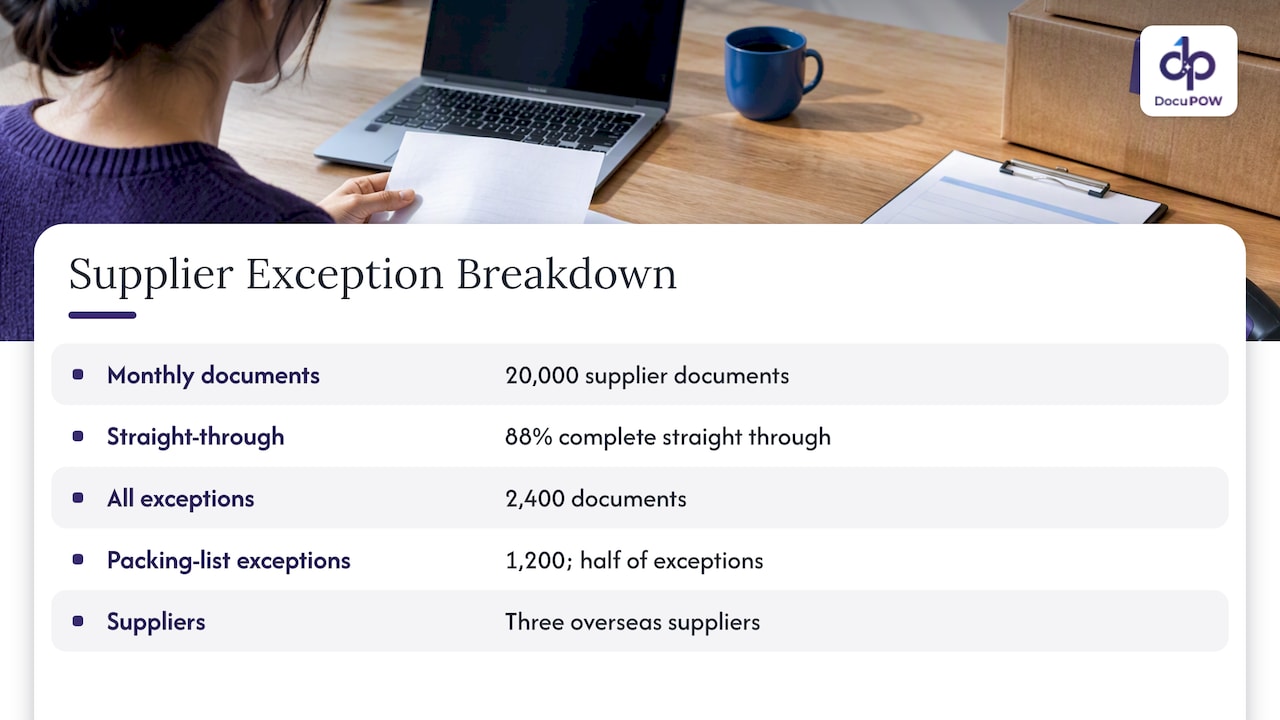
    Proof of delivery processing is the work of turning a delivery confirmation (a signature, a photo, a scan, a timestamp) into clean, validated data that reaches billing, claims and customer systems without anyone retyping it. For a carrier, the goal is simple: the moment a driver hands over freight, the evidence is captured, checked against the order, and attached to the right record. Carriers that still rely on paper receipts, emailed photos and manual keying wait longer to invoice and scramble when a customer disputes a delivery.

    This guide walks through what a POD record contains, how the data moves from the driver to storage, where automation fits, how to handle missing or disputed evidence, and what to ask when you evaluate tools.

    DocuPOW
    Move Delivery Proof Into Billing
    DocuPOW reads and validates administrative and financial documents, then routes transactional data into core databases without manual data entry.

    Request a demo

    TL;DR

    • A POD record confirms the right goods reached the right recipient. It usually combines a signature or recipient name, a timestamp and often photos, scans or GPS coordinates.
    • Processing means four steps: capture, extract and validate, route to your TMS, ERP or accounting system, and store with an audit trail.
    • Most delays come from the messy middle: blurry photos, handwritten receipts, mismatched order numbers. Exception queues with human review keep these from stalling billing.
    • A signed bill of lading is a commonly accepted form of POD, but it does not replace the final delivery record.
    • Template-free extraction matters for carriers because every consignee, shipper and driver app produces a different layout.

    Table of Contents

    What a proof of delivery record contains

    Proof of delivery is a receipt or document showing that a package was handed to the intended recipient at the correct address, as ShipBob’s guide to POD puts it. EasyPost adds that it also records the condition of the goods at the moment of handoff. That condition note is what makes POD so valuable when freight arrives damaged or short.

    What it holds depends on the carrier and the mode. The U.S. Postal Service gives a clear public example: its Proof of Delivery response is an emailed letter with the delivery information, recipient name, tracking number, an image of the recipient’s signature, and the printed name and address. It can also show the delivery location, product of mail, extra services and package weight.

    For trucking and last-mile fleets, the evidence set is often broader. EasyPost lists recipient signatures or identity, photographs, GPS coordinates, timestamps and barcode scans. Fleet software documentation describes the same toolkit: barcode or QR scans, digital signatures and photographs, with a timestamp on every proof record.

    In practice, a useful POD for a carrier carries these fields:

    Field Why it matters downstream
    Shipment or PRO number Links the evidence to the order and invoice
    Consignee name and address Confirms the right recipient and location
    Delivery date and time Starts the clock for billing and claims
    Signature and printed name Shows who accepted the freight
    Piece count and condition notes Supports or defeats shortage and damage claims
    Exceptions (refused, damaged, short) Triggers a different billing and claims path
    Photos, GPS, scans Backs up the signature when it is disputed

    How PODs travel from the dock to a database

    The path is easiest to see in a large operation that has to do it at scale. The U.S. Postal Service’s signature capture procedure (PO-610) says employees scan mailpiece barcodes and capture signatures, names and addresses on handheld devices, and the scanners then transmit the electronic record to a central tracking and reporting database.

    Most carriers follow the same logic at a smaller scale:

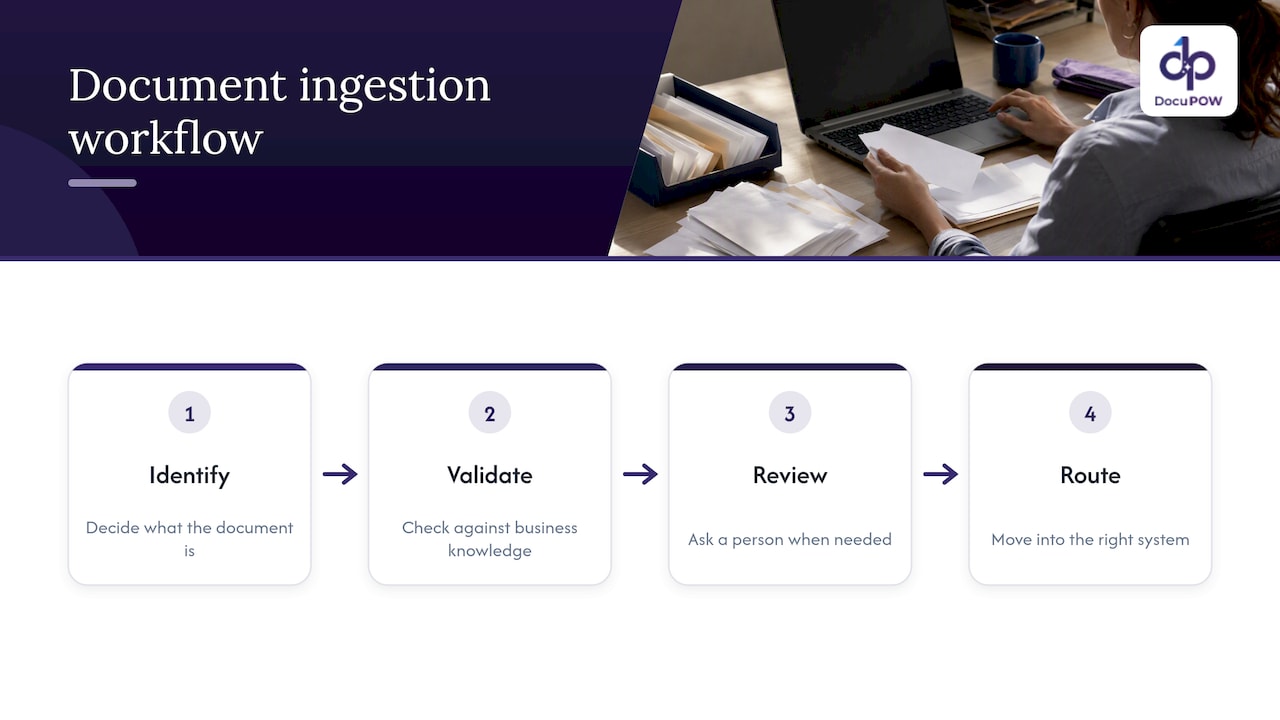
    1. Capture. The driver scans a barcode, collects a signature on a phone or handheld, and takes photos. Some fleets still collect a paper delivery receipt or signed bill of lading.
    2. Transmit. The driver app, telematics system or an emailed scan sends the evidence to the office.
    3. Read and validate. Someone, or something, reads the shipment number, consignee, quantities and signature, then compares them with the order.
    4. Route. The validated record updates the transportation management system, triggers an invoice, and notifies the customer.
    5. Store. The image and data are kept, indexed and retrievable for as long as claims or regulations require.

    Steps 3 and 4 are where the hours disappear. Driver apps handle capture well. Paper receipts, faxed scans, photos of clipboards and PDFs from consignee portals do not arrive as neat data.

    Where manual POD processing breaks down

    Anyone who has worked a billing desk recognizes the pattern. A driver photographs a receipt at an angle. A consignee stamps their own form instead of yours. The shipment number is handwritten and a 5 looks like an S. A clerk opens the image, types the details into the TMS, and attaches the file. Multiply that by hundreds of deliveries a day and three problems appear:

    • Slow billing. Invoices wait for evidence that is sitting in an inbox.
    • Typing errors. A wrong digit sends the POD to the wrong order, and the right order looks undelivered.
    • Weak claim files. When a customer says freight was never received, nobody can find the signed copy quickly.

    Old-style optical character recognition makes this only partly better. Template-based tools need a configured layout for each form, so a new consignee or a redesigned receipt means rebuilding the template. Carriers deal with thousands of formats, so the maintenance never ends.

    Automating capture, validation and routing

    Automation works best when you treat POD as a flow of business events rather than a pile of files. Integration specialists describe the proof-of-delivery pipeline as a controlled flow of events that lets billing eligibility and customer notifications be decided independently. That idea is practical: a delivery can be confirmed while the invoice is still waiting on a missing signature, and the two should not block each other.

    A working automated flow has these parts.

    Read any document, without templates

    The extraction layer has to read a signed receipt, a photographed bill of lading or a consignee’s own form and return structured fields: shipment number, consignee, date, piece count, signature present, exception notes. Template-free, zero-shot extraction does this without a setup project for each layout. That is the approach behind DocuPOW’s extraction platform, which is designed to adapt to layouts it has not seen before.

    Validate against the order

    Extraction is only useful if the result is checked. Validation compares the extracted values with the order in your TMS: does the shipment number exist, does the consignee match, does the piece count agree, is the delivery date plausible? Strict schema validation catches the record that looks complete but fails a rule, such as a signature field with no printed name.

    Push to the systems that act on it

    One integration example shows the destination. Stacksync describes moving POD images and signatures from driver apps and telematics into a TMS order record, then triggering invoicing in an ERP within seconds of delivery. Whatever tools you use, the principle is the same: the validated record should write itself into the TMS, accounting and document store through an API, not wait for a person to copy it.
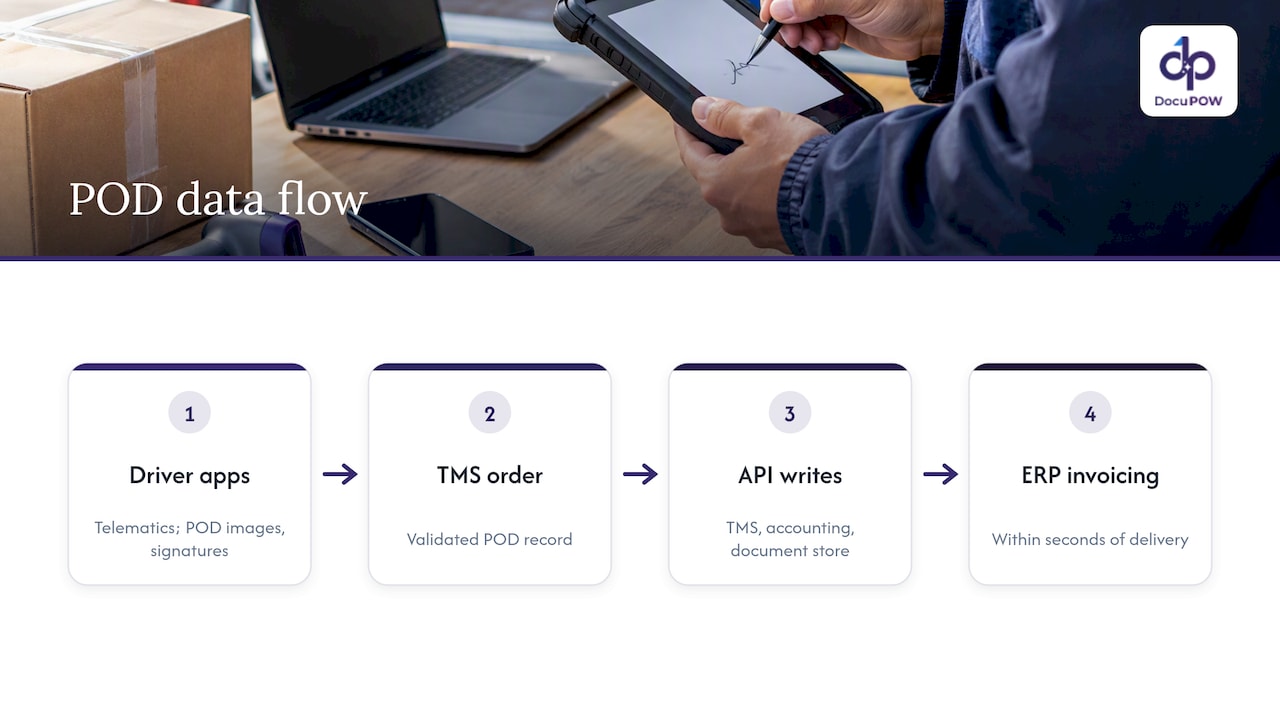
    POD extraction validation and billing workflow

    For multi-system setups, sync design guidance for logistics recommends middleware that carries delivery milestones across TMS, WMS and ERP, with stable correlation IDs so a shipment can be traced from booking to finance. If you are mapping this, start with the correlation ID: one identifier that follows the shipment everywhere.

    DocuPOW’s own write-up on proof of delivery automation for claims-ready evidence covers how we approach this for logistics operations.

    Handling missing, unclear or disputed delivery records

    No flow is clean all the time. The test of a POD process is what happens to the record that does not pass validation.

    Well-designed systems send mismatches and missing data to dedicated ownership queues where a person reviews, corrects or resolves them, and they keep an audit log of every action so the record can be reprocessed once the missing evidence arrives. That is the human-in-the-loop pattern, and it matters for three reasons:

    • Speed. The 90 percent of clean records go straight through, and staff spend time only on the exceptions.
    • Accountability. Each exception has an owner, a status and a history.
    • Defensibility. If a customer disputes a delivery, you can show who reviewed what and when.

    Typical exception rules a carrier might set:

    Exception Suggested route
    No signature or unreadable signature Billing review queue; request driver photo or GPS evidence
    Piece count differs from the order Claims queue; hold invoice adjustments
    Shipment number not found Data-entry queue; match by consignee and date
    Consignee refused delivery Customer service queue; trigger return or reschedule flow
    Duplicate document Auto-merge, flag for spot check

    A good review screen shows the original image beside the extracted fields, so the reviewer fixes a value in seconds rather than hunting through a file. Our guide to document approval workflow design covers how to structure those review steps and controls.

    Does a bill of lading prove delivery?

    A signed bill of lading often counts, but the two documents do different jobs. The bill of lading is the contract of carriage and the receipt for goods at origin, while the POD documents the final delivery. Together they establish the chain of custody for legal and claims purposes.

    For federal contracting, the Defense Logistics Agency is explicit. Its guidance lists a screenshot of shipper tracking details, a signed POD from the shipper, and a copy of a signed bill of lading as commonly accepted forms of POD. So for a DLA vendor, a signed BOL copy can be enough. For commercial freight, what counts is what your contract or the customer’s terms require, so confirm that with the customer before you decide that a signed BOL alone is your standard.
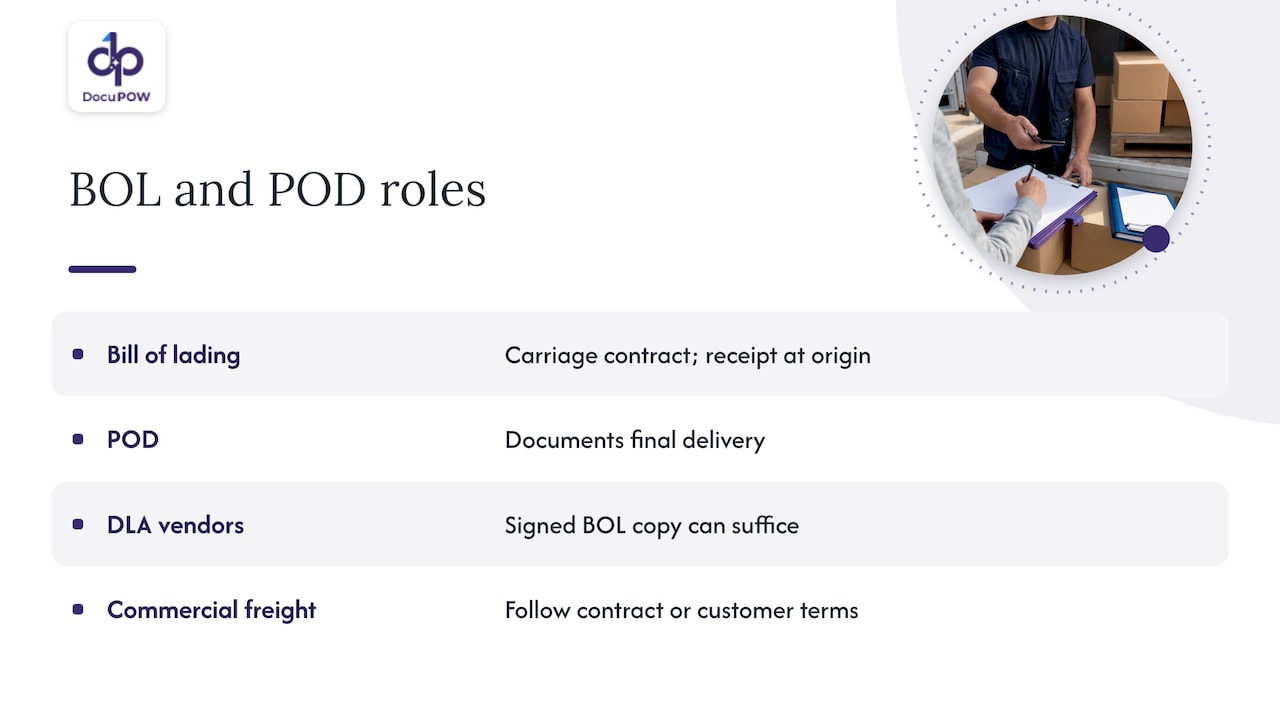
    Does a bill of lading prove delivery?

    Retention, security and audit readiness in the US

    How long you keep POD records depends on who you are and who you serve.

    • Federal contract work. DLA vendors must keep POD documentation for at least four years.
    • Regulated motor carriers. Federal rules in 49 CFR Part 379 set retention periods by record type, including shipping documents such as bills of lading. The schedule in Part 379, Appendix A lists the periods, and the same part says records of a company going out of business may not be destroyed until dissolution is final and all pending claims are completed. Check the current eCFR text and ask your counsel which category your records fall in.
    • Your own contracts. Customer agreements and insurers often require longer periods than the regulation.

    Whatever the period, design retention in from the start: store the image and the extracted data together, index them by shipment number and consignee, restrict access by role, encrypt at rest and in transit, and log every view and edit. Signatures and names are personal data, so treat the archive as sensitive.

    What to look for in POD processing software

    Because the other question readers ask is who offers automated proof of delivery data capture for carriers, it helps to sort the market by type rather than by brand:

    • Driver app and TMS modules capture signatures and photos well, but usually do not read paper or third-party documents that arrive by email or scan.
    • Integration and sync platforms move records between systems, but need clean structured data to move.
    • Template-based OCR reads fixed forms, and needs rework for every new layout.
    • Agentic document intelligence platforms read varied documents without templates, validate the output, route exceptions to people and write results into your systems.

    Use this checklist when you evaluate any option:

    1. Does it read documents it has never seen, without a template build?
    2. Does it validate against your order data, not just extract text?
    3. Can a reviewer see the source image next to every extracted field?
    4. Are exceptions routed to owners, with an audit log?
    5. Does it integrate with your TMS, ERP and accounting system through an API?
    6. How is data encrypted, and who can see what?
    7. Can you start with one lane, one customer or one document type?

    A phased start is sensible. Our logistics data entry pilot is built around a 4 to 8 week scope on a defined set of documents, and the logistics solutions page shows the wider workflow. If your delivery documents arrive alongside customs and shipping paperwork, the shipping document automation approach handles those on the same platform.

    A practical rollout plan

    1. Pick the document set. Start with the PODs that cause the most billing delay or the most disputes.
    2. Define the fields and rules. Agree what a complete POD must contain and what counts as an exception.
    3. Connect the destination. Decide where the validated record writes: TMS, ERP, document store.
    4. Run in parallel. Process documents automatically while your team checks results, and track the share that passes untouched.
    5. Assign exception owners. Name a person or team for every queue.
    6. Measure. Track days from delivery to invoice, exception rate and time to resolve a dispute. Our note on data accuracy standards explains how to set meaningful accuracy targets.
    7. Expand. Add consignee types, regions and document formats once the first set is stable.

    Our perspective

    Proof of delivery is the document that turns a shipment into revenue, and it is also the document most likely to arrive as a crooked photo or a stamped scrap of paper. We built DocuPOW because we think that gap should not be closed by people retyping fields.

    Our view is that carriers need three things together. First, extraction that does not depend on templates, because the consignee decides what the receipt looks like, not you. Second, validation that enforces a schema against the order, so a record is either right or clearly flagged. Third, human review where it counts, with source citations and an audit trail, so a disputed delivery can be answered with evidence rather than memory.

    That is why we describe DocuPOW as more than OCR. The system is designed to read documents the way an expert would, check them, and carry the result into the databases and workflows that act on it. For carriers, that means a delivery can move toward billing and claim-ready evidence without waiting for a person to open an attachment.

    Syed Naveed Abbas

    See it on your own delivery documents

    DocuPOW offers a Starter plan at $99 per month and a Professional plan at $499 per month, with Enterprise available for larger operations. Bring a batch of real delivery receipts and bills of lading, and see how template-free extraction and validation handle them.
    DocuPOW

    Review the plans on our pricing page, or see how supply chain document extraction fits your operation.

    FAQ

    What is proof of delivery processing?

    It is the set of steps that turn delivery evidence into usable records: capturing signatures, photos and scans, extracting and validating the data, routing it to billing, TMS and claims systems, and storing it with an audit trail. Automation reduces the manual typing and matching in the middle.

    What information should a POD contain?

    At minimum: the shipment identifier, recipient name and address, delivery date and time, and a signature or other proof of receipt. Many carriers add photos, GPS coordinates, barcode scans and condition notes. The USPS example shows tracking number, signature image, and printed name and address.

    Does a bill of lading prove delivery?

    Not by itself in every case. The bill of lading is the contract and origin receipt, and the POD records the final handoff. For Defense Logistics Agency vendors, a copy of a signed bill of lading is a commonly accepted form of POD. For commercial freight, follow your customer contract.

    How should carriers handle a POD with a missing or unreadable signature?

    Route it to an exception queue with a named owner rather than letting it block other records. The reviewer can use photos, GPS data or scan timestamps as supporting evidence, and the action is logged so the record can be reprocessed once the evidence arrives.

    How long should a carrier keep POD records?

    It depends on your category. DLA vendors must keep them at least four years, and motor carrier shipping documents fall under the retention schedule in 49 CFR Part 379. Confirm the current rules and your contract terms with counsel or your compliance lead.

    Sources

  • Bill of Lading Extraction: How It Works and How to Automate It

    Bill of Lading Extraction: How It Works and How to Automate It

    Bill of lading extraction is the process of reading a BOL, whether it is a scan, a photo or a PDF, and turning its shipper, consignee, cargo and freight details into structured fields your TMS, ERP or accounting system can use. Done well, it replaces retyping with a review step: software reads the document, flags what it is unsure about, and a person confirms only the exceptions. This guide covers what gets extracted, how OCR and AI differ, how to validate the output, how to connect it to your systems, and what to watch for on security and record-keeping in the US.

    DocuPOW
    Automate Bill of Lading Extraction
    DocuPOW uses AI agents to extract data from varied document formats without rigid templates, reducing manual entry in document workflows.

    Request a demo

    TL;DR

    • BOL extraction pulls parties, locations, cargo, weights, references and terms from a document into fields. The goal is clean data in your systems without manual keying.
    • Plain OCR reads characters. Modern AI also understands layout and context, so it copes with new carrier formats without a template for each one.
    • Reliable automation is not fully touchless. Per-field confidence, rules, and a human review queue for exceptions are what keep bad data out of your system of record.
    • Integration matters as much as accuracy: extracted data should flow into your TMS or ERP through an API, with an audit trail of every edit.
    • Keep the original image, since carriers and shippers may need to produce bills of lading and supporting records on request.

    Table of Contents

    What bill of lading data extraction actually captures

    A bill of lading is the receipt a carrier issues for goods it has taken to move, and it also serves as the contract of carriage. For US for-hire motor carriers, the federal rules on what a bill of lading must contain include the names of the consignor and consignee, the origin and destination points, and the number of packages. Real documents carry much more.

    A practical extraction schema usually has three layers.

    Header fields

    These identify the shipment and the parties:

    • BOL number, PRO number, booking or reference numbers, and purchase order numbers
    • Shipper (consignor), consignee and notify party, with addresses
    • Carrier name, vessel or trailer details, and seal numbers where they apply
    • Ship date, origin and destination, ports of loading and discharge on ocean documents
    • Freight terms such as prepaid or collect, and Incoterms on international moves

    Line items

    The line table is where most extraction projects struggle. For each line you typically want piece count, packaging type, description of goods, weight, dimensions, freight class or NMFC code, and hazardous-material flags. Descriptions can run across several rows, and the table may continue on a second page.

    Signatures, stamps and notations

    Delivery receipts and signed BOLs carry the proof of pickup or delivery: signature presence, date, printed name, and exception notes such as “damaged” or “short 2 cartons.” These are the details that drive claims and billing disputes, so they deserve fields of their own rather than being ignored as image noise.

    Why bills of lading are hard for older tools

    No single standard layout exists. Every carrier, freight forwarder and shipper prints its own form, and many shippers generate their own. Pages arrive skewed, faxed, photographed on a phone, stapled with a delivery receipt, or stamped over the text you need. Tables nest. Handwriting appears in the very boxes that matter.

    Template-based tools handle this by requiring a template per layout. That works for the first ten formats and falls apart at the hundredth, because every new carrier or revised form means someone builds and maintains another template. The cost shows up as ongoing setup work and exceptions that land back on a clerk’s desk.

    How OCR and AI turn a document into structured data

    The path from a paper or PDF to a clean record has several stages. Understanding them helps you judge any tool, including ours.

    1. Capture. A scan, email attachment, driver photo or EDI-adjacent PDF comes in. Image quality at this stage sets the ceiling for everything after it.
    2. Preprocessing. Deskewing, de-noising, rotation correction and page splitting prepare the image. Multi-document packets are separated into individual BOLs, delivery receipts and invoices.
    3. Text recognition (OCR). Characters are read from the image, including handwriting in more capable systems.
    4. Layout and context understanding. This is where AI separates itself from basic OCR. A model works out which block is the consignee, which table is the line items, and which number is the BOL number rather than a PO number, even when the form has never been seen before.
    5. Normalization. Dates, units, weights and addresses are converted into consistent formats, and party names are matched against your master data.
    6. Confidence scoring and routing. Each field receives a confidence value. Clean documents continue automatically, uncertain ones go to review.
    7. Delivery. Approved data is written to the TMS, ERP, or accounting system.

    The key distinction is between reading text and understanding a document. OCR alone returns a stream of characters and positions. An agent-based approach interprets what those characters mean in context, which is why it can handle a layout it has not encountered. That template-free capability is the core of how we built DocuPOW’s logistics document automation.

    Automating the whole BOL workflow, not just the reading

    Extraction is one step. The real saving comes from automating the path from intake to approved record. A practical flow looks like this:

    1. Intake from email inboxes, shared folders, portals, or driver apps, with metadata such as sender and receipt time attached.
    2. Quality gate that rejects or holds unreadable files before they waste anyone’s time.
    3. Extraction into header and line fields with per-field confidence.
    4. Validation against rules, master data and related documents.
    5. Exception queue where a clerk sees the original image beside the extracted fields and fixes what the system flagged.
    6. Staging, then writeback to the system of record only after checks pass.
    7. Analytics on volumes, error rates and turnaround time to find where documents still stall.

    One architecture write-up from a logistics consulting firm recommends a fail-closed design of this kind: capture metadata, quality gating, layout detection, per-field confidence, TMS matching, exception queues and human confirmation, with staging before anything is written back. We agree with the principle. A pipeline that guesses silently is worse than one that asks.

    If you want to see how this kind of multi-step flow is organized in practice, our shipping document automation pilot walks through a template-free approach for logistics paperwork.

    Validating extracted data and handling odd layouts

    Accuracy claims mean little until you decide what happens to the fields the system gets wrong or cannot read. These practices are what separate a demo from a production workflow.

    Set thresholds per field, not per document

    A blurry shipper address is a nuisance. A wrong weight or a mismatched BOL number can cause a billing error or a misrouted shipment. Set stricter confidence thresholds on the fields that carry financial or compliance risk, and let low-risk fields pass at a lower bar.

    Layer deterministic rules on top of AI

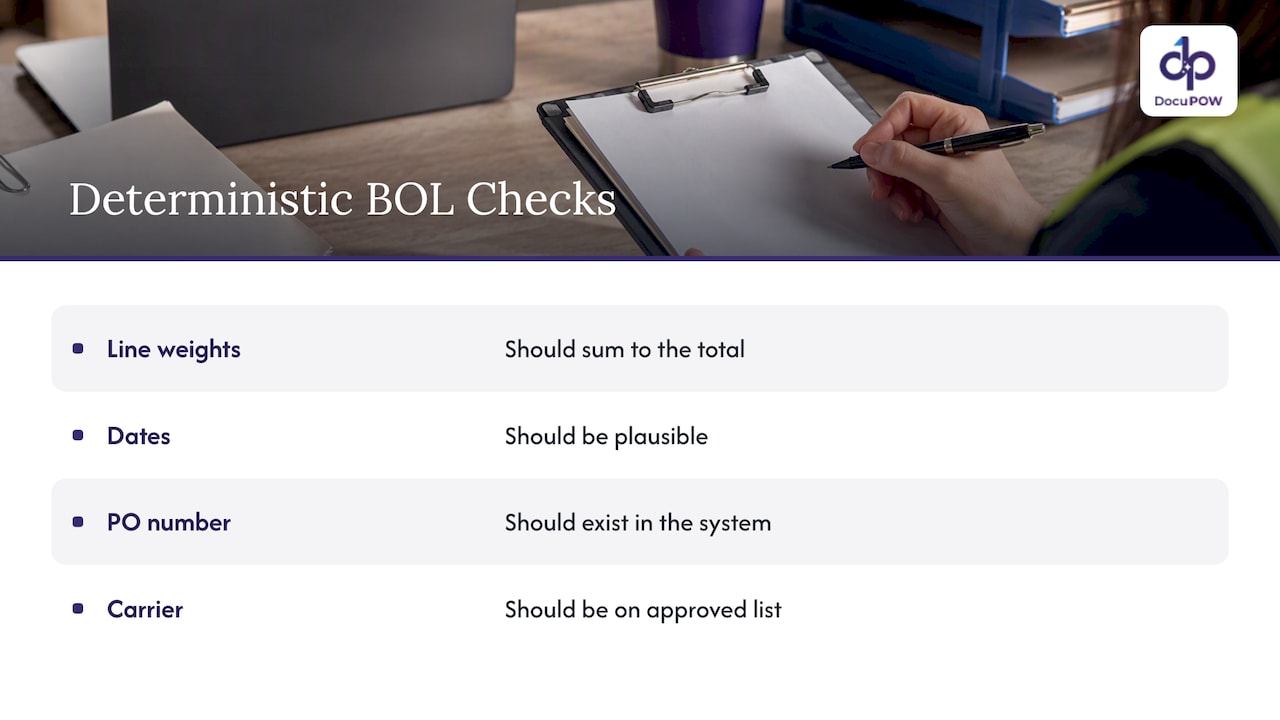
    Simple checks catch a surprising amount: line weights should sum to the total, dates should be plausible, a PO number should exist in your system, and a carrier should be on your approved list. The same consulting source advises using per-field confidence, required-field thresholds, deterministic rules and cross-document reconciliation, with fuzzy matching used narrowly and only where justified.

    Four deterministic checks for extracted shipping data

    Never let unresolved names create new records

    If the consignee on a scan does not match your master data, the right outcome is a review task, not a new customer record. Duplicate parties are expensive to clean up later. Identity conflicts, missing regions, stamp or signature problems, and line mismatches should all route to a person.

    Reconcile across documents

    A BOL rarely lives alone. Matching it against the purchase order, the rate confirmation, the delivery receipt and the carrier invoice exposes shortages, duplicate billing and rate discrepancies that no single-document check would catch.

    Keep the human edit trail

    Show the reviewer the original image next to the fields, and record every change: who edited what, when, and what the original value was. This is the human-in-the-loop audit review we build into DocuPOW, and it is what lets finance and compliance trust the result.

    Integrating extraction with your TMS and ERP

    Extracted data that sits in a spreadsheet only moves the retyping step. The value arrives when it reaches your systems automatically.

    In one published case, a services firm integrated extracted bill-of-lading data directly with a carrier’s TMS to create real-time shipment data, replacing manual entry. The same case reports thousands of documents processed daily, with benefits in reduced delays and better shipment visibility, though results of course depend on a company’s volumes and starting point.

    The U.S. Federal Highway Administration, describing electronic freight-management architectures, points to benefits that apply here too: less redundant data entry, better visibility, uniform data dictionaries, authenticated and authorized users, and encryption of data in transit.

    When you evaluate integration, ask these questions:

    • Is there a documented API for pushing approved data and pulling status?
    • Can field mappings be configured to your TMS or ERP schema without custom code each time?
    • Can the system write to a staging area first, so errors never hit production data?
    • Does it support ERP and CRM connections for the downstream steps, such as invoice matching and freight audit?

    Teams that also process carrier invoices alongside BOLs can pair this with invoice data capture so freight bills are matched against the shipping paperwork.

    Benefits and limits to expect

    The benefits are concrete. Less manual keying means fewer typos and faster posting. Faster posting means earlier visibility into where freight is and what it costs. Clerks stop transcribing and start resolving exceptions. In the Day & Ross case above, the reported gains included reduced manual entry and delays, improved real-time shipment visibility and shorter driver wait times.

    The limits matter too:

    • Input quality still counts. Crumpled, faxed or partially covered pages will produce more exceptions.
    • Handwriting and stamps remain the hardest cases. Expect a review queue, especially at the start.
    • Not every decision should be automated. The consulting perspective cited earlier holds that touchless processing should remove retyping on clean documents, not remove people from financial or exception decisions. We share that view.
    • Rollout takes tuning. Master data matching and routing rules need attention in the first weeks.

    For general guidance on handling large volumes without losing control, see our high-volume document processing best practices.

    Security, audit and US record-keeping

    Bills of lading are business and sometimes regulated records, so the automation layer should be treated like any system that touches them.

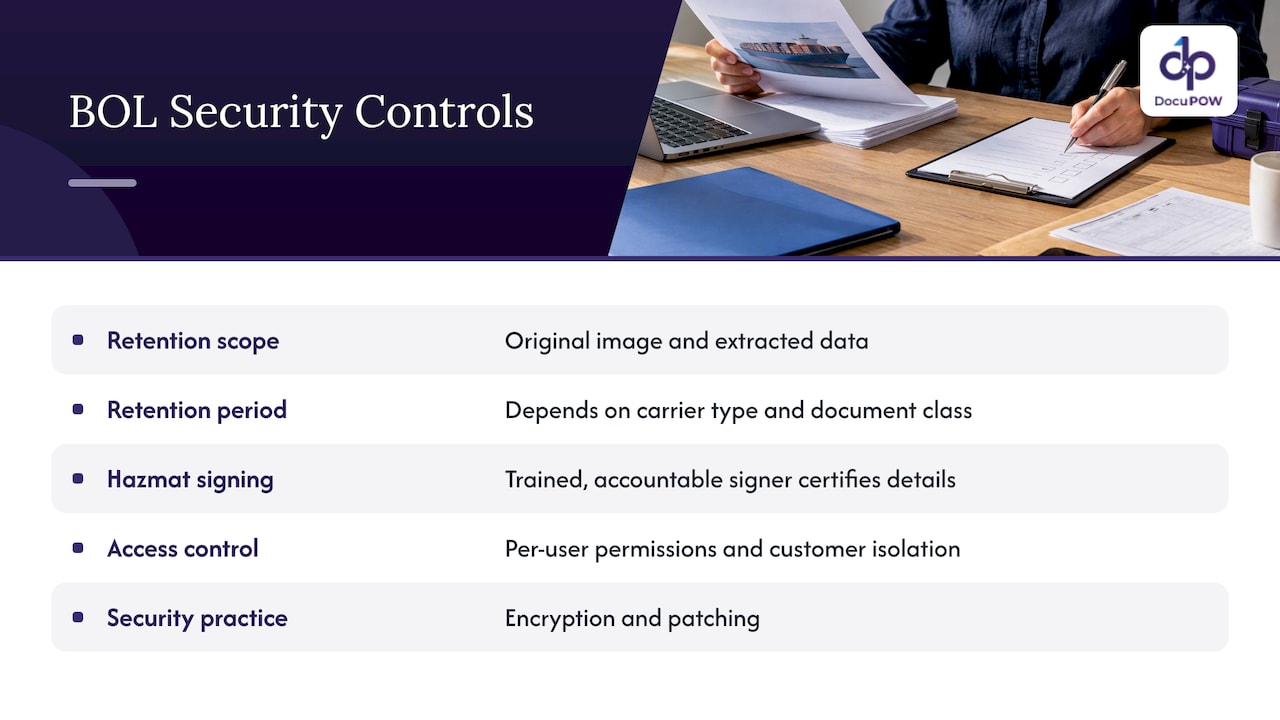
    Record retention. FMCSA notes that investigators may request bills of lading and related supporting documents, which motor carriers should keep as the FMCSRs require. Its household-goods enforcement page also lists 49 CFR Part 379, Preservation of Records. Your retention schedule should cover the original image as well as the extracted data. Confirm exact periods with your compliance counsel, since they depend on carrier type and document class.

    Hazardous materials. If your shipments include hazmat, accuracy on the shipping paper has legal weight. In a November 2024 interpretation, PHMSA said a third-party agent may prepare and sign a hazardous-material shipping paper when authorized, but the signer must be properly trained and certifies the classification, description, packaging, marking, labeling and condition. Extraction can pre-fill and check these fields. It should not replace a trained, accountable signer.

    Access control and tenant isolation. Document tools are software, and software has vulnerabilities. A recent NIST entry describes an open-source AI interface flaw that let an authenticated user reach another user’s file. When evaluating any platform, ask about per-user permissions, isolation between customers, encryption in transit and at rest, and patching practice.

    Security, audit and US record-keeping — overview diagram

    Perspective: why we build for variety, not for templates

    We have seen the same pattern across logistics and manufacturing teams: the first dozen document formats are easy and the long tail is what hurts. Templates turn every new carrier into a small project. That is why we built DocuPOW around agents that read a document the way a person would, using context to find the consignee or the line table on a layout they have never seen, and then explain where each value came from.

    We also hold a firm view on automation limits. Extraction should be fast and mostly invisible on clean documents, but a person should see the original page whenever confidence drops or a rule fails. Every edit should be logged. Speed that cannot be audited is a liability, particularly for finance and compliance teams.

    Finally, extraction by itself is not the finish line. Value comes when approved data moves through the workflow: matched, routed, posted and analyzed. Treat the BOL as the start of a process, and judge any tool by how much of that process it can carry.

    — Syed Naveed Abbas

    Try it on your own bills of lading

    The quickest way to judge extraction is to run your messiest real documents through it. DocuPOW handles template-free extraction, multi-step workflows, human-in-the-loop review and ERP or CRM integration through an API. Plans start with Starter at $99 per month and Professional at $499 per month, and Enterprise is available with pricing on request. See the details on our pricing page.

    DocuPOW

    If you want to see how the platform moves a document from intake to finished process, start with how DocuPOW works.

    FAQ

    What information is typically extracted from a bill of lading?

    Most teams capture the BOL and reference numbers, shipper, consignee and carrier, origin and destination, ship date, and freight terms. They also pull line-level detail such as pieces, packaging, description, weight and freight class, plus signatures and exception notes. The exact schema depends on whether you handle domestic trucking or ocean documents.

    Is OCR enough for bill of lading processing?

    OCR reads characters, but it does not know which number is the BOL number or where the line table starts. For a handful of fixed formats it can work with templates. For many carriers and changing layouts, AI that understands document context needs far less setup and maintenance.

    Can bill of lading extraction be fully automated?

    Clean documents can often pass with no touch, but a sound workflow still routes low-confidence fields, identity conflicts and failed rule checks to a person. That keeps errors out of your TMS or ERP and gives you an audit record. The aim is to remove retyping, not accountability.

    How does extracted BOL data get into a TMS or ERP?

    Usually through an API or configured integration that maps extracted fields to your system’s schema. Many teams write to a staging area first and release data to the system of record after validation passes.

    Do I have to keep the original document?

    Yes, plan to. FMCSA says bills of lading and supporting documents may be requested during investigations and should be kept as the regulations require. Store the original image alongside the extracted data and confirm retention periods with your compliance advisor.

    Sources

  • PII Detection in Documents: How to Find and Redact It

    PII Detection in Documents: How to Find and Redact It

    Detecting PII in documents means scanning contracts, invoices, forms and scans for data that can identify a person, then flagging, masking or removing it under rules you define. The reliable approach layers several methods: pattern matching for structured identifiers, AI for context, OCR for scanned pages, and human review for the cases where a miss would be costly. Then you test the whole pipeline against documents you labeled yourself.

    This guide covers what counts as PII in business files, how detection works, where AI helps and where it fails, how to automate redaction so the data is truly gone, and what to look for in software.

    DocuPOW
    Find Sensitive Data Across Documents
    DocuPOW uses AI agents to understand document context and automate data extraction, helping teams reduce manual handling of business files.

    Request a demo

    TL;DR

    • PII is any information that can distinguish or trace a person, alone or combined with other data. Business documents carry far more of it than most teams expect.
    • Good detection is layered: patterns, dictionaries, AI classification and OCR together, with human review on uncertain or high-stakes results.
    • Detection is not redaction. A black box drawn over text can leave the underlying text recoverable, so verify that removal is real.
    • Measure recall and precision on a labeled sample of your own documents, and rerun the test whenever the OCR, rules or model change.
    • For health data covered by HIPAA, the de-identification rules are specific. Do not assume they apply to every document or every kind of PII.

    Table of Contents

    What counts as PII in a business document

    NIST defines PII as information that can distinguish or trace an individual’s identity, either alone or when combined with other linked or linkable information. Its examples include names, Social Security numbers, biometric records, dates and places of birth, and medical, educational, financial or employment information.

    The last part of that definition matters for documents. A single line may look harmless: a job title, a ZIP code, a birth year. Together they can point to one person. That is why a detector that only hunts for nine-digit Social Security numbers misses much of the real exposure.

    The FTC’s business guidance names names, Social Security numbers, credit card information and account data as personal information companies commonly hold about customers and employees. In practice, here is where it tends to hide:

    Document type Typical PII inside
    Invoices and purchase orders Contact names, remit-to addresses, bank account details, tax IDs
    Employment files SSNs, birth dates, home addresses, salary, emergency contacts
    Contracts and leases Signatory names, personal addresses, signatures, guarantor financials
    Claims and medical forms Diagnoses, policy numbers, patient identifiers, dates of service
    Customer support attachments Photos of IDs, card numbers pasted into emails, scanned forms
    Shipping and customs paperwork Consignee names, phone numbers, delivery addresses

    Most of these are PDFs, scans or photos, not tidy database columns. That shapes everything about how detection has to work.

    How PII detection in documents works

    Practitioners rarely rely on one technique. Documentation from data-discovery tools describes a layered stack: regular expressions, dictionaries, similarity matching, AI classification, exact-data matching, document fingerprinting, and OCR run before detection so scanned pages can be read at all. Each layer covers a weakness in another.

    Pattern matching and dictionaries

    Regular expressions are fast and predictable. They are good at things with a fixed shape: email addresses, phone numbers, SSN formats, card numbers that pass a checksum. Dictionaries help with known lists such as first names or internal employee names. Both are cheap to run and easy to explain to an auditor.

    They break when formatting varies. A nine-digit number could be an SSN, a part number or an invoice reference. A pattern alone cannot tell the difference.

    Context-aware AI

    AI models read the words around a candidate. “SSN: 123-45-6789” and “PO 123-45-6789” look identical to a pattern but different to a model that understands the label and layout. Models can also catch PII with no fixed format, such as a person’s name in a free-text clause or a home address in a paragraph.

    OCR for scans and images

    If a page is an image, there is no text to search until OCR converts it. Detection quality is capped by OCR quality: a smudged digit or a misread name will be missed or mislabeled downstream. This is why OCR defects belong in your test set, not in a footnote.

    Exact-data matching

    If you already hold a list of customers or employees, you can match documents against it directly. This produces very few false positives for people you know about, but it says nothing about people who are not on the list.

    What AI can and cannot do here

    AI helps, and the evidence says to treat it as a component rather than a verdict.

    A 2023 TrustNLP study found that an open-source detection library and regular expressions caught emails and phone numbers relatively well but struggled with Social Security numbers and credit card numbers. It also named language-, country- and context-specific formatting as major limitations. If your documents include non-US formats or multiple languages, expect gaps.

    Vendors of AI models say the same. OpenAI states that its Privacy Filter is not an anonymization tool, a compliance certification, or a substitute for policy review in high-stakes settings. It also advises evaluating any such system against your own taxonomy and policies, since performance may vary across languages, scripts, naming conventions and domains.

    Two practical conclusions follow:

    1. Define what PII means for your organization first. A hospital, a staffing agency and a manufacturer have different lists.
    2. Keep a person in the loop for low-confidence results and for categories where a miss creates legal exposure.

    Detection is not redaction

    Finding PII is the first half. Removing it so it cannot come back is the second, and it is where many workflows fail quietly.

    NIST defines redaction as removing information from a document or dataset for legal or security purposes. The word that matters is removing. Covering text visually is not removing it.

    The National Vulnerability Database documents this failure in a real tool: a white-out style redaction in an online PDF editor may leave the underlying text or PDF object information recoverable. Anyone who copies the text or inspects the file could read what you thought was hidden.

    Visual cover leaves data beneath the document surface

    The same principle applies to deletion. The FTC notes that deleting files with ordinary keyboard or mouse commands is not enough because recoverable data may remain, and says paper records should be shredded, burned or pulverized before disposal. For electronic media, NIST SP 800-88 Rev. 2, published in September 2025, defines media sanitization as rendering access to target data infeasible for a specified level of effort, and recommends a program scaled to the sensitivity of the information.

    A safe automated redaction pattern

    1. Detect candidates with layered methods.
    2. Replace each hit with a neutral placeholder such as a category label, or burn the redaction into a new flattened file rather than layering a shape over the old one.
    3. Keep a mapping table in a restricted location if you need to restore values later.
    4. Open the output and try to select, search and copy text from the redacted areas. Check metadata too.
    5. Store or share only the sanitized version, and handle the original under your retention rules.

    This mirrors guidance from Lawrence Berkeley National Laboratory for working with language models: detect PII, replace it with placeholders, send only the sanitized text to the model, and optionally map placeholders back afterward. The same guidance calls redaction the safest option, because once data is sanitized it can be used with any model without concern about that data leaving the environment.

    How to test accuracy before you trust it

    Vendor accuracy numbers come from someone else’s documents. Yours include odd layouts, old scans and local conventions. The LBNL guidance gives a workable test plan:

    1. Build a labeled set. Pull a representative sample of real documents and have people mark every PII instance by hand.
    2. Measure recall and precision. Recall is the share of real PII you caught. Precision is the share of your flags that were real. For redaction, recall matters most, because a miss is a leak.
    3. Read the errors. Look at every false positive and every missed item, and sort them by cause.
    4. Stress the edges. Include unusual names, abbreviations, non-English text, OCR defects, and identifiers that look like ordinary numbers.
    5. Retest after changes. Rerun the whole suite whenever the model, OCR engine, rules or library changes.

    The guidance also recommends local or controlled processing for high-sensitivity data. If you cannot say where a document goes during detection, you have not finished evaluating the tool.

    Safeguards and rules for U.S. organizations

    There is no single U.S. law that governs PII in every document. Your obligations depend on the data type, your industry and the states where your people and customers live. These official sources give a solid backbone.

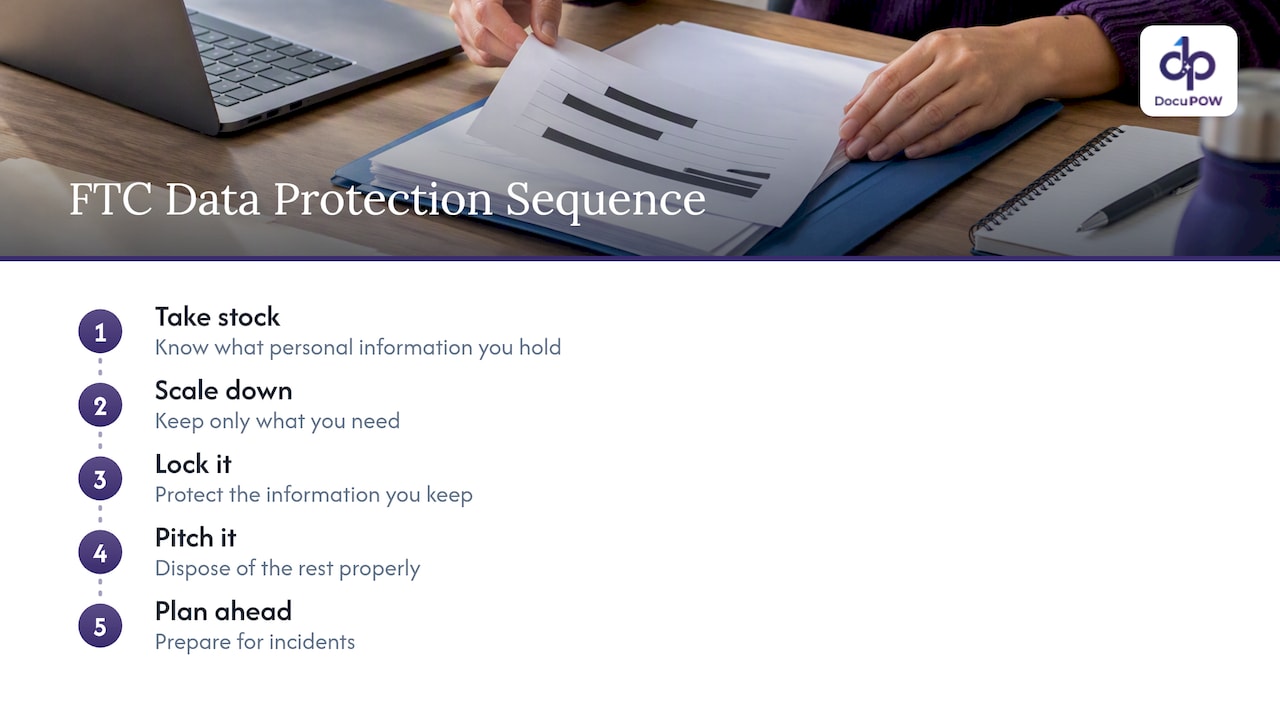
    Start with an inventory. The FTC’s guide to protecting personal information boils down to a sequence: take stock, scale down, lock it, pitch it, plan ahead. That means knowing what you hold, keeping only what you need, protecting what you keep, disposing of the rest properly, and preparing for incidents. NIST SP 800-122 adds that you should identify PII across all systems, including databases, shared drives, backups and sites run by contractors. Document stores and email attachments are the usual blind spot.

    Mind the health data rules. For protected health information under HIPAA, HHS recognizes two de-identification methods: Expert Determination and Safe Harbor. That guidance applies to de-identifying PHI under the HIPAA Privacy Rule. It does not automatically cover every business document or every kind of PII. If you handle patient records, confirm the approach with your privacy officer or counsel.

    Do not stop at security controls. NIST’s privacy engineering work draws a line between privacy risk and ordinary security risk, noting that security controls alone do not fully address authorized processing, consent, transparency or permitted uses of PII. Encrypting a file protects it from outsiders. It does not decide whether you should be holding or using it. Detection and redaction help with the second question by shrinking what you keep.

    For how we map secure processing to NIST controls, see our guide to NIST-aligned controls for secure AI processing.

    Safeguards and rules for U.S. organizations — overview diagram

    What to look for in PII redaction software

    The market spans open-source libraries, data-discovery suites, PDF editors and document automation platforms. Rather than rank products, judge any of them on these criteria:

    Capability Why it matters What to ask
    Document coverage Real files are scans, photos, tables and mixed layouts Does it handle image-only PDFs and handwriting-adjacent forms?
    Layered detection Patterns alone miss context, AI alone misses fixed formats Which methods run, and can you add custom rules?
    True redaction Visual masks can leave text recoverable Is the output flattened? Is text removed from the file and metadata?
    Human review Low-confidence hits need a decision Can reviewers approve, edit and see why something was flagged?
    Audit trail You must show what was removed, by whom and when Is every action logged and exportable?
    Data handling Sensitive files should not travel freely Where is data processed, and how is it encrypted?
    Integration Redaction at the end of a manual process still leaves risk upstream Can it connect to your ERP, CRM or storage through an API?
    Testability You need to prove accuracy on your own data Can you run a labeled sample before committing?

    Be cautious with free online redaction tools for anything sensitive. You are uploading the exact data you are trying to protect, and the recoverable-text problem above has hit real products.

    Where this fits in a document workflow

    PII detection works best as a step inside a larger process, not a separate cleanup project. An invoice arrives, fields are extracted, personal data is identified, uncertain items go to a reviewer, and the clean record flows to your ERP. Doing it at intake means personal data never spreads to the shared drives and inboxes where it is hardest to find later.

    That is the view behind our document automation platform. It reads documents without templates, so a new layout from a new vendor does not require a new setup, and our workflow overview shows how extraction, review and downstream steps connect. If you also want to query documents and see where an answer came from, our piece on document question answering covers what to check.

    Perspective: detect where the data enters

    Most teams we talk to treat PII as a storage problem. They lock down folders and buy encryption, then discover that copies of the same passport scan, W-4 or signed lease sit in six places. We think the better question is where personal data enters your company and what happens to the document in the first minute.

    That is why we build around agents that understand a document’s context instead of matching templates. A template knows where a Social Security number sat on last year’s form. An agent that reads the page can recognize what a field is even when the layout is new. We pair that with human-in-the-loop audit review, because we do not believe any model, ours included, should be the last line of defense on a high-stakes record. The reviewer sees the result, confirms or corrects it, and the decision is recorded.

    We also hold to a simple rule: no one should have to take accuracy on faith. Run your own labeled sample, measure the misses, and decide where automation ends and review begins. Sources and transparent citations back to the original page make that review faster.

    — Syed Naveed Abbas

    Try it on your own documents

    If your team handles invoices, contracts, onboarding files or claims, a short pilot on a sample of your real documents will tell you more than any demo. DocuPOW plans start at $99 per month for Starter and $499 per month for Professional, and Enterprise is priced on request. See the pricing page for what each plan includes.

    DocuPOW

    Bring a labeled sample, including your ugliest scans, and measure recall and precision before you commit. That is the standard we would hold any vendor to, including us.

    FAQ

    What is the difference between PII detection and PII redaction?

    Detection finds personal information and labels it. Redaction removes it so it can no longer be read or recovered. A tool can do the first without the second, so confirm that redacted output has the text actually removed, not just covered.

    Can AI find all the PII in a document?

    No. Studies and model providers both report weaker results on some identifiers, such as SSNs and card numbers, and on unusual languages, formats or domains. Use AI alongside patterns, OCR and human review, and measure results on your own documents.

    Is PII the same as PHI?

    Not exactly. PHI is health information held by HIPAA-covered entities and their business associates, and it is governed by HIPAA rules. PII is the broader idea of information that can identify a person. Health data can be both, and HIPAA de-identification guidance applies only to PHI.

    How do I check that a PDF is really redacted?

    Open the redacted file and try to select, search and copy text from the covered areas. Check the metadata and any earlier versions too. If anything comes back, the redaction was only visual, and the file should be regenerated with the text removed.

    Where should I start if I have no inventory of our PII?

    Start where documents enter the company: invoices, HR files, contracts and customer attachments. Then extend to shared drives, backups and contractor-managed systems, as NIST SP 800-122 recommends. Keep only what you need and dispose of the rest properly.

    Sources

  • API-Driven Document Automation: How It Works and How to Build It

    API-Driven Document Automation: How It Works and How to Build It

    API-driven document automation connects your systems to a document processing service through API calls. Files go in, validated structured data comes out, and your ERP, CRM or accounting system receives it without anyone retyping a field. The API is only one piece. A reliable setup also needs asynchronous jobs, validation, human review for uncertain results, security controls and monitoring. This guide walks through each piece, with a concrete reference architecture and the practices that keep it running at volume.

    DocuPOW
    Automate Document Workflows Through APIs
    DocuPOW uses AI agents to extract data from documents without rigid templates, helping teams reduce manual entry and improve workflow efficiency.

    Request a demo

    TL;DR

    • An API-driven approach treats documents as a service your systems call, rather than a task people do in a screen. Upload, extract, validate, route and store all happen programmatically.
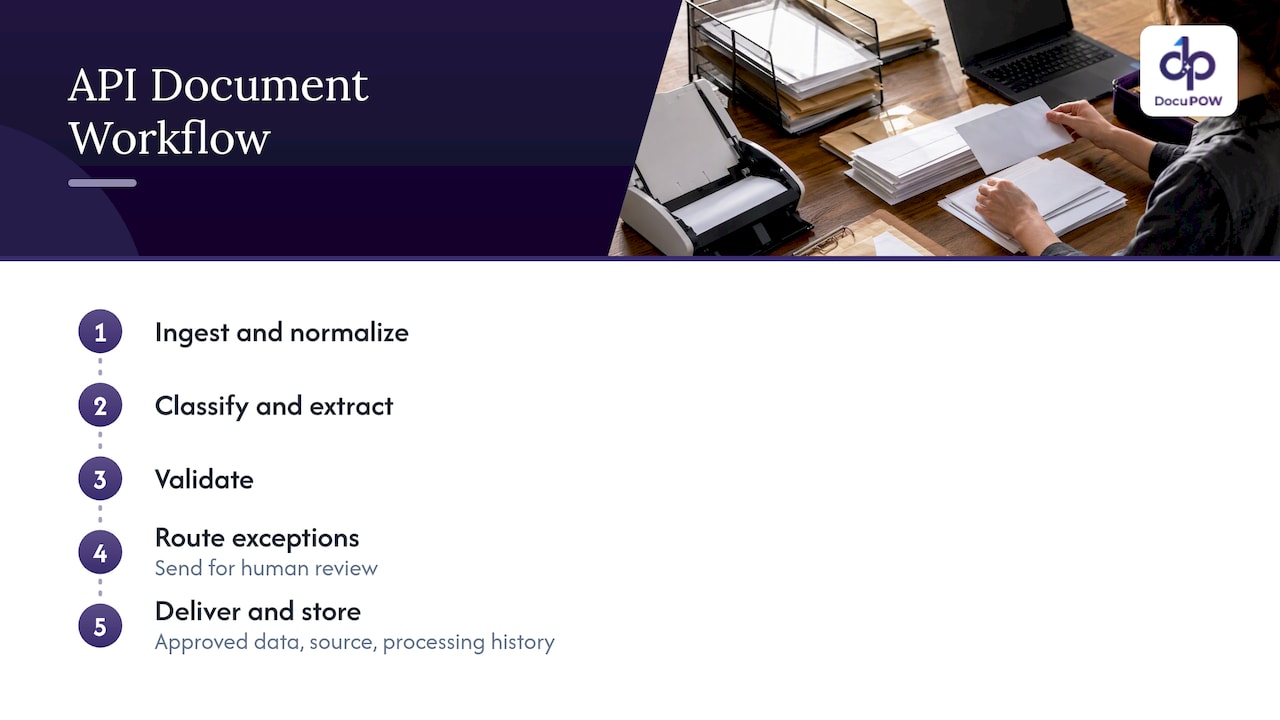
    • A production pipeline has five stages: ingest, classify and extract, validate, review exceptions, and deliver to downstream systems. A single API call covers only one of them.
    • Use asynchronous jobs, confidence thresholds with a human review path, centralized retries and logging, and least-privilege access. Follow NIST’s risk-based guidance for API security.
    • Template-free extraction cuts the maintenance that usually makes document automation brittle when a vendor changes an invoice layout.

    Table of Contents

    What API-driven document automation actually means

    The phrase covers two related things. The first is document processing: reading invoices, purchase orders, contracts, bills of lading or forms and turning them into structured fields. The second is document workflow: what happens to that data afterward, such as matching an invoice to a purchase order, routing an exception to an approver, or posting a record to your ERP.

    When both are exposed through an API, your own software starts the work. A mailbox listener, a portal upload, an EDI feed or a scheduled job submits a file. The service returns a job identifier, does the extraction in the background, and notifies your system when results are ready. Nobody logs in to drag a PDF into a window.

    This is different from UI automation, which mimics clicks and keystrokes on a screen. API automation works at the service layer, sending structured requests directly between systems, as SS&C Blue Prism’s guide to API automation describes. That makes it faster to run, easier to monitor and far less likely to break when someone moves a button.

    Why teams choose the API route

    • Volume. Humans do not scale to thousands of documents a day. A queue and a set of parallel workers do.
    • Integration. The data lands where it is needed, in the format the target system expects, with a traceable record of how it got there.
    • Control. You decide thresholds, validation rules and who sees exceptions. Those rules live in code and configuration, not in someone’s habits.
    • Auditability. Every request, result and correction can be logged and retrieved later.

    The five stages of an API-based document workflow

    Nearly every implementation, whatever the vendor, follows the same arc. Thinking in stages keeps you from treating the extraction call as the whole project.

    Five stages of API document automation

    1. Ingest

    Documents arrive from email inboxes, SFTP drops, supplier portals, scanners, mobile uploads or other systems. The ingest layer normalizes them: file type checks, virus scanning, deduplication, and attaching metadata such as sender, received time and the business process they belong to. This is also where you create a correlation ID, a single identifier that follows the document through every later step so you can trace it in logs.

    2. Classify and extract

    The service decides what kind of document it is, then pulls out the fields and, where needed, line items. Older systems depend on templates: one per vendor, per layout. When a supplier changes its invoice format, the template breaks and someone has to rebuild it. Agent-based, template-free extraction reads the document in context, so an unseen layout does not need prior setup. That is the approach DocuPOW takes, and it is the main reason maintenance drops over time.

    3. Validate

    Extraction output is a proposal, not a fact. Validation checks it against rules: do line items add up to the total, does the tax ID match the vendor master, is the date plausible, does the PO number exist? Schema validation confirms that every required field is present and typed correctly before anything moves on.

    4. Review exceptions

    Results that fail validation, or come back with low confidence, go to a person. The reviewer sees the source document next to the extracted data, corrects what is wrong and approves. Corrections should flow back into your metrics so you can see which document types and fields cause trouble.

    5. Deliver and store

    Approved data is posted to the ERP, CRM, data warehouse or case system through its own API. The original file and the structured output are stored together, with their confidence scores and processing history, so an auditor can later ask how a number got into the ledger and get a complete answer.

    A worked example: invoice intake from a shared mailbox

    A published cloud reference architecture shows how these stages fit together in practice. In this secure document automation design, controlled mailbox polling ingests documents, a workflow tool creates context for each one, and a secured OAuth 2.0 gateway invokes an asynchronous extraction service. The extracted data is validated and persisted, originals are stored with identity-controlled access, and durable orchestration handles retries, logging and downstream integrations.

    Strip away the specific products and the pattern is portable:

    1. A poller reads the accounts payable mailbox and picks up attachments.
    2. Each attachment gets a correlation ID and a metadata record.
    3. A gateway authenticates the call and submits the file to the extraction API as an asynchronous job.
    4. A callback or queue message signals completion; the result is validated against vendor and PO data.
    5. Clean records post to the ERP. Exceptions land in a review queue.
    6. The original and the output are archived together.

    The same shape works for purchase orders in manufacturing, shipping paperwork in supply chain, or loan packets in fintech and banking. Only the schema and validation rules change.

    Common business uses

    Document automation APIs show up wherever documents drive a transaction:

    • Accounts payable: invoice capture, three-way matching against purchase orders and receipts, and posting to the ledger. See our guide to automating financial data extraction.
    • Procure-to-pay: supplier onboarding documents, purchase orders and order confirmations, covered in our procure-to-pay article.
    • Logistics: bills of lading, customs forms and delivery receipts feeding shipment visibility.
    • Sales operations: quotes, order forms and contract terms moving into the CRM.
    • Real estate and construction: leases, agreements, change orders and permits, where each file carries obligations that need tracking. See our pages for real estate and construction.
    • Back office in general: HR records, claims, onboarding forms and compliance paperwork.

    If your goal is broader than extraction, our overview of back office automation with agentic AI shows how these pieces connect.

    Best practices for integrating a document processing API

    The practices below recur across published reference designs. They are what separate a demo from a system your finance team will trust.

    Use asynchronous jobs for anything long-running

    Multi-page documents and batches take time. Submit a job, receive an ID, and pick up the result by callback, webhook or polling. Holding a synchronous connection open invites timeouts and lost work. Microsoft’s sample pipeline uses durable orchestration and queue-triggered batch processing, with parallel document workflows, classification, and schema-constrained extraction.

    Carry a correlation context

    Give every document one identifier at ingest and pass it through every call, log line and database row. When a document goes missing or a number looks wrong, you can follow it from mailbox to ledger in minutes instead of hours.

    Validate at every step

    Do not wait until the end. Check file type on ingest, schema on extraction, business rules after, and target-system constraints before posting. Cheap checks early prevent expensive cleanups later.

    Make retries and logging central

    Scatter retry logic through ten scripts and you will never be sure what happened. Put retries, logging and auditing in one orchestration layer, as the secure design above does. Use idempotency keys so a retried request does not create a duplicate invoice.

    Keep originals and intermediate artifacts

    Store the source document, intermediate artifacts, final structured output, confidence scores, schema mappings and processing history. Microsoft’s architecture guidance keeps these specifically so results can be audited and retrieved later.

    Do not depend on one API call

    The design perspective that runs through these references is that sensitive document automation should combine private networking, identity-based access, asynchronous processing, durable orchestration and centralized observability. One call to an extraction endpoint is not an architecture.

    Handling errors, human review and monitoring

    No extraction system is perfect, and the goal is not to pretend otherwise. The goal is to know when a result is doubtful and to route it to the right person.

    Set confidence thresholds with a purpose. Confidence scores only help when they are tied to an explicit action. Results above the threshold flow through; results below it trigger an alert or human review. The Microsoft sample pairs confidence scoring with thresholds, schema validation, review and telemetry for exactly this reason. Start conservative, then loosen as you see real accuracy data by document type.

    Make review quick. A good review screen shows the source document and the structured data side by side, lets the reviewer correct a field, add a comment and save. In Microsoft’s content-processing architecture, users review structured JSON, correct inaccuracies and save validated results. The same design feeds success rates, document-type distributions, confidence trends and correction patterns into operational analytics.

    Watch the right numbers. Track straight-through rate (documents needing no human touch), exception rate by document type and by field, review time, and end-to-end latency. Correction patterns are the most useful signal: if reviewers keep fixing the same field from the same supplier, you have found a rule to add. Our piece on document processing analytics goes deeper on metrics.

    Instrument everything. Logs, metrics and traces should be collected in one place. OpenTelemetry is a common standard for this and the Microsoft sample uses it for monitoring.

    Securing the API and meeting US compliance expectations

    Documents carry bank details, employee records, health information and contract terms. The API that handles them is part of your attack surface.

    The US reference point is NIST SP 800-228, Guidelines for API Protection for Cloud-Native Systems. It addresses API risks across the development and runtime lifecycle, and recommends basic and advanced controls before and during runtime through an incremental, risk-based approach. In practice that means you do not need every control on day one, but you should know which risks you are accepting and why.

    The secure reference design shows what those controls look like when assembled: private endpoints, network isolation, security groups for access, a secured gateway, durable retries, centralized logging and auditing. A practical checklist for your own build:

    • Authenticate every call with short-lived tokens (OAuth 2.0 is the common choice) rather than shared static keys.
    • Give each integration only the permissions it needs, and separate read from write.
    • Restrict network paths so the extraction service is not reachable from the open internet where avoidable.
    • Encrypt documents in transit and at rest, and set retention rules for originals.
    • Log who submitted, viewed and corrected each document.
    • Keep a review trail so compliance teams can show auditors how a value was approved.

    Specific obligations depend on your industry: healthcare organizations should involve their privacy officer on HIPAA questions, and public companies should ask internal audit how document controls feed financial reporting. Your counsel or compliance lead decides what applies; the architecture simply needs to make the evidence easy to produce.

    Our perspective: templates are the hidden cost

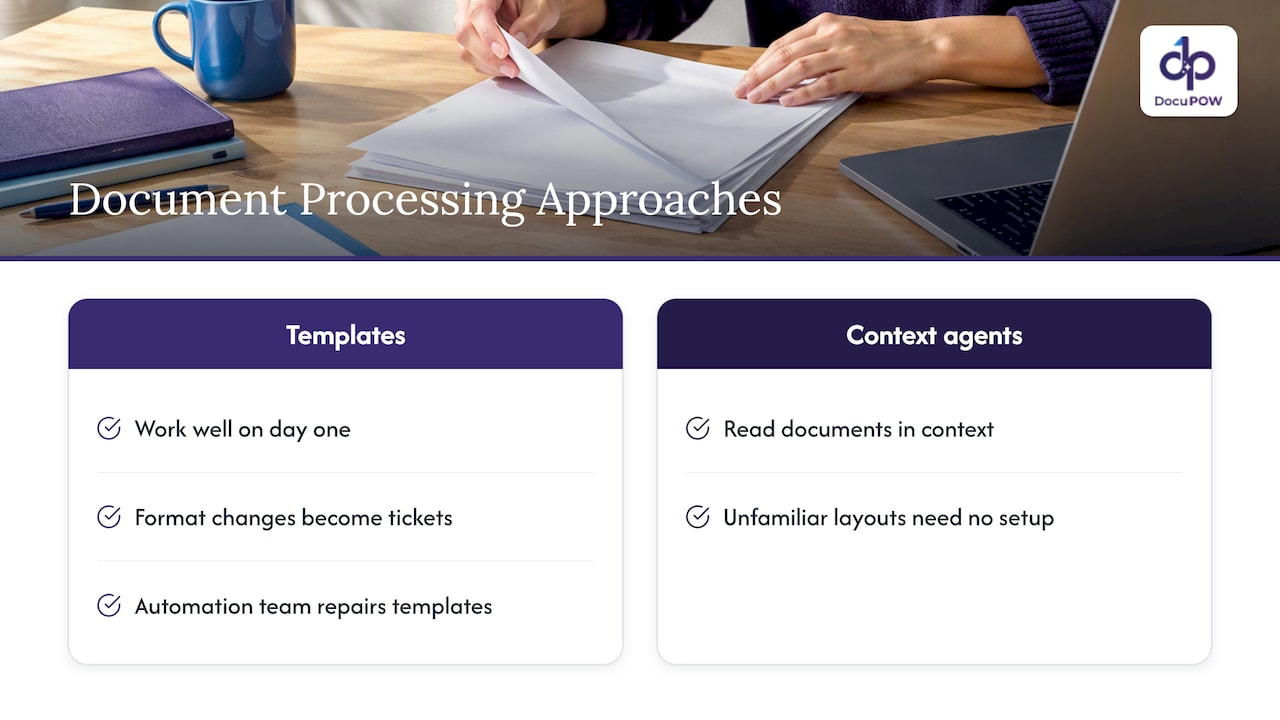
    Most teams we talk to are not stuck on whether an API can read a document. They are stuck on the maintenance. Template-based tools work well on day one, then degrade as suppliers, customers and regulators change their formats. Each change becomes a ticket, and the automation team slowly turns into a template-repair team.

    We built DocuPOW around agents that read documents in context, so an unfamiliar layout does not need setup before it can be processed. We think that is the right default for API-driven work, because an integration is only as good as its upkeep.

    Our perspective: templates are the hidden cost — overview diagram

    We also think automation should not remove people from the loop where judgment matters. Human-in-the-loop review, with the source shown beside the extracted value, is how you get speed without giving up accountability. And extraction alone is not the finish line: the value comes when data triggers the next step in the process, whether that is a match, an approval or a posting to your ERP.

    Finally, ask any vendor to show where an answer came from. If a system cannot point to the source text for a value, your reviewers and auditors cannot trust it either.

    — Syed Naveed Abbas

    Build or buy: choosing your approach

    Some teams assemble a pipeline from cloud building blocks: a queue, an orchestrator, an extraction service, a database and a review app. That gives control and costs engineering time, and you own retries, monitoring, schema management and security reviews. Others adopt a platform that bundles extraction, workflow orchestration, review and analytics behind one API.

    A few questions help decide:

    Question Leans toward building Leans toward a platform
    How many document types? One or two stable types Many types, changing layouts
    Who maintains it? A dedicated engineering team A small ops or IT team
    Review and audit needs? Light Heavy, with traceable corrections
    Time to first value? Months are acceptable Weeks matter
    Downstream systems? One target ERP, CRM and several others

    Whichever way you go, insist on the same fundamentals: asynchronous processing, validation, a review path, security controls and logs you can query.

    Where DocuPOW fits

    DocuPOW is an agent-based document automation platform. It extracts data from any document type without templates, orchestrates multi-step workflows, offers human-in-the-loop audit review, provides real-time analytics and semantic search, and integrates with ERP and CRM systems through an API, with developer tools and enterprise-grade security.

    Published plans are Starter at $99 per month and Professional at $499 per month, plus an Enterprise plan with no published price. You can compare them on the pricing page.

    DocuPOW

    To see the stages above in a real product, read how the platform works, or review the platform overview if you are weighing integration options for IT.

    A practical rollout plan

    1. Pick one process. Choose a document type with clear volume and a measurable pain, such as supplier invoices.
    2. Map the stages. Write down where documents arrive, what rules validate them and where data must land.
    3. Define the schema. List required fields, types and validation rules before touching an API.
    4. Run in shadow mode. Process documents in parallel with the current method and compare results.
    5. Set thresholds. Use the shadow data to choose confidence cutoffs and exception paths.
    6. Go live with review on. Keep people in the loop at first, then raise straight-through rates as accuracy data supports it.
    7. Monitor and expand. Watch correction patterns, fix rules, then add the next document type.

    For high-throughput environments, our notes on high-volume document processing best practices cover queueing and scaling in more detail, and the operations benefits guide helps you build the business case.

    FAQ

    What is a document automation API?

    It is an interface that lets your software send documents to a service and receive structured data or generated output back. Depending on the product, it can classify files, extract fields, validate results, route exceptions and trigger downstream actions. Your systems call it directly, so no one has to work in a separate screen.

    Can you give an example of API-based document automation?

    Invoice intake is the classic case. A poller picks up attachments from a shared mailbox, submits each to an extraction API as an asynchronous job, validates the result against vendor and purchase order data, and posts clean records to the ERP. Doubtful results go to a reviewer, and the original is archived with the output.

    What are the best practices for a document processing API?

    Use asynchronous jobs, attach a correlation ID to every document, validate at each step and centralize retries and logging. Flag low-confidence results for human review and store originals securely with their processing history. Restrict network access and permissions so each integration can only do what it needs.

    How do I secure a document automation API?

    Start with NIST SP 800-228, which recommends a risk-based, incremental set of controls across development and runtime. In practice that means token-based authentication, least-privilege permissions, network restrictions, encryption and audit logs. Ask your security and compliance leads which industry rules apply to your documents.

    Do I still need people if the process is automated?

    Yes, for exceptions. Confidence thresholds decide which results pass straight through and which need a person to check the source and correct a value. Over time, correction patterns show which rules to add so fewer documents need review.

    Sources

  • Email Document Ingestion: How to Turn Inbox Files Into Data

    Email Document Ingestion: How to Turn Inbox Files Into Data

    Email document ingestion is the automated capture of everything that arrives in a shared inbox: the message body, the attachments and the files hidden inside them. The system classifies each item, extracts the fields you need, checks them and hands clean data to the system that acts on it. Done well, nobody retypes an invoice, purchase order or claim form from a PDF into your ERP again.

    This guide covers how the pipeline works, how attachment parsing identifies file types, how to validate what the AI extracts, and how to roll it out without creating a new mess.

    DocuPOW
    Turn Email Documents Into Usable Data
    DocuPOW uses AI agents to extract context from documents without rigid templates, helping teams reduce manual entry and improve workflow efficiency.

    Request a demo

    TL;DR

    • Email ingestion is a pipeline: receive, identify file types, extract, classify, validate, route. OCR is only one step in it.
    • Template-based parsers break whenever a supplier changes a layout. Template-free extraction reads the document for meaning and keeps working on unseen formats.
    • Validation is where accuracy is won: match against POs, vendor records and totals, and send low-confidence fields to a human reviewer.
    • Start with one high-volume mailbox, such as accounts payable or order intake, and measure straight-through rate before adding more.
    • Email is not a fully secure channel, so decide which documents may arrive by email and which must go through a direct upload.

    Table of Contents

    What email document ingestion actually does

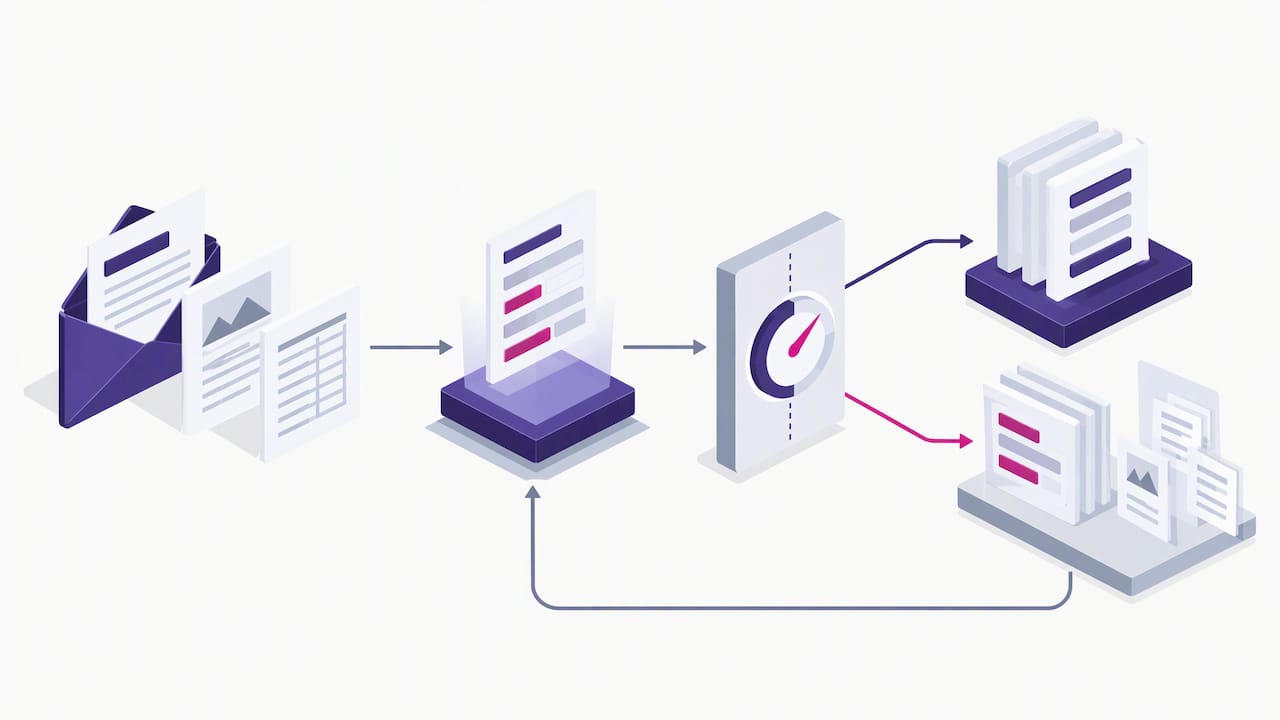
    Most teams already have a document pipeline. It is just a human one: someone opens an email, downloads the attachment, reads it, types values into another system and files the message. Ingestion replaces each of those steps with software.

    A complete flow has six stages:

    1. Receive. A dedicated address or a connection to a mailbox pulls in new messages.
    2. Unpack. The system separates the body, attachments, inline images and files inside containers such as ZIP archives.
    3. Identify. Each file is typed so the right reader handles it.
    4. Extract. Text, tables and key fields are pulled out of PDFs, scans, spreadsheets and the email text itself.
    5. Validate. Values are checked against rules and reference data.
    6. Route. Approved data is pushed to the ERP, CRM, accounting package or a queue for a person.

    The queries people type for this, such as parsing email attachments or processing email attachments, are really about stages two through four. The business result depends on stages five and six.

    How attachment processing identifies different file types

    A mailbox is a messy place. The same address receives a native PDF invoice, a phone photo of a delivery note, an Excel price list, a Word contract and a ZIP file holding all four. Treating them identically fails.

    Professional guidance from the e-discovery field, where this problem has been solved for years, is clear on the approach. Processing software should identify file types using header information, MIME types and file extensions, because extensions alone can mislead. It should also extract both the email content and its attachments, including files inside containers, and recognize the common Office formats.

    In practice that means the system reads the first bytes of each file (its signature) instead of trusting the name. A file called “invoice.pdf” that is really an executable, or a “.dat” file that is really a PDF, gets handled correctly in either case.

    Handling the awkward cases

    A few situations cause most of the trouble in real inboxes:

    • Forwarded chains. The document you need is three replies deep. The parser must separate the new content from quoted history.
    • Inline images and signatures. Logos and tracking pixels should not be treated as documents.
    • Scans and photos. These need OCR first, and quality varies widely.
    • Multi-document PDFs. One attachment may contain an invoice, a packing slip and a certificate. Splitting before extraction matters.
    • Password-protected or corrupt files. These should land in an exception queue with a reason, not disappear.

    Keeping the relationship between an email and its attachments also matters. EDRM recommends tracking email family relationships, including attachments, and notes that some systems keep families intact even when removing duplicates. For a finance team, the equivalent is simple: the extracted invoice data should always link back to the exact message and sender it came from, so an auditor can trace it.

    OCR versus intelligent document processing

    OCR converts the pixels of an image into text. That is all. It does not know whether “4,250.00” is a subtotal, a tax amount or a part number.

    Intelligent document processing (IDP) uses OCR as one layer and adds classification, field understanding, validation and delivery. The difference shows up the first time a supplier moves its totals box.

    Capability OCR alone Template-based capture Template-free AI extraction
    Reads text from scans Yes Yes Yes
    Knows which value is the invoice total No Only if layout matches the template Yes, from context
    New supplier layout Raw text only Needs a new template Works on first sight
    Maintenance Low High, grows with every vendor Low
    Validation and routing None Limited Built into the workflow

    Template-based tools are not useless. If you receive documents from three suppliers who never change formats, a template can be enough. The cost appears at scale, when every new vendor, revision or language needs someone to build and maintain another template.

    What the AI does when an email arrives

    When people ask whether AI can process email, the useful answer is that it handles two different jobs.

    Reading the message. The email body often carries the actual instruction: “please ship 40 units to the Dayton warehouse” or “attached is the corrected quote.” A language model can extract intent, quantities, dates, references and urgency, and decide what kind of request it is.

    Reading the documents. Agents extract fields and tables from attachments without a template, using the layout and the words around each value to decide what it is. They can then reconcile the two: the email says 40 units, the PO attachment says 45, so the case is flagged.

    That reconciliation across body and attachment is something a fixed parser rarely does, and it is where much of the manual checking time goes today.

    Validating extracted data before it reaches your systems

    Extraction accuracy is never the whole story. A field read with 98 percent confidence is still wrong sometimes, and a wrong invoice total posted to the ledger costs far more than a few seconds of review. Build validation as layers.

    Rule checks

    • Line items add up to the subtotal; subtotal plus tax equals the total.
    • Dates are plausible and in the expected format.
    • Required fields are present: vendor, document number, currency.
    • Document numbers are not duplicates of ones already processed.

    Reference checks

    • Vendor name and tax ID match your vendor master.
    • The PO number exists, is open and has enough remaining balance.
    • Part numbers and unit prices match your catalog or contract.
    • Bank details have not changed since the last payment, a common fraud signal.

    Human-in-the-loop review

    Set a confidence threshold per field. Anything above it flows straight through. Anything below it goes to a reviewer who sees the original document beside the extracted values, with the source location highlighted. Corrections should feed back so the same mistake does not repeat.

    Confidence routing with reviewer feedback loop

    The goal is not zero human involvement. It is humans looking only at the roughly small share of documents that really need judgment, and every decision being recorded.

    Routing data into ERP, CRM and accounting systems

    Capturing data is only worth it if it lands where work happens. Typical destinations by document type:

    Document Typical destination What gets created
    Vendor invoice ERP or AP system Invoice draft matched to PO and receipt
    Customer purchase order ERP or order management Sales order
    RFQ or quote request CRM Opportunity or task for sales
    Claim or policy form Claims platform New case with attached files
    Delivery note or bill of lading ERP or logistics system Goods receipt or shipment update
    Contract or amendment Contract repository Record with key terms and dates

    There are three common integration styles. Direct API connections to the ERP or CRM are the cleanest. Webhooks let you trigger your own services when a document is approved. A file or CSV drop is the fallback for older systems. Whichever you use, keep the original email and attachment stored and linked to the created record.

    Security: email is a convenient channel, not a secure vault

    Email is easy for senders, which is why it dominates intake. It is not designed for sensitive material. One accounting platform’s own help guidance notes that TLS encryption protects email in transit only if the sender uses it, that messages may pass through other systems along the way, and that highly confidential files are safest uploaded directly to a secure portal.

    That translates into a practical policy:

    • Decide by document class. Routine invoices and order confirmations can arrive by email. Tax filings, patient records, IDs and bank detail changes should go through a secure upload link.
    • Scan for malware before any attachment is opened or parsed.
    • Restrict who can see raw mail. The ingestion mailbox should not be a shared inbox that half the company reads.
    • Log everything. Keep an audit trail from message to extracted value to approval.
    • Set retention rules. Original files should follow your records policy, not sit forever in a mailbox.
    • Check sender identity. Flag messages that fail domain authentication or come from unknown addresses before they create payable records.

    A practical rollout in five steps

    1. Pick one mailbox. Accounts payable or customer order intake is usually best: high volume, clear fields, measurable cost.
    2. Sample 200 real messages. Include the ugly ones: scans, forwards, multi-document PDFs. Count the document types and the systems they end in.
    3. Define the fields and rules. List what must be extracted, what must match and who approves exceptions.
    4. Run in shadow mode for two weeks. Let the system extract while staff keep working the old way, then compare.
    5. Go live with review on. Track straight-through rate, correction rate per field, time from receipt to posting and exceptions by cause. Raise the confidence thresholds only as the numbers justify it.

    Only after one mailbox is stable should you add the next. Teams that connect every inbox in the first month usually spend the second month untangling exceptions.

    Our perspective: ingestion is the start of a workflow

    We see many teams treat email ingestion as a parsing problem: find the best reader, get the fields out, done. We think that frames it too narrowly. The fields are the easy part now. The expensive part is everything around them: deciding what the document is, checking it against what the business already knows, asking a person only when needed and moving the result into the right system.

    Our perspective: ingestion is the start of a workflow — overview diagram

    That is why we built DocuPOW around agents that read documents in context instead of templates, and why human-in-the-loop review sits inside the workflow rather than being bolted on. A supplier you have never seen before should not need a project. A reviewer should see the source of every value. And a manager should be able to ask a question across thousands of documents and get an answer with citations back to the originals.

    If you take one idea from this guide, make it this: measure the cost of an exception, not the accuracy of a field. The ingestion system that wins is the one that makes exceptions rare, cheap to resolve and fully traceable.

    — Syed Naveed Abbas

    Where DocuPOW fits

    DocuPOW’s platform combines template-free extraction, multi-step workflow orchestration, human audit review and ERP or CRM integration through API, so inbox documents can move from receipt to posted record in one flow. The Starter plan is $99 per month and Professional is $499 per month; Enterprise pricing is not published. You can compare them on the pricing page, or read how document workflow automation works end to end before you pilot.

    If finance documents are your first target, the guide to automating financial data extraction covers invoices and statements in more depth. For teams planning for large volumes, see these high-volume processing practices.

    FAQ

    How does AI process documents that arrive by email?

    The system pulls the message, separates the body from its attachments, identifies each file type and reads the content. It then classifies the document, extracts the relevant fields, validates them against your rules and data, and routes the result to a business system. Low-confidence items go to a person for review.

    What is the difference between IDP and OCR?

    OCR turns an image of text into machine-readable characters. IDP builds on it by identifying the document type, understanding which values are which fields, validating them and delivering structured output. OCR is a step inside an IDP workflow, not a replacement for one.

    Can I parse email attachments without building templates?

    Yes. Template-free extraction uses the context of each value, such as nearby labels and table structure, to identify fields on layouts it has not seen before. You still define which fields you want and which validation rules apply, but you do not build a template per supplier.

    Is it safe to send sensitive documents by email?

    Not always. Encryption in transit depends on the sender’s setup, and messages can pass through other systems. Use email for routine documents, and give senders a secure upload option for highly confidential files such as tax forms, patient records or bank detail changes.

    Sources

  • CRM Document Automation Integration: A Salesforce Guide

    CRM Document Automation Integration: A Salesforce Guide

    CRM document automation integration means that documents arriving in your business (contracts, quotes, purchase orders, invoices, forms) are read automatically, their data is written to the right Salesforce records, and the original file stays attached as evidence. Done well, nobody retypes a contract value or renewal date into an opportunity again. This guide covers what to automate, how the connection works, how to review extracted contract data, how to keep it secure, and what to check before you choose a tool.

    DocuPOW
    docupow.ai
    Move Document Data Into Salesforce
    DocuPOW uses AI agents to extract data from documents without rigid templates, helping teams reduce manual entry and improve workflow efficiency.

    Request a demo

    TL;DR

    • Document automation for a CRM has three jobs: capture the file, extract structured data from it, and write that data back to Salesforce objects with the file linked to the record.
    • Most integrations run through the Salesforce APIs, with an authenticated callout or middleware moving files and fields between systems. Start with one document type and one object.
    • Contract extraction is only as good as its review step. Route low-confidence fields to a person and keep a link from every value back to its source passage.
    • Treat inbound documents and forms as untrusted input. Limit what any AI agent can do, and require human approval for consequential actions.
    • Judge tools on layout flexibility, field mapping, audit trail, security and the effort to maintain them, not on a feature checklist.

    Table of Contents

    What document automation in a CRM actually means

    Two different things get called “CRM document automation,” and mixing them up leads to buying the wrong tool.

    The first is document generation: filling a template with CRM data to produce a quote, proposal or order form. Data flows out of Salesforce into a file.

    The second is document processing: reading an incoming file and pushing its contents into Salesforce. Data flows into the CRM from a file that someone else created, such as a customer’s signed agreement, a vendor’s quote, or a purchase order in a format you have never seen before.

    This article is about the second one, and the integration around it. It is where most of the manual work hides. A sales operations analyst opens a PDF, finds the term length and the payment terms, and types them into custom fields. Multiply that by hundreds of contracts a quarter and you have a slow, error-prone process that nobody put on a roadmap.

    The typical flow looks like this:

    1. A document arrives by email, upload, portal or a Salesforce record action.
    2. The automation platform classifies it and extracts the fields you care about.
    3. A rule or a reviewer validates the values.
    4. The platform writes the values to Salesforce through its API and attaches the original file.
    5. Downstream steps fire: an approval, a task, a renewal reminder, a sync to your ERP.

    Which document workflows are worth automating in Salesforce

    Not every document deserves automation. Pick the ones with volume, a clear destination in the CRM, and a cost when someone gets a field wrong.

    Document Data worth extracting Where it lands in Salesforce
    Customer contracts and amendments Parties, effective date, term, renewal terms, payment terms, liability and termination clauses Contract, Opportunity or custom contract object
    Customer purchase orders PO number, line items, quantities, prices, ship-to address Order, Opportunity products
    Vendor quotes and proposals Item pricing, validity dates, delivery terms Quote, custom procurement objects
    Onboarding forms and KYC packets Legal name, tax ID, addresses, signatories Account, Contact, Case
    Insurance or service claims paperwork Policy number, claimant, amounts, dates Case, custom claim objects
    Invoices and statements Invoice number, totals, due date Account-level financial fields, or the ERP

    A useful filter is to ask three questions of each candidate. How many arrive per month? How many different layouts exist? What happens when a number is wrong? High volume with many layouts is where template-based tools struggle and where template-free extraction pays off. We cover the underlying approach in our guide to AI data extraction for business professionals.

    If your documents are forms rather than free-form contracts, see how AI form processing handles structured and semi-structured inputs.

    How the Salesforce connection works

    There is no single “Salesforce integration.” There are several patterns, and the right one depends on volume, latency and who will maintain it.

    Pattern 1: API-based push from the document platform

    The document platform extracts data, then calls the Salesforce REST API to create or update records and upload the file. In Salesforce, files are stored as content records linked to a parent record, so the original contract can sit on the Opportunity or Account next to the extracted fields. This is the most flexible pattern and the one we see as the default for template-free extraction, because the platform controls the whole sequence: extract, validate, write, attach.

    Pattern 2: Salesforce-initiated callout

    A user clicks a button, or a Flow or Apex process fires when a file is attached, and Salesforce calls the document platform’s API. On Salesforce’s side, credentials for that callout are best stored in its managed credential features rather than hard-coded, so secrets stay out of code. The result comes back asynchronously and updates the record. This works well when the trigger is a human action inside the CRM.

    Pattern 3: Middleware or no-code connectors

    An integration platform sits between the two systems and maps fields visually. It is the fastest way to a pilot and a reasonable choice for low volume. The trade-off is that field mapping lives in a third tool, and each extra hop is one more place for a failure to hide.

    Pattern 4: Event-driven sync

    For teams that already use event messaging in Salesforce, completed extractions can be published as events that Flows or other systems subscribe to. This suits cases where a single processed document should trigger several actions at once, for example updating the opportunity, notifying legal and creating an ERP order.

    Technical requirements to settle early

    • Authentication. A dedicated integration user with a narrowly scoped permission set, not a shared admin login.
    • Field mapping. A written list of each extracted field, its Salesforce object and field API name, its data type and what happens when it is empty.
    • Record matching. How the integration decides which Account or Opportunity a document belongs to. Match on a stable key (PO number, contract ID, account ID in the filename or email), never on fuzzy names alone.
    • Limits and retries. Salesforce enforces API and storage limits that depend on your edition. Plan for batching, retries and a dead-letter queue for failed writes.
    • Sandbox first. Build and test against a sandbox with realistic, anonymized documents before production.

    If you are also connecting to an ERP, the same data often has to land in both systems. Our overview of AI integration for business document workflows explains how that coordination is usually structured.

    A practical setup in seven steps

    1. Choose one document type and one outcome. For example: signed customer contracts, with term, renewal date and payment terms populated on the Opportunity.
    2. Collect 30 to 50 real examples, including the ugly ones: scans, amendments, documents from your biggest customers’ legal teams.
    3. Define the field list and the Salesforce destination for each field, including picklist values you need to normalize (for instance “net 30” and “30 days” both mapping to one value).
    4. Set up the integration user, credentials and a sandbox connection.
    5. Run the examples through extraction and measure field-level accuracy, not document-level. A document with 19 of 20 fields correct still needs a human.
    6. Add rules and a review queue. Required fields, date logic (an end date after a start date), and a confidence threshold below which a person confirms.
    7. Launch to one team, watch for two to four weeks, fix mapping issues, then add the next document type.

    The discipline here is scope. Teams that start with “all documents, all objects” spend months in mapping meetings. Teams that start with one contract type usually have something running within a sprint or two and learn what the second one needs.

    Salesforce contract extraction: how to review and validate what comes out

    Contract extraction is the use case people ask about most, and the one where blind trust costs the most. A wrong renewal date can mean a missed notice window. A wrong liability cap can mislead a deal desk.

    Reliable contract extraction rests on four practices.

    Extract with context, not position. Contracts do not put the term in the same place twice. Template-based tools expect a field at a coordinate or next to a fixed label, so every new layout means a new template. Agent-based, template-free extraction reads the document the way a person does, so “this agreement shall continue for thirty-six months” and a table row reading “Term: 3 years” both resolve to the same field. That is the core of how we built DocuPOW.

    Keep a source link for every value. A reviewer should be able to click a field and see the passage it came from. This turns validation from re-reading the contract into a five-second check. It also gives auditors a trail.

    Route by confidence and by consequence. Not every field needs the same scrutiny. A mailing address can pass at moderate confidence. Termination rights, auto-renewal, indemnity and payment terms should go to a person whenever confidence is low, and perhaps always for large contracts.

    Validate against what you already know. Compare the extracted counterparty with the Account it is attached to. Check that the effective date is not in the future when the contract is already signed. Flag a contract value that is wildly different from the opportunity amount. These cross-checks catch errors a model cannot see from the document alone.

    This is what a human-in-the-loop audit step is for. The person is not retyping. They are confirming or correcting a short list of flagged fields, and their corrections are logged.

    Four practices for reviewing extracted contract data

    Security and compliance in an integrated workflow

    An integration widens the surface where data moves, and AI-enabled workflows add a new risk: the document itself can be hostile.

    CSO Online reported in April 2026 that researchers demonstrated form-based prompt injection against Salesforce’s Agentforce, and that Salesforce pointed to layered mitigations including instruction isolation, tool-use restrictions and human oversight. The lesson for any document workflow is the same, whatever the vendor: text inside a submitted form or file can try to give instructions to an AI system.

    In practice, that means:

    • Treat every inbound document as untrusted input. Extraction should return data, not follow instructions found in the file.
    • Apply least privilege. The integration user can create and update only the objects and fields in your mapping. It cannot delete records or change permissions.
    • Restrict what agents can do. An extraction agent that can only read a document and propose field values is far safer than one that can also send email or modify arbitrary records.
    • Require approval for consequential actions. Updating a contract’s financial terms or triggering a payment should pass a person first.
    • Encrypt in transit and at rest, and log everything. Keep an audit record of who or what changed which field, and when.
    • Check regulatory fit by document type. Healthcare documents, financial records and employee files each carry their own rules, so involve your compliance or legal team before connecting those sources.

    What to evaluate when choosing Salesforce document automation

    Feature lists look alike. These criteria separate tools in practice.

    Criterion What to ask
    Layout flexibility Does it handle a document layout it has never seen without a new template? How long does onboarding a new supplier’s format take?
    Scope of automation Does it stop at extraction, or can it orchestrate multi-step workflows such as validation, approval and system updates?
    Review and audit Is there a human review queue, with source citations and a change log?
    Salesforce fit Does it write to standard and custom objects, attach files to records, and handle record matching?
    Other systems Can it also feed your ERP and other tools through an API?
    Security Encryption, access controls, role separation, and a clear answer on how documents are used and retained
    Maintenance Who fixes the integration when a field changes in Salesforce? What breaks when layouts drift?
    Pricing model Is pricing by usage tier or by seat, and what happens when you exceed your allowance?

    Tools tend to fall into a few types: document generation and e-signature add-ons that live inside the CRM, template-based capture products, general-purpose integration platforms, and agent-based intelligent document processing. The first type is excellent for creating documents and not designed to read incoming ones. Template-based capture works if your layouts are stable. Integration platforms move data but do not understand documents. Agent-based processing is the best fit when your documents vary and you want extraction, review and downstream workflow in one place.

    Implementation effort deserves its own line in your evaluation. Ask for a pilot on your own documents, not a demo on theirs. The share of fields correct on your real files, and the time to get there, tell you more than any brochure.

    Our perspective: extraction is the easy half

    We built DocuPOW around a simple observation: the hard part of document automation is not reading a PDF, it is making the result trustworthy and useful where work happens. For a Salesforce team, that means three commitments.

    First, no templates. Documents from customers and vendors rarely look the same twice, and a system that needs a new template for each layout becomes a maintenance project. Our agents work zero-shot on layouts they have not seen, so setup stays small and upkeep stays low.

    Second, a human stays in the loop where it matters. Compliance-sensitive fields are worth a reviewer’s glance, and every extracted value should be traceable to the passage that produced it. Automation should make audit easier, not harder.

    Third, the data should keep moving. Writing a value to a Salesforce field is a midpoint. The same document may need to update an ERP, trigger an approval, or answer a question later. That is why we pair extraction with workflow orchestration, real-time analytics and conversational querying with source citations.

    If you take one thing from this guide, make it this: pilot on one document type, measure field-level accuracy on your own files, and put review where the risk is.

    — Syed Naveed Abbas

    Where DocuPOW fits

    DocuPOW is an agent-based document automation platform with template-free extraction, multi-step workflow orchestration, human-in-the-loop audit review, and ERP and CRM integration through an API, plus developer tools for custom connections. You can see the flow from raw document to finished process on our How It Works page.

    Plans are published on the pricing page: Starter is $99 per month, Professional is $499 per month, and Enterprise is priced on request. Start with a trial or demo on your own contracts and see the field-level results before you commit.

    Beyond the connector: who owns the CRM process

    A document integration succeeds or fails on the process around it. Someone in sales operations should own the field definitions, someone in legal or finance should own the review rules, and someone in IT should own credentials and monitoring. If your Salesforce team is also rethinking lead routing, follow-up sequences and reporting, specialist CRM and sales automation services can help line up those pieces with the document work, so extracted data feeds a process that is ready to use it.

    For the wider picture of how connected automations fit together across departments, our guide to AI-powered workflows is a good next read, and the operations solutions page shows how teams apply it day to day.

    Common mistakes to avoid

    • Automating before defining the field list. If nobody can say what the “renewal date” field means, automation will make the ambiguity faster.
    • Matching records on names. “Acme Inc” and “Acme, Incorporated” are the same company to a person and two different strings to a system.
    • Measuring document-level accuracy. Ninety-five percent of documents “mostly right” can still mean thousands of wrong values.
    • Giving the integration user admin rights. It is convenient on day one and a liability on day ninety.
    • Skipping the exception path. Decide what happens to unreadable scans, password-protected files and documents of an unknown type before launch.
    • Forgetting the files themselves. Extracted fields are useful, but the original document attached to the record is what legal, finance and auditors will ask for.

    FAQ

    Can I automate Salesforce document processing without writing code?

    Often, yes, for a first pilot. Middleware connectors and Salesforce Flow can handle simple mappings and triggers. Once you need record matching, retries, review queues and several document types, an API-based integration with a platform built for document processing is easier to maintain.

    How accurate is contract extraction, and who checks it?

    Accuracy depends on your documents, so test on your own files and measure it field by field. A good setup scores each extraction, sends low-confidence or high-risk fields to a reviewer, and shows the source passage for each value so checking takes seconds.

    What is the difference between document generation and document processing in Salesforce?

    Generation creates documents from CRM data, such as quotes and proposals. Processing reads documents that arrive from outside and writes their data into Salesforce. Many companies need both, and they are usually solved by different tools.

    Is it safe to let AI read customer documents connected to my CRM?

    It can be, with controls. Treat incoming files as untrusted, give the integration least-privilege access, limit what any agent can do, and require human approval for consequential changes. Involve your security and compliance teams for regulated data such as health or financial records.

    Sources

  • SOX Documentation Automation: A Practical Guide for 2026

    SOX Documentation Automation: A Practical Guide for 2026

    SOX documentation automation means using software to collect, organize and check the evidence behind your internal controls, so your team stops rebuilding it by hand every quarter. It works best on the unstructured part of the job: PDFs, policies, approvals, reconciliations and screenshots that live outside your ERP. It does not replace the control owner’s judgment or the auditor’s. This guide covers what the law expects you to document, where manual processes fail, how new audit deadlines raise the stakes, and how to automate without creating a new risk.

    DocuPOW
    Make SOX Evidence Easier to Manage
    DocuPOW uses AI agents to extract data from varied document formats, helping teams reduce manual entry and improve document workflow efficiency.

    Request a demo

    TL;DR

    • Section 404 requires management to document the design and the operating effectiveness of internal control over financial reporting, every year, whether or not an auditor attests.
    • The biggest cost is not writing narratives. It is finding, matching and packaging evidence from documents that arrive in different layouts.
    • New PCAOB rules shorten the window for assembling final audit documentation from 45 days to 14 for audits under the updated standard effective December 15, 2026.
    • Automate extraction, matching and packaging. Keep humans on judgment calls, exceptions and sign-off.
    • Any AI output used as evidence needs a visible source and a reviewer, or it is only a draft.

    Table of Contents

    What SOX actually asks you to document

    Section 404 puts a standing duty on management. You must establish and maintain internal control over financial reporting (ICFR), assess it each year, and keep enough evidence for someone else to verify your conclusion. The SEC’s interpretive guidance on management’s report says that documentation of the design of controls is an integral part of the assessment, and that management needs evidence of how it concluded the controls operate effectively.

    That guidance also makes a point many teams miss. Exemption from the auditor attestation requirement under 404(b) does not remove management’s own 404(a) obligation. A smaller public company still has to document design and operating effectiveness. Asking people whether a control ran is not enough. The documentation has to be detailed enough that an independent party can follow the evidence to the conclusion.

    The SEC’s final rule on management’s report frames it the same way: the assessment must rest on evidential matter, including documentation, covering both the design of controls and the testing behind them.

    In practice, that gives you two layers of documentation:

    1. Design documentation. Process narratives, flowcharts, risk and control matrices, policies, and the mapping from each control to the financial statement risk it addresses.
    2. Operating evidence. The proof that each control actually ran: approvals, reconciliations, review sign-offs, system reports, invoices, contracts and the samples your testers pulled.

    Both layers are made mostly of documents. That is why this is a document processing problem as much as a compliance one.

    Where manual SOX documentation breaks

    Most teams do not fail because they lack controls. They fail because the proof is scattered and the process of gathering it is slow.

    Evidence arrives in too many shapes

    A single revenue control might depend on a signed contract, a customer purchase order, a shipping document, an invoice and an approval email. Each vendor and customer formats these differently. Traditional template-based capture needs a new template for every layout, so teams fall back on spreadsheets and copy and paste.

    The swivel-chair work piles up

    KPMG’s paper on the changing SOX landscape describes manual processes, endless spreadsheets and constant back and forth with control owners as no longer sufficient. The repetitive tasks are easy to name: populating test workpapers, retrieving samples, chasing owners for screenshots, and checking that every required attribute is present.

    Check-the-box documentation looks fine until it is tested

    Practitioners describe a gap between documentation that is management-ready and ICFR that is attestation-ready. The first shows a control exists. The second proves, with evidence, that it operated through the period. A document produced in a rush at year end tends to describe how a control should work, not how it did.

    The advisory firm Connor Group makes a related point in a comment letter to the SEC: self-assessment alone can drift into formalism, especially at smaller companies with thin finance staffs and legacy systems. Automation should be judged on whether it makes the evidence more rigorous, not only whether it makes it faster.

    The 14-day clock is the new pressure point

    The PCAOB has changed the timing of audit documentation. Under the updated version of AS 1215, effective December 15, 2026, the auditor must assemble a complete and final set of audit documentation within 14 days of the report release date. The earlier standard allowed 45 days. The PCAOB explained in a statement on the proposal that electronic documentation takes much less time to compile than paper.

    This is the auditor’s deadline, not yours. But it flows downstream. Auditors will want your support schedules, control evidence and sample populations earlier and in cleaner form, because they cannot wait for stragglers after the report goes out. Late additions are documented with who made them and why, which invites inspection attention.

    The standard’s test for sufficiency is also worth keeping in mind when you design your own evidence. Documentation must let an experienced auditor with no prior connection to the engagement understand the nature, timing, extent and results of the procedures performed, as set out in the AS 1215 text. Apply the same test to your own files: could a stranger follow this without calling the control owner?

    A team that assembles evidence by email chains and shared drives at the end of the quarter will feel the squeeze first. A team whose evidence is indexed, tagged and linked to controls as it arrives will not.

    What to automate, and what to leave to people

    Not every part of SOX documentation benefits equally. Here is a practical split.

    Task Good candidate for automation? Why
    Extracting fields from invoices, contracts, POs, approvals Yes High volume, rule-bound, layouts vary
    Matching evidence to the control and period it supports Yes Pure lookup and comparison
    Checking that required attributes are present in each sample Yes Completeness checks are repetitive
    Formatting evidence into standard tables for reviewers Yes Removes copy and paste
    Drafting first-pass control narratives from policies and transcripts With review Useful as a draft, never as final
    Concluding that a control is effective No Management judgment
    Assessing deficiencies and their severity No Requires expertise and context
    Final sign-off on evidence No Accountability stays with a named person

    The pattern is consistent. Let software do the reading, matching and packaging. Let people decide.

    Norman Marks, a long-time internal audit voice, argues in a piece on AI in SOX programs that the real value of AI is not speed but detection: spotting anomalies, unusual payment patterns and material errors. The goal, as he frames it, is to move from annual, reactive testing toward continuous risk sensing. Documentation automation is the foundation for that, because you cannot monitor continuously what you cannot read.

    The pitfall: unreviewed AI output

    The most common mistake is treating AI output as evidence. AI can read a pile of policies and transcripts and produce a decent first draft of a narrative or flowchart. That draft is still a draft. Auditors must be able to understand the nature, source and reliability of the evidence you hand them, which is the heart of AS 1215.

    Three safeguards make AI-assisted documentation defensible:

    • Source citation on every extracted value. A reviewer should click from a number to the page and region of the document it came from.
    • Human review on exceptions. Low-confidence fields, mismatches and missing attributes go to a named reviewer, and the decision is logged.
    • An audit trail. Who approved what, when, and what changed.

    Our perspective: documents are the data layer of your controls

    We build document automation, so we see the same pattern in finance and compliance teams. The controls are designed well. The proof lives in documents nobody has structured. A purchase order arrives as a scan, a contract as a 40-page PDF, an approval as a forwarded email. Someone has to read each one, type the key facts into a spreadsheet, and then do it again next quarter.

    Two things follow from that.

    First, template-based capture does not scale to control evidence. Evidence comes from hundreds of counterparties and the layouts keep changing. We built DocuPOW around agents that read documents in context, without per-layout templates, so a layout the system has never seen does not mean a new setup project.

    Our perspective: documents are the data layer of your controls — overview diagram

    Second, extraction alone is not compliance. An extracted number is only useful in an audit when the reviewer can trace it to its source and a person has confirmed the exceptions. That is why we pair extraction with human-in-the-loop review, source citations when you query documents, and multi-step workflows that carry evidence from intake to the point where it supports a control.

    Our advice is to start narrow. Pick one control family with heavy document load, such as procure-to-pay or revenue, automate evidence intake and matching there, and expand once your auditors have seen the output and accepted it. Talk to your external auditor early about how evidence will be presented. Automation that the auditor trusts is worth more than automation that is merely fast.

    — Syed Naveed Abbas

    A rollout plan you can run this quarter

    1. Inventory your key controls and the documents behind them. List each key control, its owner, its frequency and the document types that prove it ran. You will usually find a handful of document types account for most of the volume.
    2. Define the evidence standard per control. Write down which attributes must be present: approver, date, amount, system of record, period. This is your completeness checklist and becomes the rule set for automation.
    3. Set up intake. Route invoices, contracts, approvals and reports to one place instead of inboxes and drives. Extraction should run on arrival, not at quarter end.
    4. Extract and match. Pull the fields, link each document to its control and period, and flag anything missing or inconsistent.
    5. Route exceptions to reviewers. Keep a named person accountable for each control’s evidence, with their decisions logged.
    6. Package for testers and auditors. Produce standardized tables and index each item to its source document, so a sample request is answered in minutes instead of days.
    7. Review with your auditor. Walk them through one control end to end before you scale.
    8. Connect upstream and downstream systems. Feed extracted data to your ERP or GRC tooling through APIs so there is one version of the facts.

    If you are earlier in the journey, our audit preparation checklist and timeline shows how accounting teams sequence the work, and our guide to compliance documentation covers what an audit-ready file looks like. For financial documents specifically, see how to automate financial data extraction.

    Security and governance questions to settle first

    SOX evidence contains vendor pricing, payroll detail and unreleased financial information. Before sending it through any AI system, ask where data is stored, how it is encrypted, who can see it, and whether your documents are used to train shared models. Record the answers in your own vendor risk file, because your auditors may ask.

    Our write-up on secure AI document processing and NIST-aligned controls lays out the questions compliance teams should put to any vendor. If your compliance team is building a broader program, four capabilities of audit-ready, AI-powered compliance shows how document intelligence fits in.

    How DocuPOW fits

    DocuPOW is an agent-based document automation platform. It extracts data from any document type without templates, orchestrates multi-step workflows, adds human-in-the-loop audit review, lets you query documents in plain language with source citations, and connects to ERP and CRM systems through an API. Enterprise-grade security and compliance features sit underneath.

    For teams that want to test it on real control evidence, the pricing page lists the Starter plan at $99 per month and the Professional plan at $499 per month. Enterprise pricing is not published. Revenue-critical controls and large document volumes are a good place to begin.

    What good looks like after six months

    You will know the effort is working when a few things change. Sample requests from testers are answered from an index, not an inbox search. Control owners are asked only about exceptions, not for routine screenshots. Your external auditor receives evidence in a consistent format with a source link on every line. And the quarter-end scramble moves earlier, into the normal rhythm of the month, which matters more once the shorter audit documentation window applies.

    The longer-term shift is the one KPMG describes: moving from manual documentation toward orchestrated agents doing more of the end-to-end work, while people focus on assurance. KPMG also notes that the limit on adoption is now audit standards and professional norms rather than technology. That is a reason to bring your auditors along from the start and to keep humans visibly in the loop.

    FAQ

    Does SOX require a specific tool for documentation?

    No. The SEC guidance asks for sufficient evidential matter supporting management’s assessment, not a particular system. What matters is that the documentation covers design and operating effectiveness and that an independent party can follow it. Software is a way to meet that standard more consistently.

    Is a company exempt from 404(b) also exempt from documenting controls?

    No. Exemption from the auditor attestation requirement does not remove management’s own 404(a) duty to assess ICFR and support the conclusion with documentation. Confirm your specific filer status with your securities counsel or external auditor.

    Can AI-generated control narratives be used as audit evidence?

    Treat them as drafts. Auditors must understand the nature, source and reliability of the evidence behind your assertions, so a domain expert should validate any AI-produced narrative or flowchart and the source documents should be traceable.

    What should we automate first?

    Start with a control family where documents are numerous and repetitive, such as procure-to-pay or revenue. Automate intake, field extraction, matching and packaging, and keep exception review with a named person. Show the output to your auditor before expanding.

    Sources

  • Document Question Answering: How It Works and What to Check

    Document Question Answering: How It Works and What to Check

    Document question answering (document QA) is software that reads your files, takes a question in plain English and returns an answer drawn from those files, ideally with a pointer to the page it came from. Done well, it replaces the hunt through a 200-page contract or a folder of supplier invoices. Done badly, it produces confident answers that no one can verify. This guide explains how the technology works, where it breaks, and how a business team should evaluate it before trusting it with real decisions.

    DocuPOW
    Get More From Your Business Documents
    DocuPOW uses AI agents to extract and interpret information from documents, helping teams reduce manual entry and find answers faster.

    Request a demo

    TL;DR

    • Document QA has two jobs: finding the right passage (retrieval) and reading it correctly (reasoning). Most failures come from the first job, not the second.
    • On long documents, retrieving relevant pages beats feeding the model every page. One 2025 study reported gains of up to 22.5 ANLS points from retrieval.
    • Tables, scans and images matter. A system that only reads plain text will miss answers that sit in a table or a stamped form.
    • Demand source citations and a human review path for anything that touches money, compliance or contracts.
    • Test on your own messy documents, not on a vendor’s demo file.

    Table of Contents

    What document question answering actually is

    The research community calls the visual version of this task Document Visual Question Answering, or DocVQA. A model gets a document image or text plus a question and must produce an answer. In a business setting the same idea shows up as a chat box on top of your files: “What is the termination notice period in the Acme supply agreement?” or “Which invoices from March exceed the purchase order amount?”

    It differs from a search engine in one important way. Search returns documents and leaves the reading to you. Document QA returns the answer itself, and, if it is built responsibly, shows where in the source that answer lives so you can check it in seconds.

    It also differs from classic data extraction. Extraction pulls a fixed set of fields (invoice number, date, total) from every document. Question answering handles the open-ended request nobody planned a field for. Most teams end up needing both: extraction for the repeatable work that flows into an ERP, and question answering for the one-off questions that come from legal, finance or operations.

    What document question answering actually is — overview diagram

    How it works under the hood

    A typical pipeline has five stages. Knowing them helps you ask vendors sharper questions.

    1. Ingestion. The system reads PDFs, scans, spreadsheets and images. Scans need optical character recognition or a vision model to turn pixels into text and layout.
    2. Chunking. Documents are split into passages. Split too small and a clause loses its context. Split too large and the passage becomes noisy.
    3. Indexing. Each passage is converted into a numerical representation (an embedding) so that passages with similar meaning can be found even when the wording differs.
    4. Retrieval. When you ask a question, the system finds the passages most likely to contain the answer.
    5. Generation. A language model reads those passages and writes the answer, ideally quoting or citing the source.

    This pattern is known as retrieval-augmented generation, or RAG. It exists because language models cannot reliably hold an entire document set in working memory, and because you want answers grounded in your files rather than in the model’s general knowledge.

    Why retrieval matters more than the model

    It is tempting to judge a document QA product by the language model behind it. The research suggests the weak link is usually earlier in the chain. A 2025 paper on multi-page DocVQA describes how leading systems often concatenate every page or lean on very large vision-language models, both of which are memory-hungry. Its evaluation found that text-centric retrieval improved accuracy by up to 22.5 ANLS over baseline models on benchmarks such as MP-DocVQA, and that text-based retrieval variants generally gained more than purely visual ones on those standard multi-page datasets.

    The practical translation: if a system cannot find the right page, no model will rescue it. And if it stuffs in every page, performance degrades and cost climbs. When you evaluate a tool, ask how it selects evidence, not just which model it calls.

    Text is not enough: tables, images and layout

    Business documents are rarely clean prose. A bill of lading has stamps. A quality certificate has a results table. A purchase order has a scanned signature block. Researchers behind a 2025 benchmark for retrieval-augmented multimodal DocVQA describe the field’s twin challenges: lengthy documents that mix text, images and tables, and the need for reasoning across those modes.

    For a buyer, that means a few concrete tests:

    • Ask a question whose answer sits only in a table cell, such as a unit price on line 14.
    • Ask something that requires combining two places, such as comparing a contract rate with the rate on an invoice.
    • Upload a skewed, low-quality scan and see what happens.
    • Ask a question the document does not answer. A trustworthy system says so instead of guessing.

    Where document QA goes wrong

    The failure modes are predictable, which makes them testable.

    Fabricated answers. NIST’s generative AI profile uses the term confabulation for erroneous or false content produced in response to prompts. In document QA this looks like a plausible payment term that appears nowhere in the contract.

    Missed evidence. The right clause exists but was never retrieved, so the answer is based on a neighboring paragraph. This is the retrieval problem above.

    Cross-document blending. Asked about “the agreement,” the system mixes terms from two vendors. Good systems let you scope a question to a specific document, folder or customer.

    Stale or duplicate files. If three versions of a contract sit in the index, the answer may come from the superseded one. Governance of the document set matters as much as the AI. Our document lifecycle management playbook covers how to keep that set clean.

    Bad upstream data. A Parseur-commissioned survey reported that 88% of U.S. organizations find errors in the data feeding their systems, even though a similar share of leaders say they are confident in their data accuracy. Note that the survey was commissioned by a data extraction vendor, so read it as a signal rather than a precise measure. The point stands: an answer is only as good as the text and numbers read from the page.

    Five common document question answering failure modes

    A practical evaluation checklist

    Before you commit, run a pilot with 30 to 50 real documents and 40 to 60 real questions collected from the people who will use the system. Score each answer on these criteria.

    Criterion What to test Pass looks like
    Accuracy Questions with known answers Correct on the large majority, errors are explainable
    Citations Click every source reference Each answer links to the exact page or passage
    Abstention Questions with no answer in the files The system says it cannot find it
    Layout handling Tables, scans, multi-column pages Values come from the right cell or field
    Multi-document reasoning Compare two files Both sources cited, no blending
    Access control Ask as a user without permission Restricted documents never surface
    Review path Flag a wrong answer A person can correct it and the fix is logged
    Integration Push an answer or field to your ERP or CRM Available through an API, not by copy and paste

    Write the expected answers down before the pilot, so you are not tempted to accept a fluent but wrong response.

    Governing document AI: what NIST asks for

    If your documents contain contracts, financial records, employee files or patient information, the question is not only “is it accurate?” but “is it managed?” The NIST AI Risk Management Framework organizes AI risk work into four functions: govern, map, measure and manage. Applied to document QA, that translates roughly into:

    • Govern: name an owner for the system, decide which document types are in scope, and set who can ask about what.
    • Map: list the risks for each use case. A question about a lunch policy is not the same as a question about a covenant in a loan agreement.
    • Measure: track accuracy, abstention and citation quality on a recurring test set, not just once at purchase.
    • Manage: define what happens when the system is wrong, including review, correction and escalation.

    NIST also publishes a Playbook with suggested actions for each function, which is a useful starting point for a compliance team writing its own procedure. For a closer look at how these controls map to document processing, see our guide on NIST-aligned controls for secure AI processing.

    This is guidance for managing risk, not a certification. Legal and compliance staff in your organization should decide which obligations apply to your documents and your industry.

    Our perspective: question answering is the last step, not the first

    We build document automation, and what we see is that teams often start with the chat box because it demos well. The harder and more valuable work happens before and after it.

    Before it, documents have to be read accurately without someone building a template for every supplier layout. That is why we focus on template-free, agent-based extraction that adapts to layouts it has not seen. If the structure of a document is understood at ingestion, the answers downstream are better, because the system knows a number is a unit price and not a part number.

    After it, an answer needs somewhere to go. A finance lead who learns that an invoice exceeds its purchase order does not want to stop at an answer. They want the exception routed, reviewed and resolved. So we treat conversational querying as one capability inside a workflow that includes multi-step orchestration and human-in-the-loop review, with source citations on every answer so a reviewer can verify it quickly.

    Our advice is simple. Pick a narrow, high-value question set, such as payment terms across supplier contracts or exceptions on inbound invoices. Measure it for a month. Then expand. Teams that begin with “ask anything about everything” tend to lose trust after the first confident wrong answer, and trust is very hard to win back.

    — Syed Naveed Abbas

    Use cases where it pays off

    Accounts payable and finance. Ask which invoices carry a payment term different from the master agreement, or what the total tax charged to a vendor was last quarter. Pairing questions with structured extraction is covered in our guide to automating financial data extraction.

    Legal and compliance. Locate indemnity language across hundreds of agreements, or pull every document that mentions a particular regulation. Citations and audit trails are non-negotiable here. Our overview of audit-ready AI for compliance teams goes deeper.

    Operations and manufacturing. Check a supplier’s certificate against the spec, or find which work instructions reference a discontinued part. See how AI is changing manufacturing documents.

    Real estate and construction. Surface lease clauses, change-order terms or closing conditions from large transaction files. We outline how this plays out on our real estate solutions page.

    Sales and customer service. Answer a customer’s question about contract terms or warranty coverage without paging legal.

    Build, buy or assemble

    There are three common routes, and each fits a different team.

    • Build it yourself. Open-source tooling and a model API will get a prototype running in a weekend, and it is a good way to learn. Getting from prototype to production means handling scans, access control, evaluation, citations and maintenance. Expect an ongoing engineering commitment.
    • Use a general-purpose chat assistant with uploads. Fine for a single document and an occasional question. It generally lacks workflow, audit trails and system integration, which is where business value accumulates.
    • Adopt a document automation platform. Best when questions are part of a larger process: extraction, review, routing and integration. The tradeoff is that you adopt the platform’s way of working.

    If your IT team needs to connect answers and extracted fields to existing systems, look for a documented API and developer tools rather than a closed interface. Our AI integration guide explains what to look for.

    Where DocuPOW fits

    DocuPOW is an agent-based document automation platform. It extracts data from any document type without templates, orchestrates multi-step workflows, keeps a human in the loop for audit review, and lets you search and query documents conversationally with source citations. It connects to ERP and CRM systems through an API and runs on encrypted, enterprise-grade infrastructure.

    Plans are published on our pricing page: Starter is $99 per month and Professional is $499 per month. Enterprise pricing is not published, so talk to us if you have high volumes or specific security requirements. The simplest way to judge fit is to bring a handful of your own hardest documents and the questions your team actually asks, then see what comes back. You can start from the DocuPOW homepage.

    Getting started in four steps

    1. Collect questions. Interview three to five people who currently dig through documents. Write down the exact questions they ask.
    2. Assemble a test set. Choose 30 to 50 documents that include the ugly ones: scans, multi-page contracts, unusual layouts.
    3. Define success. Decide what accuracy, citation quality and turnaround time would justify rollout, and who reviews the answers.
    4. Pilot, then widen. Start with one team and one document type. Review errors weekly, and add document types only when the first set is stable.

    If your volumes are high, our notes on high-volume document processing cover how to scale the pipeline behind the questions.

    FAQ

    Search returns a list of files or passages and leaves the reading to you. Document question answering reads the relevant passages and writes a direct answer, ideally with a citation to the source. Many products combine both, so you can jump from the answer to the original page.

    Can document QA read scanned PDFs and tables?

    It can, but quality varies widely between systems. Scans need OCR or a vision model, and tables need layout understanding so values land in the right row and column. Test with your own scans and with a question whose answer is only in a table, because that is where weak systems fail.

    How do I stop an AI from making up answers about my documents?

    You cannot eliminate the risk, but you can reduce it. Use retrieval so answers are grounded in your files, require citations, make sure the system says when it cannot find an answer, and keep a human review step for high-stakes questions. NIST’s generative AI profile describes this category of risk in detail.

    Is a general chatbot good enough for contracts and invoices?

    For a single file and a casual question, often yes. For recurring business work, you usually need access control, audit trails, consistent citations and integration with your accounting or contract systems. Those are platform features, not chatbot features.

    How should I measure accuracy?

    Build a fixed test set of real questions with answers written down in advance. Score correctness, citation accuracy and whether the system correctly declines unanswerable questions. Rerun it after any change to the system or the document set.

    Sources

  • Semantic vs Keyword Search: How to Choose for Documents

    Semantic vs Keyword Search: How to Choose for Documents

    Keyword search finds documents that contain the words you typed. Semantic search finds documents that mean what you asked, even when the wording differs. Neither is better across the board. Keyword search wins on exact identifiers such as invoice numbers, part codes and clause references. Semantic search wins when people describe a concept in their own words. For most business document collections, the strongest setup uses both, which is called hybrid search.

    This guide explains how each method works, where each one breaks, what the research says about combining them, and how to judge a document search tool before you buy one.

    DocuPOW
    docupow.ai
    Turn Documents Into Usable Data
    DocuPOW uses AI agents to extract information from documents without rigid templates, helping teams reduce manual entry and improve operational efficiency.

    Request a demo

    TL;DR

    • Keyword search (lexical retrieval, usually BM25) matches surface words. It is precise for IDs, names and rare terms, and it fails when the query and the document use different vocabulary.
    • Semantic search (dense retrieval) compares embeddings, so it handles synonyms and intent. It can also surface text that sounds related but is not what you needed.
    • Hybrid search combines both and, in published studies, outperformed either method alone on technical documentation.
    • For contracts, invoices and compliance records, also test permissions, citations and audit trails. Those decide whether a search tool is safe to use, not only whether it is clever.

    Table of Contents

    What keyword search actually does

    Keyword search, also called lexical search, builds an index of the words in your documents. When you type a query, it looks for documents containing those words and ranks them by signals such as how often a term appears and how rare it is across the collection. The classic ranking function is BM25, and lexical models like BM25 remain a strong baseline for high-precision exact matching after decades of use.

    That makes it the right tool when you know what you are looking for:

    • A purchase order number, serial number or case number.
    • A specific party name in a contract archive.
    • A rare technical term, such as a part designation that no general language model has seen often.
    • A quoted phrase that must appear verbatim, such as a defined term in a master services agreement.

    Its weakness is the vocabulary mismatch problem. The same CMU paper notes that exact matching fails when query and document use different terminology, such as synonyms. Search a contract folder for “termination for convenience” and you will miss the agreement that says “either party may cancel without cause on 60 days’ notice.” Nothing is wrong with the index. The words simply do not overlap.

    What semantic search does differently

    Semantic search converts text into embeddings, which are lists of numbers that place a passage in a shared vector space. A query is converted the same way, and the system returns the passages whose vectors sit closest to the query vector. Because the vectors encode meaning and context, dense retrieval can match softly beyond the exact words on the page.

    In practice, a question like “which supplier agreements let us cancel early?” can retrieve the clause about cancellation without cause, even though it never uses the word “early.” That is the behavior people mean when they search for semantic document search.

    It also has real failure modes:

    • Plausible but wrong results. The CMU authors note that dense retrieval can elevate tangential or misleading content when retrieval is not well calibrated. A clause about early payment discounts may look close to a clause about early termination.
    • Weak handling of identifiers. An embedding of “PO-448213” carries little meaning. Exact IDs are where lexical search shines.
    • Jargon gaps. In specialized fields, pre-trained models often struggle. A ScienceDirect study on industrial maintenance text found that good semantic retrieval frequently needs domain-specific tuning or ontologies to capture unique terminology.

    Semantic vs keyword search side by side

    Criterion Keyword (BM25) Semantic (embeddings) Hybrid
    Matches on Exact words and word stems Meaning and context Both
    Best query type IDs, names, quoted phrases, rare terms Natural-language questions, concepts Mixed real-world queries
    Handles synonyms Poorly Well Well
    Handles exact identifiers Very well Poorly Well
    Typical failure Misses relevant text with different wording Returns related but wrong passages Needs tuning of how scores are merged
    Explainability Easy: you can see the matched words Harder: similarity scores are opaque Moderate
    Setup cost Low Needs an embedding model and vector store Highest, but most robust

    Why hybrid search usually wins

    The two methods fail in opposite directions, so combining them covers the gaps. The HyKSS research from BYU describes how keyword search suffers from ambiguity, synonymy and an inability to handle semantic constraints, while semantic search is limited by the quality of its annotations. In that line of work, hybrid search outperformed both keyword and pure semantic search on precision and recall for large collections of technical and maintenance documentation.

    Comparison of keyword, semantic, and hybrid search

    A 2023 paper in ACM Transactions on Information Systems explains why the fusion step matters. Lexical search is simple and efficient, but susceptible to the vocabulary mismatch problem. The paper analyzes the functions used to blend lexical and semantic scores, which is the part of a hybrid system that most often needs tuning.

    There is a second reason to care, and it matters if you use AI assistants over your documents. A 2025 arXiv paper on legal GenAI argues that retrieval quality, more than the language model, drives the quality of answers in retrieval-augmented generation. Many errors labeled as hallucinations start as retrieval errors: the model was handed the wrong passage. The same paper points toward multi-method retrieval rather than a single approach, since no one method wins on every query type.

    A worked example with contracts

    Imagine a legal or procurement team with 4,000 supplier contracts and three typical questions:

    1. “Find every contract with Acme Industrial Supply.” Keyword search handles this instantly. Semantic search might also return contracts with similar suppliers, which is noise.
    2. “Which agreements let us walk away without cause?” Semantic search finds the cancellation clauses however they are phrased. Keyword search needs you to guess every phrasing.
    3. “Show liability caps above $1 million in agreements governed by Texas law.” This needs both: semantic matching for the concept of a liability cap, and exact matching for “Texas” and the dollar figures. It is also a structured question, which is where extraction beats search, as the next section explains.

    The example is illustrative, not data from a study. It shows why a contract semantic search tool that offers only one method will frustrate someone within a week.

    When search is the wrong tool: extraction

    Search returns passages. Many business questions need fields: invoice total, payment terms, renewal date, ship-to address. If you find yourself searching for the same data point across hundreds of files, you are doing extraction by hand.

    Extraction turns each document into structured records once, and then you query the records. Search and extraction complement each other: extraction answers “what is the value?”, search answers “where does it say that, and what else is relevant?” Our guide to AI data extraction for business professionals covers where that line falls, and our information retrieval technical guide goes deeper on ranking models for practitioners.

    Document branching into a record and source passages

    What to check before you choose a document search tool

    Ranking quality is only part of the decision. For contracts, HR files, patient records and financial documents, these checks matter just as much.

    Permissions at the retrieval layer

    Do not rely on an AI model to hide restricted content. GS Consulting’s guidance on secure RAG for government contractors says security trimming must happen at the retrieval layer: the system verifies who is asking, resolves their permissions and filters results before anything reaches the model. Ask any vendor how this works, and ask for a demonstration with two users who have different access.

    Citations and an audit path

    The same source warns that companies often neglect the audit path. Every answer should trace back to a specific source document, because without transparent citations a system lacks defensibility in law, finance and government work. If a search tool gives you an answer with no page or clause reference, a reviewer cannot verify it.

    Treat embeddings as sensitive data

    It is tempting to think vectors are anonymous numbers. The OWASP RAG security cheat sheet says otherwise: text can be reconstructed from embeddings through inversion attacks, so organizations should encrypt embeddings at rest, limit similarity search exposure and apply the same access controls as the source repository. Your security team should ask where the vector store lives and who can query it.

    Retrieved text is untrusted input

    Microsoft’s zero-trust guidance on AI treats retrieved passages as data, not trusted instructions, and says they should be inspected and authorized before they influence the model. See its section on input, context and retrieval hygiene. A poisoned or malicious document in your repository should not be able to steer an assistant. For a fuller control list, see our piece on NIST-aligned controls for secure AI processing.

    A quick evaluation method

    You do not need a research lab to compare tools. Build a test set from your own files:

    1. Collect 30 to 50 real questions your team asks, and tag each as identifier-style, concept-style or mixed.
    2. For each, note the document and passage that is the correct answer.
    3. Run every candidate tool on the set and record whether the right passage appears in the top three results.
    4. Check the failures by type. If misses cluster on IDs, the tool lacks strong lexical search. If they cluster on paraphrases, it lacks semantic strength.
    5. Repeat with two user accounts to test permissions.

    The same discipline applies outward. If you publish content and want to know how AI systems surface it, measuring AI search visibility with a set of test prompts follows the same logic of testing with real queries instead of trusting claims.

    Our perspective: search is the last step, not the first

    We build document automation, and what we see again and again is that teams ask for “better search” when the real problem is that their data is trapped in files that were never structured. Swapping keyword search for semantic search helps, but it does not change the fact that someone still has to open the PDF and read it.

    Three convictions shape how we think about this:

    Hybrid is the honest default. Anyone selling pure semantic search as a replacement for exact matching is skipping the cases where your finance and legal teams live: invoice numbers, part numbers, defined terms. Meaning and exactness both matter.

    An answer without a source is a liability. Conversational querying is only useful in regulated work if every answer points back to the document it came from, so a person can check it. That is why we pair semantic querying with source citations and human-in-the-loop review for audit-sensitive steps.

    Extract first, then search. When the platform understands a document’s content and structure without rigid templates, you get fields you can filter and total, plus passages you can search. Search over structured, validated data is far more reliable than search over a pile of scans. This is also the idea behind our work on hybrid GraphRAG and document knowledge graphs, where relationships between documents, parties and terms become queryable.

    None of this makes search less important. It makes search the layer you build on top of data you can trust.

    — Syed Naveed Abbas

    Where DocuPOW fits

    DocuPOW is an agent-based document automation platform. It extracts data from any document type without templates, orchestrates multi-step workflows, keeps a human in the loop for audit review, and lets your team query documents in natural language with source citations. It integrates with ERP and CRM systems through an API.

    If your team is stuck between “search is not finding things” and “we are retyping data from PDFs,” it is worth seeing both problems handled in one place. Plans are published on our pricing page: Starter is $99 per month, Professional is $499 per month, and Enterprise is available with custom pricing on request. For a broader view of the category, read our enterprise search buying guide for IT leaders.

    FAQ

    Not universally. Semantic search is better when people phrase questions in their own words, and keyword search is better for exact identifiers and rare terms. Studies of hybrid approaches found that combining the two beat either alone on technical documentation, which is why most production systems use both.

    What is the difference between vector search and BM25?

    BM25 scores documents by how well their words overlap with the query, weighting rare terms more heavily. Vector search compares embeddings, so it can match passages with no shared words. BM25 is simpler, cheaper and easy to explain, while vector search captures meaning but needs an embedding model and a vector store.

    Do I need semantic search to use an AI assistant on my documents?

    In most cases you need some form of retrieval, and retrieval quality largely determines answer quality. Research on legal GenAI suggests that many apparent hallucinations are retrieval failures. Whatever method you choose, require citations so reviewers can verify each answer.

    Is semantic search safe for confidential contracts?

    It can be, if permissions are enforced at the retrieval layer and embeddings are protected like the source files. OWASP notes that embeddings are not anonymous. Your security and legal teams should review the vendor’s architecture before any confidential repository is connected.

    Can semantic search work on specialized jargon?

    Sometimes, but not out of the box. Research on industrial maintenance text found that domain tuning or ontologies are often needed for specialized vocabulary. Test any tool on your own documents and terminology before you commit.

    Sources

  • Document Processing Analytics: Metrics That Matter

    Document Processing Analytics: Metrics That Matter

    Document processing analytics is the practice of measuring how well your document workflows actually run: how many documents finish without a human touching them, how accurate each extracted field is, where work stalls, and which sources keep causing exceptions. If you only track volume, you will know how busy the system is but not whether it is working. The metrics below tell you the second thing.

    This guide covers the core metrics, how to read them together, how to set up a dashboard, and what to add for accounts payable. It also covers how to keep AI-driven extraction accountable in a U.S. compliance setting.

    DocuPOW
    Turn Document Analytics Into Action
    DocuPOW uses AI agents to extract document data and provides real-time analytics and predictive insights for more informed decisions.

    Request a demo

    TL;DR

    • Track extraction accuracy and straight-through processing (STP) rate separately. They answer different questions, and blending them hides the real problem.
    • Exceptions are your best data. Log the document type, vendor, field and root cause for every manual touch, then fix the top few causes first.
    • Watch for drift. Document layouts change, so accuracy that was fine in March can slip by September without anyone noticing.
    • For accounts payable, add touchless invoice rate, cycle time, cost per invoice and duplicate or mismatch catches.
    • Keep a documented human review path for low-confidence and high-risk documents, and record the results.

    Table of Contents

    What document processing analytics actually measures

    Intelligent document processing (IDP) goes beyond legacy OCR. OCR turns characters on a page into text. IDP uses computer vision, natural language processing and large language models to understand context, pull structured data out of unstructured formats such as invoices or contracts, and orchestrate business workflows. That difference matters for analytics. A system that only reads text has one thing to measure: character accuracy. A system that classifies, extracts, validates, routes and posts to an ERP has a pipeline, and every stage can fail in its own way.

    Good analytics therefore cover four layers:

    1. Intake: how many documents arrive, from which channels, in which formats and at what quality.
    2. Understanding: whether each document was classified correctly and each field was read correctly.
    3. Flow: how long documents take, where they wait, and how many leave the automated path.
    4. Outcome: what the data did downstream, such as invoices paid on time, contracts filed or claims closed.

    Most teams instrument layers one and three because their tools report them by default. The value sits in layers two and four.

    The metrics to track, and how to read them

    Metric What it tells you How to calculate it
    Field-level accuracy Whether specific values (total, date, PO number) are read correctly Correct fields divided by total fields checked, per field and per document type
    Confidence score distribution How sure the system was, and whether that matches reality Share of fields in each confidence band, compared with audited correctness
    Straight-through processing rate How many documents finish with no human touch Documents completed automatically divided by documents received
    Exception rate How many documents leave the automated path Documents routed to review divided by documents received
    Workflow latency Time from receipt to posted data Median and 90th percentile, tracked against your SLA
    Review time per exception The real labor cost of the exceptions Average minutes a reviewer spends per flagged document
    Correction rate How often reviewers change what the system produced Corrected fields divided by fields reviewed
    Classification accuracy Whether documents reach the right extraction logic Correctly typed documents divided by total

    Accuracy and STP are not the same thing

    This is the most common mistake in IDP reporting. Extraction accuracy tells you how often fields are read correctly. STP rate tells you how often a document completes without anyone intervening. You can have high accuracy and a low STP rate: the fields are right, but a validation rule rejects the document because, say, a purchase order has not yet been entered in the ERP. The reverse is also possible. A high STP rate with weak accuracy means errors are flowing through unchecked, which is worse.

    Report both, side by side, and when they diverge, ask which stage is responsible.

    Confidence scores only help if you calibrate them

    Confidence scores decide which documents go to a person. If a field is marked 97% confident but is wrong 10% of the time, your routing threshold is meaningless. Each month, pull a random sample from each confidence band, have a reviewer check it, and compare. Where the score and the truth disagree, move the threshold or retrain. This sampling is also the evidence an auditor will want to see.

    Latency needs percentiles, not averages

    An average processing time of a few seconds can hide a tail of documents that sit in a review queue for two days. Track the median and the 90th percentile, and track queue wait separately from machine time. Your SLA breaches live in the tail.

    Exceptions are where the insight is

    A throughput chart tells you how much happened. An exception log tells you why the rest did not. For each document that leaves the automated path, capture:

    • The document type and source (vendor, customer, plant, branch)
    • The field or rule that triggered the exception
    • The root cause: poor scan, new layout, missing reference data, failed validation, or genuine ambiguity
    • The resolution and how long it took

    Over a few weeks, patterns appear. Practitioners point to exception patterns and root cause attribution as what moves a team from watching its dashboard to improving its process. Typically a small number of vendors or document types create a disproportionate share of manual work. Fixing the cause upstream (asking a supplier for a machine-readable PDF, adding a missing master-data record, tightening a validation rule) is cheaper than reviewing the same exception every week.

    A worked example

    Imagine a manufacturer processing 20,000 supplier documents a month. The dashboard shows 88% of documents completing straight through. That sounds healthy until the exception breakdown shows that half of the remaining 2,400 exceptions come from one category: packing lists from three overseas suppliers whose layouts changed. This is an illustrative scenario, not a customer result. The action is clear: review those three suppliers’ formats, confirm the system handles the new layouts, and measure the STP rate for that segment alone. Without the breakdown, the team would only see a number stuck at 88%.

    Worked example of supplier document exceptions

    Drift: the metric most teams forget

    Many businesses expect 100% accuracy from AI on day one. In practice, STP rates are built iteratively. Strong teams monitor accuracy drift as document variations evolve, and use predictive signals to trigger retraining or prompt and rule updates before performance falls below SLA.

    A practical drift watch looks like this:

    • Plot weekly field accuracy and STP rate by document type, not in aggregate.
    • Alert when a rolling four-week average drops by a set margin, for example two percentage points.
    • Track the count of “new layout” documents, meaning ones the system has not seen from that sender before.
    • Review the lowest-confidence fields every month, even if the overall number looks fine.

    Template-based systems make drift painful because every new layout means a new template. AWS technical guidance describes the shift from fragile template pipelines to intelligence-based extraction that handles document variations, and advises designing for adaptable models rather than perfect templates. Analytics are how you confirm that adaptability is holding up in production.

    Building a document processing dashboard

    One dashboard rarely serves everyone. Build three views from the same data.

    Executive view

    Four to six numbers, trended monthly: STP rate, cost or labor hours per document, SLA attainment, and the dollar value of documents processed. Leadership wants to know whether the program is paying for itself.

    Operations view

    The working screen for the team lead: queue depth, oldest item in the queue, exceptions by cause, review time per exception, and volume by source. This is the view that gets checked daily.

    Model quality view

    For whoever owns extraction quality: field-level accuracy, confidence calibration, classification accuracy, drift charts and the audited sample results. This is the view that gets checked weekly and before any change.

    Setup steps

    1. Define the document types in scope. Start with the two or three that drive the most volume or pain.
    2. Establish a baseline. Measure the manual process first: minutes per document, error rate, cycle time. Without it you cannot quantify improvement.
    3. Create a ground-truth sample. Have a reviewer verify a few hundred documents per type. This becomes your accuracy yardstick.
    4. Log every touch. Each human intervention needs a reason code, or exceptions turn into an unreadable pile.
    5. Set thresholds and owners. Every metric needs a target and a named person who acts when it is missed.
    6. Review on a schedule. Weekly for operations, monthly for quality, quarterly for leadership.

    Accounts payable analytics

    Accounts payable is where many teams first apply IDP, because invoices are high volume, varied in layout and tied directly to cash. AP dashboards add business metrics on top of the processing metrics above:

    • Touchless invoice rate: invoices that go from receipt to approved posting with no manual touch. It is the AP version of STP.
    • Invoice cycle time: days from receipt to payment, tracked against terms so you can see missed early-payment discounts and late fees.
    • Cost per invoice: total AP labor and overhead divided by invoices processed. Compute it yourself from your own baseline rather than borrowing an industry average.
    • Match rate: the share of invoices that pass two-way or three-way matching against purchase orders and receipts on the first attempt.
    • Exception reasons: price variance, quantity variance, missing PO, duplicate invoice, unknown vendor.
    • Duplicate and anomaly catches: how many suspicious invoices the system flagged before payment.
    • Vendor scorecards: exception rate by supplier, so procurement can ask the worst offenders to fix their formats.

    The last item is underused. A vendor scorecard turns analytics into a conversation with the supplier and often removes a recurring exception completely. For more on this workflow, see our guide to automating financial data extraction and our page on automated invoice processing.

    Keeping humans in the loop, and keeping a record

    A sound IDP design uses the machine for the high-volume first pass and reserves people for low-confidence fields and high-risk documents. This follows a long-standing finding that human and machine recognition have complementary strengths and weaknesses, a conclusion from NIST’s evaluation of form-recognition systems.

    For analytics, this means measuring the review step itself:

    • What share of documents go to review, and is it falling as the system learns?
    • How often do reviewers overturn the machine’s answer? A very low overturn rate suggests the threshold is too cautious and wasting time. A high one suggests the opposite.
    • Do reviewers agree with each other? Sampling the same documents across two reviewers exposes unclear rules.

    In the U.S., there is no single federal rule for AI-driven document processing, but many enterprises use the NIST AI Risk Management Framework as voluntary guidance to map, measure and manage AI risks, including accuracy, bias and privacy. It points organizations toward documenting methodology, characterizing the data and recording validation results. Your analytics history, with its audited samples, threshold changes and exception logs, is much of that documentation. If you operate in a regulated field such as healthcare, financial services or government contracting, ask your compliance or legal team which specific rules apply to your documents. The framework does not replace them.

    Our perspective: analytics should change what you do on Monday

    We built DocuPOW around a simple belief: the point of reading a document is to act on what it says, and the point of measuring the reading is to improve it. Many document programs fail quietly. They launch, the headline number looks fine, and the team spends the next year absorbing exceptions nobody categorizes.

    Three convictions shape how we think about analytics.

    First, template-free extraction changes what you measure. When a platform handles unseen layouts without a template per supplier, the maintenance burden shifts from building and repairing templates to watching quality. That is a better problem to have, but only if you can see quality clearly.

    Second, human review is a feature, not a failure. A human-in-the-loop audit step gives compliance teams evidence and gives you labeled corrections. Measure it, trend it and make it shrink where it can.

    Third, answers need sources. When someone queries a document set conversationally, they should see the passage the answer came from. Citations let a finance or legal reviewer verify in seconds, and they turn “the AI said so” into something auditable.

    If your dashboard cannot tell you which vendor, document type and field caused last week’s manual work, it is a report, not a tool. Fix that before you buy anything else.

    — Syed Naveed Abbas

    What to look for in a tool with strong analytics

    When you evaluate document automation software, check the analytics as carefully as the extraction. Types of alternatives differ here:

    • Cloud AI services from large providers give powerful building blocks, but you usually assemble the dashboards, review queues and routing yourself.
    • Legacy capture suites often report volumes well but rely on templates, so analytics tend to show template maintenance rather than learning.
    • Workflow or RPA tools track bot runs, not field-level data quality.
    • Agent-based document platforms combine extraction, workflow, review and reporting in one place, so a corrected field and its effect on STP live in the same system.

    A short checklist for demos:

    1. Can I see accuracy per field and per document type, not just a global number?
    2. Are confidence scores exposed, and can I compare them to audited results?
    3. Does every exception carry a reason code?
    4. Can I trace any extracted value back to its place in the source document?
    5. Can I export metrics through an API to my own BI tool?
    6. Is there a review workflow with a record of who changed what?

    Bring a messy sample of your own documents to the demo. Clean vendor samples prove little.

    How DocuPOW fits

    DocuPOW is an agent-based document automation platform: template-free extraction from any document type, multi-step workflow orchestration, human-in-the-loop audit review, real-time analytics, predictive insights, and semantic search with source citations. It connects to ERP and CRM systems through an API. You can see how the pieces fit on the platform page or the product overview, and learn how teams use it in operations and manufacturing.

    Plans start at $99 per month for Starter and $499 per month for Professional, and Enterprise is priced on request. Details are on the pricing page.

    A 30-day plan to get started

    • Week 1: Pick one document type. Measure the current manual time, error rate and cycle time.
    • Week 2: Build a ground-truth sample and run it through your process. Record field-level accuracy and STP.
    • Week 3: Add reason codes for every exception and review the top five causes.
    • Week 4: Set targets and owners, schedule the weekly operations review and the monthly quality sample, and decide which upstream fix to try first.

    For broader context on throughput gains, read how document automation improves throughput.

    FAQ

    What is the most important document processing metric?

    Straight-through processing rate is usually the headline number, because it shows how much work needs no human touch. Pair it with field-level accuracy, though, since a high STP rate with poor accuracy means errors are passing through unchecked.

    How is IDP analytics different from OCR reporting?

    OCR reporting mostly measures character recognition quality. IDP analytics cover the whole pipeline: classification, field extraction, validation, routing, review and downstream outcomes. That is why exception causes and drift matter far more than raw volume.

    How often should I audit extraction accuracy?

    Sample monthly at minimum, and after any change to documents, models, rules or thresholds. Draw the sample from each confidence band so you can check that your routing thresholds still match reality.

    What should an AP analytics dashboard show?

    Touchless invoice rate, cycle time against payment terms, first-pass match rate, exception reasons, duplicate catches and exception rate by vendor. Calculate cost per invoice from your own labor and overhead baseline.

    Sources