Category: Blog

Your blog category

  • How Document Automation Improves Throughput in 2026

    How Document Automation Improves Throughput in 2026

    Document automation is the process of using technology to automate the creation, population, routing, and storage of documents, eliminating manual, repetitive tasks and directly increasing how many documents your team can process per hour. For business professionals managing high-volume workflows, understanding how document automation improves throughput is no longer optional. It is the difference between a team that scales and one that drowns in paper. Platforms like DocuPOW, Formstack, and tools studied in Deloitte’s 2026 agreement management research all point to the same conclusion: automation compresses cycle times and multiplies output without adding headcount.

    How document automation improves throughput: the measurable gains

    Throughput, in document processing terms, means the number of completed documents your operation produces within a fixed time window. The most precise way to measure it is the documents per hour metric, which compares manual and automated processing against identical data sets. That single number cuts through ambiguity and gives decision-makers a defensible ROI figure before and after deployment.

    The gains documented across industries are not incremental. Financial institutions report a 100 to 130% increase in file throughput per staff member alongside a 67 to 70% reduction in cycle times. That means the same team processes more than twice the volume in less than a third of the original time. Mortgage file processing, for example, dropped from 8 to 15 days down to 2 to 3 days. KYC and CDD workflows fell from 5 days to under 24 hours.

    How to Create a Document Management Workflow - KDAN Blog

    Legal document automation tells a similar story. Automating contract assembly reduces drafting time from 2.5 hours to roughly 14 minutes, a 91% reduction. Error rates dropped from 4.3% to 0.4% in the same workflows. Fewer errors mean fewer rework loops, and rework loops are one of the most underestimated throughput killers in any document-heavy operation.

    Workflow type Throughput gain Cycle-time reduction
    Mortgage file processing 100 to 130% more files per staff member 8 to 15 days reduced to 2 to 3 days
    KYC/CDD compliance Significant volume increase per analyst 5 days reduced to under 24 hours
    Contract drafting 91% time reduction per document 2.5 hours reduced to 14 minutes
    High-volume record generation 20,000+ records per run Delays reduced by up to 85%

    Pro Tip: Measure throughput separately for document generation and for downstream tasks like approvals or storage. Conflating the two makes it easy to mistake a partial automation win for a full workflow gain, and you will miss the real bottleneck.

    Which workflow steps benefit most from automation?

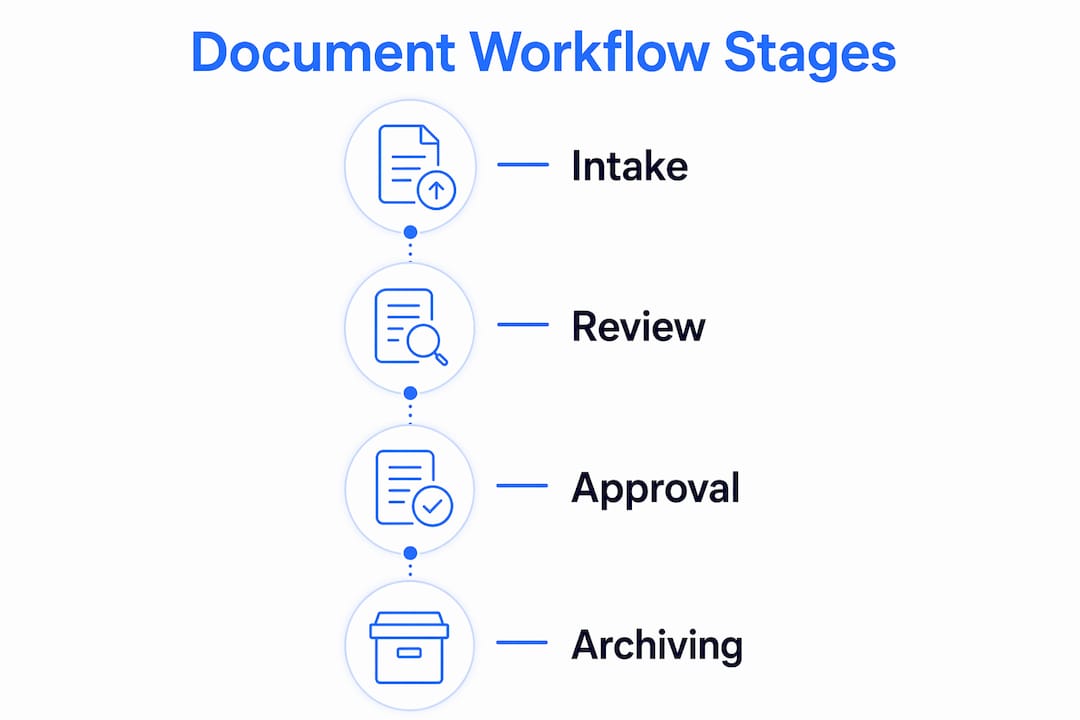
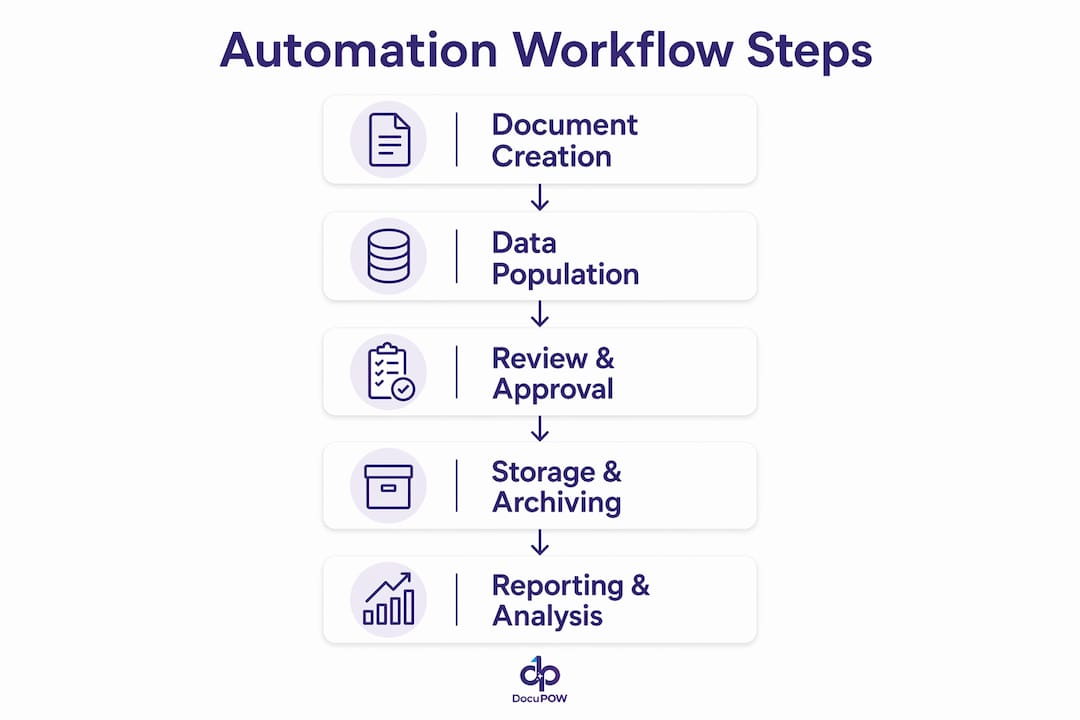
    Not every step in a document workflow responds equally to automation. The biggest throughput gains concentrate in five specific phases, and knowing which ones to target first saves months of implementation time.

    • Data classification and extraction. AI-powered extraction pulls structured and unstructured data from source documents without manual keying. This eliminates the single most time-consuming step in most intake workflows and directly cuts the time-to-first-draft.

    • Document assembly and population. Template-driven assembly with live data feeds replaces manual drafting. The 91% drafting time reduction cited in legal automation comes almost entirely from this step. When a system auto-populates a 40-field contract in seconds, the throughput impact is immediate.

    • Validation and exception handling. AI validation catches formatting errors, missing fields, and data mismatches before a document moves forward. Fewer exceptions mean fewer manual review cycles, which is where most cycle-time inflation actually lives.

    • Routing and approvals. Approval bottlenecks are a throughput constraint that pure document speed cannot fix. Automated routing sends documents to the right reviewer the moment they are ready, with no handoff delays. The Deloitte and Docusign 2026 study found that linking data and automating routing reduces handoffs and measurably improves speed in approval-heavy workflows.

    • Storage and indexing. Automated filing with metadata tagging eliminates the post-processing queue that often adds hours to a document’s total cycle time.

    The document automation impact on productivity is highest when all five phases connect into a single end-to-end workflow rather than isolated point solutions. A system that automates extraction but leaves routing manual will still hit a wall at the approval stage.

    Pro Tip: When mapping your current workflow, time each phase separately. You will almost always find that 70 to 80% of total cycle time sits in two or three steps, not spread evenly. Automate those first.
    Infographic of document automation workflow steps

    How platform architecture shapes throughput at scale

    The intelligence inside a document automation platform matters. But the execution architecture underneath it matters just as much, and most buyers overlook it entirely.

    Batch processing and high-volume generation modes determine how a platform behaves under load. Formstack’s High-Volume Generation mode processes over 20,000 records per run with adjustable batch sizes ranging from 1 to 200 records, reducing delays by up to 85% compared to standard batch processing. That kind of scalability does not come from smarter document intelligence. It comes from how the platform manages memory, concurrency, and recovery when a run fails mid-stream.

    Architecture factor Lower-capability platforms Higher-capability platforms
    Batch size control Fixed, often small Configurable, up to 200+ records
    Parallel processing Sequential only Concurrent runs across queues
    Failure recovery Manual restart required Automatic recovery mid-run
    Peak volume handling Degrades under load Maintains throughput at scale

    Parallel processing is the most direct throughput multiplier at the platform level. When a system can run multiple document generation queues simultaneously, total output scales with workload rather than being capped by a single processing thread. This is how organizations handle end-of-month reporting spikes or regulatory filing deadlines without adding staff or extending hours.

    Batch sizing and parallelism also affect memory stability during very large runs. A platform that crashes at 5,000 records and requires a manual restart does not just lose time on the restart. It breaks the throughput measurement entirely and introduces unpredictable delays into downstream workflows. Choosing a platform with automatic recovery and configurable concurrency is a technical decision with direct operational consequences.

    What steps maximize throughput gains from document automation?

    Implementation quality determines whether an organization captures the gains the research promises or settles for a fraction of them. These steps reflect what consistently separates high-performing deployments from stalled ones.

    1. Start with high-volume, repeatable workflows. Automation performs best on structured, rule-based tasks with predictable inputs. Accounts payable invoice processing, onboarding document packages, and compliance reporting are ideal starting points. They generate immediate, measurable throughput data and build organizational confidence.

    2. Establish a baseline before you automate anything. Record your current documents-per-hour rate, average cycle time, and error rate for the target workflow. Without a baseline, you cannot validate gains, and you cannot identify which step is still limiting throughput after automation goes live.

    3. Segment your workload by exception rate. High-exception workflows require more human judgment and will always cap your throughput gains. Separate clean, structured documents from messy, variable ones and automate the clean segment first. This approach, supported by Shopify’s analysis of AI efficiency, limits human intervention to genuine judgment calls rather than routine processing.

    4. Automate routing alongside document generation. Teams that automate document creation but leave approval routing manual consistently underperform on cycle-time metrics. The Deloitte 2026 findings show 36% efficiency gains in time savings when AI covers the full agreement lifecycle, not just drafting. Legal teams reclaimed 37% of their time; HR teams reclaimed 45%.

    5. Use no-code or low-code platforms for faster iteration. Platforms that allow non-technical staff to modify templates and routing rules reduce the change management burden significantly. When a business rule changes, a no-code platform lets an operations manager update the workflow in hours rather than waiting weeks for an IT ticket.

    6. Run a pilot, measure it rigorously, then scale. A pilot on one workflow with clean measurement gives you the throughput data to justify broader rollout. It also surfaces the exception types and edge cases that would otherwise derail a larger deployment.

    Key takeaways

    Document automation improves throughput by compressing cycle times, eliminating rework loops, and enabling parallel processing at scale, with documented gains of 100 to 130% in file throughput and 67 to 70% in cycle-time reduction across financial and legal workflows.

    Point Details
    Measure throughput precisely Use documents per hour before and after automation to generate defensible ROI data.
    Target assembly and routing first Contract drafting and approval routing deliver the largest cycle-time reductions per automation dollar.
    Platform architecture matters Configurable batch sizes, parallel processing, and automatic recovery determine throughput at scale.
    Start with repeatable workflows High-volume, rule-based processes minimize exceptions and maximize early throughput gains.
    Automate the full lifecycle Covering extraction, assembly, routing, and storage together captures the full efficiency gain.

    Why throughput deserves to be your primary automation metric

    I have watched organizations invest in document automation and then measure success by cost savings alone. They get a number they can present to finance, declare victory, and move on. Six months later, the operations team is still complaining about turnaround times, and nobody can explain why.

    The problem is that cost savings are a lagging indicator. Throughput is a leading one. When you track documents per hour and cycle time, you see the bottleneck in real time. You know immediately whether the automation is working or whether a manual approval step is eating the gains you just engineered into the generation phase.

    The Deloitte 2026 research makes this explicit. Efficiency gains from automation come primarily from cycle-time reduction and fewer exceptions requiring manual review, not from labor cost reduction. That is a meaningful distinction. It means the path to better throughput runs through accuracy and routing clarity, not just faster typing.

    What I find most organizations miss is the approval layer. They automate document creation beautifully and then send the finished document into a queue where it waits three days for a signature. The document automation impact on productivity is real, but it stops at the handoff. If you are not measuring end-to-end cycle time from intake to final storage, you are measuring the wrong thing.

    My honest recommendation: run a 30-day pilot on one high-volume workflow, measure every phase separately, and present the throughput data to leadership before you ask for budget to scale. The numbers speak for themselves when you measure them correctly.

    — Sameer

    See how DocuPOW accelerates document throughput
    https://docupow.ai

    DocuPOW’s AI-powered platform is built specifically for organizations that need to process high document volumes without adding headcount. Its autonomous agents extract data from unstructured files without rigid templates, feed that data directly into document assembly, and route completed documents through configurable approval workflows. For manufacturers, real estate operations, and financial teams, this means the kind of throughput gains in operations that show up in your cycle-time reports within weeks of deployment. Explore DocuPOW’s high-volume processing guide to see the architecture behind the results, or visit DocuPOW’s automation platform to match the right solution to your workflow.

    FAQ

    What does document automation throughput actually measure?

    Throughput in document automation measures the number of completed documents processed within a fixed time period, typically expressed as documents per hour. Comparing this metric before and after automation gives you a direct, defensible measure of productivity gain.

    How much throughput improvement can a business realistically expect?

    Financial institutions have documented 100 to 130% throughput increases per staff member alongside 67 to 70% cycle-time reductions after deploying document automation. Results vary by workflow complexity and exception rate, but double-digit gains are consistent across industries.

    Which document workflows see the fastest throughput gains?

    High-volume, rule-based workflows with structured inputs, such as contract generation, mortgage processing, and compliance reporting, respond fastest to automation. These workflows have predictable data patterns that minimize exceptions and allow automation to run without frequent human intervention.

    Does platform architecture affect throughput as much as AI capability?

    Yes. Batch sizing, parallel processing, and automatic failure recovery can influence throughput independently of how intelligent the document extraction is. Formstack’s configurable batch architecture, for example, reduces processing delays by up to 85% compared to standard batch modes on the same data.

    What is the biggest mistake organizations make when automating for throughput?

    The most common mistake is automating document generation while leaving approval routing manual. This creates a new bottleneck at the handoff stage that cancels out the cycle-time gains from faster document creation. Automating the full lifecycle, from extraction through routing to storage, is what delivers the throughput improvements the research documents.


  • What Is Autonomous Document Processing for Business

    What Is Autonomous Document Processing for Business

    Autonomous document processing is defined as an AI-driven system that independently ingests, extracts, validates, and acts on data from business documents with minimal human intervention. Unlike basic optical character recognition tools, it combines natural language processing (NLP), machine learning, and computer vision to handle unstructured content across invoices, contracts, HR forms, and compliance records. The industry standard term for this category is intelligent document processing (IDP), and autonomous document processing represents its most advanced form. Platforms like Microsoft Copilot Studio and IBM IDP demonstrate how far this technology has moved beyond simple text conversion. For business professionals managing high document volumes, the difference between traditional processing and autonomous automation is the difference between a manual assembly line and a self-directing factory floor.

    What is autonomous document processing and how does it work?

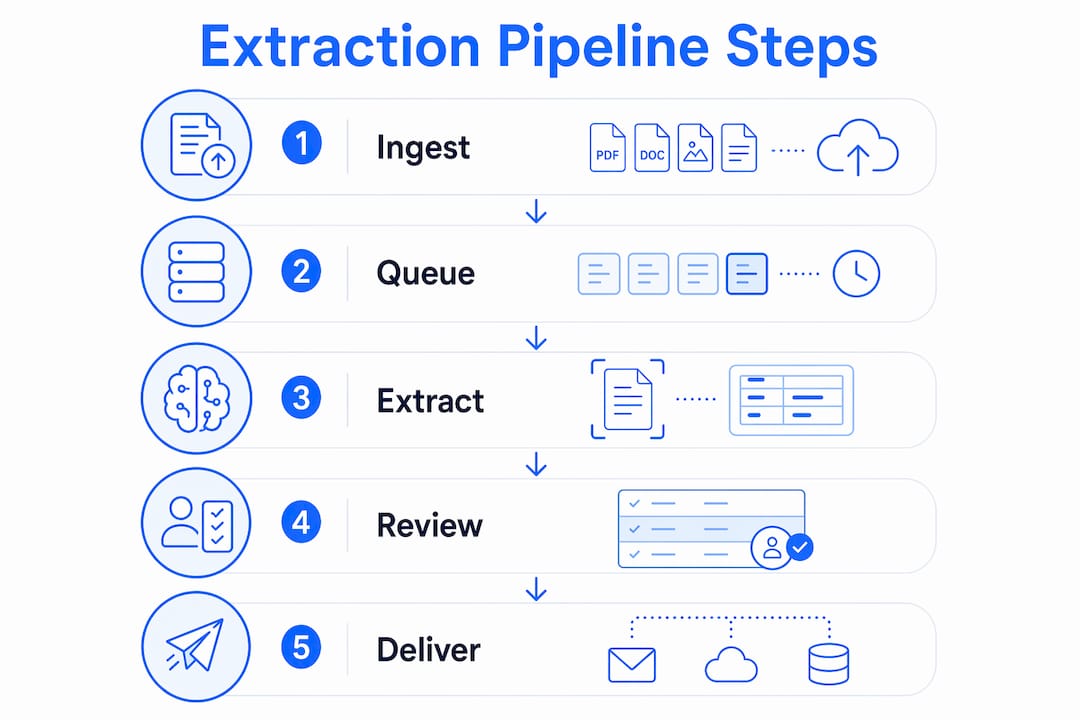
    Autonomous document processing works through a five-stage pipeline that moves a document from raw input to a completed business transaction without a human touching every step.

    1. Document ingestion. The system monitors sources like email inboxes, SharePoint libraries, and API feeds for new documents. Enterprise autonomous agents pull files on triggers, meaning a new invoice arriving in a shared inbox is captured and queued within seconds, not hours.

    2. AI-driven extraction. OCR converts scanned images or PDFs to machine-readable text. NLP then interprets meaning, context, and relationships within that text. Machine learning models trained on thousands of prior documents identify fields like vendor name, total amount, and payment terms, even when document layouts vary by supplier.

    3. Validation and reasoning. Extracted data is checked against business rules. A purchase order amount that exceeds an approval threshold triggers a flag. A contract date that falls outside a permitted range gets escalated. The Microsoft Copilot Studio Document Processing Agent uses GPT-4.0 to apply multi-step reasoning during this phase, combining generative AI with deterministic rule checks.

    4. Human-in-the-loop exception handling. Autonomous does not mean unsupervised. Systems escalate uncertain cases to human reviewers based on confidence scores or business rules. A document with a confidence score below a set threshold goes to a reviewer queue rather than proceeding silently through the workflow.

    5. Integration and audit trail generation. Validated data routes to ERP systems like SAP, CRM platforms like Salesforce, or HR tools like Workday. APIs connect extracted outputs to ServiceNow, Teams, Slack, and SharePoint, so the processed data lands exactly where downstream teams need it. Every action, including reviewer overrides, is logged in a tamper-evident audit trail.

    Pro Tip: Before selecting a platform, map every document source your team currently uses. Systems that cannot ingest from your existing email, cloud storage, or ERP feed will create manual handoff points that defeat the purpose of automation.

    A practical architecture separates two distinct functions: document intelligence (extracting queryable structured data) and autonomous action execution (triggering downstream transactions). Keeping these layers modular means your extraction engine can be reused across workflows while each business process consumes validated data independently.

    Hands sorting color coded files in meeting room

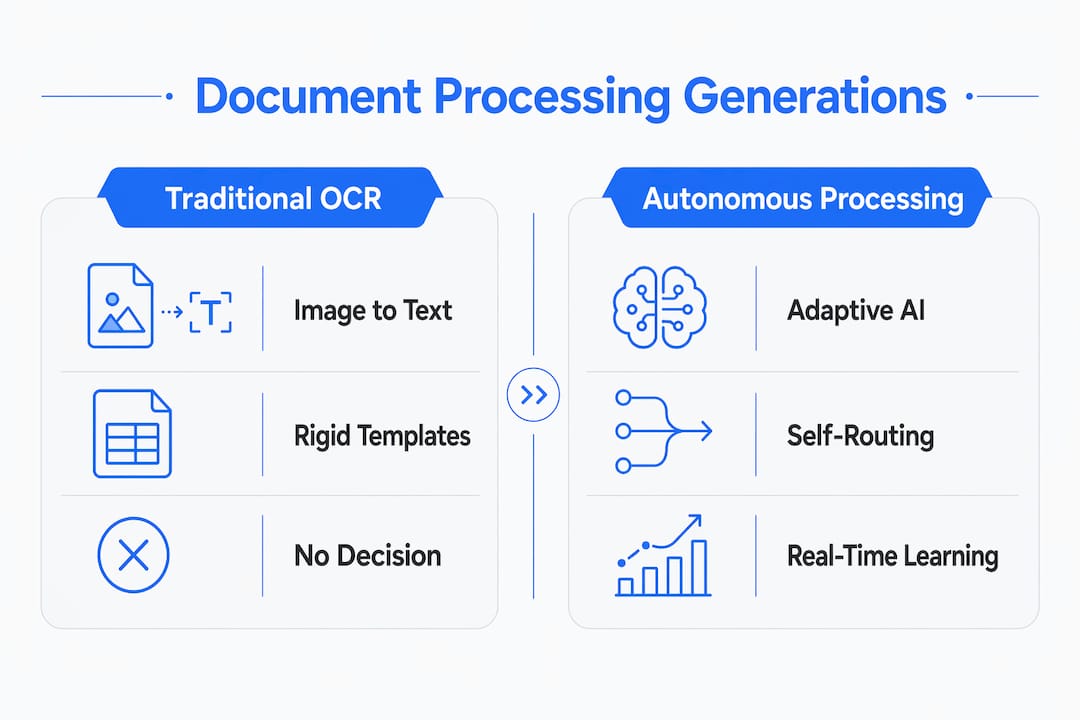
    How does autonomous processing compare to traditional OCR and IDP?

    The three generations of document processing technology differ most sharply in how much human judgment they require and how they handle documents they have never seen before.

    Traditional OCR tools convert images to text but struggle with complex layouts and have no decision-making capability. They require rigid templates, break when a vendor changes their invoice format, and produce raw text that still needs a human to interpret and route. Intelligent document processing added NLP and machine learning to OCR, enabling field extraction and basic classification. But most IDP systems still rely on pre-trained models for specific document types and escalate exceptions to human queues by default.

    Autonomous document processing goes further by introducing adaptive AI agents that self-route documents, detect anomalies, flag compliance issues, and generate responses based on business rules. These agents learn from feedback loops over time, improving accuracy without manual retraining cycles.

    Feature Traditional OCR Intelligent document processing Autonomous document processing
    Human intervention required High (every document) Medium (exceptions and setup) Low (exceptions only)
    Decision-making capability None Rule-based Adaptive AI agents
    Handles new document formats No Limited Yes, with learning
    Audit trail generation Manual Partial Automatic and tamper-evident
    Integration with ERP/CRM Manual export Semi-automated Native API integration
    Continuous learning No No Yes

    Infographic comparing traditional OCR and autonomous document processing

    The table makes the business case visible. Moving from OCR to autonomous processing is not an incremental upgrade. It is a structural shift in how document data flows through your organization.

    Pro Tip: If your current IDP system requires a consultant to retrain models every time a supplier changes their invoice template, that is a strong signal you are still operating in the second generation, not the third.

    What are the real-world benefits of autonomous document processing?

    The practical benefits of document processing at this level of autonomy fall into four categories that matter directly to finance, legal, HR, and operations teams.

    • Labor cost reduction. Finance teams processing thousands of invoices monthly spend significant time on manual data entry, matching, and approval routing. Autonomous systems handle classification, extraction, validation, and routing without staff involvement on standard documents. Teams redirect that capacity to exception resolution and vendor relationship management instead.

    • Error reduction and data accuracy. Manual data entry carries an inherent error rate. Autonomous systems improve accuracy by automating classification, extraction, validation, and routing across document types including invoices, contracts, and HR forms. Fewer errors in source data means fewer downstream corrections in ERP and CRM records.

    • Compliance and audit readiness. Regulated industries like insurance and financial services face document retention and audit requirements that are expensive to satisfy manually. Tamper-evident audit trails that capture ingestion timestamps, model versions, classification decisions, and reviewer overrides satisfy regulatory requirements without reconstructing manual steps after the fact. DocuPOW’s insurance workflow solutions are built around exactly this compliance architecture.

    • Cross-department applications. In legal departments, autonomous agents extract key clauses, dates, and obligations from contracts and flag deviations from standard terms. In HR, they process onboarding documents, verify credentials, and update employee records in Workday without manual input. In real estate, they handle lease abstractions, title documents, and closing packages at a scale no manual team can match.

    Feedback loops and context awareness enable these systems to learn over time while making real-time decisions. A system processing construction contracts for six months will outperform the same system on day one because it has learned the specific language patterns, exception types, and routing rules your organization uses.

    How to implement autonomous document processing successfully

    Successful implementation depends less on the technology you choose and more on the decisions you make before deployment.

    1. Evaluate integration APIs first. A system that cannot connect to your existing SAP, Salesforce, or SharePoint environment will require custom middleware that adds cost and fragility. Confirm native connectors before evaluating any other feature. DocuPOW’s AI document automation platform is built with pre-configured integrations for common enterprise stacks.

    2. Define decision boundaries and validation gates. Configurable thresholds and business rules determine when agents escalate rather than produce unreliable outputs silently. Define these boundaries before go-live, not after your first batch of misrouted documents.

    3. Balance autonomy with human review workflows. Design reviewer queues for exceptions from the start. Autonomous processing reduces human touchpoints but does not eliminate them. Teams need clear ownership of the exception queue and defined response time standards.

    4. Build auditability into the architecture. Immutable audit trails that log every extraction, decision, and override are not optional for regulated industries. Confirm that your chosen platform generates these logs automatically and stores them in a format your compliance team can access without vendor assistance.

    5. Plan change management alongside technical deployment. Staff who previously handled manual document routing need retraining on exception management and quality review. Teams that understand why the system escalates certain documents will resolve exceptions faster and provide better feedback for model improvement.

    Organizations that treat implementation as a technical project alone consistently underperform compared to those that treat it as an operational change program with technology as the enabler.

    Key takeaways

    Autonomous document processing delivers measurable efficiency and accuracy gains only when organizations combine adaptive AI agents with well-defined decision boundaries, human oversight workflows, and tamper-evident audit trails.

    Point Details
    Core definition Autonomous document processing uses NLP, machine learning, and computer vision to handle documents end-to-end with minimal human input.
    Human oversight remains essential Systems escalate low-confidence documents to reviewers; autonomy reduces touchpoints but does not eliminate human accountability.
    Audit trails are non-negotiable Tamper-evident logs capturing every extraction, decision, and override are required for compliance and regulatory readiness.
    Integration determines ROI Native API connections to SAP, Salesforce, and Workday determine whether extracted data reaches downstream systems without manual handoffs.
    Implementation is an operational change Defining decision boundaries and retraining staff on exception management matters as much as the technology selection itself.

    Why “autonomous” deserves more scrutiny than it gets

    I have watched organizations buy autonomous document processing platforms expecting a hands-off system and then spend the first six months frustrated that humans are still involved. That frustration comes from a misreading of what autonomous actually means in an enterprise context.

    The word implies independence. What it actually delivers is conditional independence. The AI agent concept is powerful precisely because it operates within defined boundaries, not outside them. The moment you remove those boundaries in the name of full automation, you get silent errors that compound across thousands of documents before anyone notices.

    The organizations I have seen get the most value from this technology are the ones that invest heavily in the exception workflow, not the automation workflow. They treat the human review queue as a strategic feedback mechanism, not a failure mode. Every escalated document is a data point that improves the model and tightens the decision boundaries over time.

    My honest advice: do not evaluate autonomous document processing platforms on how few humans they require. Evaluate them on how well they handle the documents they cannot process confidently. That is where the real quality gap between platforms shows up, and it is the capability that protects you when document volumes spike or a new document type enters your workflow without warning.

    The future of this technology points toward deeper integration with predictive analytics and real-time financial visibility, which is exactly where platforms like DocuPOW are heading. But the foundation is always the same: reliable extraction, honest escalation, and an audit trail you can defend in front of a regulator.

    — Sameer

    See autonomous document processing in action with DocuPOW

    DocuPOW applies autonomous document processing across industries where document volume and accuracy directly affect revenue and compliance outcomes.

    https://docupow.ai

    For real estate teams managing lease abstractions, title documents, and closing packages, DocuPOW’s real estate document automation handles extraction and routing at scale without template dependency. The platform’s AI agents understand document context, not just field positions, which means new document formats do not require manual reconfiguration. If you are evaluating platforms for high-volume environments, the DocuPOW product overview details the full capability set including real-time analytics and integration architecture. For organizations processing at scale in 2026, the high-volume processing guide covers the operational practices that separate efficient deployments from costly ones.

    FAQ

    What is autonomous document processing?

    Autonomous document processing is an AI-driven system that independently ingests, extracts, validates, and routes data from business documents using NLP, machine learning, and computer vision. It handles end-to-end document workflows with minimal human intervention, escalating only low-confidence cases for review.

    How is autonomous document processing different from OCR?

    Traditional OCR converts images to text but has no decision-making capability and requires rigid templates. Autonomous document processing adds adaptive AI agents that classify, extract, validate, and route documents independently, handling new formats without manual retraining.

    Does autonomous document processing eliminate human review entirely?

    No. Even highly autonomous systems escalate uncertain cases to human reviewers based on confidence scores or business rules. Human oversight remains a core component of reliable autonomous workflows, not an optional add-on.

    What systems can autonomous document processing integrate with?

    Autonomous document processing platforms connect to ERP systems like SAP, CRM platforms like Salesforce, HR tools like Workday, and communication platforms like Teams and Slack through native APIs, routing validated data directly into existing business workflows.

    What industries benefit most from autonomous document processing?

    Finance, legal, HR, real estate, insurance, and construction teams all benefit from autonomous document automation. High-volume, document-intensive workflows with compliance requirements see the strongest return, particularly where manual data entry errors carry financial or regulatory consequences.

  • The Role of Data Extraction in Operations: 2026 Guide

    The Role of Data Extraction in Operations: 2026 Guide

    Data extraction is the systematic process of retrieving structured or unstructured data from source systems so it can be analyzed, transformed, and acted upon across operational workflows. For business operations managers, this is not a background IT concern. It is the foundation on which every downstream process, from financial reporting to supply chain decisions, either stands or collapses. The role of data extraction in operations has grown sharply as organizations rely on ERP systems, CRM platforms, and document-heavy workflows that generate more data than any manual process can handle. Manual data entry in high-stress environments produces error rates exceeding 17%, and that number climbs past 38% when documentation is delayed by more than 20 minutes. Getting extraction right is not optional. It is the prerequisite for everything else.

    How does data extraction fit into operational processes?

    Data extraction is the “E” in ETL (Extract, Transform, Load) and ELT pipelines, and its position at the front of the chain makes it the most consequential step. Reliable extraction reduces copy-paste errors and reconciliation burden, which directly improves the integrity of every report, dashboard, and automated workflow that follows. If the extraction step is flawed, every downstream system inherits that flaw.

    Operations teams typically pull data from several source types: relational databases like Microsoft SQL Server or Oracle, cloud APIs from platforms like Salesforce or SAP, scanned documents and PDFs, and flat files like CSV exports from legacy systems. Each source presents different challenges. APIs require authentication and rate-limit management. Documents require parsing logic that understands layout and context. Databases require schema mapping and incremental load strategies to avoid redundant processing.

    The core technical approaches used in operational extraction include:

    • API-driven extraction: Connects directly to SaaS platforms and databases using REST or SOAP APIs, enabling real-time or scheduled pulls with minimal manual intervention.
    • Automated incremental loads: Captures only new or changed records since the last extraction, reducing processing time and system load.
    • Document parsing: Uses OCR (Optical Character Recognition) and AI-based interpretation to extract data from invoices, contracts, and forms.
    • Database queries: Runs structured SQL queries against operational databases to pull specific datasets on a defined schedule.

    Pro Tip: Before selecting an extraction method, map every data source your team depends on and document its format, update frequency, and access method. This single exercise prevents the majority of integration failures that operations teams encounter post-deployment.

    Siloed systems are the most persistent challenge. A manufacturer might hold purchase order data in SAP, logistics data in a third-party TMS, and quality records in a spreadsheet. Without a reliable extraction layer connecting these sources, operations analysts spend hours reconciling data manually rather than acting on it.

    What are the benefits of automating data extraction?

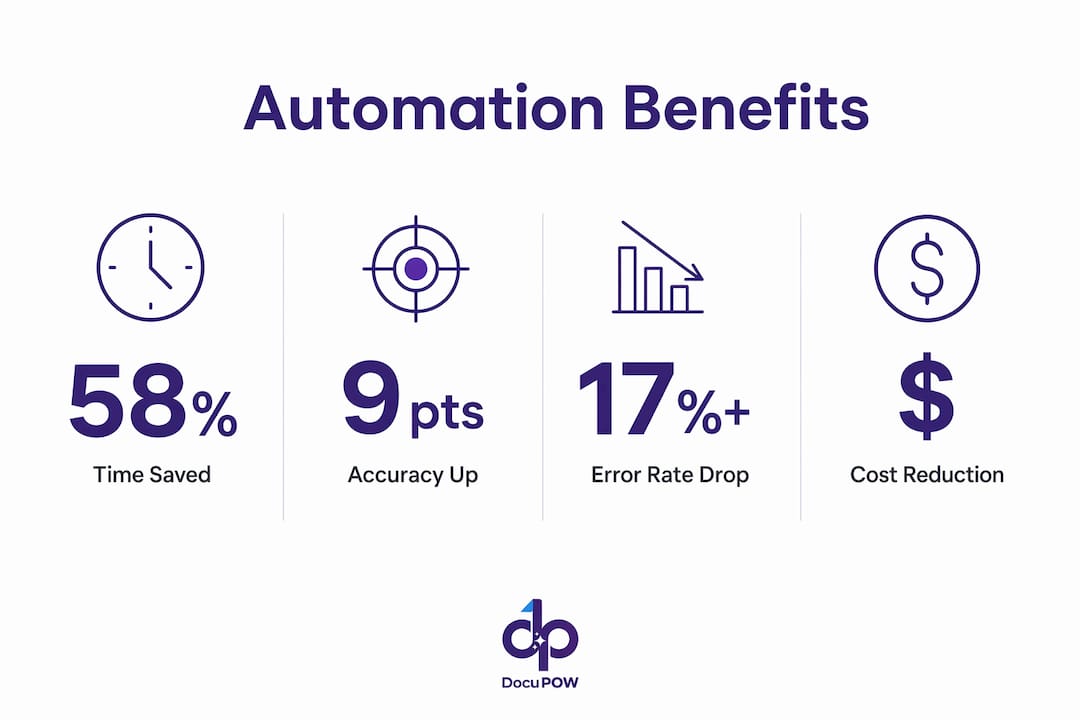
    Automation transforms data extraction from a labor-intensive bottleneck into a continuous, reliable feed that operations teams can trust. The impact of data extraction automation is measurable: AI-based extraction benchmarks show accuracy improvements of 9.25 percentage points on average, with time savings exceeding 50% for document-heavy workflows. For receipts specifically, accuracy improved from 75.7% to 97.3%, with a 58% reduction in processing time. These are not marginal gains. They represent the difference between a finance team that closes the books in two days versus two weeks.

    Metric Manual extraction Automated extraction
    Error rate (high-stress environments) 17%+ Reduced significantly with AI validation
    Documentation delay impact Errors rise to 38%+ after 20 min Near-real-time capture eliminates delay
    Processing time (document workflows) Baseline Up to 58% faster
    Accuracy (receipt/invoice data) ~75.7% Up to 97.3%

    Infographic showing key benefits of automating data extraction

    The operational impact extends beyond accuracy. Integrating extraction with ERP, CRM, and RPA systems yields faster processing cycles, fewer manual corrections, and measurable ROI when baseline metrics are established before deployment. An operations team that automates purchase order extraction into its ERP, for example, eliminates the data entry queue entirely and frees analysts for exception handling and strategic work.

    Automation also reduces the cost of error correction. Manual extraction errors do not just slow processes. They trigger downstream rework: wrong shipment quantities, incorrect invoices, and misaligned inventory records. Each correction costs time and credibility. AI-based extraction catches field-level errors at the point of capture rather than after the damage is done.

    Pro Tip: Establish a baseline of your current error rate and average processing time before deploying any automated extraction tool. Without a pre-deployment benchmark, you cannot calculate ROI or identify where the tool is underperforming.

    For operations managers evaluating AI-driven extraction tools, the key question is not whether automation improves accuracy. The evidence is clear that it does. The question is which document types and source systems represent your highest error and delay risk, and whether the tool you select handles those cases without requiring rigid templates.

    What are the main challenges in validating extraction outputs?

    Accuracy at deployment does not guarantee accuracy over time. Extraction systems degrade when source formats change, when new document layouts appear, or when data volumes spike. NIST’s agentic AI research identifies automated evaluation probes as the mechanism for maintaining trust in extraction systems, particularly when extraction outputs drive approvals or compliance decisions. An audit trail is not a nice-to-have. It is the operational control that makes extraction trustworthy.

    The most common error sources in operational extraction include:

    • Format variability: Vendors change invoice layouts, and template-dependent systems fail silently.
    • Delayed capture: As noted, documentation delays beyond 20 minutes raise error rates dramatically, a problem that manual workflows cannot structurally solve.
    • Field mapping drift: Schema changes in source databases break extraction queries without triggering visible errors.
    • Ambiguous data: Handwritten fields, abbreviations, and non-standard date formats create interpretation errors that only surface downstream.

    Extraction outputs must be validated continuously, not just at go-live. Structured validation with documented acceptance criteria, as outlined in NIST’s validation principles, prevents the assumption that ‘good enough at launch’ means ‘good enough at scale.’

    Structured validation means defining what correct output looks like for each field, setting acceptable error thresholds, and running automated checks against those thresholds on every extraction cycle. Operations teams that treat validation as a one-time setup consistently encounter accuracy degradation within six months of deployment. Teams that treat it as a continuous measurement practice maintain performance and catch regressions before they affect downstream systems.

    Protecting your extraction infrastructure also means addressing the AI security risks that come with deploying agentic systems in operational environments. Audit trails, access controls, and anomaly detection are not separate concerns from extraction quality. They are part of the same operational control framework.

    How do you integrate data extraction with existing operational systems?

    Integration is where most extraction projects succeed or fail. The architecture decision you make at the start determines how much flexibility you have when business requirements change. For operations teams, the practical deployment options are:

    1. Cloud API integration: The extraction tool connects to your ERP, CRM, or document management system via API. This is the fastest path to deployment and works well when your systems have well-documented APIs. SAP, Oracle NetSuite, and Salesforce all support this model.
    2. Self-hosted deployment: The extraction engine runs within your own infrastructure. This is preferred when data governance or compliance requirements (including GDPR) prohibit sending documents to third-party cloud environments.
    3. SDK embedding: The extraction library is embedded directly into an existing application or workflow platform. This gives developers the most control but requires engineering resources.
    4. Intelligent Document Processing (IDP) platforms: Dedicated platforms that combine extraction, classification, and validation in a single layer, then push structured data to downstream systems via API or webhook.
    Deployment model Best for Key trade-off
    Cloud API Fast deployment, SaaS-first environments Data leaves your infrastructure
    Self-hosted Compliance-sensitive operations Requires internal IT resources
    SDK embedding Custom application integration Higher development cost
    IDP platform High-volume document workflows Vendor dependency

    Field mapping is the most underestimated integration task. Every source system uses different field names, data types, and formats. Mapping “Invoice Date” in a PDF to “BUDAT” in SAP requires explicit configuration and testing. Operations teams that skip this step discover the mismatch only after corrupted records appear in their ERP.

    Close-up of hands planning data integration on desk

    For procurement and supply chain operations, the integration layer between document extraction and ERP is particularly high-stakes. A missed field in a purchase order extraction can trigger incorrect goods receipts, payment discrepancies, and supplier disputes. Plan your integration endpoints before selecting a vendor, and evaluate every candidate against your specific field mapping requirements.

    What emerging technologies are reshaping data extraction?

    Large Language Models (LLMs) are the most significant development in extraction technology since OCR. LLM-powered tools achieve 71 to 94% accuracy on binary outcome extraction but drop to 24 to 56% on complex continuous data. This means LLMs are production-ready for classification and simple field extraction but still require human review for nuanced or multi-variable data. The gap will close, but operations managers should not assume LLM accuracy is uniform across all document types today.

    The trends reshaping extraction in 2026 include:

    • Zero-template extraction: AI models that interpret document structure contextually, without predefined field maps, enabling extraction from new document types without reconfiguration.
    • Agentic AI workflows: Autonomous agents that extract, validate, and route data through approval workflows without human intervention, as DocuPOW’s platform demonstrates in manufacturing operations.
    • Consensus models: Multiple extraction passes compared against each other to auto-accept high-confidence results and flag low-confidence fields for review, reducing manual oversight without sacrificing accuracy.
    • Real-time validation probes: Automated checks that run continuously against live extraction outputs, creating the audit trails that NIST identifies as critical for operational trust.

    The direction is clear. Extraction is moving from a scheduled batch process to a continuous, self-validating operational layer. Operations teams that build their infrastructure around this model now will have a structural advantage in speed and accuracy over those still running manual or template-dependent workflows.

    Key takeaways

    Effective data extraction is the single most controllable factor in operational accuracy, and organizations that automate and validate it continuously outperform those that treat it as a one-time setup.

    Point Details
    Extraction anchors every downstream process Errors at the extraction step propagate through ERP, CRM, and reporting systems without correction.
    Automation delivers measurable accuracy gains AI-based extraction improves accuracy by 9.25 percentage points on average, with up to 58% time savings on document workflows.
    Validation must be continuous, not one-time Structured acceptance criteria and automated probes prevent accuracy degradation after deployment.
    Integration planning determines project success Field mapping, API compatibility, and deployment model selection must be resolved before vendor selection.
    LLMs are production-ready for structured tasks LLM extraction achieves 71 to 94% accuracy on binary fields but requires oversight for complex continuous data.

    Why operations leaders underestimate extraction until it breaks

    I have worked with operations teams that spent months selecting an ERP and two weeks selecting their extraction layer. That ratio is backwards. The ERP is only as good as the data going into it, and the data quality is determined entirely by what happens at extraction.

    The most common mistake I see is treating extraction as a solved problem after a successful pilot. Pilots run on clean, representative documents. Production environments throw edge cases, format changes, and volume spikes at the system within weeks. Teams that did not build continuous validation into their deployment find out about accuracy degradation from a supplier dispute or a financial reconciliation error, not from their monitoring dashboard.

    The human factor is also consistently underestimated. Even in highly automated workflows, people introduce variability. They scan documents at angles, use non-standard templates, and enter data in fields that were not designed for it. Extraction systems need to handle human inconsistency, not assume it away.

    My strongest advice for operations managers: treat extraction as a controllable operational step with its own performance metrics, not as infrastructure that runs in the background. Measure it, validate it continuously, and connect it explicitly to the downstream outcomes it affects. When you do that, you stop reacting to data quality problems and start preventing them. The operational efficiency gains from getting this right compound over time in ways that are difficult to overstate.

    — Sameer

    How DocuPOW turns extraction into an operational advantage

    DocuPOW’s AI-powered platform addresses the exact challenges this article covers: template-dependent failures, manual validation overhead, and integration complexity with ERP and CRM systems.

    https://docupow.ai

    DocuPOW uses autonomous agents that understand document context without rigid templates, which means new document types do not require reconfiguration. Every extraction includes a full audit trail, supporting the continuous validation practices that NIST identifies as critical for operational trust. The platform connects directly to ERP, CRM, and RPA systems via API, with field mapping tools designed for operations teams rather than developers. For organizations ready to move from reactive data management to proactive, real-time decision-making, DocuPOW’s agentic AI platform is built specifically for that transition.

    FAQ

    What is the role of data extraction in operations?

    Data extraction retrieves raw data from source systems, including databases, documents, and APIs, and structures it for use in operational workflows, reporting, and automation. It is the first step in ETL pipelines and directly determines the accuracy of every downstream process.

    How does data extraction improve efficiency?

    AI-based extraction reduces processing time by up to 58% and improves accuracy by over 9 percentage points compared to manual entry, according to OCR benchmark studies. It eliminates data entry queues and reduces the cost of downstream error correction.

    What are the biggest risks in operational data extraction?

    The primary risks are format variability causing silent failures, field mapping drift after source system updates, and accuracy degradation over time without continuous validation. NIST recommends automated evaluation probes and documented acceptance criteria to manage these risks.

    What is the difference between ETL and ELT in extraction?

    In ETL (Extract, Transform, Load), data is transformed before loading into the target system. In ELT (Extract, Load, Transform), raw data is loaded first and transformed within the target system. The extraction step is identical in both, but ELT is more common in cloud-based operational environments where transformation can happen at scale inside the data warehouse.

    Are LLMs reliable for operational data extraction?

    LLMs achieve 71 to 94% accuracy on binary and structured field extraction but drop to 24 to 56% on complex continuous data. For high-volume, structured document workflows, LLMs are production-ready with appropriate validation. Complex or variable data types still require human review or consensus-based verification models.

  • Document Process Automation Benefits for Operations

    Document Process Automation Benefits for Operations

    Document process automation (DPA) is the software-driven handling of document workflows that replaces manual data entry, routing, and validation with rule-based and AI-powered systems. The benefits of document process automation operations are concrete and measurable: organizations report 80% reductions in processing time, error rates cut by up to 90%, and first-year ROI figures that routinely exceed 200%. For business leaders evaluating where to deploy capital in 2026, DPA ranks among the highest-return investments available. Intelligent Document Processing (IDP) platforms like DocuPOW have pushed these gains further by replacing rigid templates with context-aware AI agents that extract and route data without manual configuration.

    1. Benefits of document process automation operations: the core case

    The central argument for automating document workflows is speed combined with accuracy at scale. Manual document handling averages roughly 15 minutes per document when you factor in data entry, review, and routing. LLM-enabled automation cuts that figure to 4 minutes, an 80% reduction in human effort per document. That is not a marginal improvement. It is a structural change in how your operations function.

    The gains compound as volume increases. A team processing 1,000 documents per week recaptures roughly 183 staff hours every week at that ratio. Those hours shift to exception handling, customer engagement, and strategic analysis. The advantages of document automation are not theoretical. They show up directly in headcount allocation and throughput capacity.

    Team hands working on devices with documents

    2. How document automation cuts processing time

    Automation accelerates document handling through three mechanisms: parallel processing, automated classification, and confidence-based routing. Where a human worker handles one document at a time, an automated pipeline processes batches simultaneously. Classification assigns document types without manual sorting. Routing sends high-confidence extractions straight to downstream systems while flagging low-confidence items for human review.

    The FutureVault deployment illustrates what this looks like at scale. The platform processed 6.2 million pages in two weeks, averaging 20.5 seconds per page. That volume would have taken years of manual effort. The key design choice was not just OCR accuracy. It was pipeline orchestration: batching, confidence scoring, and automated validation working together.

    Pro Tip: Start with your highest-volume, most repetitive document type. Invoice processing, purchase orders, and intake forms are ideal candidates because their structure is predictable and the ROI is visible within 90 days.

    • Parallel batch processing eliminates sequential bottlenecks
    • Automated classification removes manual sorting from the intake queue
    • Confidence-based routing sends clean data forward and flags exceptions for review
    • Audit trails capture every decision point for compliance and traceability

    3. Cost savings from automating document workflows

    The cost reduction from document automation is significant across three categories: direct labor, error remediation, and operational delays. Template-based automation drops cost per document from over $1.00 to below $0.10. That is a 90% reduction in per-unit processing cost. At 25,000 documents per month, the savings are immediate and substantial.

    Labor savings go beyond the obvious. Financial services firms that cut their manual document extraction workforce in half save $2.9 million annually. That figure does not include avoided costs from late payment penalties, compliance fines, or deal delays caused by slow document turnaround. The indirect cost avoidance often exceeds the direct labor savings.

    The FutureVault case study puts a precise number on the ROI argument. The deployment cost $200,000 and replaced $2.85 million in manual processing costs, producing a 1,325% return on investment. That outcome is not typical for every deployment, but it illustrates the ceiling when automation is matched to high-volume, structured document tasks.

    1. Direct labor reduction: Fewer staff hours spent on data entry and document routing
    2. Error remediation savings: Fewer corrections, rework cycles, and downstream data fixes
    3. Penalty and delay avoidance: Faster processing prevents late fees and contract delays
    4. Scalability without proportional cost: Volume can double without doubling headcount
    5. Year-one ROI: Organizations consistently report 200-300% ROI in the first year of deployment

    4. How document automation improves accuracy and compliance

    Automation reduces human error in document processing by up to 90% compared to manual data entry. Human error averages 1% in manual entry workflows. That sounds small until you multiply it across 50,000 documents per month. At that volume, 500 errors per month create downstream data quality problems, compliance exposure, and customer-facing mistakes.

    Validated templates and AI extraction logic enforce consistency that humans cannot sustain at scale. Every field is checked against defined rules before data moves downstream. In regulated industries like healthcare and legal services, this matters beyond efficiency. Audit trails capture who approved what and when, satisfying regulatory requirements without additional administrative overhead.

    Pro Tip: For high-risk documents like contracts, loan agreements, or patient records, build an approval workflow with a mandatory human review step before final processing. Automation handles the extraction and pre-validation. A human confirms the decision. This design captures speed gains while maintaining accountability.

    • Error rates drop by up to 90% versus manual entry workflows
    • Validated templates enforce mandatory clauses and required fields automatically
    • Audit trails satisfy compliance requirements in legal, healthcare, and financial services
    • Exception routing ensures low-confidence extractions receive human review before processing

    5. Productivity gains and team collaboration

    Document automation boosts productivity by removing the manual handoffs that slow cross-department workflows. Contract approval cycles are a clear example. Workflow automation compresses legal review time by 60-80%, cutting approval cycles from 9 days to 36 hours for mid-market legal teams. That speed translates to $180,000 per year in labor savings and over $2 million in faster deal velocity.

    The productivity impact extends beyond legal. Sales teams close faster when contracts route automatically. HR processes onboarding documents without manual follow-up. Finance reconciles invoices without chasing approvals. Automation connects these workflows through integration with ERP, CRM, and communication platforms like Slack, eliminating the email chains and status meetings that consume staff time.

    • Automated routing eliminates manual handoffs between departments
    • Integration with ERP and CRM systems keeps data synchronized without re-entry
    • Notification triggers replace status-check meetings and follow-up emails
    • Staff shift from document handling to analysis, client work, and strategic tasks
    • Document drafting time drops by 70% with template-based generation

    The collaboration benefit is often underestimated. When documents move automatically with full visibility into status, teams stop working around each other and start working with each other. The bottleneck disappears and the information flow becomes predictable.

    6. Technology components that determine automation success

    The technology stack behind document automation determines how much of the theoretical ROI you actually capture. OCR handles text extraction from scanned documents. Large language models (LLMs) interpret context, classify document types, and extract structured data from unstructured text. AI agents, like those deployed in DocuPOW, go further by understanding document intent without requiring rigid template configuration.

    Operational value depends on mapping extracted data to downstream business logic and integrating it with ERP, AP, and CRM systems. Accurate extraction that stops at a spreadsheet delivers a fraction of the value of extraction that feeds directly into your AP workflow or customer record. The integration layer is where most deployments either succeed or stall.

    Approach Best for Tradeoff
    Rule-based automation Highly structured, fixed-format documents Breaks when document format changes
    OCR with templates Semi-structured documents with consistent layouts Requires template maintenance per document type
    IDP with LLMs Unstructured and variable-format documents Higher setup cost, higher accuracy and flexibility
    Agentic AI (e.g., DocuPOW) Complex, context-dependent document workflows Requires quality training data and workflow mapping

    Human-in-the-loop checkpoints are not a weakness in the design. They are a governance feature. Routing low-confidence extractions to a human reviewer before they enter your ERP protects data integrity and satisfies audit requirements. The strongest ROI outcomes come from automating both the standard path and the exception path, not just the easy cases.

    7. Scalability: handling volume without adding headcount

    Scalability is one of the most underappreciated document management process benefits. Manual processing scales linearly: double the volume, double the staff. Automated pipelines scale differently. Once the infrastructure is in place, processing 100,000 documents costs only marginally more than processing 10,000. The unit economics improve as volume grows.

    This matters most for organizations in growth phases or those facing seasonal volume spikes. A manufacturer processing supplier invoices across 40 countries cannot hire its way through a volume surge. An automated pipeline absorbs the surge without service degradation. DocuPOW’s AI-driven workflow automation is built specifically for this use case, handling high-volume, multi-format document intake without template reconfiguration for each new supplier format.

    The scalability benefit also applies to geographic expansion. Adding a new market means adding new document formats, languages, and regulatory requirements. Agentic AI handles format variation without manual template updates, which is the operational difference between a two-week onboarding and a two-month one.

    Key takeaways

    Document process automation delivers its highest returns when deployed on high-volume, structured workflows with full integration into downstream business systems and human review checkpoints for exceptions.

    Point Details
    Processing time reduction Automation cuts per-document handling from 15 minutes to 4 minutes, an 80% efficiency gain.
    Cost per document Automated processing drops cost per document from over $1.00 to below $0.10 at scale.
    Error and compliance control Automation reduces human error by up to 90% and enforces audit trails for regulated industries.
    ROI timeline Organizations consistently report 200-300% ROI in year one; high-volume deployments can exceed 1,000%.
    Integration determines outcome Extracted data must connect to ERP, CRM, and AP systems to deliver full operational value.

    Why most automation projects underdeliver (and how to avoid it)

    I have reviewed enough document automation deployments to identify the single most common failure mode: organizations automate the easy path and ignore the exceptions. They build a pipeline that handles clean, well-formatted documents beautifully and then watch it collapse when a vendor sends a non-standard invoice or a contract arrives as a scanned PDF with handwritten annotations.

    The projects that deliver outsized returns, like the FutureVault deployment that hit 1,325% ROI, are designed around exception handling from day one. They route low-confidence extractions to a human reviewer automatically, capture the correction as training data, and improve over time. That feedback loop is what separates a static automation tool from an intelligent system that gets better with use.

    My second observation is about integration. I have seen teams celebrate a successful extraction pipeline only to discover that the data lands in a spreadsheet that someone still manually uploads to their ERP. That is not automation. That is a faster version of the same manual process. The operational value of IDP is only realized when extracted data flows directly into the systems that act on it.

    Start with one high-volume workflow. Map the exception path before you build the standard path. Connect the output to your ERP or AP system on day one. Measure cycle time and error rate before and after. Those four steps will tell you more about your automation ROI than any vendor benchmark.

    — Sameer

    See how DocuPOW handles document automation at scale

    DocuPOW’s agentic AI platform extracts, classifies, and routes document data without rigid templates, making it the right fit for organizations dealing with variable document formats across industries like real estate and insurance.

    https://docupow.ai

    Whether you are processing insurance claims documents or managing high-volume supplier invoices, DocuPOW connects extracted data directly to your downstream workflows. For organizations ready to move beyond proof-of-concept, the high-volume document processing guide covers the architecture decisions that determine whether your deployment scales or stalls. Explore DocuPOW’s platform to see how AI-driven document intelligence translates into measurable operational gains for your team.

    FAQ

    What is document process automation?

    Document process automation is the use of software, AI, and workflow rules to handle document intake, extraction, validation, and routing without manual intervention. Modern platforms use Intelligent Document Processing (IDP) and large language models to handle unstructured and variable-format documents.

    How much can automation reduce document processing costs?

    Automation reduces cost per document from over $1.00 to below $0.10, and organizations report 200-300% ROI in year one. High-volume deployments like FutureVault have achieved returns exceeding 1,325%.

    What document types are best suited for automation?

    High-volume, repetitive, and structured documents deliver the fastest ROI. Invoices, purchase orders, contracts, and intake forms are ideal starting points because their data fields are predictable and the downstream workflows are well-defined.

    How does automation support regulatory compliance?

    Automated systems enforce mandatory fields and clause requirements through validated templates, and they generate audit trails that capture every processing decision. This satisfies compliance requirements in regulated industries including healthcare, legal, and financial services.

    Does document automation require replacing existing systems?

    No. Effective automation integrates with existing ERP, CRM, and AP systems through APIs, feeding extracted data directly into the workflows your teams already use. The goal is to connect automation output to business logic, not to replace the systems that act on it.

  • What Is Digital Document Transformation: A 2026 Guide

    What Is Digital Document Transformation: A 2026 Guide

    Digital document transformation is defined as the process of converting analog or unstructured documents into structured, machine-readable data that integrates directly into automated business workflows. This goes far beyond scanning a paper invoice or saving a Word file as a PDF. The real shift happens when technologies like intelligent document processing (IDP), optical character recognition (OCR), and large language models (LLMs) work together to classify, extract, validate, and route data without human intervention. For decision-makers in manufacturing, finance, healthcare, and legal services, understanding this distinction is the difference between a digitization project and a genuine operational transformation.

    What is digital document transformation, and why does it matter?

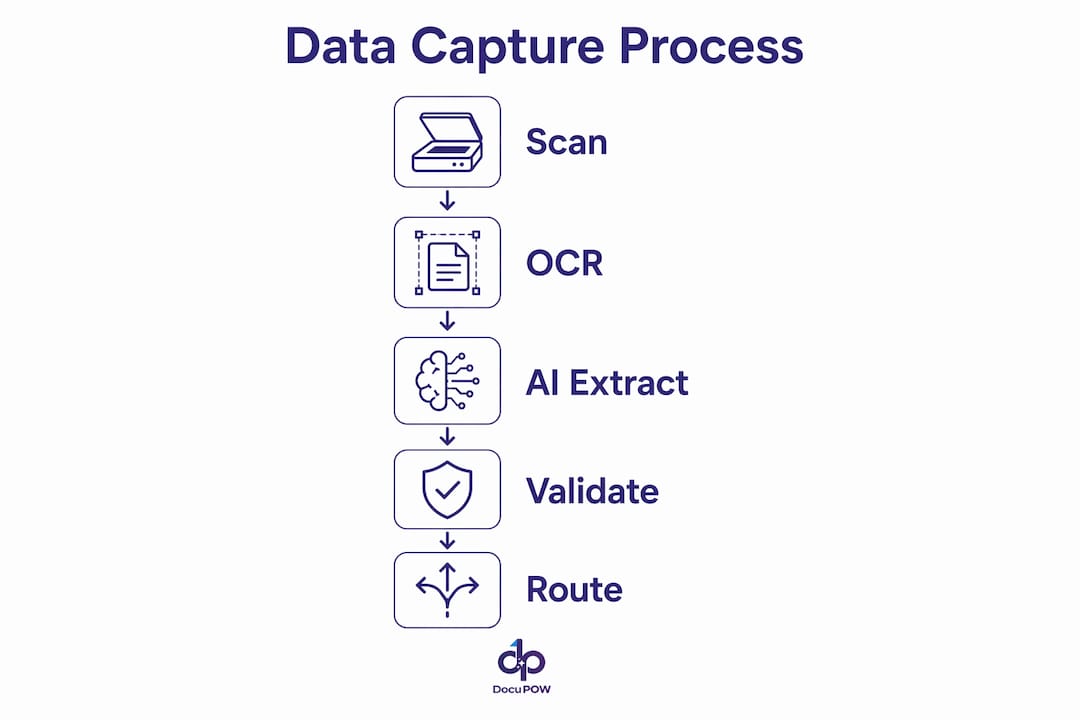
    Digital document transformation, sometimes called document digitization or intelligent document processing in industry practice, is the full conversion pipeline that takes a document from capture to structured, workflow-ready data. The five core stages are capture, classify, extract, validate, and route or archive. Each stage adds operational value that a simple scan cannot deliver.

    Consider a global manufacturer receiving thousands of supplier invoices monthly. Scanning those invoices creates digital images. That is digitization. Routing those images through an IDP system that reads vendor names, line items, and totals, then pushes the data directly into an ERP like SAP or Oracle, is digital document transformation. The difference in operational output is enormous.

    Team reviewing digital and paper invoices

    The importance of digital documents in this context is not about storage. It is about data usability. A document that lives as a static PDF is operationally inert. A document whose data has been extracted, validated, and integrated into a workflow becomes a live input for decisions, approvals, and reporting.

    How does digital document transformation differ from digitization and digitalization?

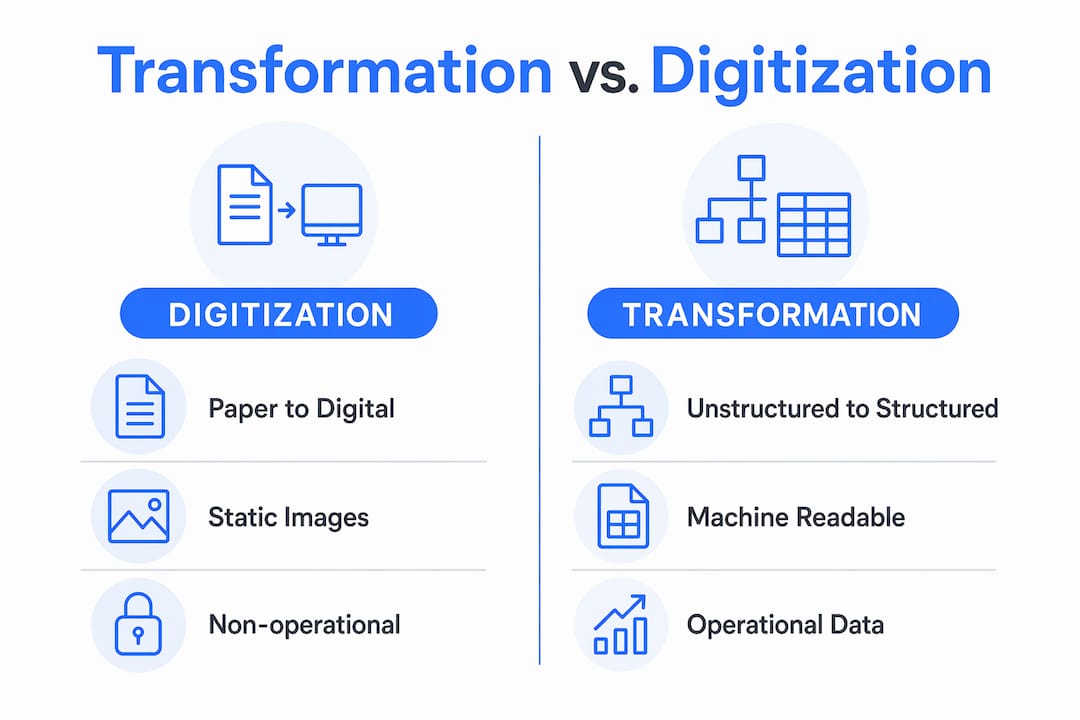
    These three terms are frequently used interchangeably, and that confusion costs organizations money. Digitization, digitalization, and transformation are sequential steps, not synonyms.

    Concept What it does Operational output
    Digitization Converts paper to digital images or PDFs Static digital file, no workflow integration
    Digitalization Applies digital data to existing workflows Partial automation, limited data extraction
    Digital document transformation AI-driven classification, extraction, validation, and routing Fully structured data integrated into systems

    The critical insight here is that scanning to PDFs alone leaves organizations with non-operational digital images. Those files are searchable by filename, not by content. They cannot trigger an approval workflow, populate a database, or feed a compliance report without additional manual work.

    Digitalization moves one step further by applying digital data within existing processes. A company that emails scanned invoices to an accounts payable team has digitalized that step. But a human still opens the email, reads the invoice, and enters data manually. Digital document transformation removes that human from the data entry loop entirely. The document enters a pipeline, and structured data exits the other end.

    This distinction matters most when organizations evaluate ROI. Projects framed as “going paperless” typically deliver digitization. Projects framed as “automating document workflows” deliver transformation. The second category produces measurable cost reductions and faster processing cycles.

    Infographic comparing transformation and digitization

    What technologies enable digital document transformation?

    The technology stack behind modern document transformation has matured significantly. IDP pipelines use AI and ML to automatically detect, classify, and extract information from diverse document types, then feed that data into automated workflows for approvals, routing, or downstream system input.

    The core components of a production-grade IDP system include:

    • OCR (Optical Character Recognition): Converts printed or handwritten text in images into machine-readable characters. Modern OCR handles degraded scans, mixed fonts, and multilingual content.
    • NLP (Natural Language Processing): Interprets the meaning and context of extracted text, enabling the system to distinguish between a “ship to” address and a “bill to” address on the same document.
    • Layout detection: Identifies tables, headers, signatures, and form fields within complex document structures like contracts or insurance claims.
    • LLMs (Large Language Models): Handle ambiguous or unstructured content where rule-based extraction fails. Oracle’s architecture demonstrates orchestration combining deterministic and generative AI models to enhance extraction accuracy and normalize data for downstream systems.
    • Confidence scoring and validation: Flags low-confidence extractions for human review, maintaining accuracy without requiring full manual oversight.

    For decision-makers evaluating vendors, the key differentiator is template dependency. Legacy OCR tools require rigid templates, meaning a new invoice layout from a new supplier breaks the extraction. Modern IDP systems like DocuPOW use context-aware agents that understand document intent without predefined templates, which is critical for organizations dealing with hundreds of supplier or counterparty document formats.

    Pro Tip: When evaluating IDP vendors, ask specifically whether the system requires template configuration for new document types. Template-free extraction is the benchmark for scalable digital document transformation.

    What are the benefits and business impacts of digital document transformation?

    The benefits of document transformation extend across efficiency, compliance, and strategic decision-making. Organizations that treat this as a workflow redesign initiative, rather than a technology purchase, consistently report higher returns.

    The business impact follows a clear progression:

    1. Reduce manual data entry. Automated extraction eliminates the labor cost and error rate associated with keying data from paper or PDF documents into systems.
    2. Accelerate processing cycles. Invoice approval cycles that take days manually can complete in hours when data flows directly from document to ERP without human touchpoints.
    3. Improve data accessibility. Structured, searchable formats make document data retrievable by content, not just filename, enabling faster audits, reporting, and compliance checks.
    4. Enable real-time decision-making. When financial documents like purchase orders, contracts, and invoices feed live dashboards, operations teams shift from reactive reporting to proactive management.
    5. Strengthen compliance posture. Standardized archiving with formats like PDF/A and compliance with regulations like eIDAS 2.0 reduces legal exposure and simplifies audit trails.

    DocuPOW’s approach to these benefits is worth noting specifically. Rather than applying fixed extraction rules, DocuPOW’s autonomous agents interpret document context, which means accuracy holds up across variable formats. For global manufacturers processing supplier documents from dozens of countries, that consistency directly translates to financial visibility and fewer reconciliation errors.

    Knowing which back-office workflow to automate first is also a strategic decision. Accounts payable and contract management consistently deliver the fastest measurable ROI in document transformation projects.

    How to implement digital document transformation effectively?

    Effective implementation requires a structured approach. Organizations that skip the assessment phase and jump directly to technology deployment typically encounter integration failures and low adoption rates.

    The recommended implementation sequence:

    • Assess your document inventory. Catalog document types by volume, format, and downstream use. Invoices, contracts, purchase orders, and compliance forms each have different extraction requirements.
    • Map existing workflows. Identify where documents enter your processes, where data is manually transferred, and where bottlenecks occur. This map becomes the blueprint for automation.
    • Select technology matched to your document complexity. High-variability documents require AI-driven, template-free extraction. Standardized forms with consistent layouts can use lighter-weight OCR solutions.
    • Implement IDP with integration connectors. The extraction system must connect to your ERP, CRM, or document management platform. Connecting document automation to existing systems is often the most technically demanding step and deserves dedicated planning.
    • Establish validation and quality checkpoints. Use AI confidence scoring to route uncertain extractions to human reviewers. This hybrid model maintains accuracy during the learning period.
    • Plan for change management. Staff who previously handled manual data entry need retraining for exception handling and oversight roles. Transformation projects that neglect this step face resistance that undermines adoption.

    Certified digital archiving deserves attention from the start, not as an afterthought. Compliant digital archiving requires early integration of preservation standards and trust service providers to avoid costly retrofits later.

    Pro Tip: Partner with a vendor that has documented experience in your specific industry vertical. A provider experienced in insurance document workflows understands policy endorsements and claims forms in ways a general-purpose OCR tool does not.

    What are the archival standards and compliance requirements to know?

    Compliance is not optional in document transformation. Organizations in healthcare, legal services, and financial services operate under strict retention and integrity requirements that directly shape how transformation systems must be designed.

    Standard / Regulation Scope Key requirement
    PDF/A (ISO 19005) Global Long-term archiving with embedded fonts and no external dependencies
    eIDAS 2.0 European Union Qualified electronic archiving with trust service provider involvement
    HIPAA United States healthcare Protected health information retention and access controls
    SOX U.S. public companies Financial document integrity and audit trail requirements

    PDF/A is an ISO-standardized format designed specifically for stable, future-proof archiving. It embeds all fonts, color profiles, and metadata within the file, eliminating dependencies on external resources that may not exist in ten or twenty years. Any transformation system targeting long-term preservation should output PDF/A as its archival format.

    eIDAS 2.0, which entered into force on May 20, 2024, introduced qualified electronic archiving as a formal trust service. This regulation requires trust service provider involvement, data integrity checks, and guarantees of document readability despite technological obsolescence over legal retention periods. For EU-based organizations or those handling EU counterparty documents, designing for eIDAS 2.0 compliance from the start of a transformation project is far less expensive than retrofitting later.

    The practical implication for system architects is that archival format selection and trust service provider contracts must be part of the initial project scope. Organizations that treat compliance as a final-stage checkbox consistently face rework costs and legal exposure.

    Key takeaways

    Digital document transformation delivers operational value only when it converts unstructured documents into structured, workflow-integrated data using AI-driven IDP pipelines, not simple scanning.

    Point Details
    Transformation vs. digitization Scanning creates static files; transformation produces structured, workflow-ready data.
    Core technology stack IDP combines OCR, NLP, layout detection, and LLMs for accurate, template-free extraction.
    Business impact sequence Automation reduces manual entry, accelerates cycles, and enables real-time financial visibility.
    Compliance starts early PDF/A and eIDAS 2.0 requirements must be designed in from project start, not added later.
    Vendor selection criteria Template-free extraction and industry-specific experience are the two non-negotiable benchmarks.

    Why most document transformation projects underdeliver

    I have reviewed enough failed document transformation projects to identify the single most common mistake: organizations treat it as a scanning upgrade rather than a workflow redesign. They invest in OCR software, digitize their paper archives, and declare success. Six months later, staff are still manually re-entering data because nothing was connected to the systems that actually run the business.

    The second mistake is underestimating document variability. A company might process invoices from 200 different suppliers, each with a different layout. Template-based systems collapse under that variability. The shift to context-aware, AI-driven extraction is not a luxury. It is a prerequisite for any organization with real document diversity.

    What I find genuinely encouraging is the direction the technology is moving. Digital transformation is a fundamental change in operations, not just tool adoption, and the best organizations I have seen treat document transformation as the entry point to rethinking entire back-office functions. When you automate document intake correctly, you suddenly have clean, structured data flowing into systems that previously ran on spreadsheets and email threads. That data becomes the foundation for predictive analytics, supplier performance tracking, and real-time financial reporting.

    The organizations that get the most from this investment are the ones that ask “what decisions do we want to make faster?” before they ask “what software should we buy?” Start with the workflow outcome, then select the technology that delivers it.

    — Sameer

    How DocuPOW accelerates your document transformation

    DocuPOW’s AI-powered document intelligence platform is built specifically for organizations that need accurate, scalable extraction without the overhead of template configuration. Its autonomous agents understand document context across variable formats, making it the right fit for high-volume, multi-supplier environments.

    https://docupow.ai

    Whether you are processing real estate transaction documents, insurance claims workflows, or complex manufacturing purchase orders, DocuPOW connects directly to your existing ERP and workflow systems. Explore the DocuPOW product platform to see how template-free extraction works in practice, or review the high-volume processing best practices guide to plan your implementation at scale. For real estate professionals, the DocuPOW real estate solution addresses the specific document complexity of transactions, title work, and compliance filing.

    FAQ

    What is digital document transformation in simple terms?

    Digital document transformation converts paper or unstructured digital files into structured, machine-readable data that feeds directly into automated business workflows. It goes beyond scanning by using AI to extract, validate, and route document data without manual intervention.

    How does IDP differ from standard OCR?

    Standard OCR converts images of text into characters but produces unstructured output. Intelligent document processing adds classification, key-value extraction, validation, and workflow routing on top of OCR, delivering structured data ready for system integration.

    What is the role of PDF/A in document transformation?

    PDF/A is an ISO-standardized archival format that embeds all document dependencies within the file, making it suitable for long-term preservation. Organizations targeting compliance with regulations like eIDAS 2.0 use PDF/A as the standard output format for archived documents.

    How long does a document transformation implementation take?

    Implementation timelines vary by document volume and system complexity, but most mid-size organizations complete initial IDP deployment and ERP integration within three to six months. Change management and staff retraining typically extend the full adoption timeline.

    What industries benefit most from digital document transformation?

    Manufacturing, financial services, healthcare, insurance, and legal services see the highest ROI because they process large volumes of variable-format documents with strict compliance and retention requirements. Each of these sectors has document workflows where manual data entry creates measurable cost and error exposure.

  • What Is Document Workflow Automation? A 2026 Guide

    What Is Document Workflow Automation? A 2026 Guide

    Document workflow automation is the use of software to route documents through defined review, approval, and storage steps with minimal human intervention, replacing manual tasks like emailing files and chasing approvals in spreadsheets. Where a finance manager once forwarded invoices by hand and tracked sign-offs in Excel, an automated system handles every step from intake to archive. Technologies like Intelligent Document Processing (IDP) and audit trail systems sit at the core of modern implementations. The result is faster cycle times, fewer errors, and compliance records that build themselves. This guide explains how the process works, what it delivers, and how to design it right.

    What is document workflow automation and how does it work?

    Document workflow automation uses software to handle the document lifecycle as a repeatable process, from the moment a file enters a system to the moment it reaches secure archiving. The underlying model is straightforward: a trigger starts the workflow, rules define what happens next, and actions execute automatically without anyone manually forwarding or following up.

    The trigger can be a document upload, a form submission, an email attachment, or an event in a connected system like a CRM or ERP. Once triggered, the workflow engine applies routing rules. A contract above a certain dollar value routes to legal and finance simultaneously. A vendor invoice below a threshold routes directly to accounts payable for single-step approval. These conditional paths are defined once and then run without supervision.

    Office worker scanning documents for automation

    Intelligent Document Processing sits inside this model as the layer that reads and understands documents. IDP goes beyond basic OCR by extracting named fields like vendor name, invoice total, and due date, then using that data to make routing decisions. A purchase order with a missing approval code gets flagged and returned automatically. A completed insurance claim with all required fields routes straight to the adjuster queue.

    The end-to-end lifecycle runs through four stages: intake, review, approval, and archiving. Each stage can include parallel steps (multiple reviewers working simultaneously) or sequential steps (one reviewer must approve before the next is notified). Every action at every stage is logged, creating a record that supports compliance reporting without any extra effort.

    Pro Tip: Map your current document process on paper before configuring any automation tool. Identify every handoff, every decision point, and every person who touches the document. Automation amplifies whatever process you give it, so a poorly mapped process produces a faster version of the same problem.

    What are the key benefits of automating document workflows?

    Automated workflows can cut administrative costs by 30 to 40% and reduce processing errors by up to 90%. Those numbers reflect what happens when you remove the friction of manual handoffs, re-keying data, and hunting down approvals across email threads.

    The specific advantages break down across five areas:

    • Speed. Approval cycles that once took days or weeks compress to hours. A mortgage application that required a loan officer to physically route documents between departments can move through digital review in the same afternoon.
    • Accuracy. IDP extracts and validates data fields before any human sees the document, catching mismatches and missing information at intake rather than after processing.
    • Compliance. Every action is timestamped and attributed to a specific user, creating the kind of audit trail that satisfies SOX, HIPAA, and GDPR requirements without manual preparation.
    • Visibility. Managers see exactly where every document sits in the workflow in real time. Bottlenecks become visible immediately rather than surfacing only when a deadline is missed.
    • Cost reduction. Fewer manual steps mean fewer labor hours spent on low-value tasks. Rework from errors drops sharply when validation happens automatically at intake.

    Workflow automation handles repetitive tasks like data entry and approvals to reduce manual effort while maintaining consistency across every transaction. For a department processing hundreds of documents per week, that consistency is as valuable as the speed gain. One missed approval in a regulated industry can trigger an audit. Automation makes the compliant path the only path.

    The compliance benefit deserves special attention for managers in regulated industries. Automated approval workflows create audit evidence as a byproduct of normal operations, eliminating the need for manual audit preparation. Every delegation, escalation, and document version is recorded continuously. When an auditor asks for evidence of who approved a specific contract revision, the system produces it in seconds.

    Infographic illustrating four stages of document workflow

    How to design effective document workflows with clear roles and audit trails

    The most common reason document workflow projects fail is that teams start from a list of task statuses rather than from a model of who is responsible for what decision. Starting from responsibility and decision rights is the foundation of a dependable workflow. A status like “under review” tells you nothing about who owns the next action or what authority they have to approve, reject, or escalate.

    Effective workflow design begins with three questions for each step: Who has the authority to act? What conditions trigger escalation? What evidence must the system capture? Answering these before touching any software prevents the most expensive redesign cycles.

    The distinction between a compliance-grade audit trail and a basic activity log matters enormously in regulated environments. The table below shows the difference:

    Feature Basic activity log Compliance-grade audit trail
    Actor identity Username only Full user identity with role
    Timestamp Action time Action time plus session context
    Data visibility Status change only Field-level before and after states
    Version tracking None Document version ID at each step
    Justification capture None Required comment on rejection or escalation
    Export capability Manual screenshot Structured export for auditors

    Compliance-grade audit trails must capture actor identity, timestamps, actions, version IDs, prior versus new states, and justifications. This completeness prevents audit failures from evidence gaps. A basic log that records “document approved by jsmith at 14:32” fails a HIPAA audit. A compliance trail that records the document version, the field values at approval, and the approver’s stated authority passes it.

    Escalation paths are equally important. If a reviewer does not act within a defined window, the workflow should automatically notify their manager and reassign the task. This prevents documents from stalling silently in someone’s queue. Define escalation thresholds during design, not after the first missed deadline.

    Pro Tip: Build your audit trail requirements before selecting a workflow tool, not after. Many platforms log actions but do not capture field-level state changes or support structured export. Discovering this gap after deployment means rebuilding the workflow from scratch.

    What tools and technologies power document workflow automation?

    The technology stack behind document workflow automation typically combines three layers: document understanding, workflow orchestration, and system integration. Separating document understanding from orchestration improves automation reliability because each layer can be optimized independently.

    The core technologies and capabilities to evaluate include:

    • IDP platforms that extract structured data from unstructured documents, including PDFs, scanned forms, and email attachments, without relying on rigid templates. DocuPOW uses autonomous agents that understand document context rather than matching fixed field positions, which handles variation across vendor formats without manual reconfiguration.
    • Workflow orchestration engines that manage routing rules, parallel and sequential approvals, notifications, and escalations. Platforms like Microsoft Power Automate and ServiceNow handle orchestration for general business processes, while purpose-built document automation platforms offer deeper document-specific logic.
    • OCR and AI classification that identify document type at intake and route accordingly. An incoming PDF might be a contract, an invoice, or a compliance certificate. AI classification determines which workflow applies before any human reviews it.
    • Integration connectors that link the workflow to existing business systems. A workflow that extracts invoice data but cannot write it to SAP or Oracle still requires manual re-entry. Native connectors or API-based integrations to ERP, CRM, and email platforms close that gap.
    • Version control and notification systems that track every document revision and alert stakeholders at each transition. For industries like logistics and shipping, automated routing and version control across shipping manifests and compliance documents reduces costly errors in high-volume operations.

    The intelligent document processing layer is where the most significant capability gains are happening in 2026. Machine learning models trained on domain-specific document types now achieve extraction accuracy that matches or exceeds manual data entry, while processing documents in seconds rather than minutes. For managers evaluating tools, the key question is not whether a platform uses AI, but whether its AI handles the specific document types and variation your organization actually processes.

    Key Takeaways

    Document workflow automation delivers measurable efficiency, accuracy, and compliance gains only when the underlying process design starts from clear responsibility models and compliance-grade audit trail requirements.

    Point Details
    Core definition Automation routes documents through intake, review, approval, and archiving with minimal manual intervention.
    IDP drives accuracy Intelligent Document Processing extracts and validates field-level data before routing, cutting errors at the source.
    Audit trails require completeness Compliance-grade trails capture actor identity, timestamps, field states, and justifications, not just status changes.
    Design from responsibility first Start workflow design with decision rights and escalation paths, not task statuses, to avoid costly redesigns.
    Cost and error reduction Automated workflows can cut administrative costs by 30 to 40% and reduce processing errors by up to 90%.

    Why most automation projects underdeliver, and what actually fixes it

    I have seen organizations invest in capable workflow platforms and still end up with the same bottlenecks they started with. The platform was not the problem. The process design was. Teams mapped their existing email-based process into the new tool and called it automation. What they got was a digital version of the same broken handoffs.

    The organizations that get real results do one thing differently. They treat the automation project as a process redesign project first and a technology project second. They ask who owns each decision, not just who performs each task. They define what “approved” actually means in terms of data completeness and authority level before they configure a single routing rule.

    The other pattern I see consistently is underinvestment in the audit trail. Managers assume their platform logs everything they need until the first audit request arrives. Field-level state changes, justification capture, and structured export are not default features in most general-purpose workflow tools. You have to specify them as requirements before you sign a contract.

    The future of this space is AI that handles document variation without template maintenance. The shift from rule-based extraction to context-aware agents means workflows can handle new document formats without IT involvement. That is the capability gap worth closing in 2026, and it is where purpose-built platforms are pulling ahead of general automation tools.

    — Sameer

    See how DocuPOW handles this for your team

    https://docupow.ai

    DocuPOW’s intelligent document automation platform combines context-aware AI agents with compliance-grade audit trails and direct integration into ERP and CRM systems, covering every stage from intake to archive. Unlike template-dependent tools, DocuPOW handles document variation across vendor formats without manual reconfiguration. Industry-specific solutions are available for real estate workflows, insurance document processing, and manufacturing operations. If your team is processing documents manually or managing approvals across email, DocuPOW’s platform replaces that friction with a traceable, auditable process that runs without supervision.

    FAQ

    What is document workflow automation in simple terms?

    Document workflow automation is software that moves documents through defined steps, such as review, approval, and storage, automatically, without manual forwarding or follow-up. It replaces email chains and spreadsheet tracking with a system that routes, notifies, and records every action.

    How does IDP differ from basic OCR in document workflows?

    OCR converts scanned images to text, while Intelligent Document Processing extracts specific named fields, validates their content, and uses that data to trigger routing decisions. IDP drives workflow logic; OCR only produces raw text.

    What makes an audit trail compliance-grade?

    A compliance-grade audit trail captures actor identity, timestamps, document version IDs, field-level before and after states, and justifications for each action. Basic logs that record only status changes do not meet SOX, HIPAA, or GDPR standards.

    How long does it take to implement document workflow automation?

    Implementation timelines vary by complexity, but a single well-defined workflow, such as invoice approval or contract review, can be configured and tested within two to six weeks when the process design and responsibility model are defined before configuration begins.

    What is the biggest mistake organizations make when automating document workflows?

    The most common mistake is mapping an existing broken process directly into the automation tool. Starting from a list of task statuses rather than from a clear model of decision rights and escalation paths produces a faster version of the same problem.

  • Real-Time Data Extraction from Documents: 2026 Guide

    Real-Time Data Extraction from Documents: 2026 Guide

    Real-time data extraction from documents is the automated process of instantly capturing structured data from unstructured sources like PDFs, scanned forms, and images to enable immediate business decisions. Tools like Amazon Textract, Databricks IDP, and Snowflake Arctic-Extract have made this process faster and more accurate than ever. For professionals managing contracts, invoices, claims, or logistics records, the difference between batch processing and true real-time extraction is the difference between reacting to yesterday’s data and acting on what just arrived.

    What is real-time data extraction from documents?

    Real-time document data extraction is the practice of pulling structured fields, tables, and metadata from raw documents the moment they enter a system, without waiting for scheduled batch runs. The industry term for the broader discipline is Intelligent Document Processing (IDP), which combines optical character recognition (OCR), AI classification, and structured output generation into a single automated pipeline.

    Two fundamental API patterns define how extraction happens in practice. Synchronous APIs like DetectDocumentText return results immediately for single-page documents, making them ideal for real-time use cases where a user uploads one invoice and expects instant field population. Asynchronous APIs like StartDocumentAnalysis handle multi-page batch jobs and use SNS notifications to signal when processing is complete. Choosing the wrong pattern for your use case adds unnecessary latency.

    Professional reviewing API extraction logs on laptop

    OCR is the foundation, but AI models layered on top handle layout understanding and semantic classification. A raw OCR pass gives you text. An AI model tells you that the text in the upper-right corner is a vendor ID, not a date. Structured extraction APIs deliver JSON output with text, confidence scores, and bounding boxes for tables and forms, giving downstream systems the context they need to act automatically.

    Pro Tip: If your documents are consistently single-page and latency is your top priority, default to synchronous APIs. Reserve asynchronous processing for bulk ingestion workflows where throughput matters more than per-document speed.

    • Synchronous APIs: Best for single-page, user-triggered uploads requiring instant results
    • Asynchronous APIs: Best for multi-page documents and high-volume batch ingestion
    • Event-driven pipelines: Best for continuous document streams requiring near-real-time freshness
    • OCR plus AI classification: Required for any document with variable layouts or mixed content types

    How can human-in-the-loop workflows improve accuracy without sacrificing speed?

    Human-in-the-loop (HITL) workflows are the most underrated component of a production-grade extraction pipeline. The goal is not to have humans review everything. The goal is to have humans review only what the AI is genuinely uncertain about, and nothing else.

    Per-field confidence scoring makes this possible. Every extracted field receives a score between 0 and 1. Fields above a set threshold pass through automatically. Fields below it get routed to a reviewer. HITL pipelines achieve 99 to 99.5% field accuracy by routing uncertain fields for review while processing the majority automatically. That level of accuracy is not achievable with pure automation on real-world document variance.

    The key design insight is that confidence scores require calibration against your actual production data. A score of 0.85 does not mean 85% correct. It means the model is relatively confident, but that confidence level may correspond to a 5% error rate on your specific document types. Calibrating thresholds against labeled production samples lets you set the exact cutoff where automation is safe.

    A well-designed HITL workflow follows this sequence:

    1. Ingest and extract: The document enters the pipeline and all fields are extracted with confidence scores attached.
    2. Threshold check: Each field is evaluated against pre-calibrated thresholds. High-confidence fields pass automatically.
    3. Route for review: Low-confidence fields are surfaced in a review interface, grouped by document to minimize context switching.
    4. Reviewer action: The reviewer corrects or confirms the flagged fields. Corrections feed back into model retraining.
    5. Output and log: The validated record exits the pipeline and the confidence calibration data is logged for ongoing threshold tuning.

    Targeting only low-confidence fields for manual review means 70 to 90% of documents clear fully automated extraction. That ratio makes HITL economically viable even at enterprise scale.

    Pro Tip: Build your review interface to show the original document alongside the extracted fields. Reviewers who can see the source context make corrections in seconds rather than minutes, which is the difference between a manageable queue and a backlog.

    Which architectural patterns support scalable real-time document extraction?

    The architecture of your extraction pipeline determines whether you achieve true real-time performance or just fast batch processing. The distinction matters more than most teams realize.

    Infographic showing real-time extraction pipeline steps

    True streaming pipelines process each document individually as it arrives, delivering results without waiting for a batch to complete. Micro-batching groups documents into small windows before processing, which introduces latency that compounds under load. For workflows where a field officer uploads a contract and needs extracted data in under 10 seconds, micro-batching is not an option.

    Event-driven architectures use durable message queues as buffers between ingestion and extraction. When document uploads spike, the queue absorbs the burst without overwhelming rate-limited extraction APIs. Consumer groups can operate at different speeds, so a fast OCR extractor and a slower AI classifier can run in parallel without blocking each other.

    Pattern Latency Best for Key trade-off
    Synchronous API Under 2 seconds Single-page, user-triggered Limited to simple documents
    Event-driven streaming 2 to 10 seconds Continuous document flows Higher infrastructure complexity
    Micro-batch 30 to 120 seconds High-volume, latency-tolerant Unacceptable for true real-time
    Asynchronous batch Minutes to hours Large multi-page archives No real-time capability

    Layering your pipeline into raw, refined, and curated data stages is a pattern borrowed from data lakehouse design and it works equally well for document extraction. Raw data lands immediately after ingestion. Refined data is extracted and structured. Curated data is validated, enriched, and ready for downstream analytics. Databricks IDP implements this pattern natively, unifying parsing, extraction, classification, and search-ready output without requiring data movement between systems.

    For high-volume document processing, routing logic at the pipeline entry point also matters. A one-page invoice should not go through the same extraction path as a 200-page legal contract. Tiered routing based on document type, page count, and content complexity keeps latency low for simple documents while allocating heavier AI resources only where needed.

    What advanced AI capabilities enhance extraction accuracy and utility?

    Modern extraction pipelines go well beyond OCR. The most accurate systems combine layout-preserving multimodal analysis with fine-tuned models trained on domain-specific document types.

    • Fine-tuning on labeled examples: Snowflake Arctic-Extract Fine-Tuning lets users submit labeled document-answer pairs and trigger fine-tuning with a SQL call. The resulting model understands the specific terminology and layout of your document types, not just generic form fields.
    • Multimodal extraction: Combining OCR with spatial grounding means the system extracts tables, charts, and images with their positional relationships intact. A revenue table in a financial report is not just text. It is a structured grid with row and column semantics that downstream agents need to interpret correctly.
    • Generative AI for post-extraction refinement: Large language models can summarize extracted content, detect inconsistencies between fields, and classify documents into workflow categories without additional rule-based logic.
    • Semantic parsing: Preserving the meaning and context of extracted fields, not just their raw text values, is what makes extracted data usable by downstream AI agents and analytics tools. A date field labeled “effective date” carries different business meaning than one labeled “expiration date,” even if both contain the same format.

    The practical implication is that layout preservation and semantic understanding are not optional enhancements. They are prerequisites for any extraction pipeline feeding AI agents or LLMs. Without them, downstream models receive decontextualized text that produces unreliable outputs.

    How to implement a real-time extraction solution: steps and pitfalls

    Getting from concept to production requires a clear sequence of decisions and a realistic view of where things break.

    Tool Role in pipeline
    Amazon Textract OCR and structured field extraction with confidence scores
    Databricks IDP Unified parsing, classification, and analytics-ready output
    Snowflake Arctic-Extract Fine-tuned domain-specific extraction models
    Confluent Kafka Event streaming and message queue buffering
    Docupow Autonomous agent-based extraction without rigid templates

    Follow this implementation sequence:

    1. Define document types and fields: Catalog every document type you process and list the fields you need extracted. This drives all downstream decisions about models and routing.
    2. Select your API pattern: Choose synchronous for real-time single-page use cases and event-driven streaming for continuous flows.
    3. Build ingestion and buffering: Set up a message queue to decouple upload events from extraction processing.
    4. Configure extraction and confidence scoring: Deploy your extraction model and set initial confidence thresholds based on document type.
    5. Integrate HITL review: Route low-confidence fields to a reviewer interface. Log all corrections for threshold calibration.
    6. Index and integrate outputs: Push validated structured data to your downstream systems, whether that is a database, a vector store, or an analytics platform.

    The most common pitfalls are rate limit collisions when extraction APIs get overwhelmed by upload spikes, data quality variance from inconsistent scan quality, and latency creep from synchronous calls placed inside loops. Address rate limits with queue buffering. Address scan quality with pre-processing normalization. Address latency by auditing every synchronous call in your pipeline and replacing it with an async pattern wherever the use case allows.

    Key takeaways

    Real-time data extraction from documents requires event-driven pipelines, calibrated HITL workflows, and multimodal AI models working together to deliver both speed and accuracy at scale.

    Point Details
    Choose the right API pattern Synchronous APIs serve real-time single-page needs; streaming pipelines serve continuous document flows.
    Calibrate confidence thresholds Raw confidence scores must be validated against production data before setting auto-acceptance cutoffs.
    Use HITL for accuracy at scale Routing only low-confidence fields to reviewers achieves 99 to 99.5% accuracy without full manual review.
    Layer your pipeline architecture Separate raw ingestion, refined extraction, and curated output stages to accelerate downstream use.
    Fine-tune models on your documents Domain-specific fine-tuning with tools like Snowflake Arctic-Extract reduces errors on specialized document types.

    Why most real-time extraction projects stall before they scale

    I have seen teams invest months building extraction pipelines that work beautifully in testing and fall apart in production. The failure mode is almost always the same: they optimized for OCR accuracy and ignored pipeline latency as a system property.

    OCR speed is one variable. Queue depth, API rate limits, HITL review throughput, and downstream indexing time are the other four. If any one of them becomes a bottleneck, your “real-time” pipeline becomes a fast batch job. The teams that succeed treat pipeline latency as a holistic constraint, not an OCR benchmark.

    The second misconception I encounter constantly is that automation and human review are in opposition. They are not. A well-calibrated HITL layer is what makes automation trustworthy enough to use in critical workflows like insurance claims or financial reporting. Without it, you are either accepting errors silently or reviewing everything manually. Neither is acceptable for enterprise operations.

    My honest recommendation: start with a narrow document type, calibrate your confidence thresholds against 500 real production samples, and measure end-to-end latency before adding complexity. The teams that try to solve every document type simultaneously end up with a pipeline that handles none of them well. Modular design, where each document type has its own extraction path and threshold profile, is the architecture that actually scales. Docupow’s agent-based extraction approach is built on exactly this principle, which is why it handles document variance without requiring template updates every time a vendor changes their invoice format.

    — Vivek

    See how Docupow handles real-time extraction across your industry

    https://docupow.ai

    Docupow’s autonomous agents extract structured data from documents the moment they arrive, without templates, without manual field mapping, and without the latency of batch processing. Whether you are processing insurance claims, construction contracts, or real estate closing documents, Docupow routes each document through the right extraction path automatically. The platform’s built-in confidence scoring and HITL review layer means your team only touches the records that genuinely need human judgment. Explore Docupow’s insurance solutions for claims processing, or see how the platform handles construction document workflows at scale. Start extracting data that your business can act on immediately.

    FAQ

    What is real-time document data extraction?

    Real-time document data extraction is the automated capture of structured fields from unstructured documents like PDFs and scanned images the moment they enter a system. It uses OCR, AI classification, and structured APIs to deliver usable data without batch delays.

    How accurate is automated document data extraction?

    HITL pipelines achieve 99 to 99.5% field-level accuracy by routing only low-confidence fields to human reviewers while processing the majority automatically. Pure automation without confidence-based routing typically produces higher error rates on real-world document variance.

    What is the difference between synchronous and asynchronous extraction APIs?

    Synchronous APIs like Amazon Textract’s DetectDocumentText return results immediately for single-page documents, while asynchronous APIs handle multi-page jobs and notify the system when processing is complete. Synchronous is the right choice when per-document latency is the priority.

    How do event-driven pipelines improve extraction speed?

    Event-driven architectures use durable message queues to decouple document uploads from extraction processing, absorbing traffic spikes without overwhelming rate-limited APIs. Each document triggers its own processing chain, so results arrive as individual documents finish rather than when a full batch completes.

    Can extraction models be trained on specific document types?

    Yes. Tools like Snowflake Arctic-Extract Fine-Tuning allow teams to submit labeled document examples and fine-tune models on specific layouts and terminology using a SQL call. This significantly improves accuracy on specialized document types compared to general-purpose extraction models.

  • Enterprise AI API Integration Examples for 2026

    Enterprise AI API Integration Examples for 2026

    Enterprise AI API integration is defined as the programmatic connection of AI models and services to existing business systems, enabling automated data exchange, governance, and workflow execution at scale. The examples of AI API integrations enterprise leaders are deploying in 2026 range from Anthropic’s Claude Compliance API, which connects to 28 security platforms, to Lacoste’s Salesforce-connected agent platform that cut escalation rates by 30%. These are not prototype experiments. They are production systems delivering measurable operational outcomes. This article breaks down the most instructive cases, the design principles behind them, and the platforms worth evaluating.

    1. Claude Compliance API: AI governance at enterprise scale

    The Claude Compliance API is the clearest current example of AI governance built directly into the integration layer rather than bolted on afterward. Anthropic designed it to give enterprise security teams programmatic, real-time access to two distinct data streams: conversation content from Claude Enterprise sessions, and activity events such as logins and admin actions across platforms. That separation is deliberate and architecturally significant.

    The API supports 28 enterprise integrations spanning data loss prevention, SIEM, identity governance, eDiscovery, AI security posture management, and telemetry. Named partners include Cloudflare, CrowdStrike, IBM Guardium, Microsoft Purview, and Netskope. Each of these tools already lives inside enterprise security operations centers, so Claude usage data flows into existing dashboards and alerting workflows rather than creating a separate compliance silo.

    Security analyst reviewing AI compliance data

    The design insight here is that content signals and activity signals serve different downstream consumers. DLP and eDiscovery tools need conversation content. SIEM and identity management platforms need behavioral events. Routing each signal type to the right tool reduces data normalization complexity and makes the governance model operationally sustainable.

    Pro Tip: When evaluating AI compliance integrations, ask vendors whether governance runs in the request/response path or only as after-the-fact logging. Runtime governance, as demonstrated by the Claude Compliance API, catches policy violations before data leaves the system.

    For technology leaders managing regulated environments, this architecture sets a new baseline. Runtime governance integrated into the AI API call path is materially stronger than periodic log exports reviewed by analysts after the fact.

    2. Lacoste’s AI agent platform: a four-month production deployment

    Lacoste’s deployment of an AI agent platform is one of the most detailed enterprise AI API integration case studies available in 2026. The project ran across four months: two months of design and two months of development and testing. The result was a production system integrated with Salesforce Commerce Cloud, Salesforce Service Cloud, and Manhattan Associates for order management.

    The agent handles three primary use cases: answering FAQs, tracking order status, and routing product quality issues. Each use case required a distinct integration path. Order tracking pulls live data from Manhattan Associates via API. FAQ resolution draws from a knowledge base managed in Salesforce Service Cloud. Product quality issues trigger a structured escalation workflow with defined handoff criteria to human advisors.

    The outcomes are concrete. Customer satisfaction exceeded 4 out of 5, and the escalation rate dropped 30%. Those numbers reflect a system that resolves the majority of contacts without human intervention while maintaining quality thresholds that justify the automation.

    “The value of a structured rollout is not speed. It is the discipline to define integration boundaries before you build, so observability and approval workflows are part of the system from day one, not retrofitted later.”

    The Lacoste case also surfaces a concept worth naming directly: integration tax. Every connection between the AI agent and a backend system adds latency, failure modes, and maintenance overhead. Defining integration scope early and building observability into the workflow from the start is what kept this project on schedule and in production.

    1. Map every backend system the agent needs to touch before writing a line of code.
    2. Define escalation criteria in writing before development begins.
    3. Build structured logging into every API call from day one.
    4. Run parallel testing with human agents before full cutover.
    5. Establish a feedback loop between escalation data and agent training.

    3. Best practices for designing enterprise AI API integrations

    The lessons from 2,000-plus enterprise integrations covering SAP, Oracle, and IBM Maximo point to a consistent set of failure modes. Most of them are not AI problems. They are integration problems that AI makes more visible because the stakes of a bad response are higher than the stakes of a bad data sync.

    Authentication normalization is the first design challenge. Enterprise systems use OAuth 2.0, API keys, SAML, and proprietary token schemes. An AI integration layer must abstract these differences so the AI model sees a consistent interface regardless of which backend it is calling. Separating connection establishment from individual API requests is the pattern that handles heterogeneous auth schemes without coupling authentication logic to business logic.

    Rate limit and error handling must be explicit, not assumed. Enterprise ERP systems enforce rate limits that vary by endpoint, user tier, and time of day. AI agents that generate high request volumes will hit these limits. The integration layer needs exponential backoff, circuit breakers, and graceful degradation so a rate limit event does not cascade into a failed user interaction.

    Webhooks for real-time processing require more infrastructure than most teams anticipate. Reliable webhook delivery requires signature verification, replay capability, dead letter queues for failed deliveries, and monitoring dashboards. Without these, real-time event processing becomes a source of silent failures that are difficult to diagnose.

    Pro Tip: Build a versioning strategy for your integration layer before you connect your first system. API versioning across a unified middleware layer and the underlying source systems is the most common cause of production instability in complex enterprise environments.

    Design Principle Why It Matters Implementation Pattern
    Auth abstraction Prevents coupling to vendor-specific schemes Separate connection layer from request layer
    Rate limit handling Avoids cascading failures under load Exponential backoff plus circuit breakers
    Webhook reliability Ensures real-time events are not silently dropped Replay queues and signature verification
    Structured logging Makes failures diagnosable without manual tracing Correlation IDs on every API call
    Versioning strategy Prevents breaking changes from destabilizing production Unified API layer with version pinning

    4. Comparing leading AI API integration platforms for enterprises

    Enterprise technology leaders evaluating the best AI API solutions in 2026 are working with a market that has matured significantly. The differences between platforms are now less about capability and more about compliance depth, integration scope, and the trade-off between pre-built connectors and custom configuration.

    Anthropic Claude leads on compliance architecture. The 28-partner ecosystem built around the Claude Compliance API gives it the strongest governance story for regulated industries. The trade-off is that Claude’s integration ecosystem is narrower than platforms with longer enterprise histories. It is the right choice when AI governance is the primary requirement.

    Google Gemini Enterprise offers deep integration with Google Workspace, BigQuery, and Vertex AI. For organizations already running on Google Cloud, the native connectivity reduces integration overhead substantially. The compliance tooling is less mature than Claude’s dedicated compliance API, but the breadth of pre-built connectors accelerates deployment for non-regulated use cases.

    Workato operates as an AI-powered integration platform rather than an AI model provider. It connects over 1,200 enterprise applications and adds AI capabilities on top of existing workflow automation. For enterprises that need cross-department AI automation across HR, finance, and operations without building custom integrations, Workato’s pre-built connector library is a significant accelerator.

    IBM Watson remains the choice for enterprises with deep IBM infrastructure investments, particularly those running IBM Maximo for asset management or IBM Guardium for data security. Watson’s integration with Guardium is a direct parallel to the Claude Compliance API model, routing AI usage data into existing security workflows.

    Platform Compliance Depth Integration Scope Best Fit
    Anthropic Claude High (28 security partners) Moderate Regulated industries, AI governance
    Google Gemini Enterprise Moderate High (Google ecosystem) Cloud-native, non-regulated
    Workato Moderate Very High (1,200+ apps) Cross-department automation
    IBM Watson High (IBM stack) Moderate (IBM-centric) IBM infrastructure environments

    For IT leaders evaluating where to start, the IT leader’s guide to API integration provides a useful framework for matching platform capabilities to organizational requirements before committing to a vendor.

    Key takeaways

    Successful enterprise AI API integrations require governance built into the integration layer, defined integration boundaries set before development begins, and observability instrumented from day one.

    Point Details
    Governance in the request path Runtime compliance controls, as in Claude’s API, outperform after-the-fact log reviews.
    Define scope before building Lacoste’s four-month deployment succeeded because integration boundaries were set in the design phase.
    Separate signal types Routing content signals to DLP tools and activity signals to SIEM reduces normalization complexity.
    Auth abstraction is non-negotiable Normalizing authentication across SAP, Oracle, and other systems prevents coupling failures.
    Platform choice follows compliance need Regulated industries should prioritize compliance depth; cloud-native teams can prioritize connector breadth.

    What I’ve learned about enterprise AI API integration after watching dozens of deployments

    Most enterprise AI projects fail at the integration layer, not the AI layer. The model works fine in a sandbox. The problems appear when it needs to call a legacy ERP system that enforces undocumented rate limits, or when the escalation workflow depends on a Salesforce field that three teams define differently.

    The Lacoste case resonates with me because the team treated integration planning as a first-class design activity, not a technical detail to resolve during development. That discipline is rare. Most organizations I have observed treat integration as something the engineering team figures out after the business requirements are locked. The result is a project that hits its demo milestone and then spends six months in production stabilization.

    The Claude Compliance API tells a different story about where the market is heading. Anthropic did not build a compliance dashboard. They built an API that routes governance data into the tools security teams already use. That is the right model. It respects the fact that enterprise security operations centers have invested years in their SIEM and DLP workflows. Adding AI governance as a data source to those workflows is far more sustainable than asking security teams to learn a new interface.

    My honest recommendation for technology leaders starting an AI API integration project in 2026: spend the first month on architecture, not prototypes. Map every system the AI needs to touch. Define who owns each integration boundary. Instrument logging before you write business logic. The teams that do this ship faster and break less.

    — Vivek

    How Docupow accelerates enterprise AI API integration

    https://docupow.ai

    Docupow is built for exactly the integration complexity described in this article. Its autonomous agents extract data from documents without rigid templates, connect to enterprise workflows via API, and deliver real-time analytics that give operations teams the visibility they need to act on data rather than chase it. For organizations in manufacturing, real estate, or supply chain, Docupow’s intelligent document automation turns static files into live data sources that feed directly into existing business systems.

    If your team is evaluating how to connect document workflows to ERP, finance, or compliance platforms, Docupow’s operations automation solutions and agentic back-office automation are worth a close look. The platform is designed to reduce manual entry, improve financial visibility, and support the kind of data-driven decision-making that enterprise AI API integration is supposed to deliver.

    FAQ

    What are the best examples of AI API integrations in enterprise?

    The strongest current examples include Anthropic’s Claude Compliance API, which connects to 28 security platforms including CrowdStrike and Microsoft Purview, and Lacoste’s Salesforce-connected AI agent platform, which reduced escalation rates by 30% in four months. Both demonstrate production-grade AI API integrations with measurable business outcomes.

    How long does an enterprise AI API integration project take?

    Lacoste’s deployment of an AI agent integrated with Salesforce Commerce Cloud and Manhattan Associates took four months, split evenly between design and development. Timelines vary by integration complexity, but projects with well-defined integration boundaries and pre-built connectors consistently deploy faster.

    What is the Claude Compliance API?

    The Claude Compliance API gives enterprise security teams real-time, programmatic access to Claude usage data, including conversation content and activity events, routed directly into existing security tools like SIEM, DLP, and identity governance platforms. It currently supports 28 named security and compliance integrations.

    How do enterprises handle authentication across multiple AI API integrations?

    The standard approach is to abstract authentication at the integration layer, separating connection establishment from individual API requests. This normalizes OAuth 2.0, API keys, SAML, and proprietary token schemes so the AI model interacts with a consistent interface regardless of the underlying system.

    What is integration tax in enterprise AI deployments?

    Integration tax refers to the cumulative latency, failure modes, and maintenance overhead added by each connection between an AI agent and a backend system. Minimizing integration tax requires defining integration scope early, building structured logging into every API call, and limiting the number of live system dependencies per agent workflow.

  • Digital Transformation in Operations: A Leader’s Guide

    Digital Transformation in Operations: A Leader’s Guide

    Digital transformation in operations is defined as the strategic, end-to-end redesign of operational work using integrated digital technologies and data-driven decision capabilities across people, processes, and technology. This goes far beyond installing new software or scanning paper forms. It changes the operating model itself, producing measurable gains in speed, accuracy, and resilience. For business leaders and operational managers, understanding what this transformation actually requires, and what it does not, is the difference between a funded initiative that delivers results and one that quietly stalls after the pilot phase.

    What is digital transformation in operations?

    Digital transformation in operations is the practice of rethinking how operational work gets done by embedding digital technologies and data into every core function, from production scheduling to procurement to quality control. The industry term for this broader shift is operations management transformation, and it is distinct from two narrower concepts that often get confused with it.

    Digitization converts analog information into digital format. Think of scanning a paper invoice into a PDF. Digitalization uses digital data to improve an existing process, such as routing that PDF through an automated approval workflow. Transformation changes how the business operates and delivers value at a structural level. It redesigns the workflow, the decision rights, and the underlying data architecture simultaneously.

    Engineer digitizing maintenance log in plant

    The practical implication is significant. A manufacturer that digitizes its maintenance logs has not transformed its maintenance operations. Transformation occurs when sensor data, maintenance history, and parts inventory are unified into a predictive system that tells a technician what to fix before a line goes down. That shift from reactive to predictive is the defining characteristic of operational digital transformation.

    Three named frameworks illustrate this well. The Unified Namespace (UNS) acts as a semantic data hub connecting machines, MES systems, and ERP platforms. Manufacturing Execution Systems (MES) translate production plans into shop-floor instructions. Enterprise Resource Planning (ERP) platforms consolidate financial and supply chain data. Transformation connects all three into a coherent data environment rather than leaving them as isolated tools.

    What are the core dimensions of digital transformation in operations?

    Operational digital transformation organizes around three interconnected dimensions. Each one must advance in parallel. Neglecting any single dimension is the most common reason well-funded initiatives underdeliver.

    Infographic showing core dimensions of digital transformation

    Technology modernization covers updating platforms, architectures, and tooling. This includes migrating from on-premise systems to cloud infrastructure, deploying IoT sensors on production equipment, and integrating APIs between previously siloed applications. Technology modernization is the most visible dimension and the one that attracts the most budget, which is precisely why it gets overweighted.

    Process and operational redesign means reengineering workflows, automating decision layers, and redefining governance. A new ERP system installed on top of a broken procurement process produces a faster broken process. Redesign must precede or run alongside technology deployment, not follow it.

    People and culture shifts enable new ways of working. Cross-functional collaboration between IT and operations, data literacy training for floor supervisors, and new performance metrics that reward data-driven decisions all fall into this dimension. Without cultural alignment, even well-designed technology and process changes get worked around.

    • Technology modernization: cloud migration, IoT integration, API connectivity between MES, ERP, and analytics platforms
    • Process redesign: workflow automation, governance restructuring, decision-right clarification
    • People and culture: cross-functional teams, data literacy programs, new KPIs tied to digital outcomes

    Pro Tip: Before approving any technology investment, map the workflow it will support. If the workflow is broken or undefined, fix that first. Technology amplifies what already exists, good or bad.

    How does leadership shape the success of operations transformation?

    Leadership structure is not a soft factor in digital transformation. It is a quantitative predictor of success. Digital initiatives reporting to the CEO achieve expected value 69% of the time, compared to 59% when ownership sits with another C-suite executive. That 10-point gap represents hundreds of millions of dollars in unrealized value across large organizations.

    The reason is straightforward. Operational transformation requires decisions that cut across finance, IT, HR, and operations simultaneously. Only a CEO-level sponsor has the authority to resolve conflicts between those functions quickly. When ownership sits lower in the hierarchy, transformation initiatives get trapped in cross-departmental negotiations that slow execution and dilute scope.

    Organizational design also matters. Matrixed models that balance central coordination with business unit autonomy consistently outperform either fully centralized or fully decentralized structures. Central teams set standards, govern data, and manage shared platforms. Business units own execution and adapt solutions to their specific operational context.

    The skill composition of transformation teams is equally critical. Teams that combine commercial acumen with technical depth, meaning people who understand both P&L impact and data architecture, realize more value than purely technical teams. Data transformation requires executive ownership of data as a business asset, not just an IT responsibility.

    1. Assign CEO-level sponsorship to the transformation program, not just a steering committee seat.
    2. Build a matrixed team with both commercial and technical roles reporting into the program.
    3. Define decision rights explicitly: who governs data standards, who approves workflow changes, who owns vendor relationships.
    4. Set outcome-based metrics from day one. Revenue impact, defect reduction, and cycle time improvement are more useful than technology adoption rates.

    Pro Tip: If your transformation program’s primary KPI is “number of use cases deployed,” reframe it immediately. Deployed use cases that don’t move a business metric are expensive experiments, not transformation.

    What technological frameworks support digital transformation in operations?

    The concept of a digital backbone describes the integrated technology infrastructure that connects operational data sources into a single, coherent environment. Building a digital backbone using a Unified Namespace provides a single source of truth that stores the current state of the entire operation, enabling real-time decision-making at every level of the organization.

    The Unified Namespace functions as an event-driven data hub. Sensors publish data. MES systems consume and enrich it. ERP platforms use it for planning. Analytics tools query it for patterns. The UNS standardizes the semantic meaning of data across all these systems so that “unit produced” means the same thing to the shop floor, the supply chain team, and the CFO’s dashboard.

    Master data, semantic consistency, and common data models must be treated as operational infrastructure, not IT housekeeping. Without them, automation and analytics produce outputs that operators don’t trust and managers won’t act on. Data governance is the foundation that makes everything else work.

    The performance case for this architecture is concrete. Operations with a fully integrated digital backbone improve efficiency by 20 to 35%, reduce downtime by 40 to 50%, and lower defect rates by 15 to 25%. These are not projections from vendor case studies. They are empirical metrics from the Smart Operations and Digital Transformation framework. For a mid-size manufacturer running at 80% OEE, a 20% efficiency gain translates directly to capacity expansion without capital investment.

    Approach Scope Data model Decision speed
    Siloed systems (MES, ERP separate) Function-level Inconsistent, manual reconciliation Days to weeks
    Digitalized workflows Process-level Partially standardized Hours to days
    Unified Namespace digital backbone Enterprise-level Semantic standard, real-time Minutes to hours

    For organizations building toward a scalable AI analytics infrastructure, the UNS is the prerequisite layer. AI models trained on inconsistent operational data produce unreliable predictions. The data architecture must come first.

    What are the common pitfalls in operational digital transformation?

    The most expensive mistake in operations transformation is treating it as a technology project. Technology alone does not drive results. Missing operational and data foundations are the leading cause of failure, and they are almost always invisible during the planning phase because no one puts “fix our data governance” on a transformation roadmap.

    Several failure patterns appear consistently across industries:

    • Narrow technology focus: Deploying AI tools or automation platforms without redesigning the workflows they are meant to support. The technology runs, but the process around it remains unchanged, so the expected value never materializes.
    • Disconnected initiatives: Running five separate digital pilots in five business units with no shared data standards, no common architecture, and no mechanism to scale what works. Each pilot succeeds locally and fails globally.
    • Skipping data quality: Automating decisions on top of dirty, inconsistent, or incomplete data. Operators quickly learn not to trust the outputs, and the system gets bypassed within months.
    • Change management as an afterthought: Announcing a transformation program and then expecting frontline workers to adopt new tools without training, incentives, or visible leadership commitment.

    Digital transformation must be anchored firmly in business strategy. Technology supports evolution but does not define it. The organizations that avoid these pitfalls share one habit: they define the business outcome first, then work backward to identify the technology, process, and cultural changes required to achieve it.

    How to implement digital transformation in operations for measurable impact

    Implementation that produces measurable results follows a deliberate sequence. Operational leaders should prioritize outcome-driven workflow redesign over piloting AI tools. Technology should serve clear business needs, not the other way around.

    1. Define the business outcome. Start with a specific, measurable target: reduce order-to-ship cycle time by 30%, cut unplanned downtime by 40%, or reduce invoice processing cost by 50%. Every subsequent decision filters through this target.

    2. Audit the operational and data foundation. Map current workflows, identify where data is generated and where it gets lost, and assess the quality of master data in existing systems. This audit reveals whether you need to fix the foundation before building on it.

    3. Build the digital backbone in phases. Connect the highest-priority data sources first. Integrate MES and ERP before adding IoT sensor feeds. Establish the Unified Namespace as the semantic standard before deploying analytics. Phased modernization avoids disrupting live operations while building toward full integration.

    4. Redesign workflows around data. Use the data now available to identify where decisions are slow, where errors cluster, and where automation can replace manual steps. Redesign those workflows with clear accountability and human-machine handoff points. Successful AI adoption requires sequencing to automate decision layers appropriately, with explicit accountability and handoff design.

    5. Measure, learn, and scale. Track the business outcome metric from step one. If the metric moves, scale the approach. If it does not, diagnose whether the gap is in technology, process, or adoption before investing further.

    You can explore how document automation connects to existing systems as a practical starting point for embedding digital tools into operational workflows without disrupting current infrastructure.

    Key takeaways

    Digital transformation in operations requires simultaneous advancement across technology, process redesign, and cultural change, and CEO-level ownership is the single strongest predictor of whether that investment delivers its expected value.

    Point Details
    Transformation vs. digitization Transformation changes the operating model; digitization only converts data formats.
    CEO ownership matters Initiatives reporting to the CEO succeed 69% of the time vs. 59% under other C-suite leaders.
    Digital backbone is foundational A Unified Namespace integrating MES, ERP, and sensors enables real-time decisions and measurable efficiency gains.
    Data quality is non-negotiable Automation built on inconsistent data loses operator trust and gets bypassed within months.
    Outcome-first sequencing Define the business target first, then work backward to identify required technology and process changes.

    Why most transformation programs miss the point

    I have reviewed enough transformation programs to recognize a pattern that rarely gets named directly: most of them are technology procurement exercises dressed up as strategy. The roadmap is a list of tools. The milestones are deployment dates. The success metric is go-live, not business impact.

    What actually separates the programs that work from the ones that produce expensive shelfware is the order of operations. The organizations that get this right spend the first quarter of a transformation program doing things that look unimpressive from the outside: mapping data flows, cleaning master data, defining decision rights, and aligning on what “success” means in financial terms. That groundwork is unglamorous. It does not generate press releases. But it is the reason the technology investments that follow actually stick.

    The other thing I would push back on is the assumption that transformation is a project with an end date. The organizations running the most effective operations I have seen treat digital capability as a continuous investment, not a one-time program. They have standing teams, ongoing data governance processes, and regular reviews that connect operational metrics to technology decisions. That operating rhythm is what sustains the gains after the initial implementation energy fades.

    If you are a business leader evaluating where to start, my honest advice is this: do not start with the technology. Start with the one operational outcome that, if improved, would have the most visible impact on your P&L. Then ask what data, process, and organizational changes are required to move that metric. The technology choice becomes obvious once you have answered that question clearly.

    — Vivek

    How Docupow accelerates your operational transformation

    https://docupow.ai

    One of the highest-friction points in any operational transformation is document-heavy workflows: purchase orders, quality certificates, supplier invoices, and compliance records that trap critical data in static files. Docupow addresses this directly. Its AI-powered platform uses autonomous agents to extract and contextualize data from unstructured documents without rigid templates, feeding clean, structured data into the operational systems that need it.

    For global manufacturers and supply chain teams, Docupow’s operational automation solutions connect document workflows to ERP and analytics platforms, reducing manual entry and improving the data quality that makes downstream automation trustworthy. Explore the full Docupow platform to see how intelligent document processing fits into your digital transformation strategy.

    FAQ

    What is digital transformation in operations?

    Digital transformation in operations is the strategic redesign of how operational work is performed by integrating digital technologies and data-driven decision capabilities into core functions. It differs from digitization by changing the operating model itself, not just converting data formats.

    How does a Unified Namespace support operational transformation?

    A Unified Namespace acts as a single source of truth that connects sensors, MES, and ERP systems into a real-time data environment. It standardizes data semantics across the organization, enabling predictive operations and faster decision-making.

    Why do most digital transformation programs fail?

    Most programs fail because they treat transformation as a technology project without fixing the operational and data foundations first. Missing data governance, disconnected pilots, and lack of CEO-level ownership are the three most common failure drivers.

    What is the difference between digitalization and digital transformation?

    Digitalization improves an existing process using digital data, such as automating an approval workflow. Digital transformation restructures the operating model, decision rights, and data architecture to deliver fundamentally different business outcomes.

    How long does operational digital transformation take?

    There is no fixed timeline, but organizations that sequence investments correctly, starting with data foundations and workflow redesign before scaling automation, typically see measurable business impact within 12 to 18 months of focused execution.

  • Automated Data Capture: A 2026 Business Guide

    Automated Data Capture: A 2026 Business Guide


    TL;DR:

    • Automated data capture uses AI to extract, validate, and route data from digital documents into business systems. It achieves 99.83% accuracy and significantly reduces error rates compared to manual entry, especially for high-volume workflows. Proper exception handling and workflow integration are essential for reliable automation and long-term success.

    Automated data capture is defined as the software-driven, AI-enhanced process of extracting, validating, and routing data from documents and digital sources into business systems without manual entry. The industry term for the most advanced form of this process is intelligent data capture, which combines optical character recognition (OCR), machine learning, and structured output schemas to replace repetitive human input. Automated form-to-system workflows achieve 99.83% accuracy compared to 95.8% for manual keyboard entry. That gap translates directly to fewer billing errors, cleaner customer records, and faster financial closes. For any business processing high volumes of invoices, forms, or reports, the difference between those two accuracy rates is the difference between a functional operation and a costly one.

    How does automated data capture work?

    Automated data capture follows five key stages: ingestion, extraction, validation, routing, and exception handling. Each stage builds on the last, and skipping any one of them breaks the entire workflow.

    1. Ingestion collects raw inputs from web forms, email attachments, API calls, and file uploads. The system accepts PDFs, scanned images, spreadsheets, and structured data feeds without requiring a human to sort or pre-process them.

    2. Extraction applies AI models and OCR to pull specific fields from unstructured documents. The system maps extracted values to a predefined output schema, such as vendor name, invoice number, line items, and total amount.

    3. Validation checks each extracted value against business rules and confidence scores. A field flagged below a set confidence threshold, or one that fails a rule like “invoice total must match line item sum,” does not pass through automatically.

    4. Routing writes validated data directly to the target system. Pre-built integrations with HubSpot, Salesforce, NetSuite, and QuickBooks handle most enterprise routing tasks without custom development.

    5. Exception handling escalates low-confidence or failed records to a human reviewer. This is the stage most businesses underestimate, and it is the one that determines whether the whole system holds up under real-world conditions.

    Pro Tip: Set your confidence threshold at the validation stage before going live. A threshold that is too low passes bad data; one that is too high creates unnecessary manual review queues. Start at 90% and adjust based on your first two weeks of output.

    What accuracy improvements does data capture automation deliver?

    Infographic illustrating automated data capture steps

    The accuracy gap between automated and manual entry is not marginal. Manual data entry carries a 4.2% error rate, while automated systems bring that down to 0.17%. For a business processing 10,000 invoices per month, that difference means roughly 400 fewer errors every single month.

    Common error types that automation eliminates include transpositions (entering “1,234” as “1,243”), omissions (missing a required field entirely), and formatting inconsistencies (dates entered as MM/DD vs. DD/MM). These errors are small individually, but they compound into reconciliation nightmares at month-end.

    Automated systems produce consistent error patterns, which means IT teams can identify the root cause and retune the system quickly. Random human errors, by contrast, have no pattern and are far harder to diagnose or prevent systematically.

    Consistent automated errors allow faster systemic fixes than the scattered, unpredictable mistakes that come from manual input. This is one of the least-discussed advantages of automation. You are not just reducing errors. You are making the errors that do occur much easier to fix permanently.

    One important limitation: OCR achieves 97–99% accuracy on typed text, but handwriting recognition drops to 87–92%. Businesses processing handwritten forms should account for this range when designing their validation and exception workflows.

    What technologies power automated data collection?

    Several core technologies work together in modern data capture automation. Understanding each one helps you evaluate platforms and set realistic expectations.

    Hands typing on laptop keyboard with tech workspace details

    OCR for data capture converts scanned images and PDFs into machine-readable text. Modern OCR engines handle multi-column layouts, tables, and rotated text with high reliability on printed documents.

    AI-powered extraction goes beyond OCR by understanding context. An AI model can identify that “Net 30” in a document refers to payment terms, not a product quantity, and route it to the correct field in your ERP.

    Webhook and API connectivity enables real-time data capture from web forms, e-commerce platforms, and third-party applications. When a customer submits a form, the data flows directly into your CRM within seconds, with no human in the middle.

    The most common automation categories businesses deploy include:

    • Form-to-system transfers: Web form submissions written directly to a CRM or database
    • Email-to-record creation: Inbound emails parsed for key fields and converted into support tickets or sales leads
    • Invoice processing: PDF invoices extracted, validated, and posted to accounting systems
    • Inter-system data sync: Records updated across multiple platforms when a change occurs in one

    Pro Tip: When evaluating platforms for AI-powered data extraction, prioritize those that offer pre-built connectors for your existing ERP and CRM. Custom API development adds months to your deployment timeline and ongoing maintenance costs.

    Up to 90% of manual data entry tasks in SMBs are fully automatable with current technology. That figure covers form-to-system transfers, invoice processing, and email record creation. Most businesses are not close to that ceiling yet, which means the opportunity is large.

    Where do businesses apply automated data entry in practice?

    The business applications for data entry automation span every department that handles documents or forms at volume. The gains are most visible in four areas.

    Accounting and finance benefit most immediately. Automated invoice capture reads vendor invoices, extracts line items and totals, matches them against purchase orders, and posts approved entries to the general ledger. For teams processing hundreds of invoices weekly, this eliminates days of manual work. DocuPOW’s invoice data capture capabilities are built specifically for this workflow, handling multi-format invoices without rigid templates.

    Sales and customer service use automated data collection to keep CRM records current. When a prospect fills out a web form, the system creates a contact record, assigns it to the right sales rep, and triggers a follow-up sequence. No one copies and pastes from an email.

    Supply chain and logistics teams capture shipping confirmations, customs documents, and supplier invoices automatically. DocuPOW’s supply chain data extraction handles the document variety that makes this category difficult for template-based tools.

    HR and compliance departments automate the capture of employee forms, onboarding documents, and regulatory filings. The validation layer checks that required fields are complete before a record is accepted.

    Employees using automation report working 74% faster and spending more time on high-value tasks. That productivity shift is not just about speed. It changes what your team is actually doing each day, moving them from data entry to analysis, relationship management, and decision support.

    What are the biggest pitfalls in deploying data capture automation?

    The most common failure in automated data capture deployments is treating AI extraction as a standalone solution. Effective AI data entry requires structured schemas, validation layers, and integration, not just transcription. Businesses that skip validation and routing end up with fast but unreliable data flows.

    The second most common mistake is insufficient exception handling. Every AI model produces low-confidence outputs on some percentage of inputs. Without a clear escalation path, those records either fail silently or get posted with errors.

    Best practices for a reliable deployment:

    • Define your output schema first. Know exactly which fields you need, in what format, before configuring extraction.
    • Set validation rules at the field level. Date fields should reject non-date values. Amount fields should reject text strings.
    • Build your exception queue before go-live. Assign a reviewer, set a review SLA, and track how often records escalate.
    • Monitor error patterns weekly for the first 90 days. Consistent extraction errors on a specific document type signal a tuning opportunity, not a fundamental flaw.
    • Iterate on confidence thresholds. Your initial settings will not be optimal. Adjust based on real throughput data.

    Pro Tip: Treat your first month of automated data capture as a calibration period, not a finished deployment. The system learns from corrections, and your team learns which document types need closer attention. Build that expectation into your rollout plan.

    For businesses processing high volumes, real-time data extraction adds another layer of value by surfacing data the moment a document arrives, rather than in batch cycles.

    Key Takeaways

    Automated data capture reduces error rates from 4.2% to 0.17%, but only when validation, exception handling, and system integration are built into the workflow from the start.

    Point Details
    Accuracy gap is significant Automated systems achieve 99.83% accuracy vs. 95.8% for manual entry, per industry benchmarks.
    Five stages are non-negotiable Ingestion, extraction, validation, routing, and exception handling must all be present for reliable output.
    Exception handling is the weak link Skipping human-in-the-loop review for low-confidence records is the leading cause of automation failures.
    OCR has limits on handwriting Typed text reaches 97–99% OCR accuracy; handwriting recognition drops to 87–92%.
    Productivity gains are real Employees using automation report working 74% faster, shifting time to higher-value work.

    Why exception handling is the part nobody talks about

    I have watched businesses invest heavily in AI extraction tools and then wonder why their data quality did not improve. Almost every time, the answer is the same: they built the ingestion and extraction stages carefully, then treated exception handling as an afterthought.

    The uncomfortable truth is that no AI model is perfect on every document it sees. A vendor invoice formatted differently from the training data, a scanned form with a coffee stain over a key field, a PDF generated by an older system with non-standard encoding. These edge cases are not rare. They are a normal part of any real document workflow.

    What separates a reliable automation deployment from a frustrating one is not the AI model. It is the discipline around what happens when the model is uncertain. A well-designed exception queue, with a clear reviewer, a defined SLA, and a feedback loop back into the system, turns those edge cases into tuning data rather than silent failures.

    The businesses I have seen get the most from intelligent document processing treat the first 90 days as a learning period. They track which document types escalate most often, they adjust their validation rules, and they retrain or reconfigure extraction for those specific cases. The system gets measurably better over time because they built the feedback loop in from the start.

    The other shift worth noting is what happens to the people who used to do the manual entry. When repetitive data work disappears, teams do not shrink. They redirect. The accounts payable clerk who spent three hours a day entering invoices now spends that time on vendor relationship management and exception resolution. That is a better use of their skills, and it shows up in retention numbers too.

    — Sameer

    DocuPOW brings AI-powered data capture to your existing workflows

    DocuPOW is built for businesses that need reliable, high-volume document automation without rebuilding their existing systems. Its AI agents understand document context without rigid templates, which means they handle the format variation that breaks rule-based tools.

    https://docupow.ai

    DocuPOW connects directly to the ERPs and CRMs your team already uses, with validation and exception handling built into every workflow. For operations teams managing large document volumes, the document process automation capabilities translate directly into faster closes, fewer errors, and better financial visibility. If you are ready to move from manual entry to a fully automated pipeline, the AI automation services guide is the right place to start.

    FAQ

    What is automated data capture?

    Automated data capture is the process of using software and AI to extract, validate, and route data from documents and digital sources into business systems without manual entry. It replaces repetitive human input with structured, rules-driven workflows.

    How accurate is automated data entry compared to manual entry?

    Automated form-to-system workflows achieve 99.83% accuracy, compared to 95.8% for manual keyboard entry, reducing the error rate from 4.2% to 0.17%.

    What is the most common reason automated data capture fails?

    The leading cause of failure is insufficient exception handling. Without a human-in-the-loop review process for low-confidence or mismatched records, errors pass through undetected and compound over time.

    What types of documents can automated data capture process?

    Current systems handle PDFs, scanned images, web forms, emails, invoices, receipts, and structured data feeds. OCR accuracy on typed text runs 97–99%; handwriting recognition ranges from 87–92%.

    How long does it take to deploy an automated data capture system?

    Deployment timelines vary by platform and integration complexity, but most businesses treat the first 30–90 days as a calibration period, adjusting confidence thresholds and validation rules based on real throughput data before considering the system fully optimized.