Author: Naveed Abbas

  • 2026: 4 Steps to Process Intelligence Readiness With Document Data

    2026: 4 Steps to Process Intelligence Readiness With Document Data

    Process intelligence turns execution data into a live, continuously updated map of how work actually happens, not how the flowchart says it should happen. It exists so teams can find the exact bottlenecks, rework loops, and manual workarounds draining ROI from automation and AI. Everything below covers how it works, what it delivers, and how to evaluate a platform before you buy one.


    TL;DR:

    • Process intelligence combines system logs, desktop activity, and document data to provide a real-time view of how work actually flows across multiple tools and knowledge work environments.
    • It follows a continuous cycle of capturing execution data, reconstructing process maps, analyzing bottlenecks, and testing fixes before full deployment to ensure ongoing process improvement.
    • Platforms with diverse data coverage and quick deployment are essential, and vendors should demonstrate functionality using actual customer data rather than curated demos.
    • Integrating document extraction, especially for heavy paperwork roles like claims or procurement, fills a critical gap where traditional log-based process maps fall short.
    • Evaluating a process intelligence platform requires assessing data sources, integration capability, privacy measures, modeling features, and ease of deployment, with a focus on aligning with existing systems.

    Table of Contents

    What Is Process Intelligence, and How Does It Differ From Process Mining?

    Process intelligence is the broader discipline. It pulls together system event logs, desktop-level activity, and document data to build a near-real-time picture of how work moves across tools and people, not just through one application. Process mining is a subset of that: it works strictly from structured event logs, the timestamped digital trail that ERP, CRM, and ticketing systems leave behind. Task mining, meanwhile, watches what happens on someone’s screen, capturing clicks, copy-paste steps, and switches between applications that never show up in a system log.

    Here’s how the three relate in practice:

    • Process mining reconstructs workflows from clean, structured system logs. It’s strong where data volume is high and consistent.
    • Task mining captures desktop-level behavior missing from those logs, including manual data entry and cross-app copying.
    • Process intelligence combines both, then layers in document-based signals to cover knowledge work that touches spreadsheets, PDFs, and email alongside core systems.

    Process mining works best when logs are clean and high-volume. Process intelligence fits better for multi-tool, document-heavy workflows where the real bottleneck lives outside the system of record entirely.

    How Does Process Intelligence Work, Step by Step?

    Process intelligence follows a repeatable cycle: capture, reconstruct, analyze, act. Each phase feeds the next, and the loop never really closes because processes keep drifting the moment you stop watching them.

    1. Capture. The platform pulls system event logs, deterministic desktop telemetry, and document extraction data. This is the raw material: every click, every field entry, every approval stamp.
    2. Reconstruct. Raw signals get assembled into an actual process map, showing every path a case took and every variant that deviated from the intended design.
    3. Analyze. The platform surfaces bottlenecks, rework loops, and the outcomes tied to specific variants, often correlating a slow step with a root cause like a missing field or a manual handoff.
    4. Act. Teams run fixes, launch targeted automation, and re-measure to confirm the change actually worked, rather than assuming it did.

    This four-phase loop is what separates process intelligence from a one-time audit: it keeps measuring after the fix ships. Pro Tip: Run the “act” phase as a controlled test on one variant before rolling a fix out enterprise-wide. Process intelligence platforms with simulation features let you model the change before committing budget to it.

    The reconstruction phase is where most of the surprises happen. Teams routinely discover that the “standard” process they documented years ago is actually a dozen different paths, and the slowest one is often the one leadership assumed was fastest.

    What Are the Biggest Benefits and Use Cases of Process Intelligence?

    The core payoff breaks into five areas: visibility into how work actually flows, targeted automation instead of blanket automation, lower cost per transaction, stronger governance and compliance evidence, and a continuous improvement loop, instead of a one-time project monitored over time.

    • Order-to-cash: spot where invoices stall between approval and payment, and which customer segments trigger the most exceptions.
    • Claims processing: identify which claim types loop back for rework and why, often tracing delays to missing documentation rather than adjuster error.
    • Finance and accounting: find manual reconciliation steps hiding inside a “standardized” close process.
    • Customer service: correlate ticket resolution time with the number of system switches an agent has to make.
    • HR onboarding: track how many approval hops a new-hire form actually takes versus the documented three.

    Because process intelligence continuously monitors execution rather than sampling it once, teams get standing KPIs to track: cycle time by variant, error rate by handoff point, and cost per transaction by process path. Those three numbers, watched over a full quarter, tend to expose more waste than any single audit ever will.

    Why Does Process Intelligence Matter for Automation and AI?

    Automating a broken process just makes the mess run faster. That’s the risk industry analysts point to directly: organizations that skip process intelligence often automate existing flaws and never see the AI return they budgeted for. Process intelligence supplies the operational context an AI agent needs before it can act safely, showing which variant is the exception, which step is a compliance checkpoint, and which handoff actually has a human reason behind it.

    Governance is the other half of this. Mature process intelligence platforms support conformance checking and simulation, so teams can test a proposed automation against real variant data before deployment, plus audit trails and human-in-the-loop review points for anything touching regulated data.

    Pro Tip: Before automating any step, ask how many distinct variants feed into it. If the answer is more than three, you’re not ready to automate. You’re ready to redesign.

    How Do You Evaluate a Process Intelligence Platform?

    Vendor evaluation comes down to five practical questions, and most procurement teams skip at least two of them.

    • Data coverage: Does it capture system logs, desktop telemetry, and document data, or just one of the three?
    • Deployment effort: What’s the realistic time to first insight? Traditional manual process mapping takes weeks; some process intelligence platforms deliver an initial map in days.
    • Privacy model: Does capture happen privacy-first, with PII masking and anonymization options built in, or is that bolted on later?
    • Integration depth: Can it connect directly to your ERP, CRM, and HRIS through native connectors and open APIs, or does it need custom middleware?
    • Measurement and simulation: Can it model a proposed fix and estimate the ROI before you commit resources, per ARIS’s evaluation criteria?

    Ask every vendor to show you these features live in a demo against your own sample data, not a canned dataset. A platform that handles a vendor’s curated demo cleanly can still fall apart against your actual document mix, especially if a meaningful share of your process runs through PDFs, scanned forms, or email attachments the log-based tools never see.

    How Do You Design a Process Intelligence Pilot?

    Start narrow. A pilot that tries to map the entire enterprise at once produces a wall of data nobody acts on.

    1. Pick one process with a known pain point — a claims queue, an AP cycle, an onboarding flow — and define two or three success metrics up front (cycle time, error rate, cost per case).
    2. Assign cross-functional owners: a process owner who knows the workflow, an IT lead who can grant data access, a compliance reviewer for anything touching regulated data, and an analyst to interpret the output.
    3. Set a realistic timeline. Expect an initial process map within one to two weeks and enough analysis for a first set of fixes by week four.
    4. Measure, then roll out. Compare post-fix metrics against your baseline before expanding scope to a second process.

    Quick wins tend to show up fastest in high-volume, high-variant processes, exactly where manual mapping would have taken months to surface the same insight.

    What Are the Common Challenges With Process Intelligence?

    Data fragmentation is the most persistent problem. Most enterprises run processes across a patchwork of systems, spreadsheets, email, and paper or PDF documents that never generate a clean event log. A platform that only reads structured logs will miss a large share of the actual work, which means the process map it produces looks complete but isn’t.

    Fragmented document sources feeding incomplete process map

    Privacy concerns come next, especially with desktop telemetry. Capturing screen-level activity raises legitimate questions about employee monitoring and PII exposure. The fix is a privacy-first capture model with built-in masking and clear data governance policies, agreed on before deployment, not retrofitted after employees start asking questions.

    Change management is underrated as a limitation. A process map that reveals uncomfortable truths, like a manager’s pet workaround adding two days to every case, tends to meet resistance. Bringing process owners into the analysis phase early, rather than presenting findings as a fait accompli, heads off a lot of that friction.

    Data quality and integration overhead round out the list. Connecting a process intelligence platform to legacy ERP or homegrown systems can take longer than vendors advertise, particularly when those systems lack modern APIs. Budgeting extra time for integration, and prioritizing systems of record with the cleanest data first, keeps a pilot from stalling in its first month.

    Finally, plenty of teams treat process intelligence as a one-time audit instead of a standing capability. The value compounds only when the capture, analyze, and act cycle keeps running after the first project wraps.

    How Do Leading Process Intelligence Platforms Compare?

    Platforms in this category generally split into three tiers, and the right fit depends more on your data mix than on brand reputation.

    Enterprise process mining suites excel at high-volume, structured-log environments, think large-scale manufacturing or logistics operations with clean ERP data. They’re strong on statistical rigor and conformance checking but weaker on anything that happens outside a system log, like document-based approvals or manual desktop work.
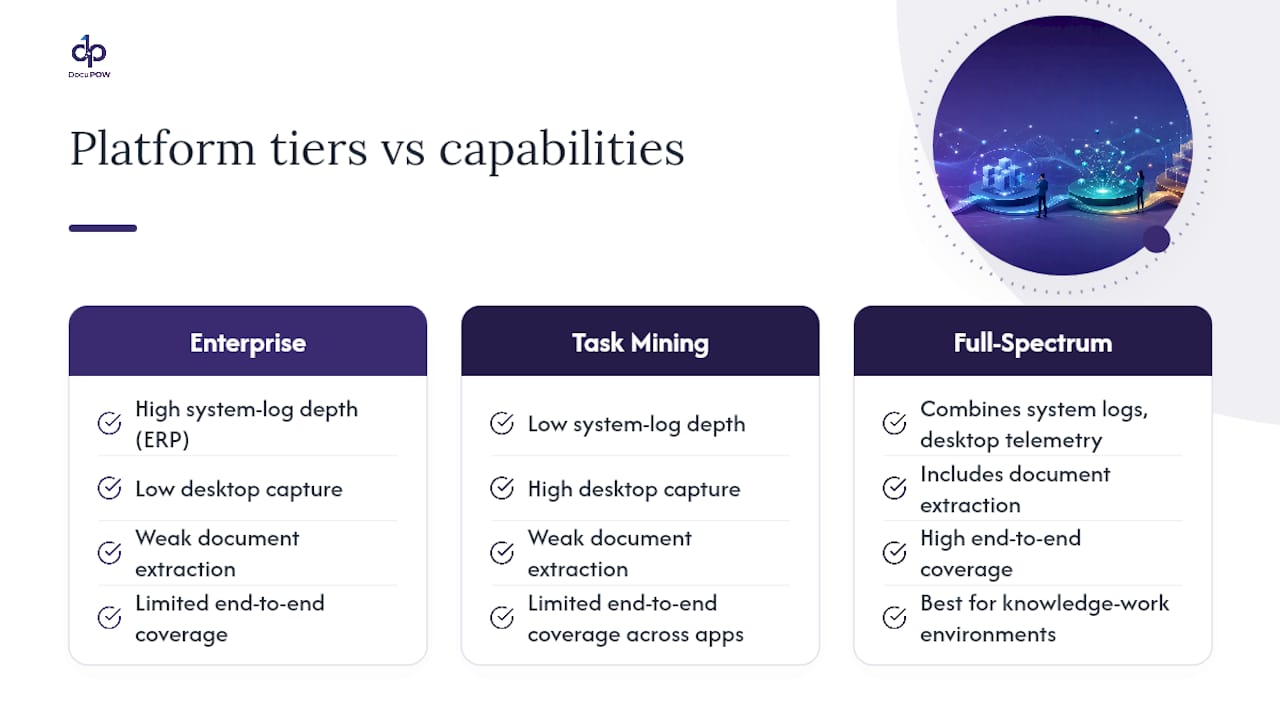
    Three process intelligence platform tiers compared

    Task mining specialists focus on desktop-level capture, which is valuable for understanding knowledge-worker behavior, but they often lack the system-log depth to reconstruct end-to-end processes spanning multiple applications.

    Full-spectrum process intelligence platforms combine system logs, desktop telemetry, and document extraction into one view. This category tends to serve knowledge-work environments best, where a single case might touch a CRM, a shared drive, three email threads, and a scanned contract before it closes.

    The honest evaluation question isn’t which category sounds most advanced. It’s which one matches your actual document mix and integration landscape. A manufacturer with clean, high-volume ERP transactions has different needs than a professional services firm where half the process lives in unstructured documents. Ask any vendor for a coverage breakdown of your own systems before assuming their strength in one industry translates to yours.

    What’s Next for Process Intelligence Technology?

    The clearest trend is convergence: platforms that used to specialize narrowly in process mining or task mining are adding the other capability, plus document extraction, because customers keep asking for one unified view instead of stitching three tools together.

    AI-native analysis is the second shift. Instead of a human analyst manually spotting a bottleneck in a process map, generative models are starting to flag anomalies, suggest root causes, and draft automation recommendations directly from the reconstructed map. That doesn’t remove the human reviewer. It just moves them from search to verification.

    Simulation is becoming a standard feature rather than a premium add-on. Being able to model a proposed fix against historical variant data before deploying it, rather than after, cuts the cost of a bad automation decision considerably.

    Expect tighter integration with agentic AI systems too. As more organizations deploy AI agents to execute steps in a workflow, those agents need the operational context process intelligence provides to know which variant they’re handling and when to escalate to a human. Document-heavy industries, insurance, healthcare, financial services, will likely see the fastest adoption, since that’s where the gap between “what the system log shows” and “what actually happened” is widest.

    Publisher Perspective: Document Intelligence Fills a Real Gap

    Most process intelligence platforms read logs well but treat documents as an afterthought, even though document-heavy steps often hide the worst bottlenecks. Agentic, template-free extraction can pull structured data straight out of invoices, contracts, and forms without a rigid template, surfacing manual steps that never show up in a system log. That’s the missing layer in a lot of process maps: not another dashboard, but visibility into the paperwork underneath.

    — Syed Naveed Abbas

    See How Document Data Fits Into Your Process Intelligence Picture

    If your process maps keep hitting a wall at “document received” and picking back up at “document processed,” that gap often represents a significant source of hidden cost. DocuPOW uses agent-based, template-free extraction to pull structured data out of invoices, contracts, claims forms, and any document type your team touches, without the manual re-keying that skews cycle-time metrics in the first place.
    DocuPOW

    That matters most in operations where paperwork drives the workflow: procurement approvals, claims intake, financial close, HR files. Pairing DocuPOW with a process intelligence initiative means your capture phase finally accounts for the documents your system logs never saw, giving analysts a complete picture instead of a partial one. Teams running high-volume paperwork should look at best practices for high-volume document processing before scoping a pilot, and construction and real estate operations with heavy document loads can start with DocuPOW’s construction or real estate solution pages. Request a demo to scope a pilot against your own document mix.

    Sources

    For deeper technical grounding, review Salesforce’s explainer on process intelligence, Insightful’s breakdown of process mining versus task mining, and ARIS’s guide to evaluation criteria. For AI readiness ahead of a pilot, Pattrn Data’s AI readiness assessment offers a useful starting checklist, and Sonance AI’s research on automation ROI covers metrics worth tracking post-deployment.

    FAQ

    What Is Process Intelligence?

    Process intelligence is the discipline of combining system event logs, desktop telemetry, and document data into a continuously updated view of how work actually happens, so teams can find and fix real bottlenecks rather than assumed ones.

    What Is the Difference Between Process Mining and Process Intelligence?

    Process mining works only from structured system event logs, while process intelligence combines those logs with desktop telemetry and document data for a fuller view of knowledge work spanning multiple tools.

    What Are the Four Steps in the Process Intelligence Cycle?

    The core cycle is capture, reconstruct, analyze, and act: gather execution data, build a real process map, identify bottlenecks and variants, then implement fixes and re-measure.

    Why Do You Need Process Intelligence Before Automating With AI?

    Without it, organizations risk automating a process’s existing flaws instead of fixing them, which undermines the ROI automation and AI investments are supposed to deliver.

    How Does Document Automation Fit Into Process Intelligence?

    Document-heavy steps like invoice approvals or claims intake often sit outside standard system logs entirely. Platforms like DocuPOW extract that document data directly, closing a capture gap that log-based process intelligence tools typically miss.


  • Enterprise AI Solutions: Turn 90 Day Pilots Into Agentic Production

    Enterprise AI Solutions: Turn 90 Day Pilots Into Agentic Production

    Enterprise AI solutions are integrated platforms and orchestration layers that let large organizations automate business outcomes at scale, not just isolated tasks. The primary payoff is measurable ROI across functions, achieved through agentic AI that plans and executes multistep work rather than a single chatbot bolted onto one process. DocuPOW’s document automation approach is one concrete example of this pattern applied to a specific, high-friction problem: turning static files into usable data.


    TL;DR:

    • Enterprise AI solutions require strong orchestration and knowledge retrieval capabilities to handle high-volume, complex workflows at scale.
    • Successful deployment hinges on rigorous security, compliance, and monitoring features, with pilots focusing on measurable KPIs tied to specific financial or operational goals.
    • Scaling from pilot to production demands clear planning for process redesign, shared data infrastructure, and long-term ownership of AI performance and outcomes.
    • Autonomous agents are increasingly replacing task-level automation with outcome-based ownership, enabling end-to-end process ownership and value capture.
    • Most organizations see faster initial ROI from focused pilots on high-volume workflows but require disciplined sequencing and infrastructure investment to scale enterprise-wide.

    Table of Contents

    What Are Enterprise AI Solutions, and How Do They Differ From SMB Tools?

    Consumer and small-business AI tools solve one problem for one person. Enterprise AI solutions have to solve one problem for thousands of people, across dozens of systems, under audit scrutiny. That difference in scope changes almost everything about how the software gets built and bought.

    Three categories dominate the market, and mixing them up is the single most common procurement mistake.

    • Point tools handle one job well: summarizing documents, transcribing calls, drafting emails. They’re cheap and fast to deploy but rarely connect to anything else.
    • Platforms bundle model access, data pipelines, and governance controls into one environment, usually from a major cloud or software vendor.
    • Agent orchestration layers sit above both, coordinating multiple AI agents and existing systems to complete a full business process end to end, such as closing the books or onboarding a vendor.

    Buyers should map the category to the objective, not the other way around. If the goal is answering “where’s our Q3 contract with Acme Corp,” a point tool with strong retrieval capabilities might be enough. If the goal is running procure-to-pay with minimal human touch, only an orchestration layer with real workflow authority will get there.

    Underneath any of the three, six capability buckets determine whether the tool actually works at enterprise volume: orchestration and agents, retrieval-augmented generation (RAG) and semantic search, model lifecycle management, security and compliance, integrations, and inference infrastructure. A vendor strong in one bucket and weak in another usually reveals itself during a 90-day pilot, which is exactly why pilots matter more than demos.

    What Capabilities Signal True Enterprise Readiness?

    A slick demo tells you almost nothing about whether a system survives contact with 40,000 employees and a compliance audit. The technical foundation matters more than the interface.

    RAG and knowledge graphs are the baseline for accuracy. Instead of relying purely on a model’s trained knowledge, RAG retrieves relevant documents or data at query time, which cuts down on fabricated answers. Layering a knowledge graph or ontology on top helps the system understand relationships between entities, such as which invoice belongs to which vendor contract, rather than treating every document as an island.

    Agent orchestration is what separates enterprise-grade platforms from chatbots wearing a business suit. A single agent can draft an email. A well-orchestrated set of agents can read an invoice, check it against a purchase order, flag a discrepancy, route it to a human for approval, and post the transaction to the ERP once approved.

    Data infrastructure is the unglamorous part that determines whether any of this survives past the pilot. Feature stores, model registries, and lineage tracking let teams know exactly which model version produced which output and why. The IBM overview of enterprise AI points to MLOps pipelines and model registries as prerequisites for moving past experimentation, not optional extras.

    Security has to run through all of it: encryption at rest and in transit, role-based access control, and audit trails detailed enough to satisfy a regulator asking who touched what data and when.

    • Confirm the vendor supports RAG with citation of source documents, not just generated summaries.
    • Ask whether agents can be assigned scoped permissions rather than blanket system access.
    • Require API-level integration with your ERP, CRM, or core systems, not screen scraping.
    • Check whether monitoring dashboards show model drift, not just uptime.

    Pro Tip: Ask any vendor to show you a failed agent run, not a successful one. How the system logs, flags, and recovers from a mistake tells you more about production readiness than a perfect demo ever will.

    Where Does Enterprise AI Deliver Measurable Business Impact?

    The use cases that survive budget season share one trait: a KPI attached before the project starts rather than after.

    1. Knowledge discovery and RAG-powered search. Employees stop digging through shared drives and get direct answers pulled from policy documents, contracts, or product specs. Track time-to-insight and the percentage of queries resolved without escalation to a human expert.
    2. Employee support copilots for IT, HR, and finance. These absorb the repetitive ticket volume: password resets, benefits questions, expense policy checks. Support-cost reduction and first-contact resolution rate are the metrics that matter to a shared-services leader.
    3. End-to-end workflow orchestration. This is where agentic operations earn the name: an agent doesn’t just answer a question about a purchase order, it processes the purchase order. McKinsey’s global survey found that 88% of organizations use AI in at least one function, but only about a third have scaled it enterprise-wide, and the gap usually traces back to workflows that were never redesigned for agent autonomy.
    4. Document processing and real-time data extraction. Finance and supply chain teams lose enormous hours reconciling invoices, purchase orders, and shipping manifests that arrive in inconsistent formats. Template-free extraction removes the manual re-keying step and speeds up close cycles.
    5. Predictive analytics for demand forecasting and operations. Once clean, structured data flows reliably from documents and transactions, forecasting models get meaningfully more accurate, because they’re no longer trained on delayed or manually transcribed inputs.

    Each use case above depends on the one before it. Predictive analytics is only as good as the document extraction feeding it, and workflow orchestration only works if the underlying data is trustworthy. Sequencing matters more than most roadmaps admit.

    How Should You Evaluate Enterprise AI Vendors?

    Most procurement teams evaluate AI vendors the way they’d evaluate a CRM, and it shows in how many pilots quietly die after six months. AI systems need a different due diligence checklist.

    Start with enterprise readiness questions that have nothing to do with the model itself: What’s the guaranteed SLA for uptime and response latency at your actual transaction volume, not a demo volume? Has the vendor run this at a scale comparable to yours, and can they name a reference customer at that scale?

    Security and compliance deserve their own conversation, separate from the sales pitch. Ask where data is processed and stored, whether it’s used to train the vendor’s models for other customers, and how access is logged. Red Hat’s framing of enterprise AI is blunt about this: without governance and security controls built in from the start, data leakage and compliance failures are what actually kill enterprise AI projects, not model accuracy.

    • Require API-first integration with documented rate limits and versioning policy.
    • Set a specific time-to-value target for the pilot, ideally under 90 days for a defined workflow.
    • Define graduation gates in writing before the pilot starts, not after it succeeds.
    • Ask for full pricing transparency, including per-agent, per-seat, or per-transaction costs at scale, not just list price.

    By the numbers: Only about 20% of organizations report using AI to drive measurable revenue growth today, even though 66% report productivity gains, according to Deloitte’s State of AI in the Enterprise research. That gap is exactly why boards are shifting from counting pilots to demanding financial accountability.

    Commercial transparency matters as much as technical fit. A vendor who can’t explain their pricing model clearly in the sales process usually can’t explain it clearly on the invoice either.

    How Do You Scale Enterprise AI From Pilot to Production?

    Most enterprise AI programs don’t fail because the model was wrong. They fail because nobody planned what happens after the pilot succeeds.

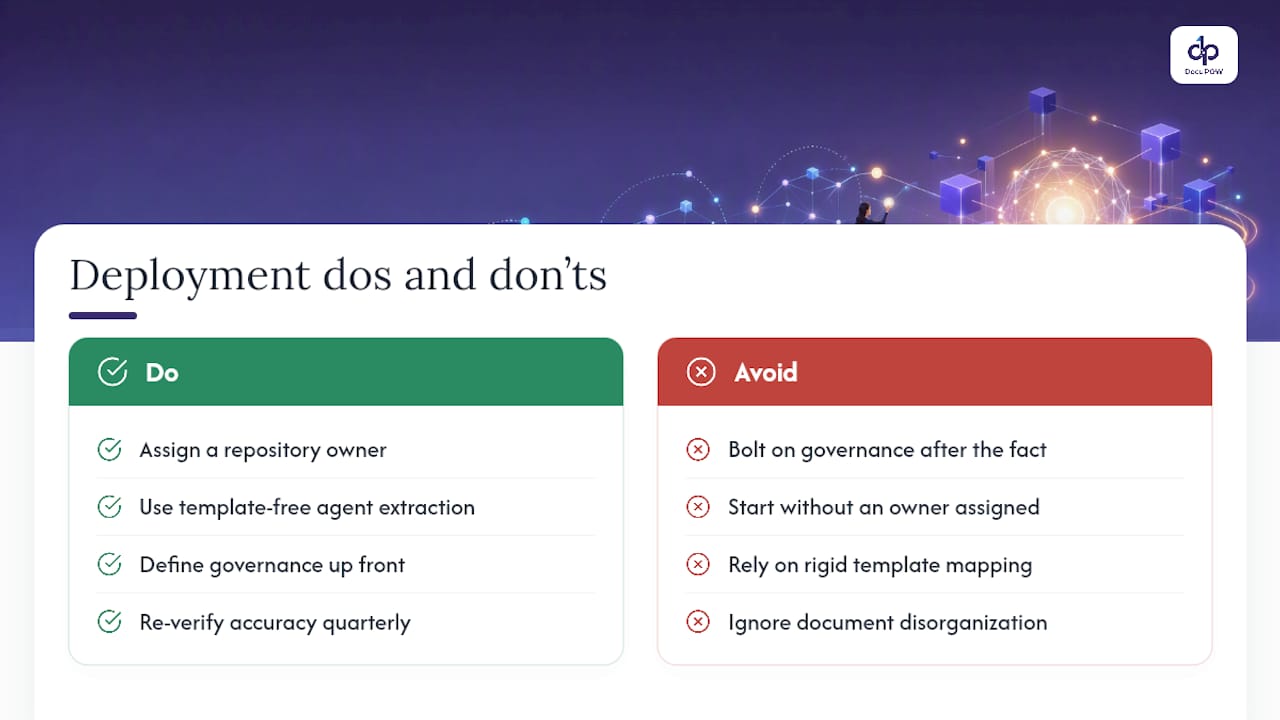
    Define graduation pathways before launch, not after. A staged rollout, department by department or region by region, gives you room to catch integration issues before they touch the whole company. Assign clear ownership too: someone needs to be the process owner accountable for outcomes, and a separate AI-ops function needs to own model health, drift monitoring, and incident response.

    The technical backbone for scaling is a shared intelligence layer, built from ontologies and knowledge graphs, that lets different departments’ AI agents share context instead of operating as isolated silos. Deloitte’s research on enterprise deployment also flags a specific engineering discipline worth borrowing: maintaining a unified, production-representative data image for model training, so the system doesn’t degrade when it hits real-world data that looks different from clean test data.

    • Build automated drift detection into every production agent, not just the flagship one.
    • Give every AI agent a managed identity and permission scope, the same way you would a new employee.
    • Set realistic timelines: expect months for a single workflow to reach steady-state reliability, not weeks.
    • Tie budget renewal explicitly to the ROI metric defined during the pilot phase.

    Pro Tip: *Treat your first production AI workflow like a reference implementation, not a one-off.

    McKinsey’s research backs this up directly: the state of AI adoption in 2026 shows that high performers commit meaningfully more budget to AI capabilities and restructure talent and delivery models around it, rather than treating AI as a bolt-on to existing teams. For a deeper look at governance structures that support this, DocuPOW’s guide to audit-ready AI compliance breaks down what auditors actually check.

    Why Is Agentic AI the Framing Every Enterprise Needs Now?

    Task automation answers a question or completes a step. Agentic AI owns an outcome, end to end, and that distinction is reshaping how enterprise software gets designed in 2026.

    The old model: a human runs a process, occasionally asking an AI tool for help along the way. The agentic model: an AI agent runs the process, and a human intervenes only at defined checkpoints or exceptions. BCG’s research on agentic enterprise operations identifies five elements required for this shift to actually work, and warns that partial adoption, automating a few tasks inside an otherwise unchanged process, rarely captures the compounding value that full redesign delivers.

    This creates a real organizational fork. Greenfield redesign, building a new process around what agents can do, captures more value but demands more change management and carries more risk. Brownfield automation, layering agents onto an existing process, is safer and faster to launch but tends to plateau quickly, because the process was never designed for autonomous decision-making in the first place.

    EY’s analysis of enterprise AI value puts a number on what’s at stake: a significant portion of potential AI value remains trapped between functional silos when processes aren’t redesigned end to end. That’s not a rounding error. That’s most of the value on the table.

    • Pick one cross-functional process, not a department, as your first agentic bet.
    • Assign an executive sponsor who owns the outcome metric, not just the technology budget.
    • Redesign the process map before selecting the technology, not after.

    DocuPOW’s guide to AI agents in operational decisions walks through how to structure agent roles so accountability doesn’t get lost in the handoff between human and machine.

    How Does DocuPOW Apply This to Document Workflows?

    Documents are where a lot of “trapped value” literally lives, buried in PDFs, scanned invoices, and contracts that no rigid template ever quite matches. DocuPOW uses autonomous agents that read the context of a document rather than forcing it into a fixed template, which means data extraction doesn’t break every time a vendor changes their invoice layout.

    The operational payoff shows up in three places: less manual re-keying, clearer financial visibility because transaction data flows into finance systems faster, and quicker decisions because the numbers are current instead of a week behind. Built-in real-time analytics and predictive insight tie directly back to the finance and operations use cases covered earlier. Native API integration with ERP and CRM systems means extracted data lands where finance teams already work, rather than sitting in a separate dashboard.

    Where Should Enterprise Leaders Place Their Bets in 2026?

    The pattern that separates programs that scale from programs that stall isn’t the model vendor. It’s discipline. Teams that pick outcome-based pilots, tied to a real financial metric from day one, graduate to production far more often than teams chasing a general-purpose AI strategy.

    Invest early in data productization, a knowledge graph, a feature store, a single intelligence layer, before layering on flashy agent capabilities. Skipping that step is how you end up with five orphaned pilots and no shared foundation between them. The EY finding that 75% of value stays trapped in silos isn’t a warning about technology. It’s a warning about sequencing.

    — Syed Naveed Abbas

    Ready to Put Agentic Document Automation to Work?

    If your organization is drowning in invoices, contracts, or shipping manifests that never quite fit a template, that’s the exact gap DocuPOW was built to close. Rather than another point tool that automates one screen, DocuPOW deploys autonomous agents that read document context directly, cutting the manual re-keying that keeps finance and operations teams a week behind on real numbers.

    DocuPOW

    The practical first step isn’t a long procurement cycle. It’s a focused pilot on one high-volume workflow, invoice processing, contract intake, or claims documents, with a clear time-to-value target attached before you start. DocuPOW’s AI workflow automation guide walks through how that pilot typically gets scoped for finance and operations teams. If document volume and inconsistent formats are the bottleneck slowing your close cycle or your claims backlog, request a walkthrough to see what template-free extraction looks like against your own documents.

    Sources

    For deeper reading on the governance and scaling frameworks referenced throughout this piece: BCG’s agentic enterprise operations report covers redesign mechanics, EY’s value-at-scale analysis quantifies the silo problem, and Opptymizer’s leadership guide offers a strategy-first perspective on prioritization.

    FAQ

    What Is an Enterprise AI Solution?

    An enterprise AI solution is a platform or orchestration layer that lets a large organization deploy AI across multiple departments and systems, rather than a single-user tool solving one narrow task.

    There’s no single dominant vendor; most enterprises run a mix of major cloud AI platforms for general infrastructure alongside specialized tools like DocuPOW for document-heavy workflows where template-free extraction and agentic processing matter most.

    Who Are the Top Enterprise AI Solution Providers?

    Major cloud and software vendors provide broad AI platforms and infrastructure, while specialized providers like DocuPOW focus on specific high-value workflows such as document automation, where deep domain capability matters more than general-purpose breadth.

    What Kind of AI Job Pays Close to $900,000?

    Compensation packages that high typically belong to senior AI research scientists or applied AI leadership roles at large technology companies, usually including substantial equity rather than base salary alone; these roles are rare and concentrated at a handful of firms racing for frontier model talent.

    How Long Does It Take to See ROI From Enterprise AI?

    A well-scoped pilot on a single workflow can show measurable time-to-value within 90 days, but McKinsey’s research shows most organizations still take considerably longer to move from scattered pilots to enterprise-wide scaling.

  • Compliance Teams: 7 NIST Aligned Controls for Secure AI Processing

    Compliance Teams: 7 NIST Aligned Controls for Secure AI Processing

    Secure AI document processing requires seven baseline controls: validated ingestion, redaction or tokenization before any model sees the data, permission-aware retrieval, envelope encryption backed by a proper key management system, least-privilege access, tamper-evident audit logging, and documented testing and evaluation (TEVV). Compliance teams should operationalize all seven using the NIST AI Risk Management Framework’s four functions, Govern, Map, Measure, and Manage, rather than treating security as a one-time review. Platforms like DocuPOW build several of these controls into the extraction layer itself.


    TL;DR:

    • Ensuring secure AI document processing requires all seven baseline controls to be operational at each pipeline stage, including validation, redaction, encryption, and audit logging.
    • Derivative data like embeddings and logs can leak sensitive information if redaction and permission checks are not applied consistently throughout preprocessing, inference, and retrieval.
    • Implementing strict access controls during ingestion and tagging each data chunk with permissions automatically enforces confidentiality during retrieval, especially when integrated with envelope encryption.
    • Regular testing and evaluation, such as accuracy benchmarks, redaction validation, and drift monitoring, are essential for maintaining security and compliance over time.
    • Starting with low-risk document types and gradually scaling up controls, combined with continuous governance review, reduces exposure before handling highly sensitive data.

    Table of Contents

    Why Sensitive Document AI Pipelines Carry Different Risks

    Traditional document security assumes a file sits somewhere and access is either granted or denied. AI pipelines break that assumption because every processing step generates a new copy of the data in a different form. OCR output, vector embeddings, model logs, and even the model’s own responses all inherit the sensitivity of the source document, whether anyone intended that or not.

    Document data transformed through AI stages

    That derivative data is where most exposure actually lives. A redacted PDF can still leak the redacted text through its OCR layer or its embedding vectors if nobody thought to apply the same rule twice.

    Threats specific to this pipeline shape include:

    • Prompt injection, where malicious text embedded in a document instructs the model to ignore its guardrails or exfiltrate other users’ data.
    • Model exfiltration, where an attacker queries an inference endpoint repeatedly to reconstruct training or context data.
    • Data poisoning, where corrupted documents skew extraction accuracy or plant triggers for later exploitation.
    • Telemetry leaks, where debug logs or monitoring dashboards capture raw text that was supposed to stay redacted.
    • Malformed or embedded content, such as macros or hidden layers in scanned files that exploit parser vulnerabilities.

    Trust boundaries in these systems typically fall at four points: the preprocessing step where files first get parsed, the inference endpoint where a model reads content, any external model call that leaves your infrastructure, and the logging layer that records what happened. Security-by-design principles for OCR treat confidentiality and accountability as core requirements at each of those boundaries, not bolted-on extras.

    A Stage-by-Stage Controls Checklist for Document AI Pipelines

    Mapping controls to each stage of the pipeline gives engineering and compliance teams a shared checklist instead of a vague mandate to “secure the AI.” Here is the sequence, in the order data actually flows.

    1. Ingest. Validate file types, scan for malware, and route uploads through an intake zone that quarantines anything unrecognized before it touches a parser.
    2. OCR and preprocessing. Canonicalize formats, apply deterministic redaction and tokenization rules, and run this step on ephemeral workers that don’t persist intermediate files.
    3. Inference. Favor private or VPC-hosted models over public APIs where possible, use scoped tokens and mutual TLS for every call, and back your key management with a hardware security module. If you use an external model, insist on a no-data-retention clause in the contract.
    4. Retrieval and RAG. Tag chunks with access control lists at the moment of ingest, gate retrieval so a query only returns chunks the requester is actually permitted to see, redact sensitive spans before anything reaches a prompt, and require citations so every answer traces back to an auditable source.
    5. Storage and retention. Keep separate retention schedules for raw scans, extracted text, embeddings, and metadata. Bind deletion timers at the moment of intake so nothing lingers by default.
    6. Logging and audit. Redact or tokenize log content, write logs to tamper-evident storage, and record who accessed what, when, and for what stated purpose.
    7. Operational controls. Enforce least-privilege role-based access, rotate keys on a fixed schedule, run inference on ephemeral compute where feasible, and keep an incident response plan specific to AI pipeline failures.

    Permission-aware retrieval deserves special weight here. Secure RAG system design treats access control lists as something you can only attach reliably at ingest, since reconstructing who was allowed to see a chunk after it has been embedded and stripped of context is nearly impossible.

    Pro Tip: Run regular permission drift tests: periodically pick a sample of documents whose access rules changed after ingestion, then confirm your retrieval layer actually reflects the new permissions instead of the ones baked in at indexing time.

    Secure Architecture Patterns That Make RAG Safe for Sensitive Documents

    Envelope encryption is the backbone of any document AI system handling regulated data. A data encryption key wraps the document content, and a separate key encryption key, held in a key management system, wraps that key in turn. Inference jobs decrypt only what they need for the duration of the call, which keeps cleartext exposure to a narrow window instead of a standing risk.

    Chunking strategy matters just as much as encryption. When you split a document into pieces for embedding, attach the source document’s access control list to every chunk at that same moment. Permissions that travel with the vector, rather than living in a separate table someone has to remember to check, are what make permission-aware retrieval actually enforceable later.

    A retrieval gateway sits between the user’s query and the vector store, and it should enforce the intersection of relevance and permission, not relevance alone. A few practices define this pattern:

    • Redact sensitive spans from retrieved chunks before they ever enter a prompt.
    • Delimit retrieved content clearly from system instructions so injected text inside a document can’t masquerade as a command.
    • Log the exact chunks returned for every query, tied to the requester’s identity.

    The OWASP catalog of generative AI risks lists prompt injection as one of the most common attack vectors against exactly this kind of retrieval layer, which is why delimiting retrieved content is not optional polish.

    Deployment choice shapes how much of this you control directly. On-premises or VPC-hosted models give you full visibility into where data lives, at the cost of more infrastructure to manage. Contractually constrained external models can match that privacy bar on paper, through no-retention and no-training clauses, but you’re trusting a vendor’s implementation rather than verifying it yourself.

    Mapping Document AI Governance to the NIST AI RMF

    The NIST AI RMF gives compliance teams four functions to organize governance work around, and each one maps to concrete deliverables rather than abstract principle.

    Govern means writing the policy that says who owns AI risk decisions, maintaining a model inventory, and setting documentation standards before any pipeline goes live. Map means scoping intended use for each document class, cataloging what data types flow through the system, and binding purpose to classification so a contract document and a medical record don’t get treated identically. Measure means running TEVV processes on a defined schedule, testing for both privacy leakage and bias, and tracking security and resilience metrics over time, not just at launch. Manage means having a risk treatment plan, an incident response procedure specific to AI failures, and a rollback path if a model version starts misbehaving in production.

    The NIST AI RMF Playbook recommends specific artifacts that turn these functions into something an auditor can actually review:

    • Model cards documenting training data sources and known limitations.
    • Impact assessments scoped to each document class and use case.
    • TEVV reports showing test methodology and results, not just pass/fail summaries.
    • Audit playbooks that walk a reviewer through how to verify a control is functioning.

    NIST frames this as continuous and cross-cutting rather than a single approval gate, and that framing matters. A pipeline that passed governance review in January can drift out of compliance by June if nobody re-checks it.

    Testing, Validation, and Continuous Assurance for Document AI

    TEVV, test, evaluation, verification, and validation, is where most document AI projects either earn trust or lose it. The NIST AI 100-1 Core document treats security and resilience testing as core measurement activities, not afterthoughts bolted on before launch.

    1. Pre-deployment benchmarking. Run accuracy benchmarks against a held-out dataset, quantify uncertainty in extraction confidence scores, and get an independent reviewer, not the team that built the pipeline, to sign off.
    2. Redaction and exfiltration testing. Feed synthetic PII through the pipeline and measure recall and precision on what gets caught, then run known prompt injection payloads against the retrieval layer to see what leaks.
    3. Adversarial parser testing. Fuzz document parsers with malformed files, since a crashed or misbehaving parser is often the first crack an attacker finds.
    4. Drift monitoring. Watch for query pattern anomalies, shifts in output entropy that might signal model degradation, and access pattern alerts that flag unusual retrieval behavior.

    Pro Tip: Schedule redaction testing on the same cadence as your key rotation policy. Both drift silently, and pairing the reminders means neither gets forgotten.

    Treat re-testing as a calendar item, not a response to an incident. Audit readiness improves dramatically when TEVV reports already exist rather than getting assembled the week before a review.

    A 90-Day Playbook for Deploying a Secure Document AI Pipeline

    Rolling out secure AI document processing in phases lets you catch problems on low-risk data before they touch anything regulated.

    1. Phase 0 (weeks 1 to 2): Scope and threat model. Identify stakeholders across security, legal, and the business unit, inventory your document types, build a threat model for the pipeline, and assemble a synthetic pilot dataset that mimics sensitive data without using any real records.
    2. Phase 1 (weeks 3 to 5): Secure ingestion. Implement intake validation, malware scanning, and OCR with redaction and tokenization hooks built in from the start.
    3. Phase 2 (weeks 6 to 9): Permission-aware retrieval. Deploy the RAG gateway with access control list tagging at ingest and redaction-before-prompt enforced on every query.
    4. Phase 3 (weeks 10 to 12): Instrumentation. Turn on TEVV testing, drift monitoring, and tamper-evident logging, and bind retention policies so deletion timers start automatically.
    5. Phase 4 (ongoing): Governance operationalization. Produce the model cards, impact assessments, and audit playbooks the NIST AI RMF calls for, then schedule recurring revalidation.

    Start with your lowest-risk document classes, invoices without personal data, public filings, internal memos, and hold your highest-risk categories back until Phase 2 controls are live and tested.

    Phase Weeks Primary deliverable
    Phase 0 1 to 2 Threat model and synthetic pilot dataset
    Phase 1 3 to 5 Secure ingestion with redaction hooks
    Phase 2 6 to 9 Permission-aware RAG gateway live
    Phase 3 10 to 12 TEVV, monitoring, and audit logging instrumented
    Phase 4 Ongoing Governance artifacts and recurring audits

    How DocuPOW Approaches Secure Document Processing

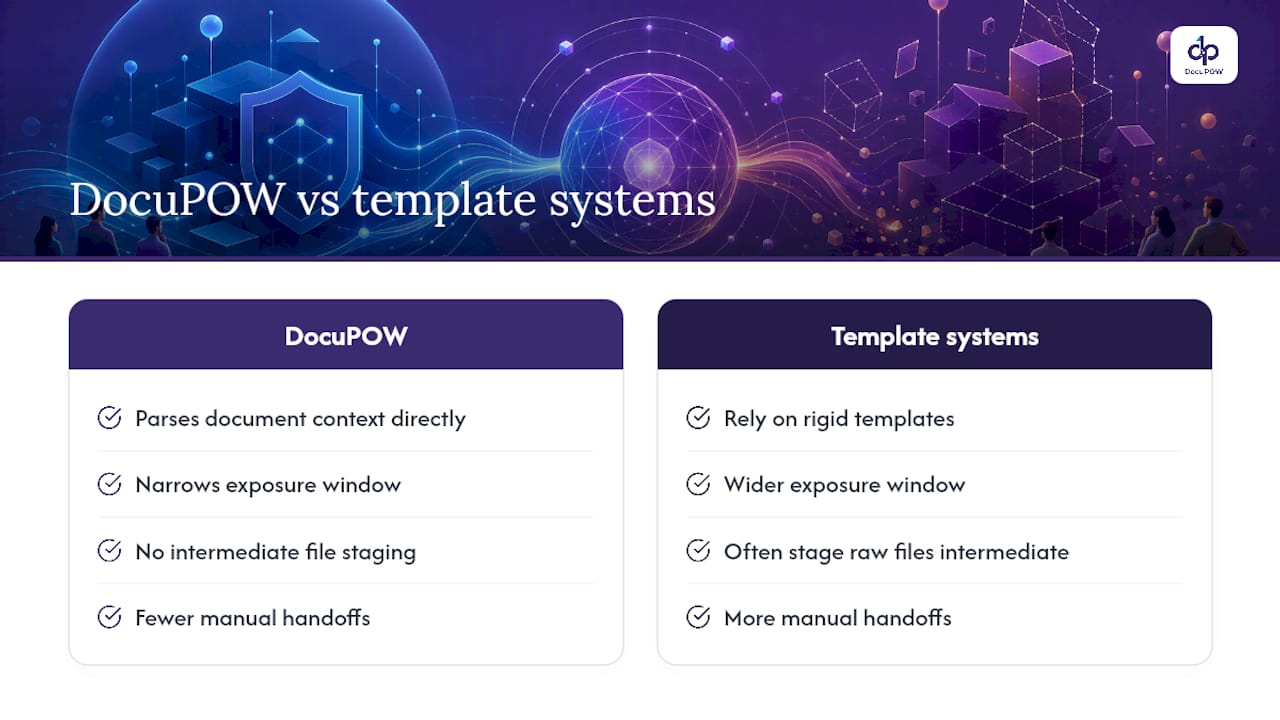
    DocuPOW’s autonomous agents parse document context directly instead of relying on rigid templates, which narrows the exposure window inherent in template-based extraction tools that often require staging raw files in intermediate formats. Fewer manual handoffs mean fewer places sensitive data can sit unmonitored.

    Real-time analytics built into the platform give compliance teams continuous visibility into extraction activity, rather than the periodic spot-checks that template-based systems typically depend on. That visibility matters more than most teams expect once a pipeline is running dozens of document classes simultaneously, because problems tend to surface in the gaps between scheduled reviews.

    How DocuPOW Approaches Secure Document Processing — overview diagram

    How DocuPOW Fits Into a Secure Document Pipeline

    Building every control in this guide from scratch, ingestion validation, permission-aware retrieval, tamper-evident logging, TEVV instrumentation, takes most teams months of engineering time before a single production document gets processed. DocuPOW compresses that timeline by handling template-free extraction and multi-step workflow orchestration with enterprise security controls already built into the platform, so your team spends its cycles on governance and validation instead of infrastructure.

    DocuPOW

    The platform’s document processing case studies show how manufacturers and other enterprises have applied agent-based extraction to high-volume document workflows without rebuilding their security stack from zero. If your team is scoping a pilot, start with a synthetic dataset that mirrors your sensitive document classes, request a security brief covering DocuPOW’s encryption and access control implementation, and schedule a demo to see how the permission model maps to your existing role structure.

    Standards and Resources Worth Reading Next

    Start with the NIST AI RMF and its companion playbook, the National Archives’ CUI guidance for handling controlled unclassified information, and OCR security-by-design principles for parser hardening. Partners like gamgi’s transparency framework offer useful models for audit documentation as well.

    Sources

    FAQ

    How Can AI Be Used for Document Processing?

    AI extracts structured data from unstructured documents through OCR combined with context-aware models that identify fields, relationships, and meaning without relying on rigid templates. Secure implementations pair this extraction with redaction, tokenization, and permission-aware retrieval so sensitive fields never reach a model or a log unprotected.

    What Is the Difference Between IDP and OCR?

    OCR converts images of text into machine-readable characters, while intelligent document processing (IDP) goes further by using AI to understand document structure, context, and meaning to extract usable data. IDP typically includes OCR as one component within a larger pipeline that also validates, classifies, and routes extracted information.

    Is There Such a Thing as Secure AI?

    AI systems can be made secure through layered controls, envelope encryption, permission-aware access, tamper-evident logging, and TEVV, but security is a continuous practice rather than a fixed state, per the NIST AI RMF’s emphasis on lifecycle risk management. No AI deployment is permanently secure without ongoing testing and monitoring.

    What Is the Best AI for Processing Documents Securely?

    The best choice depends on your document volume, sensitivity, and existing infrastructure, but platforms built with permission-aware retrieval, encryption, and audit logging as core features rather than add-ons hold a clear advantage. DocuPOW’s agent-based approach builds several of these controls into the extraction layer itself, which reduces the custom engineering work compliance teams would otherwise need to build separately.

    How Do You Secure AI-Processed Documents Against Prompt Injection?

    Delimit retrieved content clearly from system instructions, redact sensitive spans before they reach a prompt, and enforce permission-aware retrieval so injected instructions in one document can’t surface another user’s data. The OWASP GenAI risk catalog recommends treating every retrieved chunk as untrusted input until it passes these checks.

  • Up to 70% Faster: Document Automation Without Templates for Operations

    Up to 70% Faster: Document Automation Without Templates for Operations

    Business documentation automation replaces manual data entry and paper-based routing with software that extracts, generates, and moves documents through approval chains automatically. For organizations processing high volumes of contracts, invoices, or claims, the payoff shows up fast: intelligent document processing tools report processing time reductions of 60 to 70 percent and error reductions of up to 90 percent. The sections below walk through how the technology works, what it costs, and how to pick the right approach for your document volume and complexity.


    TL;DR:

    • Template-based generation works best for standardized outbound documents with fixed formats, but fails when inbound documents vary in layout or language.
    • Ensuring high accuracy requires human-in-the-loop systems that incorporate exception handling and reliable integration with existing enterprise systems like ERPs and CRMs.
    • Most organizations see a return on investment of 200 to 300 percent within the first year, mainly through labor saving, faster revenue recognition, and fewer compliance issues.
    • High-variability inbound documents in industries like manufacturing and supply chain benefit most from agent-based, template-free extraction solutions that interpret context directly.
    • A successful implementation begins with a baseline audit, a focused pilot, and fixes workflow inefficiencies beforehand to prevent automating broken processes.

    Table of Contents

    What Is Business Documentation Automation, Exactly?

    Two very different technologies get lumped under “document automation,” and mixing them up is the fastest way to buy the wrong tool. The first is template-based generation: software that fills in pre-built document templates (contracts, offer letters, proposals) with data pulled from a CRM or database. It’s outbound. You’re creating documents from structured data you already have.

    The second is intelligent document processing, or IDP. IDP works in reverse. It reads incoming documents, whether a scanned invoice, a signed lease, or a handwritten claim form, and pulls structured data out of them using optical character recognition, natural language processing, and machine learning. It’s inbound. You’re extracting data from documents other people send you.

    Here’s the decision rule that actually matters: if your documents are standardized and you control the format, template generation wins on speed and cost. Around 80 percent of mid-to-large organizations already use templated solutions for routine forms and invoices. But if incoming documents vary in layout, vendor, or language, template tools break constantly, and IDP becomes the only approach that scales.

    • Template generation: fast, cheap, ideal for outbound contracts and standardized forms
    • IDP/AI extraction: slower to configure, but essential for variable inbound documents
    • Hybrid stacks: most mid-size and enterprise operations end up running both

    The Technical Layers Behind Every Automated Document Workflow

    A document automation platform isn’t one feature. It’s a stack, and weak links anywhere in that stack show up as errors, delays, or compliance gaps downstream.

    1. Capture and OCR/IDP — the system reads the raw document, whether scanned, photographed, or born digital, and converts it into machine-readable text.
    2. Classification — the platform identifies what kind of document it’s looking at (invoice, purchase order, lease amendment) before it tries to extract anything.
    3. Extraction — data fields get pulled out: amounts, dates, vendor names, line items, signatures.
    4. Business rules — extracted data gets validated against logic (does this invoice total match the PO, is this discount within policy).
    5. Orchestration — the document and its data move to the next human or system in the workflow.
    6. E-signature and storage — final approval, signing, and archiving with version history.
    7. Analytics and audit — dashboards track cycle time and exceptions, while an audit trail logs every touchpoint for compliance.

    A complete document workflow stack needs all seven functional layers: capture and OCR/IDP, classification, extraction, business rules, orchestration, e-signature, and audit, working together, not bolted on separately.

    The accuracy layer deserves special attention. No IDP system hits 100 percent extraction accuracy on messy real-world documents out of the gate. The better platforms use a human-in-the-loop model: a person reviews and corrects low-confidence extractions, and the system learns from those corrections over time, gradually needing less human review. Integration matters just as much as extraction. Native connectors matter less than most buyers assume; what matters is whether the platform maintains reliable, bi-directional sync with your ERP, CRM, or HRIS so data doesn’t get stuck in a one-way pipe.

    Pro Tip: Ask any vendor to show you their exception-handling workflow, not just their happy-path demo. How a platform handles a document it can’t confidently read tells you more about production readiness than any accuracy percentage on a slide.

    Benefits and ROI: What the Numbers Actually Show

    The financial case for documentation automation is one of the stronger ones in enterprise software, and it’s backed by consistent figures across independent reports.

    Organizations implementing document automation commonly report ROI in the 200 to 300 percent range within the first year, with per-document processing costs dropping to low levels at scale once volume justifies the setup investment.

    That ROI shows up in a few concrete ways:

    • Labor recovered: staff who spent hours on manual data entry shift to exception handling and higher-value review work
    • Faster revenue recognition: contracts and invoices that used to sit in approval queues for days close in hours
    • Fewer compliance penalties: automated audit trails catch missing signatures or approval gaps before they become fines
    • Lower error-correction cost: with error reductions up to 90 percent on well-tuned IDP deployments, rework and downstream corrections drop sharply

    None of that is guaranteed, though. The gains fall short most often when integration work gets underestimated, teams treat the rollout as a one-time IT project instead of an ongoing process, or change management gets skipped and staff quietly route around the new system. Enterprise investment in automation keeps climbing, with analysts projecting continued growth in adoption through 2026, which raises the competitive cost of standing still.

    Which Workflows Should You Automate First?

    Not every document workflow deserves equal priority. The best pilot candidates share three traits: high volume, repetitive structure, and a clear, measurable bottleneck.

    • Sales agreements and proposals: trigger on deal-stage change in the CRM, auto-generate the contract, route for e-signature, update the CRM on completion. Owner: sales operations. KPI: time from quote to signed contract.
    • Accounts payable invoice intake: trigger on email or portal receipt, extract vendor and line-item data, match against purchase orders, flag discrepancies for review. Owner: finance/AP. KPI: cost per invoice processed and days payable outstanding.
    • HR onboarding paperwork: trigger on offer acceptance, generate the packet, route for background-check and tax-form completion, sync to the HRIS. Owner: HR operations. KPI: time to first productive day.
    • Procurement approvals: trigger on requisition submission, apply approval-threshold rules, route to the right approver tier automatically. Owner: procurement. KPI: approval cycle time.
    • Claims and service tickets: trigger on inbound submission, extract claim details, classify severity, route to the right adjuster or agent. Owner: operations/service. KPI: first-response time and resolution rate.

    Pick one, run it for eight weeks, and measure it before adding a second workflow.

    How to Evaluate a Document Automation Platform

    Skip the vendor comparison charts for a minute and focus on what actually predicts success: fit between the platform’s architecture and your document reality.

    1. Integration depth over integration count. A platform with fifty shallow connectors is worse than one with five that sync bi-directionally and reliably with the systems you actually run.
    2. Template flexibility versus extraction intelligence. If your inbound documents vary in format, ask specifically how the platform handles a document layout it has never seen before.
    3. Accuracy and the human-in-the-loop workflow. Ask for real accuracy figures on documents similar to yours, not vendor-wide averages, and ask how corrections feed back into the model.
    4. Throughput and scale. A tool that works cleanly for 500 documents a month can choke at 50,000. Ask about performance at your projected volume, not your current one.
    5. Security and compliance posture. Confirm SOC 2 status, audit-trail granularity, and data residency options before you get attached to a platform’s interface.
    6. Analytics and reporting depth. Dashboards should show cycle time, exception rates, and bottlenecks, not just document counts.

    On the procurement side, define your proof-of-concept success metrics in writing before you start (target accuracy, target cycle time, integration test cases), and calculate total cost of ownership including implementation and ongoing model tuning, not just the subscription line.

    The most common cause of a failed rollout isn’t a bad product. It’s a mismatch between document complexity and tool capability: teams pick a template tool for genuinely variable inbound documents, hit a wall at scale, and have to migrate mid-project.

    Pro Tip: Run your proof-of-concept on your ugliest documents, not your cleanest ones. Any platform can handle a pristine invoice template. The one that handles your worst vendor’s handwritten purchase order is the one worth buying.

    Rolling Out Document Automation: From Pilot to Enterprise Scale

    Most failed automation projects fail before a single document gets processed, because nobody measured the baseline. Here’s a rollout sequence that avoids that trap.

    1. Week 0: baseline audit. Measure current document volume, average cycle time, and error rate for the workflow you’re targeting. Without this, you can’t prove ROI later.
    2. Weeks 1 to 3: map and configure. Identify every data source feeding the workflow, then build the template or train the extraction model on a representative sample of real documents, not clean sample data.
    3. Weeks 4 to 6: test with production-like volume. Run the configured workflow against real historical documents and compare outputs against known-correct answers.
    4. Weeks 7 to 8: limited live pilot. Route a subset of live documents through the new system alongside the old process, with a person checking both.
    5. Post-pilot: scale and govern. Add template version control, define exception-routing rules for documents the system can’t confidently process, and set up monitoring dashboards before expanding to a second workflow.

    A frequent mistake at the audit stage is automating a broken process instead of fixing it first. If your approval chain has three redundant sign-offs today, automating it just moves the redundancy faster instead of removing it. Fix the workflow, then automate it. For teams scaling past a single department, structured strategies for sustainable growth apply just as much to document operations as to any other part of the business.

    Security Risks and How to Mitigate Them

    Documentation automation systems handle sensitive data at volume, which makes them a meaningful attack surface if security gets treated as an afterthought.

    The biggest risk isn’t exotic. It’s overly broad access. When every employee who touches a workflow has full visibility into every document flowing through it, a single compromised account exposes far more than it should. Role-based access control, scoped to the specific document types and fields a person actually needs, closes most of that gap.

    Data residency and retention are the second concern, especially for organizations handling financial or healthcare-adjacent documents. Confirm where extracted data physically lives, how long it’s retained, and whether it can be purged on request before you sign a contract, not after.

    Third, watch integration points. APIs and webhooks connecting your document platform to your ERP or CRM are common targets, since a poorly secured connector can leak data even when the core platform is locked down tight. Insist on encrypted connections, scoped API keys, and logged access for every integration point.

    Finally, audit trail integrity matters as much as audit trail existence. A log that can be edited or deleted after the fact isn’t a real audit trail. Confirm the platform’s logs are immutable and time-stamped, and that SOC 2 or equivalent compliance certification actually covers the document-handling components, not just the hosting infrastructure.

    Comparing Document Automation Approaches Without the Vendor Hype

    Rather than ranking specific products, it helps to compare document automation platforms by architecture category, since that’s what actually determines fit.

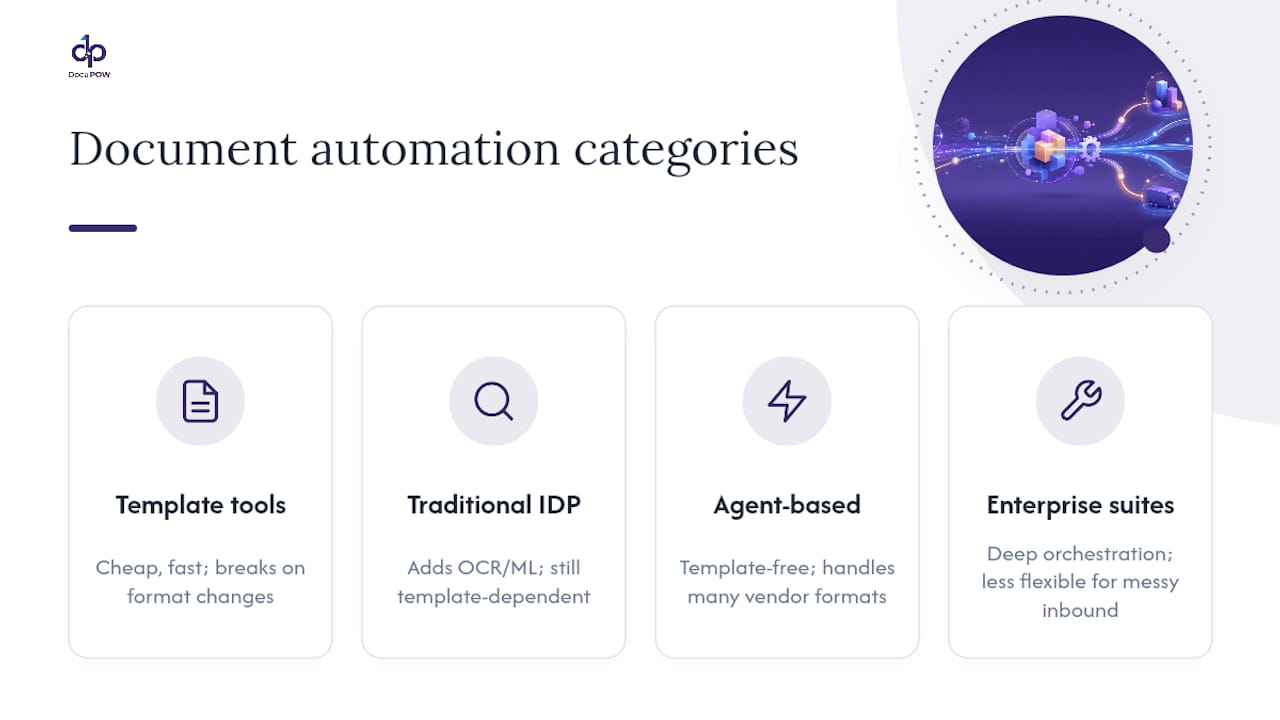
    Comparison of four document automation approaches

    Entry-level template tools handle standardized outbound documents well: contracts, offer letters, standard forms. They’re cheap and fast to configure, but they break the moment document format varies, and they offer little for inbound processing.

    Traditional IDP platforms add OCR and machine learning for inbound extraction, but many still depend on pre-built templates matched to specific document layouts. That works fine until a new vendor sends an invoice in a format the template has never seen, at which point accuracy drops and someone has to manually build a new template.

    Agent-based, template-free extraction platforms represent the newer category. Instead of matching documents against a template library, autonomous agents interpret document context and structure directly, extracting data without needing a pre-built layout match. This matters most for organizations receiving documents from hundreds of different vendors, partners, or geographies, where building and maintaining a template for every format is a losing game.

    Enterprise workflow suites bundle document automation into broader business-process platforms, offering deep orchestration but often at the cost of extraction flexibility for genuinely messy inbound documents.

    The right category depends entirely on document variability, not brand reputation. A construction company processing subcontractor invoices in forty different formats has a fundamentally different need than a company generating standardized internal HR forms.

    Where Document Automation Is Headed Next

    The next wave of documentation automation is moving from “extract and route” to “extract, understand, and predict.” Real-time analytics layered on top of extracted data already let finance and operations teams spot cash-flow patterns or vendor risk before a human would notice them in a spreadsheet. Predictive insights, flagging a likely invoice dispute or an approval bottleneck before it happens, are becoming a standard feature rather than a premium add-on.

    Agentic AI is the bigger shift. Instead of software that follows a fixed extraction template, autonomous agents are starting to handle multi-step reasoning: reading a contract, checking it against policy, flagging the specific clause that deviates, and routing it to the right reviewer, all without a human pre-defining every rule. That reduces the brittle template maintenance that has plagued IDP for years.

    Semantic search across document repositories is also maturing fast. Instead of searching by filename or exact keyword, teams can query “show me every vendor contract with a termination clause under 30 days” and get a real answer, because the system understands document meaning, not just text strings.

    Expect deeper integration with predictive financial modeling next, where document-extracted data feeds directly into forecasting rather than sitting in a static database waiting for someone to run a report.

    Why Template-Free Extraction Is the Approach That Scales

    Most document automation vendors will tell you templates are a feature. I’d argue they’re a liability that hasn’t caught up to how variable real-world documents actually are. A template works great until the eleventh vendor sends an invoice in a format nobody anticipated, and then someone on your team is back to manual entry or building yet another template to maintain.

    DocuPOW’s agent-based approach skips that entirely. Instead of matching documents against a template library, autonomous agents interpret document context directly, which means a global manufacturer receiving purchase orders from six hundred suppliers in a dozen formats doesn’t need six hundred templates. It needs a system that actually reads the document the way a person would.

    This isn’t the right fit for every organization. If your document volume is low and your formats are genuinely standardized, a simpler template tool will cost less and do the job. But for high-variability inbound documents, especially in manufacturing, construction, and supply chain operations, template-free extraction is the only approach that doesn’t degrade as your vendor list grows.

    — Syed Naveed Abbas

    Ready to Move Past Manual Document Entry?

    If your team has spent this article recognizing your own invoice pile or contract backlog, the checklist above should feel less like theory and more like a shopping list. DocuPOW is built specifically around the item most vendors struggle with: template-free extraction that handles document variability instead of breaking on it.

    DocuPOW

    The platform combines agent-based extraction, API-first integrations with your ERP and CRM, real-time analytics, and full audit trails, the same criteria the evaluation checklist above walks through, in one system rather than five stitched together. For operations teams managing high document volume, the operational benefits map directly to measurable outcomes: fewer manual touches, faster cycle times, and a compliance trail that holds up to scrutiny.

    If you’re managing document volume in real estate, construction, or supply chain operations specifically, start with a scoped proof of concept on your messiest current workflow. Request a demo and bring your worst vendor invoice. That’s the real test.

    Sources

    FAQ

    What Are Some Examples of Document Automation?

    Common examples include auto-generated sales contracts, AI-extracted invoice data for accounts payable, automated HR onboarding packets, and claims processing that classifies and routes incoming forms without manual sorting.

    What Are the Four Types of Automation?

    Documentation-focused automation generally falls into template-based generation, IDP/AI extraction, workflow orchestration and routing, and e-signature/approval automation, each addressing a different stage of the document lifecycle.

    What Is the Best Document Automation Software?

    The right platform depends on document variability: standardized outbound documents favor template tools, while high-variability inbound documents favor agent-based, template-free extraction platforms like DocuPOW that don’t require a pre-built layout match.

    What Are the Top Document Management Systems Businesses Use?

    Most businesses now choose between traditional document management systems built for storage and retrieval, and modern documentation automation platforms that add extraction, workflow orchestration, and analytics on top of storage rather than treating it as the end goal.

    How Long Does It Take to Implement Document Automation?

    A focused pilot on a single workflow typically runs six to eight weeks from baseline audit to live testing, with enterprise-wide scaling following in phases after the pilot proves out accuracy and ROI.

  • Cut Administrative Work in 60–90 Days for Enterprise Teams

    Cut Administrative Work in 60–90 Days for Enterprise Teams

    Map your single highest-friction workflow, strip out every step that doesn’t change the outcome, then automate what’s left. That order matters more than any specific tool. Priority moves: clean the process, automate the routine parts, delegate what doesn’t need to stay in-house. DocuPOW fits the automation step for document-heavy workflows.


    TL;DR:

    • Focusing on high-volume, error-prone workflows that offer low strategic value delivers the most immediate efficiency gains and should be prioritized first.
    • Automating after thorough process mapping, data centralization, and establishing clear ownership prevents faster error propagation and inefficiencies.
    • Target tasks like invoice processing, claims intake, and scheduling for initial automation, ensuring data quality and choosing the right AI tools for the document types.
    • Redesign workflows around outcomes and use agentic orchestration to coordinate multiple steps, rather than layering automation onto broken processes.
    • Measure success with cycle time and error rate metrics, reviewing progress monthly to prevent regression and ensure sustained gains.

    Table of Contents

    Prioritizing Strategies to Reduce Administrative Work

    Not every administrative fix deserves the same attention this quarter. The workflows worth tackling first share three traits: high volume, high error rate, and low strategic value from the manual work itself. Invoicing, procurement approvals, employee onboarding, and (in healthcare) prior authorization all fit that description, which is why they show up in nearly every efficiency initiative that actually moves the needle.

    Sort your options into two buckets before committing resources. Quick wins are workflows where a small process change or off-the-shelf tool delivers visible relief within weeks: killing a redundant approval step, consolidating three intake forms into one, auto-routing documents that currently get manually sorted. Strategic redesigns take longer and touch multiple departments: rebuilding your entire vendor onboarding pipeline, or restructuring how claims move between clinical and billing staff.

    A rough sequencing that works for most mid-size and enterprise teams:

    1. Audit your top five recurring workflows by hours spent per month and error frequency.
    2. Kill unnecessary steps first (approvals with no real veto power, duplicate data entry, forms nobody reads).
    3. Automate the remainder using digitization and AI-based extraction tools suited to the task.
    4. Delegate or outsource low-strategic-value, high-volume work that doesn’t need internal ownership.
    5. Set governance so the redesigned process doesn’t drift back to its old shape in six months.

    Before you touch a single tool, decide how you’ll know it worked. Two metrics do most of the heavy lifting: cycle time (how long a task takes start to finish) and error rate (how often it needs rework). Track both before you change anything, and again 60 to 90 days after.

    Pro Tip: Pick the workflow your team complains about most, not the one that looks worst on paper. Frustration is a decent proxy for hidden friction that spreadsheets don’t capture.

    What Should You Automate First?

    Data has to be clean and centralized before automation does any good. Feeding a broken, inconsistent workflow into a bot just makes the errors move faster. Run a short data readiness check first: Are your source documents consistent in format? Is data currently scattered across email, shared drives, and three different systems? Do different departments use different field names for the same information? If you answered yes to the last two, fix that before automating anything downstream.

    Once data is centralized, the best first candidates for automation are usually:

    • Invoice and receipt processing (three-way matching between purchase order, invoice, and receipt)
    • Insurance claims intake and prior authorization paperwork
    • Appointment and resource scheduling
    • Repetitive data entry between systems that don’t talk to each other natively

    Choosing the right technology category matters as much as choosing the right workflow. Robotic process automation (RPA) handles rule-based, structured tasks well but breaks the moment a document format changes. Intelligent document processing (IDP) reads and extracts data from varied, less-structured documents. Agentic orchestration goes a step further, coordinating multiple steps and systems around an outcome rather than a single task. MDPI’s review of AI-enabled process improvement found that LLM-enabled tools produce meaningfully better operational outcomes only when data readiness, workflow embedding, and validation checkpoints are all in place at once. Skip any one of those, and the tool underperforms regardless of how sophisticated it is.

    Run pilots small. Scope one workflow, define your two core metrics up front, build in a human validation checkpoint before full rollout, and set a rollback trigger (an error-rate threshold that pauses the rollout automatically) before you go live.

    U.S. physicians alone spend an average of 8.7 hours per week, roughly 16.6% of their working hours, on administrative tasks. That’s the scale of the target you’re aiming an automation pilot at.

    Why Process Redesign Beats Bolt-On Automation

    Automating a broken process just makes the mess move faster. That’s the core finding behind BCG’s recommendation to redesign end-to-end workflows around agentic AI orchestration rather than layering automation onto existing steps. The distinction sounds academic until you watch a team automate an approval chain that had three redundant sign-offs to begin with. Now the redundancy runs at machine speed.

    Outcome-first redesign follows a specific sequence:

    • Map the actual outcome the workflow exists to produce (not the steps, the outcome).
    • List every current step and ask whether it changes that outcome.
    • Cut steps that exist for historical or political reasons rather than functional ones.
    • Reassign decision rights so approvals sit with whoever actually has the context to decide.

    AI orchestration differs from simple automation in scope. A single automated task might extract data from an invoice. Orchestration coordinates that extraction with matching against a purchase order, routing exceptions to a human reviewer, and updating the ERP system, all as one governed flow rather than four disconnected tools. MGMA’s research makes the same point for healthcare specifically: digitizing a clinician’s paperwork without redesigning the underlying workflow does not meaningfully reduce burden. The paperwork just becomes digital paperwork.

    Governance can’t be an afterthought here. Every orchestrated workflow needs traceability (a record of what happened and why), clear exception handling for the cases the AI can’t confidently resolve, and human-in-the-loop validation at the points where a wrong decision carries real cost. Skip governance and you’ve traded manual errors for automated ones at higher volume.

    Pro Tip: Run your first redesigned workflow as a pilot, review results monthly for at least a quarter, and only scale once error rates stabilize below your pre-redesign baseline. Rushing to scale is the single most common way pilots turn into rollbacks.

    When Should You Delegate or Outsource Admin Work?

    Not every administrative task belongs on your internal team’s plate, and not every task belongs off it either. The decision comes down to four factors: how strategically important the work is, how much volume you’re dealing with, how variable the work is task to task, and how much compliance risk it carries.

    High-volume, low-variability, low-strategic-value work is the classic outsourcing candidate: routine data entry, basic customer support tickets, standard document filing. High-compliance-risk work (patient records handling, financial reconciliation with audit exposure) usually needs to stay closer to home, or at minimum go to a vendor with strong security credentials and clear service-level agreements.

    A practical decision path:

    1. Score each recurring task on strategic importance, volume, and compliance risk (low, medium, high).
    2. Outsource the low-strategic, high-volume, low-risk tasks to a managed service or hybrid platform-plus-service model.
    3. Keep high-compliance or high-strategic-value work in-house, but automate the repetitive parts of it.
    4. Measure ROI in redeployed hours, not just cost per task. What does your team do with the time freed up?
    5. Vet vendors on integration capability, security certifications, and SLA specificity, not just price.

    The operations consulting perspective on back-office automation frames ROI the same way most efficient organizations do: it’s not the hours saved that matter most, it’s what those redeployed staff do next, whether that’s revenue-generating work or higher-value analysis your team never had bandwidth for before.

    How Do You Measure Success in Reducing Administrative Work?

    Cycle time and error rate are the two KPIs that actually prove something changed. Everything else, activity counts, tickets closed, forms processed, tends to reward busywork rather than genuine reduction in administrative burden. Track cycle time (start to finish duration for a given task), time per transaction, error or exception rate, and recovered staff hours, then convert recovered hours into an economic figure using average loaded labor cost so leadership sees the dollar impact, not just the time impact.

    KPI What it measures Why it matters
    Cycle time Start to finish duration for a workflow Shows whether redesign actually sped things up
    Error/exception rate Frequency of rework or escalation Flags whether automation is amplifying mistakes
    Recovered staff hours Time freed from manual tasks Converts directly into redeployment or cost savings
    Time per transaction Average processing time per unit of work Useful for high-volume workflows like invoicing

    Run a monthly review with whoever owns the process, not a quarterly one. Monthly cadence catches drift early, before a workflow silently reverts to its old, inefficient shape. Analysis of COO strategies for streamlining enterprise processes points to exactly this pattern: organizations that measure outcomes rather than activity, and review them monthly, are the ones that keep their gains instead of watching them erode.

    One caution worth repeating for healthcare teams specifically: a lower documentation count isn’t automatically good news if it comes with a higher clinical error rate. Match every efficiency metric with a quality or safety counterpart before you call a redesign a win.

    Getting Buy-In for New Administrative Workflows

    The best-designed workflow redesign fails without someone owning it. Assign a single process owner for each redesigned workflow, someone accountable for the metrics, not a committee. Around that owner, build a small cross-functional pod: someone from the team doing the work, someone from IT or the platform vendor, and someone from compliance if the workflow touches regulated data.

    Communication around a pilot needs to answer three questions in order: why this workflow, why now, and what specifically changes for the people doing the work day-to-day. Skip the why and staff treat the change as arbitrary. Skip the what-changes and they show up on day one confused about their new role.

    Training deserves real budget, not a fifteen-minute video. Staff moving into human validation roles, reviewing what an AI system flagged rather than doing the task manually, need practice spotting the edge cases the system will get wrong. That’s a different skill than the one they used before, and it takes weeks, not hours, to build confidence in it.

    • Name one accountable process owner per redesigned workflow.
    • Build a small cross-functional pod including compliance where relevant.
    • Communicate why, how, and what-changes before launch, not after.
    • Set policy checkpoints for auditability at each handoff point in the new flow.

    Pro Tip: Have your process owner present metrics at the same recurring meeting every month, even when the news is neutral. Consistency in reporting builds more trust than a big splashy quarterly readout.

    How DocuPOW Helps Reduce Administrative Work

    DocuPOW approaches document-heavy administrative work the way the redesign principles above suggest it should be approached: map the workflow, centralize the data, then automate with governance built in, not bolted on. Its agent-based extraction reads documents without relying on rigid templates, which matters for organizations dealing with varied invoice formats, inconsistent intake forms, or non-standard claims paperwork, exactly the kind of variability that breaks template-dependent tools.

    The platform pairs that extraction with multi-step workflow orchestration and human-in-the-loop audit review, so exceptions get flagged for a person instead of processed blindly. Real-time analytics and predictive insights give the process owner from your governance structure something concrete to review monthly.

    A global manufacturer moving from manual document intake to agent-based automation typically restructures financial visibility first: faster data availability changes when decisions get made, not just how much manual entry disappears.

    For teams evaluating where to start, the practical sequence holds: pilot one high-friction document workflow, validate outputs against your existing error rate, then expand once the numbers hold up.

    Best Practices for Document Management and Filing Systems

    A clean filing structure is the unglamorous foundation everything above depends on. Automation and orchestration both assume documents are findable, correctly labeled, and stored somewhere systems can actually reach, an assumption that fails more often than teams expect.

    Start with a consistent naming and folder convention across departments, not just within one team. A shared taxonomy (client name, document type, date, status) prevents the scattered-systems problem that blocks automation later. Version control matters just as much: know which copy of a contract or claim form is current, and retire outdated versions rather than leaving five copies floating in a shared drive.

    Retention policy needs to exist in writing, tied to your industry’s compliance requirements, so nobody is guessing whether a record should be archived or deleted. Healthcare organizations in particular need retention rules that account for both HIPAA obligations and state-specific record-keeping laws.

    Centralize storage where possible instead of letting documents live in email attachments and personal drives. That single move does more to enable future automation than almost any other filing practice, because scattered storage is the number one reason automation pilots stall at the data-readiness stage. Index documents so they’re searchable by content, not just filename, and tag records with metadata (document type, department, associated case or transaction) so retrieval doesn’t depend on someone remembering where a file was saved eighteen months ago.

    The Real Bottleneck Isn’t Technology

    The conventional advice on reducing administrative work treats it as a tool-shopping problem: find the right software, plug it in, watch hours disappear. That framing gets the sequence backwards. The evidence points the other way. Workflows fail to improve when organizations skip the unglamorous steps: mapping the actual process, centralizing data, and assigning real ownership, before automating anything.

    What’s underrated is governance. Teams get excited about agentic orchestration and forget that a human validation checkpoint is what keeps automated errors from scaling faster than manual ones did. That’s not a limitation of the technology. It’s the difference between automation that compounds a broken process and automation that fixes one.

    If you take one thing from this, prioritize process redesign over tool selection. Pick the workflow costing your team the most hours, map it honestly, cut what doesn’t serve the outcome, then automate what’s left. The technology matters less than the discipline applied before you touch it.

    — Syed Naveed Abbas

    Ready to Cut the Paperwork? Start With a Pilot

    DocuPOW fits organizations exactly at the point this article keeps returning to: after you’ve mapped a workflow and identified where document-heavy tasks are eating hours, not before. Its template-free extraction handles the messy, inconsistent document formats that break rule-based automation tools, which matters most for teams in operations, finance, or healthcare drowning in varied paperwork rather than clean, standardized forms.

    DocuPOW

    If you’re running the kind of high-volume document workflow this article describes, invoicing, claims intake, procurement, start with a focused pilot rather than a full platform rollout. Review the AI Workflow Automation Services enterprise guide for a practical implementation path, then request a demo to see how agentic extraction handles your specific document types before committing to a broader rollout.

    Sources

    This article draws on BCG’s research on agentic AI and workflow redesign, MGMA’s 2026 regulatory burden report, a PubMed study on physician administrative time, MDPI’s review of AI-enabled process improvement, and ACUS guidance on reducing administrative burdens.

    FAQ

    How Do You Reduce Administrative Burden?

    Map your highest-friction workflow, remove steps that don’t change the outcome, then automate what remains with human validation checkpoints in place. Research from BCG and MGMA both find that redesign, not simple digitization, drives real reduction.

    How Do I Move Away From Administrative-Heavy Roles?

    Shift toward exception handling and validation work rather than manual data entry, since orchestrated workflows still need people to review flagged cases and manage vendor or client relationships. Building comfort with reviewing AI-flagged exceptions, rather than performing the task manually, is the most transferable skill as automation expands.

    What Is Another Term for Administrative Burden?

    Common alternatives include “paperwork burden,” “regulatory burden,” and “compliance overhead,” all referring to the time and cognitive load spent on non-clinical or non-core tasks rather than the primary work itself.

    What Are Examples of Administrative Burdens?

    Common examples include prior authorization paperwork in healthcare, manual invoice matching, repetitive data entry between disconnected systems, and redundant approval chains with no real decision authority. Tools like DocuPOW’s document automation platform target exactly this category of document-heavy, repetitive work.

    How Long Does It Take to See Results From Process Redesign?

    Most organizations see measurable cycle time and error rate improvements within 60 to 90 days of a focused pilot, provided data readiness and governance checkpoints were in place before automation started.

  • Phased Agentic Rollout for Legal Teams: AI-Powered CLM

    Phased Agentic Rollout for Legal Teams: AI-Powered CLM

    AI-powered contract lifecycle management automates extraction, surfaces risk and obligation insight, and triggers event-driven actions across drafting, negotiation, and renewal. The payoff is faster cycle time, fewer missed obligations, and an audit trail regulators and auditors can actually follow. Start smaller than you think: pilot one high-impact workflow, like renewal management or vendor onboarding, before touching anything else.


    TL;DR:

    • High-quality, organized contract repositories are crucial, as AI-CLM’s ROI depends more on metadata and governance than on the AI model itself.
    • Running a pilot with a known-answer dataset on a single workflow, such as renewals, and monitoring extraction accuracy and adoption, can validate AI’s effectiveness before scaling.
    • Extracting clauses and metadata in under a minute and ensuring source-linked answers are essential features when evaluating AI-CLM tools.
    • Governance controls like data access segmentation, source traceability, and human review gates need to be implemented before expanding AI-CLM deployment.
    • Phased implementation starting with repository cleanup, controlled pilots, and gradual integration with enterprise systems minimizes risks and maximizes AI-CLM benefits.

    Table of Contents

    What Is AI-Powered Contract Lifecycle Management?

    AI-powered contract lifecycle management, often shortened to AI-CLM, isn’t one feature. It’s four layers of capability stacked on top of each other, and vendors rarely sit at the same layer for every function they advertise.

    The bottom layer is extraction and search: pulling metadata, clauses, and dates out of PDFs and scanned files, then letting you query that repository in plain English. Next comes the copilot layer, where AI answers questions about specific contracts with citations back to the source text. Above that sits drafting assistance, where the system suggests language or flags a clause that violates your playbook. At the top is agentic automation, where the system takes multi-step action, like assembling a renewal packet and routing it for approval, without a person clicking through every screen.

    Foundation models and generative AI pushed the top two tiers from demo-ware into production over the past two years, largely because GenAI made it usable at suggesting contract language and procurement-tailored insight generation rather than just pattern-matching keywords.

    • Extraction/search: find every contract with a specific indemnification clause in under a minute
    • Copilots: ask “what’s our termination notice period with this vendor?” and get a sourced answer
    • Drafting assistance: flag a nonstandard limitation-of-liability clause against your playbook
    • Agentic actions: auto-generate a renewal brief 90 days out and route it to the contract owner

    How Can AI Be Used in Contract Management?

    Most legal and procurement teams start with the tasks that eat the most billable or administrative hours, then work upward toward automation. The order matters. Trying to run agentic workflows before your extraction is trustworthy just moves errors downstream faster.

    1. Metadata extraction and clause classification. AI tags parties, effective dates, renewal terms, and clause types, then attaches a confidence score so reviewers know which fields need a second look.
    2. Natural-language Q&A and search. Ask a question in plain English and get an answer with a link back to the exact paragraph in the source document, not a black-box summary.
    3. Drafting assistance and playbook-driven redlines. The system compares incoming contract language against your approved fallback positions and marks deviations automatically.
    4. Obligation discovery and post-signature alerts. AI-CLM tools surface deliverables, payment triggers, and renewal deadlines buried in section 14 of a 40-page agreement, then set alerts.
    5. Agentic workflows with human gates. A renewal brief gets assembled and routed to the contract owner for sign-off; nothing executes without a person confirming it.

    Pro Tip: Run every new AI-CLM capability against a “known-answer” sample first, meaning a batch of contracts where you already know the correct clause, date, or obligation. If the tool can’t match your known answers, don’t trust it on the unknown ones.

    What ROI Should You Expect From AI Contract Automation?

    The gains are real but uneven, and they depend heavily on what your repository looks like before you turn AI loose on it. Teams that digitize and clean up their contracts first see faster payback than teams that point AI at a messy shared drive and hope.

    Reported gains cluster around three areas: shorter review cycles, fewer missed renewal deadlines, and a meaningful drop in manual review hours as AI flags deviations and speeds processing across the contract lifecycle. None of that happens automatically. It happens when extraction accuracy is high enough that reviewers trust the output instead of re-checking everything by hand.

    The gap that actually determines ROI: AI-CLM performance depends more on repository quality and metadata governance than on the sophistication of the AI model itself. A well-organized repository with clean metadata will outperform a flashier AI layered on top of chaos.

    Track these KPIs from day one of a pilot:

    • Cycle time from contract request to fully executed signature
    • Extraction accuracy against your known-answer sample
    • Obligation coverage: what percentage of deliverables and deadlines the system correctly surfaces
    • User adoption: how often legal and procurement actually use the tool versus reverting to manual review

    What Risks and Governance Controls Should You Plan For?

    Every AI-CLM rollout runs into the same governance questions, and getting ahead of them before a pilot beats fixing them after a vendor is embedded in your workflow. EY frames this as three specific questions organizations should ask before integrating generative AI into contract management: what data trains the model, who can see the outputs, and how decisions get audited.

    Build these controls in before you scale past a pilot:

    • Data sensitivity and access control. Segment contract data by permission level so an AI answer never surfaces a clause a requester isn’t cleared to see.
    • Explainability and source-tracing. Every AI-generated answer should link back to the exact contract and paragraph it came from, not just a paraphrased summary.
    • Human-in-the-loop gating. Route any AI-flagged risk or unusual clause to a human reviewer before it triggers a downstream action.
    • Operational monitoring and audits. Schedule regular spot-checks against known answers, and ask vendors directly what happens when their model updates or changes behavior.

    Agentic features are the newest and least consistent layer across the market. Vendors range widely in production readiness, so treat agentic claims with structured skepticism and verify autonomous behaviors against a known-answer set before letting any agent act without review.

    How Do You Roll Out AI-CLM in Phases?

    A staged rollout beats a big-bang deployment almost every time, because it lets you catch extraction errors and governance gaps while the blast radius is still small. PwC frames this as three phases: digitize and prepare, integrate and learn, then full orchestration. Here’s how that plays out on the ground.

    1. Digitize and prepare the repository. Run OCR on scanned contracts, deduplicate versions, and identify which agreements follow standard templates versus custom language. This is unglamorous work, and skipping it is the single biggest reason pilots underperform.
    2. Run a controlled pilot with known-answer samples. Pick one workflow, renewal review is a common starting point, and validate AI output against a review queue before trusting any field it extracts.
    3. Integrate with ERP, CRM, and procure-to-pay systems. Once extraction accuracy holds up, connect contract data to downstream systems through APIs and webhooks so renewal dates and obligations trigger automatically instead of living in a spreadsheet.
    4. Enable agentic flows behind guardrails. Turn on multi-step automation only for well-understood workflows, and monitor cycle time, accuracy, and escalation rates continuously.

    Pro Tip: Pick a workflow with a visible, undeniable deadline, like a contract renewing in 60 days, for your first pilot. Building a known-answer sample around a real deadline forces the pilot to prove itself instead of drifting.

    DocuPOW’s template-free extraction approach fits directly into phase one and two: because it doesn’t rely on rigid document templates, it cuts the manual mapping work that normally slows down repository preparation.

    What Features Should You Evaluate When Choosing an AI-CLM Tool?

    Vendor demos tend to look impressive and reveal little about production reliability. Push past the demo script with a checklist built around what actually breaks in practice.

    • Extraction accuracy and confidence scoring. Ask how the system flags low-confidence fields for review rather than silently guessing.
    • Playbooks and redline enforcement. Confirm the tool compares incoming language against your fallback positions, not just a generic clause library.
    • Audit trails and permission-aware search. Every answer should be source-linked and respect the same access controls your document repository already enforces, since source-linked answers preserve verifiability far better than a standalone chatbot.
    • Integration depth. Ask specifically about API access, connector or MCP support, webhook triggers, and where data physically resides.
    • Commercial model. Understand whether AI features are bundled, priced per seat, or gated behind feature flags that add cost later.

    Read the contract intelligence buyer’s guide for a deeper walkthrough of how to structure vendor evaluation criteria.

    How Does AI-CLM Integrate With ERP and Enterprise Systems?

    Treat your contract repository as the single source of truth, and insist that every AI-generated answer link back to it. That single rule prevents the most common failure mode: an AI summary that drifts from what the actual contract says.

    Connector and MCP ecosystems raise a real question worth asking directly: what data gets exposed to external copilots, and how are live queries secured? Don’t accept a vague answer here.

    • Favor event-driven automation (webhooks) for time-sensitive triggers like renewal alerts, and scheduled batch analysis for lower-urgency reporting.
    • Secure every API endpoint with the same access controls that govern your underlying repository, not a looser standard.
    • Test agentic behaviors in a staging environment against known-answer samples before any agent touches production data.

    DocuPOW’s AI workflow automation architecture is built around this pattern: source-linked outputs, API-driven handoffs, and staged testing before agentic actions go live.

    When Should You Pilot AI-Powered CLM?

    Pilot renewals or vendor onboarding first. Three steps: pick that workflow, build a known-answer dataset, and define governance rules before switch-on. Judge success by extraction accuracy against known answers, measurable cycle-time reduction, and whether the contract owner actually adopts the tool instead of working around it.

    What Deployments Actually Teach You About AI-CLM

    The pilots that stall almost never fail because of the AI model. They fail because nobody assigned a repository owner, or the underlying document set was too disorganized for any extraction engine to work against reliably.

    What Deployments Actually Teach You About AI-CLM — overview diagram

    Template-free extraction changes that calculus. Instead of mapping every contract type to a rigid field structure before you start, an agent-based approach reads context directly from each document, which cuts the manual setup work that usually eats the first month of any pilot.

    The teams that get this right treat governance as a design decision, not an afterthought bolted on after a vendor complains about a security review. Decide who owns escalation, what “confidence enough to trust” means for your business, and how you’ll re-verify accuracy every quarter, before you scale past a single workflow.

    — Syed Naveed Abbas

    How DocuPOW Supports Your AI-CLM Rollout

    DocuPOW aligns directly with the phased rollout legal and procurement teams actually need: template-free extraction for phase one repository cleanup, agent-based workflow orchestration for phase three integration, and real-time analytics that carry you into phase four monitoring. Unlike tools that need every contract type pre-mapped to a template, DocuPOW’s agents read context directly from the document itself, which is exactly the manual work that slows most pilots down.

    DocuPOW

    When you request a demo, bring a known-answer sample from your own contract set and ask for an integration test against your ERP or procurement stack alongside a walkthrough of DocuPOW’s security controls. That’s the fastest way to know if it holds up before you commit budget. Explore the template-free extraction platform or check DocuPOW’s enterprise automation services to scope a pilot around your highest-volume contract workflow.

    Sources

    FAQ

    How Can AI Be Used in Contract Management?

    AI extracts metadata and clauses, answers natural-language questions with source links, flags playbook deviations during drafting, tracks obligations, and, at the most advanced tier, executes multi-step renewal or onboarding workflows behind human review gates.

    What Is the Best AI Contract Management Software?

    The right choice depends on your repository’s condition and integration needs rather than any single “best” answer; platforms like DocuPOW that use template-free extraction reduce setup work for organizations without standardized contract templates.

    Will Contract Management Be Replaced by AI?

    No. AI automates extraction, drafting suggestions, and routine review, but human oversight remains necessary for final approvals and exception handling, which shifts legal roles toward governance rather than eliminating them.

    What Are the Five Stages of Contract Lifecycle Management?

    The stages are typically request and initiation, drafting and negotiation, review and approval, execution and signature, and post-signature management including obligation tracking and renewal.

    How Long Does an AI-CLM Pilot Usually Take?

    A focused pilot on a single workflow, like renewal management, with a known-answer validation set typically takes a few weeks to a few months depending on repository readiness, not a full year-long rollout.

  • 4 Pilot Metrics Leaders Must Track for AI Knowledge Management ROI

    4 Pilot Metrics Leaders Must Track for AI Knowledge Management ROI

    AI-powered knowledge management turns scattered documents into synthesized, role-aware answers instead of a pile of search results. The upside is real: faster decisions, hours of work recovered, and consistent answers across departments. None of it holds up without permission-aware retrieval and audit trails that a compliance team can actually verify. Skip that governance layer and the same technology that saves time becomes the fastest way to leak the wrong document to the wrong person.


    TL;DR:

    • Permissions, audit logs, and redaction are essential safeguards to prevent AI-driven synthesis from leaking sensitive information to unauthorized users.

    • Most AI knowledge systems excel at content capture but often lack enforced permission controls and provenance tracking during retrieval.

    • High-volume functions like customer support, finance, and manufacturing see immediate ROI through faster answers, reduced ticket volume, and automated workflows.

    • Early pilot success depends on cleaning content, defining ownership, and establishing governance measures before full deployment.

    • Content hygiene practices, such as ROT detection and ownership assignment, are critical to long-term AI-KM effectiveness, surpassing model sophistication in importance.


    Table of Contents

    What Is AI-Powered Knowledge Management, and How Is It Different?

    AI-powered knowledge management is the practice of using machine learning, natural language processing, and generative models to ingest an organization’s documents, conversations, and records, then answer questions directly instead of just pointing to files. That is the core shift. Traditional knowledge management software indexed documents and returned a ranked list; you still had to open five PDFs to find the clause you needed. Modern intelligent knowledge systems read those same PDFs, understand context, and hand back a synthesized answer with the sources attached.

    That distinction changes what a buying decision actually protects against. A ranked-document search fails safely: if a user lacks permission to see a file, it just doesn’t show up in results. A synthesis engine can pull facts from ten documents a user was never cleared to read and blend them into one confident, plausible answer. TechTarget’s analysis of generative AI in enterprise KM makes this exact point: as knowledge platforms move from search to synthesis, permission-aware retrieval stops being a nice feature and becomes a prerequisite for safe deployment.

    Most AI-driven knowledge systems organize their work around four lifecycle stages, which this article uses as its structure:

    • Capture — pulling structured and unstructured data out of documents, emails, tickets, and chat logs

    • Organize — tagging, linking, and structuring that data so it is searchable by meaning, not just keyword

    • Retrieve — surfacing the right answer to the right person, with the right permissions enforced

    • Apply — turning retrieved knowledge into summaries, decisions, and automated next steps

    Core AI Technologies Powering Modern Knowledge Systems

    Four technical layers do the actual work behind any credible AI knowledge base, and each solves a different problem.

    Natural language processing handles the messy input: unstructured emails, scanned contracts, call transcripts, and free-text ticket fields that traditional databases choke on. Embeddings and vector search sit on top of that. Instead of matching keywords, embeddings convert text into numerical representations of meaning, so a query for “vacation policy” also surfaces a document titled “PTO guidelines” because the two phrases sit close together in semantic space. This is what powers real semantic search rather than the brittle keyword matching most legacy knowledge base software still relies on.

    Cloud AI

    Generative models handle the last mile: summarizing a 40-page vendor contract into three bullet points, or drafting a synthesized answer that cites four internal sources. The benefit is speed. The risk is hallucination, where a model states something confident and wrong because it filled a gap with a plausible guess rather than a sourced fact. That risk is exactly why a 2026 systematic review across industries flags ethical and technological implementation barriers alongside the clear productivity gains, and recommends governance frameworks rather than unmonitored deployment.

    Agentic automation is the newer layer, and it changes the operating model rather than just the interface:

    • Traditional software waits for a query; an autonomous agent can monitor a workflow, notice a stalled invoice, and act on it

    • Deployment choice matters: a privately hosted model keeps sensitive data inside your infrastructure, while a hosted API trades some control for lower setup cost

    • Model governance, meaning fine-tuning oversight, accuracy evaluation, and drift monitoring, keeps answer quality from degrading silently as source content changes

    Pro Tip: Ask any vendor how often their model gets re-evaluated against a fixed test set of internal questions. “Continuously” without a specific cadence is usually marketing language, not a governance process.

    How AI Works Across the Knowledge Management Lifecycle

    Mapping AI capabilities to each lifecycle stage makes it much easier to compare vendors, because “AI-powered” means something different depending on which stage you’re evaluating.

    1. Capture. Optical character recognition (OCR) pulls text off scanned pages, but template-free extraction goes further: it identifies entities like invoice numbers, vendor names, and line items without a pre-built template for every document layout. Entity linking then connects “Acme Corp” in a contract to the same entity in your CRM, so the system knows they’re the same customer.

    2. Organize. Auto-tagging assigns metadata (department, sensitivity, document type) at ingestion instead of relying on someone remembering to do it manually. ROT detection, which stands for redundant, outdated, or trivial content, flags the three conflicting versions of a policy doc sitting in different folders. Knowledge graphs then map how entities relate to each other, which grounds later answers in verified connections instead of loose text similarity.

    3. Retrieve. This is where permission-aware retrieval enforces access rules at query time, not just at storage time. Provenance tagging means every synthesized answer arrives with a visible trail back to its source documents, and contextual grounding keeps the model tethered to actual retrieved content rather than its general training data.

    4. Apply. Summaries condense long documents into decision-ready briefs. Decision support surfaces relevant precedent, like similar past deals or prior support tickets, at the moment someone needs it. Agentic workflows take it one step further and trigger the next action, such as routing a flagged invoice to an approver, without a human having to notice the exception first.

    The gap between vendors rarely shows up at capture. Most tools can extract text reasonably well. It shows up at retrieval, where permission enforcement and provenance either exist by design or get bolted on as an afterthought.

    Key Platform Features and Procurement Requirements

    Enterprise-grade intelligent knowledge management systems need to pass a specific checklist before they touch production data. Market analysis of the AI knowledge management space identifies permission-aware retrieval, tamper-evident audit trails, field-level redaction, and provable deletion as the procurement differentiators that separate platforms ready for regulated data from ones that aren’t.

    • Permission-aware retrieval (RBAC/ABAC). Role-based access control (RBAC) and attribute-based access control (ABAC) enforce who can see what at the moment of retrieval, not just at storage. A synthesized answer built from five documents needs to check permissions on all five, not just the top result.

    • Field-level redaction. Sensitive fields, like a salary figure buried inside an HR letter, need to be masked in an answer even when the surrounding document is visible to that user.

    • Tamper-evident audit logs and source provenance. Enterprise buyers increasingly want auditor-verifiable logs, meaning records a third-party auditor can independently confirm haven’t been altered, rather than logs only the vendor can vouch for.

    • Non-disruptive integration. A platform that requires a full data migration before it delivers value is a hard sell to any CIO. Integration through existing APIs into current ERP, CRM, and document stores should let a pilot start on live systems.

    • Active content-quality controls. ROT detection paired with owner-assigned review workflows keeps the knowledge base from decaying the moment nobody’s watching it, which is the single most common reason KM initiatives quietly stop delivering value after year one.

    Benefits and Measurable ROI: What to Actually Expect

    The business case for AI-powered knowledge management rests on four measurable outcomes, and each one should show up in a pilot’s numbers within weeks, not quarters.

    Time recovery is the most immediate. Employees stop hunting across five systems for an answer that a synthesis engine can retrieve and cite in seconds. Support deflection follows close behind: when customers or internal staff get an accurate synthesized answer instead of opening a ticket, first-line ticket volume drops and human agents handle only the cases that genuinely need judgment. Faster onboarding comes from new hires querying the knowledge base directly instead of interrupting a senior colleague five times a day. Institutional knowledge retention matters most when someone leaves; a well-governed AI knowledge base captures the reasoning behind past decisions, not just the decisions themselves.

    A 2026 systematic review across industries found consistent, cross-sector benefits in capture, retrieval, and personalization from AI-powered KM adoption, while cautioning that these gains only materialize when organizations address implementation and governance barriers directly rather than treating deployment as a plug-and-play rollout.

    For a pilot, track these four metrics from day one:

    • Time-to-answer — how long it takes a user to get a correct, cited answer versus the old process

    • Search success rate — the percentage of queries that return a usable answer without escalation

    • Escalation rate — how often a query still needs a human expert despite the AI attempt

    • Net time saved — aggregated hours recovered per team per week, measured against a pre-pilot baseline

    Implementation Roadmap and Governance Checklist

    Most AI knowledge management failures trace back to sequencing, not technology. Governance and organizational readiness, not model capability, are the primary barriers to successful adoption, according to a review of AI-KM integration challenges. That single finding should reorder how most teams plan a rollout.

    1. Pick a pilot team with repetitive, well-bounded queries. Support and sales teams are the classic starting point because their questions repeat constantly and the content is lower-risk than legal or HR data, which lets you build governance patterns before touching anything sensitive.

    2. Audit content and clean up ROT before enabling synthesis. Feeding a generative model three conflicting versions of the same policy guarantees confident, wrong answers. Clean the source material first.

    3. Assign content ownership and a review cadence. Every knowledge domain needs a named owner responsible for freshness, and a set schedule (monthly, quarterly) for reviewing what’s stale.

    4. Build in human review gates. Sensitive or high-stakes answers, anything touching compliance, compensation, or legal exposure, should route through a human reviewer before it’s trusted as final.

    5. Run the security checklist before go-live. Confirm permission models are enforced at retrieval, redaction works at the field level, deletion requests are provably completed, and audit logs are tamper-evident.

    6. Set scale criteria and monitor continuously. Define the metrics (from the ROI section above) that justify expanding to a second team, and keep monitoring after launch rather than treating go-live as the finish line.

    Pro Tip: Don’t pilot in legal or HR first, no matter how tempting the use case looks. Start where a wrong answer costs you an awkward Slack message, not a compliance investigation, then earn your way into sensitive domains once the governance model has actually been tested.

    For teams building this out internally, DocuPOW’s knowledge management roadmap resource walks through the organizational change side in more depth, and a broader enterprise AI governance framework is worth reviewing before you finalize a security checklist.

    Where AI Knowledge Management Delivers the Fastest ROI

    Certain functions see payback almost immediately because their query volume is high and their content is relatively low-risk.

    • Customer support and contact centers. Deflecting repetitive tier-one questions to a synthesized, cited answer frees human agents for the calls that actually need empathy or judgment, and it’s the lowest-risk place to prove the model works before expanding scope.

    • Product and engineering teams. Centralizing decision history means a new engineer can query “why did we choose this architecture” and get the actual post-mortem instead of pinging three people who may not remember either.

    • Finance and operations. Automated document extraction from invoices, purchase orders, and contracts, paired with anomaly flagging that catches a duplicate payment or an out-of-policy line item, turns document processing from a manual bottleneck into a monitored workflow.

    • Manufacturing and supply chain. Document-to-action workflows connect a bill of lading or a quality report directly to the next step in the process, and exception handling routes anything unusual to a human before it becomes a shipment delay.

    The DocuPOW Approach to Governance-First Knowledge Extraction

    DocuPOW’s agentic, template-free extraction directly addresses the capture bottleneck most AI knowledge management projects hit first. Instead of building a rigid template for every invoice or contract layout a company handles, autonomous agents read documents contextually, which cuts ingestion friction for organizations juggling inconsistent formats across regions and vendors.

    That capability maps to specific governance needs decision-makers should be checking for:

    • Provenance tracking that keeps every extracted data point traceable to its source document

    • Real-time analytics and predictive insights that turn extracted data into decision support instead of a static archive

    • API-based integration with ERP and CRM systems, so extraction feeds existing financial and operational systems without a disruptive migration

    Global manufacturers with high-volume, inconsistent document flows are where this fit shows up most clearly, since template-free extraction removes the maintenance burden of rebuilding templates every time a supplier changes their invoice format. DocuPOW’s product documentation outlines the full extraction and workflow orchestration set for teams evaluating pilot scope.

    Conclusion: Three Steps Before You Buy Anything

    The governance-first case holds: AI-powered knowledge management pays off fastest when permission enforcement and auditability are designed in, not patched on later. Before signing anything, do three things: pick a low-risk pilot team, audit and clean your source content, and define your KPIs and ownership model in writing. Then ask every vendor the same three questions: How is retrieval permission enforced? Can an auditor independently verify your logs? What metrics do your pilots actually report?

    Why Most Knowledge Management Advice Gets the Order Backward

    Most vendor pitches lead with the model. They talk about summarization quality, response speed, how natural the generated answers sound. That’s the wrong starting point, and the research backs this up: organizational readiness and governance gaps, not model capability, are consistently cited as the primary barrier to AI-KM success. A brilliant model reading garbage, outdated, duplicated source content just produces confident garbage faster.

    Why Most Knowledge Management Advice Gets the Order Backward — overview diagram

    What gets underestimated is how much of this work is content hygiene, not AI sophistication. ROT detection and ownership assignment sound boring next to “generative synthesis,” but they determine whether your rollout works in month three or quietly stalls. The teams that succeed treat the pilot as a governance experiment with an AI component, not an AI experiment with governance bolted on.

    If you take one thing from this, prioritize provable auditability over flashy demo answers. A model that gives a great answer in a sales demo and a vendor that can show you a tamper-evident log an outside auditor can verify are solving two different problems. Only one of them survives a compliance review.

    — Syed Naveed Abbas

    Put DocuPOW to Work on Your Document Backlog

    If you’re weighing whether to build a governance-first knowledge system in-house or buy one, DocuPOW skips the months of template-building that most document automation projects get stuck on. Its agents read documents contextually, so a change in a vendor’s invoice layout doesn’t break your extraction pipeline the way a rigid, template-based tool would.

    DocuPOW

    That matters most for teams drowning in inconsistent paperwork: finance departments reconciling invoices against purchase orders, operations teams processing shipment documents, or manufacturers handling supplier paperwork that never follows the same format twice. DocuPOW’s real-time analytics and predictive insights turn that extracted data into something you can act on immediately, rather than a static file sitting in a folder waiting for someone to notice a problem. Teams running high-volume document processing can see how the three-way matching workflow handles purchase orders, invoices, and receipts automatically, catching mismatches before they become a finance headache.

    Start with a demo to see how DocuPOW handles your actual document formats, not a generic sample set, and get a clear read on where template-free extraction would save your team the most hours.

    Sources

    FAQ

    How can AI be used in knowledge management?

    AI handles document capture through OCR and entity extraction, organizes content through auto-tagging and knowledge graphs, retrieves answers through permission-aware semantic search, and applies knowledge through summaries and agentic workflows that act on what it finds.

    What is the 30% rule in AI?

    There’s no single, widely recognized “30% rule” specific to AI knowledge management; if you’ve seen the term elsewhere, it likely refers to a general productivity heuristic rather than a defined KM standard.

    What are the best AI tools for knowledge management?

    The strongest platforms combine permission-aware retrieval, tamper-evident audit logs, and template-free extraction rather than relying on rigid document templates. DocuPOW addresses the capture and extraction side of this stack with agentic, template-free processing built for high-volume enterprise document workflows.

    Is AI good for knowledge management?

    Yes, when governance is built in from the start. Cross-industry research confirms consistent benefits in capture, retrieval, and personalization, but the same research flags that skipping governance and content-quality controls is what causes AI-KM projects to underdeliver.

    What’s the difference between traditional knowledge management and AI-powered knowledge management?

    Traditional knowledge management software returns a ranked list of documents; AI-powered systems synthesize a direct answer from multiple sources and cite where it came from, which raises the stakes on permission enforcement at retrieval time.

  • 4 Capabilities for Audit Ready AI Powered Compliance Teams

    4 Capabilities for Audit Ready AI Powered Compliance Teams

    AI-powered compliance uses natural language processing, machine learning, and generative drafting to monitor regulatory change, extract obligations, and map them to internal controls, cutting the manual review time that eats up most compliance budgets. It doesn’t replace a compliance officer’s judgment. It replaces the hours spent reading, tagging, and routing documents so people can spend that time interpreting what actually matters, with human review still required before anything touches an audit file.


    TL;DR:

    • AI-powered compliance is most effective when starting with high-volume tasks like regulatory change monitoring, which can automate relevance classification and draft impact assessments.

    • Governance should be prioritized from the beginning, with ongoing model validation, audit trails, and clear ownership to prevent backtracking and ensure compliance.

    • Implement a staged rollout starting with narrow domains and high-confidence automation, gradually increasing autonomy based on confidence scores and performance gates.

    • Risks such as data gaps, automation bias, and model drift require continuous validation, responsible data handling, and regular review of system outputs.

    • Measuring ROI involves tracking time saved, change coverage, and override rates, with a focus on building audit-ready documentation from the outset.


    Table of Contents

    What Does AI-Powered Compliance Actually Do?

    Four capabilities do most of the work. Optical character recognition (OCR) turns scanned filings, contracts, and PDFs into machine-readable text. Natural language processing then classifies that text against regulatory taxonomies, flagging a new capital requirement or a data-retention clause the moment it appears. Machine learning models score confidence on those classifications, learning from reviewer corrections over time. Generative drafting tools take the flagged item and produce a first-pass impact assessment, summarizing what changed and which business units it likely touches.

    Agentic workflows tie these pieces together. Instead of a person manually pulling a document, running it through a classifier, and forwarding results, an autonomous agent ingests the filing, classifies it, drafts the summary, and routes it to the right control owner without waiting on a human at each handoff. Capco’s regulatory intelligence work applies transformer models to sort roughly 193,000 regulatory and legislative releases a year down to the subset that’s actually relevant to a given firm. That’s not a task a compliance team can do by hand at any reasonable staffing level.

    The limits matter just as much. Confidence scores degrade when regulatory language is ambiguous or novel. Models trained on historical filings struggle with genuinely new obligation types. And every one of these capabilities is only as good as the data feeding it:

    • OCR accuracy drops sharply on poor scans or non-standard document formats

    • NLP classification quality depends on how well the regulatory taxonomy is maintained

    • Generative drafts require human review before they inform any real decision

    • Agentic routing needs a clean control library to route to in the first place

    Where Should Compliance Teams Deploy AI First?

    Not every compliance function is equally ready for automation. Some deliver value almost immediately; others need more groundwork. Here’s a rough order of what to tackle first.

    1. Regulatory change monitoring. This is the highest-volume, most mechanical task in most compliance programs, and it’s where AI pays off fastest. Automated feeds ingest new rules, classify relevance, and draft a preliminary impact assessment. Thomson Reuters notes that real-time monitoring only works when the underlying automation is used responsibly, with humans validating the output before it shapes a decision.

    2. Obligation extraction and control mapping. Once a change is flagged, the next question is which controls it affects. Onspring’s guidance on regulatory change management describes AI summarizing long regulatory documents, mapping the relevant sections to existing controls, and auto-populating fields that used to require manual data entry.

    3. Continuous control testing. Instead of quarterly sampling, AI can run control tests continuously and route exceptions to the right owner as soon as a threshold is breached.

    4. Document analysis for due diligence. Contracts, vendor filings, and third-party disclosures get ingested and scored for risk indicators, giving due diligence teams a prioritized queue instead of a flat pile of PDFs.

    Start with change monitoring. It has the clearest volume problem and the least ambiguity about what “correct” looks like.

    How Do You Govern AI in a Regulated Compliance Function?

    Governance is where most AI-powered compliance projects succeed or fail, and it’s the part vendors talk about least. The NIST AI Risk Management Framework is the closest thing to a shared standard here, and it’s worth building your internal controls around its four functions: govern, map, measure, and manage.

    The first decision is how much autonomy to grant a given workflow. Not every task deserves the same level of human involvement:

    • Human-in-the-loop (HITL): every output requires sign-off before it’s used. Appropriate for anything touching a regulatory filing, a customer-facing disclosure, or a finding that could trigger enforcement action.

    • Guided autonomy: the system acts automatically on high-confidence classifications and escalates anything below a set threshold. Appropriate for routine document intake and low-stakes control testing.

    • Autonomous operation: reserved for narrow, well-validated tasks like formatting or internal routing, where an error is cheap to catch and correct.

    Model validation needs to be ongoing, not a one-time sign-off. That means testing for drift as regulatory language and data patterns shift, and documenting explainability so a reviewer can see why a model flagged something, not just that it did. SureCloud’s work on agentic regulatory change management recommends confidence-scored mappings precisely so low-confidence items surface for human review instead of sliding through unnoticed.

    Every audit log should capture four things: the input document, the model version that processed it, the output produced, and the reviewer who signed off. Skip any one of those four and you can’t reconstruct what happened when a regulator asks.

    Recommended Image

    Pro Tip: Assign a single senior owner for AI governance decisions, not a committee. Committees are great at reviewing policy and terrible at approving the next model version on a Tuesday afternoon.

    How Do You Implement AI-Powered Compliance Step by Step?

    Rolling this out well is less about picking software and more about sequencing. Here’s the order that avoids the most common failure mode, which is automating on top of bad inputs.

    1. Audit your regulatory feed coverage first. Capco’s analysis makes the scale problem obvious: at nearly 200,000 releases a year, a missing feed is an invisible gap you won’t notice until an examiner asks about a rule you never saw. Canonicalize your source list before you turn on any automation.

    2. Build or refine your control library. Every obligation needs a control it maps to, and every control needs a named owner. AI can’t route intelligently against a library that’s incomplete or stale.

    3. Start with high-confidence automation. Ingestion, classification, and routing are safe to automate early. Interpretation of what a change means for your business stays human, at least until your model’s confidence scores earn trust over a few quarters of production use.

    4. Integrate with your existing GRC and tasking tools. A standalone AI tool that doesn’t feed your governance, risk, and compliance (GRC) platform just creates another system of record to reconcile.

    5. Define SLAs and performance gates before scaling. Set a false-positive threshold, a review turnaround time, and a minimum confidence score required before a workflow moves from pilot to production.

    Pro Tip: Run your pilot on one regulatory domain, not one business unit. A narrow, deep pilot in something like data privacy surfaces feed gaps and control mapping issues faster than a shallow rollout across five departments.

    For teams evaluating platforms at this stage, DocuPOW’s guide to AI workflow automation walks through pilot design in more detail.

    What Are the Real Risks of AI-Powered Compliance?

    The risks aren’t hypothetical, and most of them trace back to one root cause: treating the model’s output as a finished answer instead of a draft.

    • Data and feed gaps. An incomplete regulatory feed produces confident, wrong silence, not an error message. Audit feed coverage quarterly, not annually.

    • Automation bias. Reviewers start rubber-stamping AI output once it’s been right for a few months, eroding the human check that made the system safe in the first place. Rotate reviewers and periodically inject known edge cases to test whether the review step still catches problems.

    • Data security and privacy exposure. Any workflow touching protected health information falls under HIPAA safeguards, and consumer data used in AI-driven decisioning can trigger HIPAA cybersecurity requirements alongside FTC and Fair Credit Reporting Act (FCRA) obligations around adverse-action notices and data accuracy. Where AI touches medical device records or submissions, FDA guidance on AI in regulatory filings applies as well.

    • Model drift. Regulatory language shifts, and a model trained on last year’s filings degrades quietly. Set a retraining cadence tied to measurable accuracy drops, not a fixed calendar date.

    How Do You Measure ROI on AI-Powered Compliance?

    Three numbers tell most of the story: time-to-impact (how fast a regulatory change gets classified and assigned), change coverage (the percentage of relevant updates actually captured by your feeds), and the override rate (how often a human reviewer overturns the model’s output).

    Deloitte’s research on “friction-finder” AI tools found they can locate process bottlenecks and cut inefficient manual steps, which is a useful proxy for where automation is actually saving time versus just moving it around.

    For audit readiness, keep every impact assessment draft, reviewer sign-off log, and model version history on file. A rough ROI formula: hours saved multiplied by the loaded cost per hour, plus the cost of remediation findings avoided by catching gaps earlier.

    Why Governance Gets Skipped, and Why That’s Backwards

    Most compliance teams I’ve watched approach AI adoption get the sequence exactly backwards. They evaluate tools on extraction accuracy and speed, then bolt governance on afterward as a compliance checkbox. That ordering guarantees a painful retrofit six months in, once an auditor asks for a log that was never designed to be produced.

    Why Governance Gets Skipped, and Why That's Backwards — overview diagram

    The teams that get this right start with the audit trail requirement and work backward into tool selection. If a system can’t tell you which model version processed a document, who reviewed it, and what the original input looked like, it doesn’t matter how good its extraction accuracy is. That’s not a hypothetical standard. It’s what the NIST AI Risk Management Framework is built around, and it’s the same discipline DocuPOW applies to its own document automation, using autonomous agents that extract data without rigid templates while preserving the input, model version, and reviewer trail an audit actually needs.

    That’s also why the staged pilot approach matters more than which vendor you pick first. Start narrow, in one regulatory domain, with human review on every output, and let the confidence scores earn their way toward more autonomy. Teams that skip the staging and go straight to broad automation usually end up walking it back once the first bad output reaches a regulator’s desk. DocuPOW’s approach to operational document automation reflects that same staged philosophy: template-free extraction paired with audit-ready documentation from day one, not retrofitted after the fact.

    — Syed Naveed Abbas

    Get Your Compliance Documents Audit-Ready

    The gap between reading about AI-powered compliance and actually running it usually comes down to one thing: whether your document intake can handle the mess of real regulatory filings, vendor contracts, and internal policies without a rigid template for every format. DocuPOW closes that gap with autonomous agents that extract data from any document type, whether it’s a scanned filing or a native PDF, and route it into a workflow with the reviewer trail an auditor will actually accept.

    DocuPOW

    If you’re planning a pilot along the lines described above, here’s where to start:

    • Request a demo focused on your highest-volume document type, whether that’s contracts, filings, or vendor disclosures

    • Run a feed and format audit against DocuPOW’s template-free extraction approach to see what your current process misses

    • Review the enterprise workflow automation guide for a staged rollout plan that matches the pilot structure covered above

    Start with a scoped demo on one document type. That’s the fastest way to see whether the extraction quality and audit trail hold up before committing to a broader rollout.

    Sources

    FAQ

    How Is AI Used in Compliance?

    AI is used to monitor regulatory changes, extract obligations from filings and contracts, map those obligations to internal controls, and draft preliminary impact assessments, with human reviewers validating output before it’s used in decisions.

    What Is the 30% Rule in AI?

    There isn’t a single, universally recognized “30% rule” specific to AI compliance; the phrase gets used inconsistently across sources, so treat any specific figure attached to it with caution rather than as an established standard.

    What Is the Best AI Tool for Regulatory Compliance?

    The right tool depends on whether your bottleneck is document intake, regulatory change monitoring, or control mapping. Platforms like DocuPOW that combine template-free extraction with human-in-the-loop review and audit logging fit teams that need traceability alongside automation, rather than speed alone.

    What Are the Compliance Requirements for AI Use?

    Requirements vary by sector and data type, but generally include model governance aligned to frameworks like NIST’s AI Risk Management Framework, safeguards for regulated data such as HIPAA protections for health information, and, for consumer-facing decisions, FTC and FCRA obligations around fairness and adverse-action notices.

    Does AI Replace Human Compliance Reviewers?

    No. AI accelerates classification, extraction, and drafting, but interpretation of what a regulatory change means for a specific business still requires a human reviewer, particularly for anything that could inform a filing or enforcement response.

  • Business Operations Modernization: A Leader’s Playbook

    Business Operations Modernization: A Leader’s Playbook

    Business operations modernization succeeds when process redesign, data quality, and operating-model changes move together, not when a company buys new software and hopes the rest follows. The technology matters far less than the sequence you introduce it in. Get the order wrong and even a well-funded initiative stalls before it delivers a single dollar of measurable value.


    TL;DR:

    • Successful modernization requires balancing talent, processes, and technology, with most organizations overinvesting in tools while neglecting people and workflows.

    • Sequencing is critical; teams must first stabilize processes, then standardize them, before scaling automation to avoid amplifying dysfunction.

    • Data foundations such as clean schemas and governance are essential before deploying AI or automation tools to ensure accuracy and reliability.

    • Operating-model changes must accompany technology adoption, with clear roles, outcome-based responsibilities, and deliberate upskilling to prevent underdelivered results.

    • Document automation tools like DocuPOW can effectively address trapped data issues, streamlining data extraction, reconciliation, and facilitating broader modernization objectives.


    Table of Contents

    What Does Business Operations Modernization Actually Cover?

    Modernization is not an IT migration. Swapping an old ERP for a new one, or moving servers to the cloud, changes infrastructure but leaves the underlying work unchanged if nobody touches the process or the people running it. Real modernization redesigns how work gets done, using better data and smarter tools to change outcomes, not just interfaces.

    Accenture’s research on enterprise reinvention frames this as three interdependent pillars, and it’s a useful lens for any leader scoping a program:

    • Talent: the skills, incentives, and decision rights people need to work differently

    • Methods & Processes: the end-to-end workflows, standards, and governance that define how work flows

    • Assets & Platforms: the technology, data, and infrastructure that support the other two

    Accenture’s analysis found that reinvention-ready companies balance all three. Most organizations over-invest in the third pillar and neglect the first two, which is exactly why PwC found that 85% of operations and supply chain leaders feel ahead of competitors on digital transformation, yet 89% say their tech investments haven’t delivered the results they expected.

    What Steps Should Leaders Take First?

    Before any tool selection or vendor conversation, get the program architecture right. A modernization initiative without a value target and clear ownership drifts into a technology procurement exercise.

    1. Set a measurable value ambition. Define the specific metric (cycle time, cost per transaction, error rate) and the target before scoping any solution.

    2. Align business and technology leadership on shared goals, then assign a single end-to-end process owner accountable for outcomes, not just a system.

    3. Prioritize by risk-to-value ratio. Pick a wedge pilot: high visibility, contained blast radius, fast enough to show results within a quarter.

    4. Build in governance and funding cadence from day one, so the program survives budget cycles instead of dying at the annual review.

    5. Embed change management as a workstream, not an afterthought bolted on before go-live.

    Pro Tip: Write the success metric on a single page before you talk to a single vendor. If you can’t state the target number in one sentence, you’re not ready to prioritize technology yet.

    Which Technology and Data Foundations Matter Most?

    Cloud platforms and AI tools get the attention, but data foundations decide whether either one works. Canonical schemas, master data cleanup, and clear governance rules have to exist before automation or AI agents touch a process, because dirty inputs just produce faster errors.

    An integration-first approach beats a rip-and-replace mentality. API-led connections and an adaptive integration fabric let you modernize incrementally instead of betting the whole operation on one migration weekend.

    Where does agentic AI fit? Not as a layer on top of a broken workflow. BCG’s research on agentic transformation found that deployments redesigning the end-to-end process around AI agents deliver far larger productivity and cost gains than automating isolated tasks inside an unchanged workflow.

    • Redesign the process for agents, not around them

    • Build observability so you can see what an agent decided and why

    • Set audit trails and security controls before scaling agent access to sensitive data

    Deloitte’s research adds a warning worth sitting with: AI agents increasingly blur functional boundaries, which means your data governance has to span departments, not just systems.

    How Should the Operating Model and Roles Change?

    Technology investment without operating-model change is the single most common reason modernization underdelivers. McKinsey’s research on operating-model transformation found that programs fail specifically when tech and data changes get pursued separately from organizational redesign. Coordinate them, or don’t bother starting.

    Practical shifts that make a measurable difference:

    • Design roles around outcomes: a named process owner accountable for a KPI, not a department accountable for a task

    • Build cross-functional teams with a regular funding and review cadence, similar to quarterly business reviews or product increment planning

    • Upskill talent deliberately, and tie incentives to the outcomes the modernization program targets, not to legacy activity metrics

    None of this happens automatically. A new platform doesn’t reassign decision rights. Leaders do that, and the reassignment usually generates more resistance than the software rollout itself.

    Why Does Sequencing Determine Success or Failure?

    The order matters more than almost any other decision in the program: stabilize, then standardize, then scale. Automating an unstable process just makes the dysfunction faster and harder to unwind.

    1. Stabilize first. Run a Pareto analysis of escalations and defects to find the 20% of causes driving 80% of the pain, then fix those before touching automation.

    2. Standardize the fixed process. A documented approach to transformation failures recommends requiring 60 days of demonstrated stability before a process moves into automation scope.

    3. Reconstruct workarounds deliberately. Workarounds exist because the formal process failed someone; before automating around them, decide whether to eliminate the root cause or formalize the workaround as the new standard.

    4. Scale only after standardization holds under real operating conditions, not just in a pilot environment.

    Pro Tip: If your team can’t describe the “happy path” of a process in under two minutes without contradicting each other, it isn’t stable enough to automate yet.

    What Does a 6 to 12 Month Modernization Roadmap Look Like?

    A pragmatic roadmap front-loads discovery and treats the first pilot as a controlled experiment, not a full rollout.

    1. Discovery (weeks 1 to 4): Run process mining, data profiling, and an escalation analysis to identify where value and risk concentrate.

    2. Prioritization: Score candidate processes on impact times risk times ease of implementation. Pick the highest-scoring wedge, not the flashiest one.

    3. Pilot design (weeks 5 to 10): Set baseline metrics before you change anything, define governance and control checkpoints, and write explicit success criteria in advance.

    4. Pilot execution and review (weeks 10 to 16): Compare results against baseline. Don’t declare victory on anecdote; use the numbers you defined at the start.

    5. Scale criteria and BAU handoff (months 4 to 12): Define the threshold a pilot must clear before expanding, and hand the stabilized process to business-as-usual ownership with documented standards intact.

    Momentum matters here. A pilot that takes 18 months to show results loses its executive sponsor long before it proves anything.

    How Do You Measure ROI on Modernization?

    Three categories of metrics keep a program honest and keep sponsors funding it.

    • Operational KPIs: cycle time, error rate, and throughput, tracked weekly during the pilot phase and monthly after scale

    • Financial KPIs: cost per transaction, cash flow impact, and working capital improvements, reported against the baseline set before the pilot started

    • AI and automation guardrails: exception rates, extraction or decision accuracy, and model drift monitoring, so agentic systems don’t quietly degrade without anyone noticing

    Skip the guardrail metrics and you’ll find out about a problem from a customer complaint instead of a dashboard.

    How Does Document Automation Solve the Trapped-Data Problem?

    Trapped data is one of the most common blockers behind a slow financial close, manual reconciliation, and decision-making that runs on stale numbers. Most invoices, purchase orders, and contracts still arrive as static files, and legacy extraction tools depend on rigid templates that break the moment a vendor changes their layout.

    DocuPOW approaches this differently, using autonomous agents that understand document context instead of matching against a fixed template. That distinction matters for finance and operations teams processing documents from hundreds of different vendors or subcontractors.

    • Template-free extraction pulls structured data from any document type without pre-built templates

    • Agentic workflow orchestration routes documents through multi-step approval and reconciliation processes automatically

    • Real-time analytics and predictive insights shift teams from reacting to close-period surprises to spotting issues earlier

    • Native ERP and CRM integration means extracted data lands where finance and operations teams already work

    Organizations tackling this well align closely with what BCG found about agentic redesign: cost and productivity gains come from rebuilding the process, not bolting AI onto the old one. Faster close cycles and fewer manual touchpoints follow from that redesign, not from the software alone.

    What Counts as True Modernization vs. a Simple Upgrade?

    The clearest test: does the change alter how a decision gets made, or just how fast a screen loads? A finance team that migrates its ERP to the cloud but still exports data to spreadsheets for reconciliation hasn’t modernized its operations. It has modernized its hosting bill.

    True business operations modernization redesigns the process, the data structure behind it, and the roles that own it, together. It typically touches four connected layers:

    • Process modernization: reworking the sequence of steps, approvals, and handoffs to remove redundant work

    • Data modernization: establishing clean, shared, canonical data instead of siloed spreadsheets and disconnected systems

    • Technology modernization: adopting cloud infrastructure, automation, and AI tools that fit the redesigned process

    • Organizational modernization: reassigning decision rights and accountability so the new process actually sticks

    EY’s research on operations transformation found that integrating standard work processes, performance monitoring, and human-AI collaboration into one coherent management system produces measurable productivity gains, well beyond what any single technology upgrade delivers on its own. That’s the difference between modernization and an upgrade: one changes a tool, the other changes how the organization operates.

    What Leaders Consistently Get Wrong

    The checklist is simple to write and hard to execute: align on a specific outcome, fund the program properly, pilot on a contained process, measure against a real baseline, then scale. Most programs fail not because the checklist is unclear but because leaders skip steps under pressure to show progress.

    Scope creep is the quiet killer. A pilot scoped around one invoice type expands to “all vendor documents” within six weeks because a stakeholder wants visibility, and suddenly nobody can isolate what worked. Watch for it, and say no more often than feels comfortable.

    What Bad Leaders Consistently Get Wrong About Discipline - Learnloft

    The politics deserve more attention than most playbooks give them. Workarounds exist because someone, somewhere, built a shortcut around a broken process, and that person often has more institutional authority than the org chart suggests. Replacing their workaround without acknowledging why it existed guarantees resistance.

    Modernization is not a project with an end date. It’s a capability an organization either builds or doesn’t.

    — Syed Naveed Abbas

    Where DocuPOW Fits in Your Modernization Plan

    If trapped document data is slowing your close, your reconciliation, or your reporting, that’s a specific, solvable problem, and it’s the one DocuPOW was built to solve. Instead of forcing your team to maintain rigid templates that break every time a vendor changes an invoice format, DocuPOW’s autonomous agents read documents the way a person would: by context, not by fixed layout.

    DocuPOW

    That maps directly onto the priorities this article covers: clean data foundations, agentic workflows designed around the process instead of bolted onto it, and integrations that push extracted data straight into your ERP or CRM without a manual handoff. Finance, procurement, and operations teams use it to cut manual entry, speed up reconciliation, and get real-time analytics instead of end-of-month surprises.

    The practical next step is a pilot on one high-volume document type. Explore DocuPOW’s platform or start with the high-volume document processing best practices guide to scope where a contained pilot would deliver the fastest measurable win.

    Sources

    The PwC 2026 Digital Trends in Operations Survey backs the data-quality gap driving underperformance. BCG’s agentic transformation research supports the redesign-first approach to AI. McKinsey’s operating-model analysis and Tekkr’s overview of AI’s operational role offer additional grounding on execution.

    FAQ

    How Can Business Operations Be Improved?

    Improvement starts with stabilizing the process before automating it, then standardizing the fixed version, and only then scaling technology across the organization. Programs that skip stabilization tend to automate existing dysfunction instead of fixing it.

    Agentic AI is the dominant trend, with BCG’s research showing that redesigning entire processes around AI agents delivers far larger gains than automating individual tasks. Data governance and integration-first architecture are close behind, since agents need clean, connected data to work reliably.

    What Are the Four Types of Business Operations Modernization?

    A useful way to break it down is process modernization, data modernization, technology modernization, and organizational modernization. All four need to move together, since fixing one layer without the others rarely produces a lasting result.

    What Business Function Sees the Highest Success Rate From Modernization?

    What the data does show is that programs balancing talent, process, and technology, rather than leaning on any single lever, consistently outperform ones that treat modernization as a pure technology upgrade.

    Can Document Automation Tools Like DocuPOW Support Broader Modernization Goals?

    Yes. Template-free extraction and agentic workflow orchestration directly address the trapped-data and manual-reconciliation bottlenecks that commonly block faster financial close and reliable decision-making across finance and operations teams.

  • AI for Back Office Operations: What Actually Delivers ROI

    AI for Back Office Operations: What Actually Delivers ROI

    AI cuts manual document work and shortens transactional close cycles when it’s aimed at high-volume, repeatable back-office processes, not deployed as a general-purpose fix. Organizations planning generative AI expected a 41% productivity increase alongside a 55% jump in process augmentation, concentrated in finance and HR workflows like source-to-pay and record-to-analyze. That’s a meaningful number, but it’s an expectation, not a guarantee.

    The single move that separates a real result from a stalled pilot: pick one high-volume, measurable process, such as invoices from a single supplier cohort, and run agentic document automation against it for 60 to 90 days before scaling anything.

    • Start narrow: one process, one team, one clear baseline.

    • Measure before you automate anything, not after.

    • Treat a platform like DocuPOW as a solution class worth evaluating for template-free extraction and agent orchestration, not a silver bullet.

    Key Takeaways

    Back-office AI works best when applied to a single high-volume, document-heavy process with clear baseline metrics before any system-wide rollout begins.

    Point Details
    Start with one process Pilot a narrow, high-volume workflow like single-cohort invoice processing before scaling anything.
    Expect conditional ROI IBM’s research points to a 41% productivity estimate, but Gartner found only 28% of AI use cases fully meet ROI targets.
    Govern from day one Apply NIST’s GOVERN, MAP, MEASURE, and MANAGE functions before deployment, not after a problem surfaces.
    Prioritize integration and data quality Poor ERP integration and messy source data cause most underperforming pilots.
    Evaluate template-free platforms like DocuPOW DocuPOW’s agent-based extraction and human-in-loop review fit directly into procure-to-pay and reconciliation pilots.

    Table of Contents

    Where AI for Back Office Operations Delivers Real Value First

    Not every back-office task deserves AI investment in year one. Some processes are simply better candidates because of volume, structure, and how expensive the manual version already is.

    1. Source-to-pay and invoice processing. Extraction, three-way matching, and routing consume enormous manual hours in accounts payable. AI reads invoices regardless of layout, validates against purchase orders, and routes exceptions to a human reviewer instead of a queue.

    2. Record-to-analyze and reconciliation. Auto-matching transactions and flagging discrepancies before month-end shortens the reporting cycle. This is where days-to-close improvements tend to show up first.

    3. Expense management. Zero-input expense capture paired with anomaly detection catches policy violations before they hit the general ledger, not after an audit.

    4. HR self-service and payroll. Routine requests, like PTO balances or benefits questions, get resolved without a ticket, freeing HR staff for judgment calls machines shouldn’t make.

    5. Contracts and sourcing. Extracting obligations and flagging renewal or price-change triggers from long, inconsistent contract documents used to require a paralegal’s afternoon. Agentic AI does it in minutes.

    Agentic AI and template-free intelligent document processing (IDP) matter most where documents are messy: multi-page contracts, non-standard invoice formats, or scanned records with no consistent layout. That’s exactly where rule-based automation historically broke down.

    Pro Tip: Rank candidate processes by volume times error cost, not by which department complains loudest. The math usually points somewhere unexpected, like vendor onboarding instead of invoicing.

    What ROI Should You Actually Expect From Back-Office AI?

    The headline numbers are real but conditional. IBM’s research points to a 41% expected productivity increase from generative AI in back-office functions, while Deloitte frames the opportunity as extending beyond task speed into better decision-making and risk mitigation. Neither number is automatic. Gartner found that only 28% of infrastructure and operations AI use cases fully meet ROI expectations, and a notable share fail outright.

    Track these KPIs from day one, not after the pilot ends:

    • Cycle time per transaction (invoice, expense report, contract review)

    • Error rate before and after automation

    • Days-to-close for monthly financial reporting

    • Cost-per-transaction, including exception handling labor

    • FTE hours reallocated to higher-value work

    Underperforming pilots usually trace back to three causes: poor data quality feeding the model, integration gaps with the ERP, and governance that gets bolted on after launch instead of built in from the start.

    Building the Pilot: Data, Integration, and Governance Checklist

    A pilot succeeds or fails based on groundwork most teams skip. Use this sequence before you sign anything.

    1. Inventory your documents. Catalog document types, volume, and how many currently require manual touches. This becomes your baseline.

    2. Map fields to ERP masters. Know exactly which extracted fields need to land in which system fields before extraction begins.

    3. Check data quality. Inconsistent vendor names, missing PO numbers, or duplicate records will undermine even the best extraction engine.

    4. Choose API-first integration. Favor event-driven connectors over batch exports; they surface exceptions in near real time instead of overnight.

    5. Design human-in-loop gates. Every financial workflow needs a review checkpoint, an audit trail, and clear escalation rules for exceptions.

    6. Set a tight timeline. Eight to twelve weeks is enough to validate or kill a pilot. Longer timelines tend to drift into scope creep.

    7. Define success criteria before launch. Agree on the exact cycle-time and error-rate targets that justify scaling, in writing, before the pilot starts.

    Operating-model design matters as much as the technology choice here. Leaders who redesign workflows alongside the rollout see better adoption than those who bolt AI onto an unchanged process.

    How Agentic Document Automation Actually Works

    Template-free extraction doesn’t rely on a fixed layout the way older OCR tools did. It uses semantic parsing and context-aware agents that read a document the way a trained analyst would, understanding that “Net 30” means a payment term regardless of where it sits on the page or what font surrounds it.

    Autonomous agents then orchestrate the full sequence: extract data, validate it against source systems, post it to the ERP, and reconcile the result, with a human reviewing exceptions rather than every transaction. That’s the practical difference between agentic AI and older robotic process automation, which broke the moment a vendor changed its invoice template.

    • Multi-page contracts get parsed for obligations and renewal dates without manual tagging.

    • Financial visibility improves because data lands in the system in near real time instead of after a batch job.

    • Predictive insights surface patterns, like a vendor’s invoices trending toward late payment terms, before they become a cash-flow problem.

    DocuPOW’s how-it-works overview walks through this extract-validate-post-reconcile sequence in more detail.

    Pro Tip: Ask any vendor to show you how their system handles a document it has never seen before. That single test reveals more about template-free capability than any spec sheet.

    Managing AI Risk: Applying the NIST Framework to Back-Office Systems

    Governance isn’t optional for financial and HR workflows, and the NIST AI Risk Management Framework gives operations leaders a structure that doesn’t require a compliance department to interpret.

    • GOVERN: Build an inventory of every AI system in use, assign clear ownership, and write acceptable-use policies before deployment, not after.

    • MAP: Define each system’s intended purpose, who it affects, and what happens if it’s wrong.

    • MEASURE: Establish testing, evaluation, validation, and verification (TEVV) practices and set ongoing monitoring metrics, a step NIST’s generative AI profile treats as non-optional for GAI systems specifically.

    • MANAGE: Write an incident response playbook before you need one, and revisit it on a fixed cadence.

    Third-party compliance tooling, like platforms built around the NIST AI RMF, can help operationalize these functions without building a governance program from scratch.

    How Do You Choose the Right Back-Office AI Solution?

    Selection comes down to a short list of criteria that separate a working system from a demo that never scales.

    1. Test extraction accuracy on your own documents, not the vendor’s curated samples.

    2. Confirm integration depth with your specific ERP, not a generic “we integrate with everything” claim.

    3. Verify human-in-loop controls exist for exception handling, with a visible audit trail.

    4. Check security certifications and data residency against your compliance requirements.

    5. Ask for real pilot metrics from existing customers, including failure cases, not just wins.

    6. Confirm the system scales without a re-architecture as document volume or process count grows.

    Red flags worth walking away from: vendors who describe their extraction as a “black box,” can’t produce a single real customer metric, or have no articulated plan for exception handling. If a vendor can’t explain what happens when the AI gets something wrong, that’s the answer.

    A Practical Note From the Field

    Sequence matters more than tooling: get people and process aligned before the technology, or the technology just automates the wrong steps faster. Most stalled pilots I’ve seen fail on data quality, not model capability. Start with a boring, high-volume process and a real baseline. Skip that step and the results will look impressive on a slide and nowhere else.

    — Syed Naveed Abbas

    DocuPOW: Matching Agentic Automation to Your Pilot Requirements

    Everything covered above, template-free extraction, agent orchestration, human-in-loop review, ERP integration, maps directly to what DocuPOW builds for global manufacturers and enterprise finance teams. Instead of forcing documents into rigid templates, DocuPOW’s autonomous agents read context the way an experienced analyst would, then extract, validate, and route data without a rules engine that breaks the moment a vendor changes an invoice format.

    DocuPOW

    The strongest starting points mirror the use cases above: procure-to-pay, invoice processing, and financial reconciliation, all high-volume, high-error-cost processes where a narrow pilot proves value fast. Real-time analytics surface exceptions as they happen instead of at month-end, giving finance leaders the visibility to shift from reactive reporting to proactive decisions.

    If you’re scoping a pilot along the lines described in this guide, the enterprise workflow automation guide walks through orchestration design in more detail, and you can request a demo scoped to your own document volume and ERP setup.

    Sources

    FAQ

    Will AI Replace Back-Office Jobs?

    AI automates repetitive tasks like data entry and matching, but human review remains essential for exceptions, judgment calls, and audit oversight. Most organizations see role shifts toward exception handling and analysis rather than outright headcount elimination.

    What Is the 30% Rule in AI?

    This isn’t a recognized standard in AI research or the frameworks covered here; definitions of a “30% rule” vary by source and context, so treat any specific claim about it with caution.

    Which Jobs Are Most Exposed to AI Automation?

    Highly repetitive, rules-based roles, like manual invoice keying, basic reconciliation matching, and routine data entry, face the most exposure, since these are precisely the tasks agentic document automation targets first.

    What Is the Best AI Approach for Operations Management?

    There’s no single best tool for every organization, but platforms built for template-free extraction and agent orchestration, like DocuPOW, tend to outperform rigid rule-based automation on messy, high-volume document workflows such as invoice processing and reconciliation.

    How Long Should a Back-Office AI Pilot Run?

    Eight to twelve weeks gives enough time to validate cycle-time and error-rate improvements against your baseline without letting scope creep delay a scale decision.