Author: Naveed Abbas

  • Process Optimization for Document Workflows: 2026 Guide

    Process Optimization for Document Workflows: 2026 Guide


    TL;DR:

    • Mapping workflows before automation prevents locking in inefficiencies and ensures measurable ROI.
    • Implementing a structured, phased approach with pilot testing and security controls is crucial for successful, scalable document process optimization.

    Successful process optimization for document workflows starts with one rule: map and fix the process before you automate anything. Organizations that skip this step automate their inefficiencies and lock them in. The practical sequence is assess, prioritize, pilot, then scale, with an AI-driven platform like DocuPOW handling extraction, orchestration, and integration once the workflow is clean. Automation can dramatically cut per-document processing time, reducing a lengthy manual task to just a fraction of the original duration at scale.

    The short version: Map workflows first. Quantify hidden costs (waiting time, rework, audit failures). Run a focused 4–12 week pilot on a high-volume document type. Measure baseline before you touch anything. Then scale what works.

    Table of Contents

    Why process optimization projects fail before they start

    The most common failure mode is not a bad tool choice. It is automating a broken process. Salesforce and Capgemini both emphasize that mapping and root-cause analysis must precede any automation investment, precisely because automation amplifies whatever is already in the workflow, good or bad.

    Three patterns show up repeatedly in failed projects:

    • Template dependence. Legacy OCR systems require a unique template for every document layout. When a supplier changes their invoice format, the template breaks and IT rebuilds it. That recurring maintenance burden is a hidden cost most ROI models ignore entirely.
    • Undercounting hidden costs. Hidden costs of manual processing are typically 2.3x to 4.7x greater than visible labor costs. Waiting time between process steps, search and rework cycles, and audit remediation are the biggest offenders, and they rarely appear in the initial business case.
    • Treating optimization as a project, not a program. Only 15% of IT leaders optimize processes continuously; 42% haven’t touched a process in the past year. One-and-done implementations drift back toward manual workarounds within months.

    Pro Tip: Before any vendor conversation, pull three months of actual cycle-time data for your target document type. Separate active processing time from waiting time. In most organizations, waiting time accounts for a significant portion of total cycle time, and that is where the real ROI lives.

    What does a practical optimization roadmap look like?

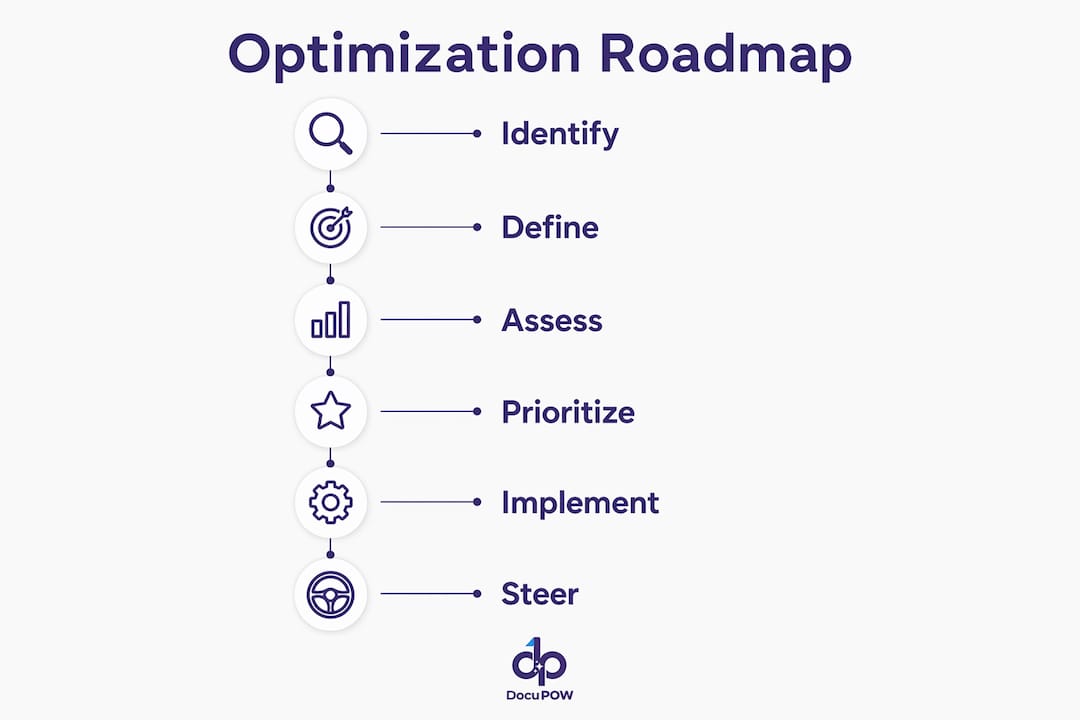
    Capgemini’s six-phase framework (identify, define, assess, prioritize, implement, steer) maps cleanly onto a five-phase execution sequence for document workflows. The table below shows what each phase produces and how long it typically takes.

    Phase Key Output Typical Duration
    Assess Baseline metrics: cycle time, error rate, cost per document Weeks 1–2
    Map End-to-end workflow diagram with friction points annotated Week 2
    Prioritize Ranked list of document types by volume, complexity, and downstream impact Week 2
    Pilot Validated extraction model, integration test, ROI proof point Weeks 4–12
    Scale Governed rollout with SLAs, monitoring, and retraining schedule Post-week 12

    Infographic of document workflow optimization phases

    Before you hand anything to a vendor, gather: representative data samples (minimum 200–500 documents per type), current SLAs and exception-handling rules, security and data-residency requirements, and a named IT owner for integration access.

    How does AI-driven document processing actually work?

    Document automation is the missing link for ERPs and CRMs. Without structured extraction feeding those systems, you get fragmented visibility, duplicate records, and reporting you cannot trust. The technical patterns that make modern platforms reliable are worth understanding before you evaluate vendors.

    Core patterns in Intelligent Document Processing (IDP):

    • Template-free extraction uses large language models and computer vision to locate and pull fields from any document layout, with no pre-built template required.
    • NLP classification routes documents to the correct workflow based on content, not filename or folder.
    • Human-in-the-loop review flags low-confidence extractions for a human validator, then feeds that correction back into the model. Accuracy improves over time without IT involvement.
    • Autonomous agents orchestrate multi-step workflows: extract, validate, enrich, route, and push to downstream systems in a single automated sequence.
    • API integration delivers structured data directly into SAP, Oracle, Salesforce, or any ERP/CRM, eliminating manual re-entry. For a deeper look at connecting document automation to existing systems, the integration patterns are well-documented.

    The contrast with legacy approaches is stark:

    Dimension Template-based OCR AI-driven IDP
    Layout changes Breaks; requires IT rebuild Adapts automatically
    New document types Weeks of template work Zero-shot extraction
    Accuracy ceiling around 80% without human review above 95% with human-in-the-loop
    IT maintenance High (recurring) Near-zero

    What metrics and ROI should you build your business case on?

    Primary KPIs to track: time per document, throughput volume, error rate, automation rate, invoice cycle time, cost per document, and FTE-equivalent hours freed. Track all of them at baseline before the pilot starts.

    Hidden cost categories most teams omit: waiting time between steps, search and retrieval time, rework after errors, audit remediation labor, and the opportunity cost of staff doing work a system should handle. These hidden costs are where the majority of the business case lives.

    An ROI model for a mid-sized operations team processing a substantial volume of invoices per month shows labor savings leading to payback within several months under typical automation rates.

    Practitioner data shows payback within 4–9 months when hidden costs are included. For a broader view of how to structure the business automation ROI calculation, independent frameworks confirm the same cost categories matter most.

    Pro Tip: Measure your baseline for at least four weeks before the pilot. One week of data is almost always atypical. Four weeks captures end-of-month spikes, exception volumes, and the rework cycles that inflate true cost.

    What security and compliance controls does your team need?

    Enterprise document automation touches sensitive financial, legal, and operational data. The controls below are non-negotiable before any production deployment.

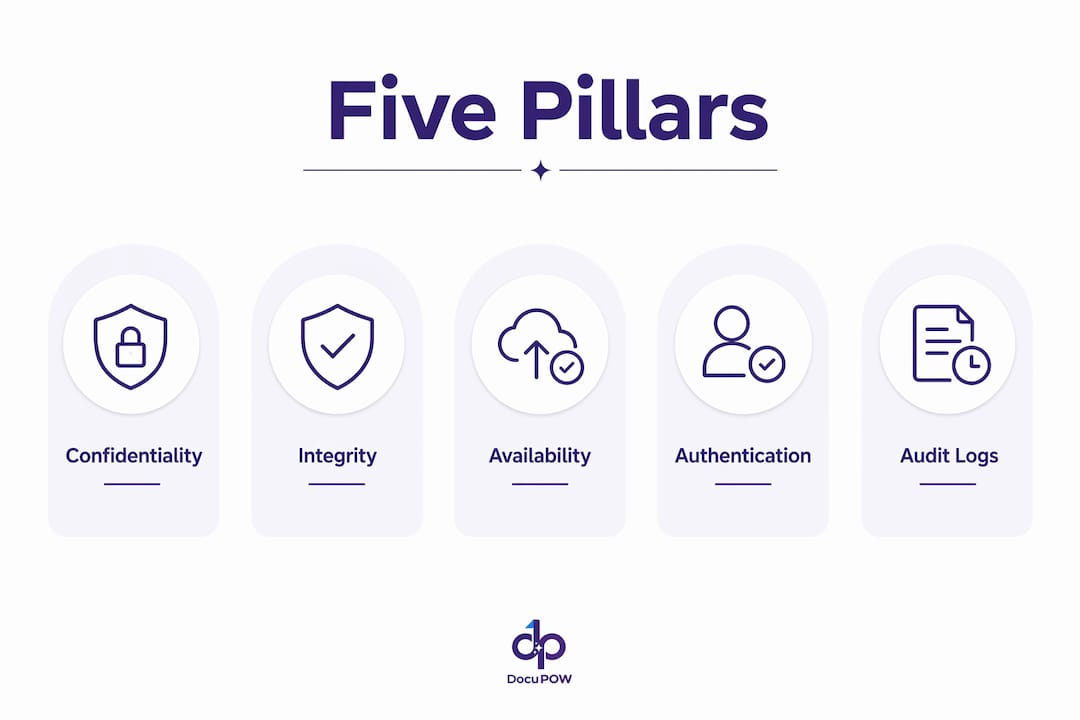
    • Encryption in transit (TLS 1.2+) and at rest (AES-256 or equivalent)
    • Role-based access control with least-privilege enforcement
    • Immutable audit trails logging every extraction, validation, and routing decision
    • Configurable retention and deletion policies aligned to your data governance framework
    • SOC 2 Type II attestation (or equivalent) from the vendor
    • Data-residency options if your organization operates under HIPAA, CCPA, or sector-specific regulations

    Operational risks to mitigate: data leakage via poorly scoped API integrations, model drift as document layouts evolve, automated decision errors on edge cases, and vendor lock-in from proprietary data formats. AI governance controls built into the platform, rather than bolted on afterward, are the cleaner solution.

    Human-in-the-loop review is not just an accuracy feature. It is a compliance control. Every low-confidence extraction that routes to a human validator creates a documented decision record. That record is what survives an audit.

    IT teams own the governance layer here. For a detailed breakdown of why IT teams manage document automation rather than business units alone, the operational and security rationale is clear.

    Why DocuPOW fits enterprise document processing needs

    DocuPOW’s platform is built around the patterns that matter most for enterprise document workflows: template-free extraction via autonomous agents, human-in-the-loop review with continuous learning, multi-step workflow orchestration, real-time analytics and predictive insights, and ERP/CRM integration via API.

    The subscription model (monthly or annual, usage-tiered) means no large upfront commitment. A pilot can start with a single document type, a defined data set, and a clear success metric. The platform’s capabilities cover the full IDP stack: extraction, classification, orchestration, search, and analytics in one environment.

    For finance teams, automated three-way matching (PO, invoice, receipt) is a common first pilot because the volume is high, the ROI is measurable within weeks, and the downstream ERP integration is well-defined.

    How do you run a low-risk pilot in 4–12 weeks?

    Scope selection criteria: pick a document type with high monthly volume (100+ per month), predictable structure, and a clear downstream system that consumes the extracted data. Accounts payable invoices, purchase orders, and shipping documents are the most common starting points.

    Hands typing preparing document pilot data

    Milestone Week Success Criteria
    Data readiness 200–500 labeled samples delivered; integration credentials confirmed
    Model baseline 2 Extraction accuracy >85% on held-out test set
    Human review threshold set 4 Confidence threshold defined; exception queue staffed
    Integration cutover 5–7 Structured data flowing into ERP/CRM; zero manual re-entry
    Pilot review 10–12 Automation rate, error rate, and cycle time vs. baseline

    For AI-powered workflow steps that align business and IT during implementation, the sequencing of data readiness before model tuning is the detail most pilots get wrong. Roll/fail criteria: if automation rate is below 60% at week 10, pause and investigate data quality before expanding scope.

    Key Takeaways

    Mapping workflows before automating is the single decision that separates successful process optimization programs from expensive failures.

    Point Details
    Map before you automate Identify friction points and root causes before any tool selection or pilot begins.
    Include hidden costs Hidden processing costs are typically 2.3x–4.7x visible labor; omitting them understates ROI.
    Pilot fast, measure baseline Run a 4–12 week pilot on a high-volume document type; measure four weeks of baseline first.
    Require enterprise security Demand SOC 2, audit trails, encryption, and human-in-the-loop controls before production.
    DocuPOW as pilot path DocuPOW’s template-free, agent-based platform supports a low-risk pilot with measurable payback within 4–9 months.

    What experienced implementers do differently

    The gap between a successful rollout and a stalled one usually comes down to change management, not technology. The teams that get this right do two things most don’t: they involve the people who handle exceptions in the pilot design, and they set realistic accuracy expectations before go-live.

    A 90% automation rate sounds impressive until your AP team discovers the 10% exception queue is all the hard cases, and nobody trained them on the new review interface. The fix is straightforward: run a two-week shadow period where the system processes documents in parallel with the existing manual workflow. Staff see the outputs, flag disagreements, and build confidence before the cutover. That shadow period also surfaces edge cases the model hasn’t seen, which improves accuracy before it matters.

    Continuous improvement means scheduling a quarterly review of automation rates, exception patterns, and new document types entering the workflow. Process optimization is not a deployment. It is a governance rhythm.

    Ready to validate this playbook with a DocuPOW pilot?

    The fastest way to prove the ROI case internally is a scoped, time-boxed pilot on your highest-volume document type. DocuPOW’s agent-based platform handles template-free extraction from day one, so you are not spending the first month building templates before you see a single result.
    DocuPOW

    A pilot typically runs 4–12 weeks, produces measurable cycle-time and accuracy data against your own baseline, and requires no long-term commitment upfront. For operations and finance teams, the document process automation benefits are clearest when the numbers come from your own documents, not a vendor’s case study. Start with your highest-volume document type and a defined success metric, then explore the platform to see how DocuPOW scales from pilot to enterprise deployment.

    Selected sources and further reading

    • Salesforce: Process automation and the iterative optimization cycle — supports the mapping-first principle and continuous improvement framing
    • Capgemini: Outlining the path to value from process optimization — source for the six-phase framework used in the roadmap section
    • IBM: Four benefits of applying AI-led automation to document processing — ERP/CRM integration value and structured data dependency
    • DocuExprt: The hidden cost of manual document processing — primary source for the 2.3x–4.7x hidden cost multiplier, 92% time reduction figure, and 4–9 month payback data
    • Luce IT: The hidden cost of manual document management — template maintenance burden and IDP technical patterns
    • Celonis: Process Optimization Report (IT Edition) — survey data on IT leader optimization frequency and continuous improvement gaps
    • Bika.ai: How AI document automation improves quality, compliance, and brand consistency — governance and compliance controls in AI document systems

    FAQ

    What is the first step in process optimization for document workflows?

    Map the current workflow end-to-end before selecting any tool. Identify where waiting time, rework, and exception handling consume the most time, since those friction points determine where automation delivers the highest return.

    How long does a document automation pilot typically take?

    A well-scoped pilot runs 4–12 weeks, from data readiness through integration cutover and results review. Payback typically follows within 4–9 months when hidden costs are included in the ROI model.

    What hidden costs should an ROI model include?

    Beyond visible labor, include waiting time between process steps, search and retrieval time, rework after data errors, audit remediation labor, and the opportunity cost of staff handling tasks that automation can own.

    How does DocuPOW handle documents with changing layouts?

    DocuPOW uses template-free extraction via autonomous agents, so layout changes do not break the system. The platform adapts without IT rebuilding templates, which removes the recurring maintenance cost that legacy OCR systems carry.

    What security controls should you require before deploying document automation?

    At minimum: TLS encryption in transit, AES-256 at rest, role-based access control, immutable audit trails, SOC 2 Type II attestation, and configurable data retention policies. Human-in-the-loop review adds a documented decision record that supports audit readiness.

  • Paperless Operations for Enterprise Leaders: Cut Time-to-Close

    Paperless Operations for Enterprise Leaders: Cut Time-to-Close

    Paperless operations, at the enterprise level, means replacing static scanned pages with governed digital job records that drive scheduling, asset updates, and reporting from structured data. The primary outcome: faster time-to-close on every document-intensive process. If you’re evaluating where to start, three moves matter most:

    • Identify one high-value workflow (invoices, field job closures, or contracts under active negotiation) where paper delays are costing measurable time.
    • Run a 4–8 week pilot on that workflow before committing to enterprise-wide rollout.
    • Baseline your time-to-close before the pilot begins, so you have a number to beat.

    79.5 % des organisations utilisent encore un modèle hybride papier + électronique, tandis que 20,5 % seulement déclarent des workflows entièrement numériques — ce qui indique un large potentiel de marché et des obstacles courants à la transition. DocuPOW’s agent-based platform is built specifically for this kind of pilot: template-free extraction, workflow orchestration, and real-time KPI tracking from day one.

    Table of Contents

    Why enterprise leaders must act on paperless operations now

    The financial case is harder to ignore than most leaders realize. Filing, retrieving, and recreating paper documents incur notable labor costs, and annual paper, storage, and labor expenses can accumulate substantially for companies. That’s before you factor in the compliance exposure of paper-based audit trails.

    The operational benefits of going fully digital compound quickly:

    • Faster decisions: structured digital records surface data in seconds instead of hours.
    • Lower operating cost: eliminate printing, physical storage, and manual retrieval labor.
    • Improved auditability: every document change is logged, timestamped, and tied to an identity.
    • Better customer responsiveness: digital job records close faster, which means invoices go out sooner and customers get answers without waiting for someone to find a file.
    • Sustainability gains: reduced paper usage cuts carbon footprint and supports ESG reporting.

    Key metrics to define before you start: Time-to-close (elapsed time from document creation to final approval), missing documentation rate (percentage of jobs with incomplete records), job turnaround time (end-to-end cycle), error rate (data entry mistakes per 100 documents), and cost per document (fully loaded, including labor).

    Workflow automation studies report significant productivity gains and faster process times when automation is adopted end-to-end, though exact figures vary. Those numbers don’t materialize from scanning alone. They come from connected, structured records that feed downstream systems automatically.

    What does a modern paperless system actually contain?

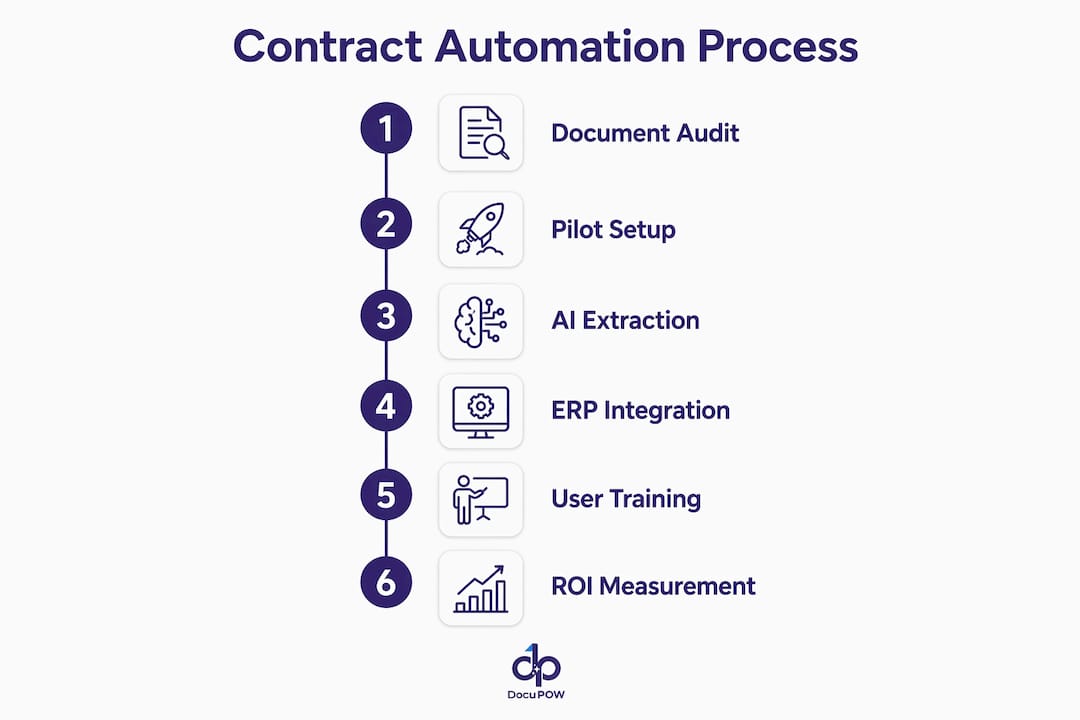
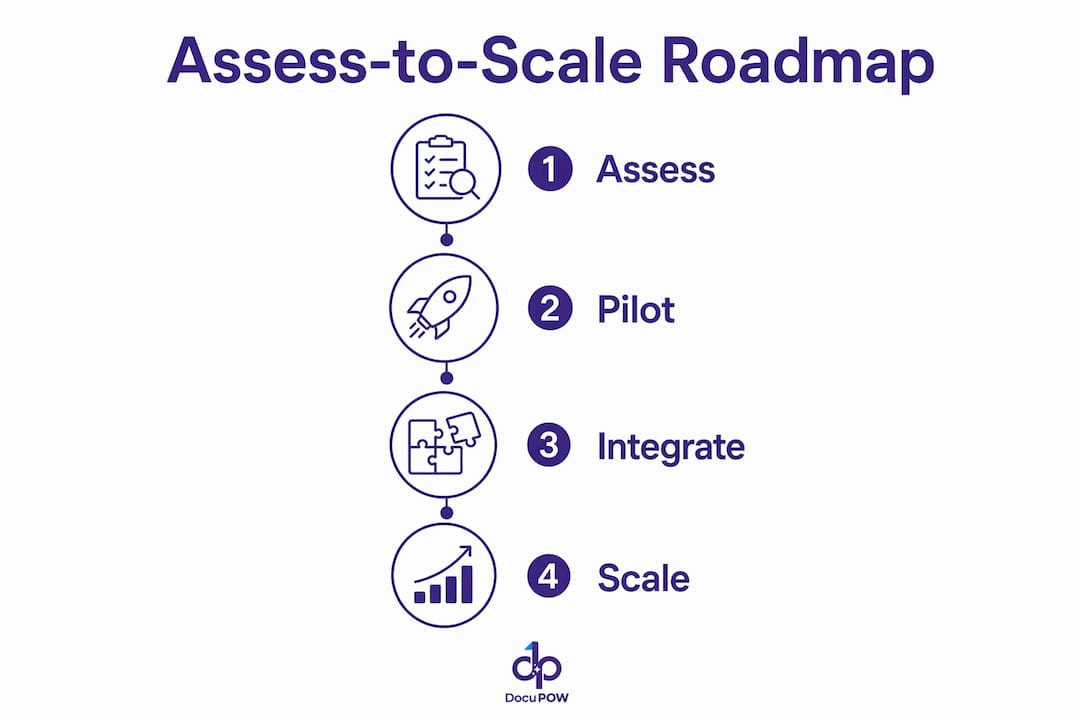
    Infographic showing assess-to-scale paperless roadmap

    The architecture has six layers. Miss one and the whole chain breaks.

    Hands sketching paperless system architecture diagram

    Component Function Enterprise Example
    Capture Digital intake via web, mobile, email, or EDI Field technicians submit job records offline; sync on reconnect
    AI Extraction Template-free field identification and data pull Invoices from multiple supplier formats parsed without manual mapping
    Workflow Orchestration Multi-step routing, approvals, conditional logic AP invoice routed to manager above threshold automatically
    Integrations API connections to ERP, CRM, accounts payable Extracted PO data posted directly to SAP or NetSuite
    Human-in-the-Loop Exception flagging, audit sampling, model feedback Low-confidence extractions queued for reviewer; corrections retrain the model
    Analytics Real-time dashboards, SLA tracking, predictive alerts Exception queue size and throughput visible to ops leads daily

    Security sits across all six: role-based access, SSO integration, encrypted storage, and a full audit log that ties every action to a user and timestamp. For US enterprises navigating HIPAA, SOX, or state-level privacy laws, digital systems provide the access controls and versioned audit trails that paper simply cannot.

    Pro Tip: Template-free AI extraction matters most when your document fleet is heterogeneous. If you receive invoices, contracts, and field reports from dozens of sources in different formats, a template-based system forces you to build and maintain a template for each one. Agent-based extraction reads context instead, which cuts maintenance overhead and eliminates the vendor lock that comes with rigid template libraries. For a deeper look at how modern AI extraction compares to legacy OCR approaches, the IDP vs. OCR breakdown from Sentient Concepts is worth ten minutes.

    How to run the assess-to-scale roadmap

    Phase 1: Assess (weeks 1–3). Audit your document types by volume, error rate, and business impact. Rank workflows by time-to-close cost. Perform a compatibility audit between your candidate platform and existing ERP/CRM systems before signing anything. Integration gaps found mid-implementation are the most common cause of timeline slips.

    Phase 2: Pilot (weeks 4–11). Select one active, high-impact workflow. Invoices, contracts under negotiation, and field job closures produce the fastest ROI. Run 4–8 weeks. Critères d’acceptation : précision d’extraction supérieure au seuil convenu, amélioration mesurable du temps de clôture, débit d’intégration conforme aux SLA, et adoption par les équipes de terrain supérieure à 80 %.

    Phase 3: Integrate (weeks 12–18). Connect the platform to your top ERP or CRM via API. Harden security: SSO, role-based permissions, encrypted data at rest and in transit. Document the data flow from capture to downstream system.

    Phase 4: Scale (weeks 19–30+). Roll out to additional workflows using the pilot playbook. Run change management in parallel, not after.

    Stakeholder Role Key Responsibility
    Executive Sponsor Decision authority Budget, escalation, cross-department alignment
    Process Owner Workflow expert Requirements, acceptance criteria, frontline liaison
    IT Integration Lead Technical delivery API connections, security hardening, middleware
    Compliance Officer Governance Audit trail review, regulatory sign-off
    Vendor/PM Delivery coordination Timeline, SLA tracking, model tuning

    L’implication des équipes de terrain dès la phase 1 dans la conception des workflows est le facteur le plus fiable pour une adoption supérieure à 80 %.

    How to measure success and read your dashboard

    Measure paperless success by operational KPIs, not by pages eliminated. Pages are an output metric. Time-to-close is a business metric.

    KPI Formula Baseline Target Pilot Target
    Time-to-close Date approved minus date created Measure in week 1 Reduce significantly
    Missing-document rate Incomplete jobs / total jobs Measure in week 1 Under 5%
    Extraction accuracy Correct fields / total fields extracted High accuracy
    Cost per document Total processing cost / volume Measure in week 1 Reduce significantly
    Human review rate Exceptions / total documents Low error rate

    A well-configured dashboard surfaces throughput, SLA breaches, exception queue size, and human review rate daily. When the exception queue spikes, that’s a signal to retrain the extraction model or investigate a new document variant entering the pipeline.

    How AI enforces quality, compliance, and brand integrity at scale

    AI-driven rules embedded in document workflows enforce brand, legal, and quality controls automatically. In practice, this means:

    • Approved clause libraries prevent non-standard contract language from reaching a customer without review.
    • Pricing guardrails block out-of-range figures from appearing on outbound quotes.
    • Brand templates apply consistent formatting, tone, and visual identity across departments.
    • Conditional content insertion pulls the correct localized language or regulatory disclosure based on document context.

    Human-in-the-loop patterns keep governance intact without slowing everything down. Low-confidence extractions route to a reviewer queue. A random sample of high-confidence outputs goes to audit. Reviewer corrections feed back into the model, improving accuracy over time.

    Every document action is tied to an identity, a timestamp, and a source record. That’s the audit trail regulators expect and paper cannot produce.

    Common pitfalls and vendor red flags to avoid

    Pitfalls that derail programs:

    • Scanning the entire legacy archive before going live. Use scan-on-retrieval instead: convert active documents first, pull legacy records on demand.
    • Skipping the compatibility audit. ERP/CRM integration gaps discovered after contract signing are expensive to fix.
    • Excluding frontline employees from design. Their workarounds become your adoption problem.
    • Defining success as “paper eliminated” rather than KPIs like time-to-close or error rate.
    • Underestimating change management. Budget time and resources for training, not just technology.

    Vendor red flags to watch:

    1. Rigid template reliance with no template-free extraction option.
    2. Vague SLAs for extraction accuracy or throughput, with no contractual commitment.
    3. No transparent audit log accessible to your compliance team.
    4. Poor or undocumented API support for your ERP/CRM stack.
    5. Hidden pricing on volume scaling, where per-document costs spike after a threshold.

    For each red flag, ask the vendor for a live demonstration, not a slide deck. Accuracy claims without a demo on your own documents are marketing, not evidence. Understanding how enterprises should govern agentic AI before it enters workflows is equally important when evaluating vendors.

    Key Takeaways

    Enterprise paperless operations succeed when they are built on governed digital job records, piloted in high-impact workflows, and measured by time-to-close rather than pages eliminated.

    Point Details
    Start with one workflow Pilotez les factures, contrats ou clôtures de missions terrain en premier pour le ROI le plus rapide.
    Baseline before you build Mesurez le temps de clôture, le taux de documents manquants et le coût par document dès la semaine 1.
    Compatibility audit is non-negotiable Les écarts d’intégration ERP/CRM découverts en cours de projet sont la principale cause de dépassements budgétaires.
    Implication des équipes de terrain dès la phase 1 Adoption supérieure à 80 % si la conception des workflows inclut les équipes de terrain dès le départ.
    DocuPOW pour des pilotes sans modèle DocuPOW effectue l’extraction contextuelle sur des jeux documentaires hétérogènes sans bibliothèque de modèles rigides.

    Why agent-based AI is the decisive advantage

    Template-based document processing works until your document fleet stops being predictable. The moment a new supplier sends invoices in a different format, or a field team starts submitting reports with a new structure, a template-based system breaks and someone has to fix it manually. That maintenance cost is invisible in vendor demos and very visible in production.

    Agent-based systems read document context instead of matching fields to a pre-built map. In accounts payable, that means a new supplier format processes correctly on the first submission, not after a two-week template build. In field operations, it means job records from different crews and equipment types all feed the same structured pipeline without custom configuration per crew.

    The AI document processing examples that produce the clearest ROI share one characteristic: high document variability. That’s exactly where agent-based extraction earns its keep, and where template-heavy platforms create long-term technical debt.

    DocuPOW closes the gap between pilot and production

    Most enterprise automation projects stall between pilot success and full deployment. The technology works in the test environment, then integration complexity, change management gaps, and governance questions slow the rollout to a crawl. DocuPOW is built to close that gap.

    DocuPOW

    The platform covers the full stack: template-free AI extraction across any document type, agentic workflow orchestration with multi-step conditional logic, human-in-the-loop audit queues, real-time analytics dashboards, and pre-built integrations to major ERP and CRM systems via API. Enterprise security features include SSO, role-based access, encrypted storage, and a complete audit trail for regulatory compliance.

    Pilots typically run 4–8 weeks on a single high-impact workflow, with KPI baselines set in week one and measurable time-to-close improvements tracked through the document process automation benefits dashboard. From there, the same architecture scales to additional workflows without rebuilding the foundation.

    Request a pilot or explore the full platform at the enterprise automation guide.

    Further reading and vendor-evaluation checklist

    DocuPOW resources:

    Vendor-evaluation checklist for procurement teams:

    • Scalability: can the platform handle your peak document volume without per-document cost spikes?
    • Integrations: does the vendor provide documented APIs for your ERP and CRM stack?
    • Governance: is the audit log accessible to your compliance team in real time?
    • Pricing transparency: are volume tiers and overage costs stated in the contract?
    • Support SLAs: what are the committed response times for extraction accuracy issues?
    • Security certifications: does the vendor hold SOC 2 Type II or equivalent?

    US compliance and governance references:

    • Federal Trade Commission data security guidance: ftc.gov
    • California Consumer Privacy Act: oag.ca.gov/privacy/ccpa

    FAQ

    What are paperless operations in an enterprise context?

    Paperless operations means replacing paper-based processes with governed digital job records that drive scheduling, approvals, and reporting from structured data. The goal is faster time-to-close, not just fewer printed pages.

    How long does a paperless operations pilot typically take?

    A focused pilot on one high-impact workflow, such as AP invoices or field job closures, typically runs 4–8 weeks and produces measurable KPI data before any enterprise-wide commitment.

    What KPIs should I track to measure paperless success?

    Track time-to-close, missing-document rate, extraction accuracy, cost per document, and human review rate. These metrics tie directly to business outcomes rather than activity volume.

    How does DocuPOW handle documents from multiple suppliers or formats?

    DocuPOW uses agent-based, template-free extraction that reads document context rather than matching fields to a pre-built map, so new supplier formats process correctly without manual template configuration.

    What compliance standards do digital document systems support?

    Digital systems with role-based access, encrypted storage, and versioned audit trails support HIPAA, SOX, GDPR, and state-level requirements such as the California Consumer Privacy Act. Confirm your vendor’s specific certifications before deployment.

  • Contract Analysis for Enterprises: Secure, Measurable AI

    Contract Analysis for Enterprises: Secure, Measurable AI


    TL;DR:

    • AI-powered contract analysis automates up to 80% of first-pass review tasks, reducing attorney workload and cycle times.
    • Organizations must ensure SOC 2 Type II, Zero Data Retention, and GDPR compliance before vendor evaluation to mitigate risks.

    AI-powered contract analysis converts unstructured contracts into structured data and automates approximately 70–80% of first-pass review tasks, including clause extraction, playbook comparison, and obligation capture. That means fewer low-risk contracts consuming attorney time, faster cycle times, and cleaner routing for the exceptions that actually need judgment. Before you evaluate any vendor, demand three things upfront: SOC 2 Type II evidence, explicit Zero Data Retention (ZDR) or a signed Data Processing Agreement (DPA), and GDPR-compatible data handling. DocuPOW is one enterprise-capable platform built around these controls, using autonomous AI agents that extract data without rigid templates.

    • AI handles clause extraction, obligation dates, playbook checks, and risk scoring automatically.
    • Security prerequisites: SOC 2 Type II, ZDR, GDPR controls, encryption in transit and at rest.
    • Expected outcomes: shorter review cycles, fewer renewal misses, and clearer exception routing.

    Table of Contents

    What contract analysis actually automates for enterprise teams

    The highest-value use cases share a common profile: high volume, rule-bound, and tied to a measurable cost. Clause extraction identifies liabilities, data protection provisions, commercial terms, and compliance references, then normalizes them into a shared taxonomy for routing and comparison.

    • NDAs and vendor MSAs: Auto-flag non-standard indemnities and liability caps; route exceptions to legal ops instead of queuing every contract for attorney review.
    • Procurement contracts: Surface payment terms, price escalators, and termination rights across hundreds of agreements simultaneously. KPI: outside-counsel spend per contract.
    • Privacy addenda and data processing agreements: Detect missing GDPR/CCPA clauses and route to privacy counsel. KPI: exception rate and compliance cycle time.
    • Real estate leases: Extract renewal dates, rent escalators, and landlord consent requirements automatically. KPI: renewal leakage avoided.
    • IT vendor agreements: Pull SLA thresholds, uptime guarantees, and auto-renewal triggers. KPI: days-to-close and renewal miss rate.

    Each of these families benefits from AI-driven contract analysis because the playbooks are definable, the volume is repeatable, and the cost of a missed clause is measurable.

    How modern AI-powered contract review actually works

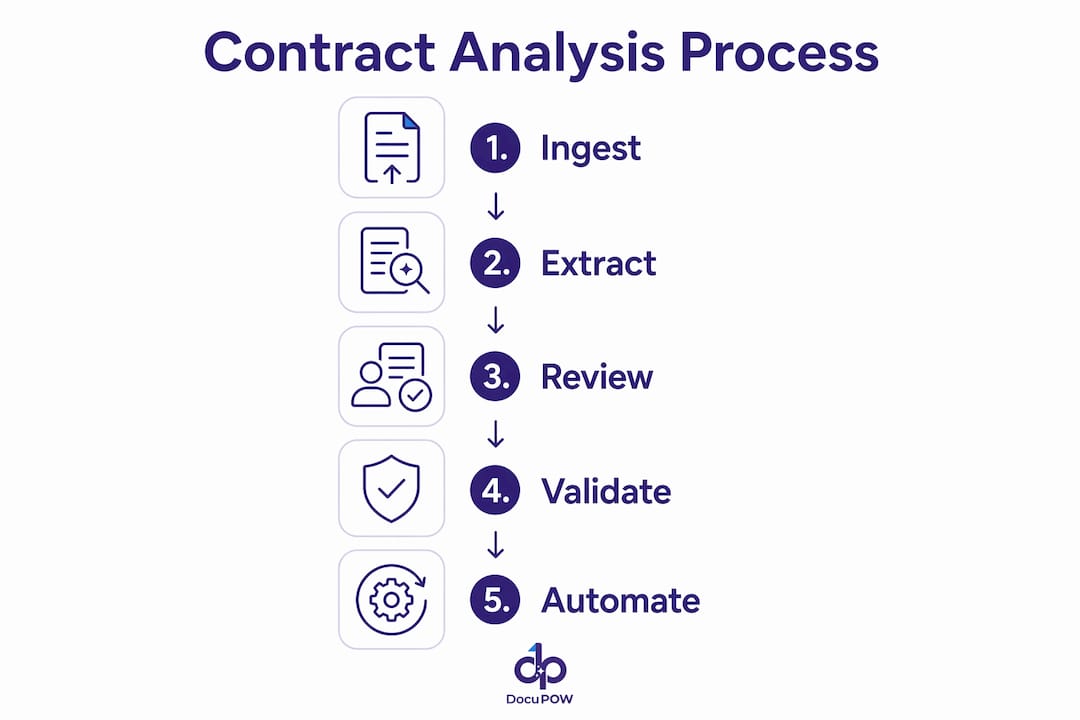
    The pipeline has six stages, and understanding each one helps technical stakeholders ask the right integration questions.

    • Intake and OCR: Contracts arrive via email, shared drives, CLM, or API. Optical character recognition converts scanned PDFs into machine-readable text.
    • Clause extraction and normalization: NLP models identify clause types, extract values, and map them to a standard taxonomy (e.g., “Limitation of Liability” → dollar cap + carve-outs).
    • Playbook comparison: Extracted positions are checked against approved, fallback, and prohibited positions defined by legal ops.
    • Risk scoring and routing: Contracts score against thresholds. Low-risk agreements route to auto-approval; exceptions route to the right reviewer.
    • Workflow integration: Outputs push to CLM, ERP, CRM, or shared drives via webhooks or API. SSO/SCIM handles identity.
    • Audit trail: Every extraction, comparison, and routing decision is logged with timestamps and reviewer actions.

    The grounding layer matters as much as the model. A Retrieval-Augmented Generation (RAG) architecture connects the AI to your approved clause libraries and fallback positions, so outputs reflect organizational policy rather than generic legal language. Without that context, the system surfaces process ambiguity faster than it resolves it.

    Pro Tip: Require “Citation-First” output from any vendor you evaluate. Every extracted value should return the exact quote plus page and paragraph location. This single requirement cuts verification time and prevents hallucinations from reaching reviewers.

    Man reviewing contracts using tablet in boardroom

    What security and governance controls should you demand?

    Infographic showing contract analysis process steps

    Shadow AI is the most underappreciated risk in contract automation. Employees using consumer chatbots for contract review expose IP and confidential terms to third-party training pipelines. The enterprise-grade architecture required to eliminate that risk has specific, checkable components.

    Technical controls checklist:

    • Zero Data Retention (ZDR) or explicit DPA with deletion SLAs
    • SOC 2 Type II report (request the actual report, not a summary)
    • Encryption in transit (TLS 1.2+) and at rest (AES-256)
    • Bring Your Own Key (BYOK) option for regulated industries
    • Tenant isolation — your data never touches another customer’s environment
    • Field-level redaction for PHI and PII
    • Role-based access control with audit logs

    Contractual asks:

    • Defined breach notification timelines (72 hours is the GDPR standard)
    • Incident response SLAs and tabletop exercise rights
    • Audit rights covering data deletion and subprocessor chains

    KPMG’s guidance on enterprise AI adoption specifically calls out clause lineage, version history, reviewer logs, and retention/legal-hold policies as required in regulated industries. If a vendor cannot produce SOC 2 evidence and a signed DPA before the pilot, that is your answer.

    How do you measure ROI and choose which contracts to automate first?

    KPMG recommends establishing a performance baseline before selecting tooling. Capture these six metrics before the pilot starts:

    • Average review time per contract (minutes)
    • Legal touches per contract
    • Exception rate (% requiring negotiation)
    • Renewal misses in the past 12 months
    • Outside-counsel spend per contract family
    • Contract velocity (calendar days from request to signature)

    Cohort selection criteria: volume above 30 contracts per month, repeatable playbooks, clean source documents, and cross-functional impact (finance, security, or procurement). Point solutions are cost-effective for teams under roughly 50 contracts per month; enterprise CLM typically pays back above roughly 200 contracts per month.

    Metric Pre-Pilot Baseline Target After Pilot Phase
    Avg. review time Capture in minutes Reduce by 50%+
    Legal touches/contract Count per family Reduce substantially
    Renewal miss rate Count from past year Target zero misses
    Outside-counsel spend $ per contract family Reduce by 30%+
    Days-to-close Calendar days Reduce substantially

    For a rough labor-savings estimate: multiply minutes saved per contract by monthly volume by the fully loaded hourly rate of the reviewer. Even 45 minutes saved per NDA at $150/hour across 200 NDAs per month is $22,500 in monthly labor value. That math builds the business case before procurement asks for it. For measuring AI ROI across the broader initiative, tie each metric to a named owner from day one.

    A practical roadmap from pilot to production

    Phased implementation is the pattern that works. Skipping playbook definition or rushing to auto-approval before calibration is the most common reason pilots stall.

    1. Weeks 0–4 — Scope and playbook definition: Select 3–5 contract families. Define approved, fallback, and prohibited positions for each clause type. Assign legal ops owners for exceptions.
    2. Weeks 4–8 — Pilot with human-in-the-loop: Run the AI alongside existing review. Compare AI outputs to attorney decisions. Calibrate confidence thresholds. Do not auto-approve anything yet.
    3. Months 3–6 — Integration and threshold-setting: Connect to CLM, ERP, or CRM via API. Set auto-approval thresholds for low-risk contracts. Establish escalation paths for exceptions.
    4. Month 6+ — Scale and continuous tuning: Expand to additional contract families. Review accuracy quarterly. Update playbooks as business terms evolve.
    Role Responsibility
    Legal ops Playbook ownership, exception review, accuracy sign-off
    Privacy/security DPA review, ZDR verification, incident response
    Procurement Vendor contract families, SLA and payment term extraction
    IT/integration API, SSO/SCIM, CLM/ERP data sync
    Change management Reviewer training, adoption tracking
    Vendor support SLA commitments, calibration support, escalation path

    Common pitfalls and how to avoid them

    Most pilots that fail do so for organizational reasons, not technical ones.

    • No playbooks: AI cannot compare against positions that do not exist. Define approved/fallback/prohibited before ingesting a single contract.
    • Poor document quality: Scanned PDFs with low resolution or handwritten annotations degrade extraction accuracy. Audit source documents before the pilot.
    • AI as a replacement for legal judgment: AI narrows attention; it does not replace negotiation strategy or risk judgment. Position it as a triage tool, not a decision-maker.
    • Missing integrations: Extracted data sitting in a separate tool creates a second source of truth. Map integration points before vendor selection.
    • Insufficient security assurances: Require SOC 2 evidence and a signed DPA before the pilot, not after.
    • Ignoring change management: Reviewers who distrust AI outputs will re-review everything manually, eliminating the efficiency gain. Train early and show accuracy data.

    If accuracy drops during the pilot, three stop-gap measures help: narrow the cohort to the simplest contract family, raise the confidence threshold for auto-approval, and enforce Citation-First verification on every flagged clause until calibration improves.

    Why DocuPOW is a practical choice for enterprise contract analysis

    DocuPOW’s autonomous AI agents extract data from contracts without relying on rigid templates, which matters when your vendor agreements and leases vary in structure across counterparties. The platform’s extraction engine understands document context rather than matching fixed fields, so it handles non-standard clause placement without retraining.

    • Template-free extraction: Handles structural variation across contract families without manual template maintenance.
    • Real-time analytics: Surfaces renewal dates, payment terms, and SLA thresholds in live dashboards rather than static exports.
    • Integration-ready: Connects to CLM, ERP, and CRM systems via API, supporting the enterprise AI integration patterns described in the roadmap above.
    • Audit trail: Every extraction is logged with source location, supporting Citation-First verification and reviewer accountability.

    A real estate or manufacturing pilot typically starts with lease renewals or vendor MSAs, measuring cycle time reduction and renewal miss rate as primary KPIs. DocuPOW maps to the security checklist above: request the SOC 2 report and DPA terms during vendor evaluation.

    Key Takeaways

    AI-powered contract analysis automates approximately 70–80% of first-pass review tasks, but measurable ROI requires baseline metrics, defined playbooks, and SOC 2-compliant security controls before the pilot starts.

    Point Details
    Automate 70–80% first-pass AI handles clause extraction, playbook checks, and routing; attorneys handle judgment.
    Baseline before tooling Capture review time, legal touches, renewal misses, and outside-counsel spend first.
    Security non-negotiables Require SOC 2 Type II, ZDR or signed DPA, and BYOK before any vendor onboards your contracts.
    Citation-First verification Every extracted value must return an exact quote and page location to prevent hallucinations.
    DocuPOW for enterprise pilots Template-free extraction, real-time analytics, and API integrations support a 4–8 week calibration pilot.

    The part most enterprise teams get wrong

    The technology is not the hard part. Most enterprise AI contract pilots stall because the organization has not done the pre-work: no defined playbooks, no baseline metrics, no clear owner for exceptions. Teams buy a tool expecting it to solve an organizational problem, and when accuracy is imperfect at week six, confidence collapses.

    The better framing is to treat AI as a triage layer, not an answer machine. Its job is to narrow the stack of contracts requiring human attention from 100% to 20–30%, and to make the remaining review faster through Citation-First outputs. The legal team’s job does not shrink; it shifts toward negotiation, strategy, and the exceptions that actually carry risk. Organizations that internalize that distinction before the pilot starts consistently outperform those that position AI as headcount reduction. The required organizational changes, specifically playbook governance and named reviewer ownership, are not implementation details. They are the actual product.

    DocuPOW cuts contract review cycles without the setup overhead

    Most enterprise teams spend more time configuring a contract analysis tool than reviewing contracts. DocuPOW’s template-free extraction means you are not building field maps for every counterparty format before the pilot produces value. Connect your contract repository, define your playbook positions, and DocuPOW’s autonomous agents start extracting renewal dates, payment terms, SLA thresholds, and indemnity positions from day one.

    DocuPOW

    A standard pilot runs 4–8 weeks: ingest 3–5 contract families, calibrate confidence thresholds with human-in-the-loop review, and measure cycle time and renewal miss rate against your pre-pilot baseline. The high-volume document processing guide walks through the operational setup in detail. For teams managing real estate portfolios or vendor MSAs at scale, the DocuPOW platform covers architecture, integrations, and security controls. Request a pilot scoping call to define your first cohort and success metrics.

    FAQ

    What does AI contract analysis actually automate?

    AI automates clause extraction, playbook comparison, obligation and date capture, risk scoring, and workflow routing. Industry experts estimate this covers approximately 70–80% of first-pass review tasks, leaving attorneys to handle negotiation and judgment.

    How long does an enterprise contract analysis pilot take?

    A calibration pilot typically runs 4–8 weeks, covering 3–5 contract families with human-in-the-loop review. Full CLM/ERP integration and auto-approval thresholds generally take 3–6 months to reach production.

    What security certifications should I require from a vendor?

    Require SOC 2 Type II evidence, a signed DPA with deletion SLAs, encryption in transit and at rest, and Zero Data Retention or BYOK options. Request the actual SOC 2 report, not a vendor summary.

    What is Shadow AI and why does it matter for contracts?

    Shadow AI refers to employees using consumer chatbots to review contracts, exposing confidential terms and IP to third-party training pipelines. Enterprise-grade architectures with ZDR and SOC 2 controls eliminate this risk.

    How do I build a business case for contract analysis software?

    Capture six baseline metrics before the pilot: average review time, legal touches per contract, exception rate, renewal misses, outside-counsel spend, and days-to-close. Multiply time saved per contract by volume and fully loaded reviewer cost to quantify labor value.

    Useful sources

    • AI Contract Review Guide (2026) — AI Vortex
    • Mastering AI Contract Analysis in 2026 — linesNcircles
    • AI Revolution: Contract Lifecycle Management — KPMG
    • AI Contract Review Automation Enterprise Guide — Tribble
    • AI-Powered Contract Analysis: Benefits & Challenges — GEP
    • How GenAI Can Drive Innovation in Contract Management — EY
    • AI Contract Analysis Insights — Alice Labs
    • Ways to Measure AI ROI for Business Leaders — Tekkr
    • AI Contract Review & Analysis — Aros Platforms

    This article is general information, not legal advice. Confirm current regulatory requirements and vendor compliance postures with qualified legal counsel and primary sources before deployment.

  • Document Classification: A Practical Guide for Professionals

    Document Classification: A Practical Guide for Professionals


    TL;DR:

    • Document classification assigns labels to documents to route and manage information efficiently.
    • Hybrid approaches combining rules, machine learning, and human review are best for high-volume, diverse, or compliance-driven environments.
    • Pre-ingestion classification keeps access controls and retention policies aligned, reducing costs and errors in production workflows.

    Document classification automatically assigns category labels to documents so teams can route, secure, and act on information at scale. The bottom line: if your document volume is low and variability is predictable, rule-based systems work fine. Once volume climbs, document types diversify, or compliance requirements demand auditability, you need machine learning or a hybrid approach.

    What goes in:

    • Text content, visual layout, and metadata (file type, sender, date, size)

    What comes out:

    • Category labels, confidence scores, and routing decisions

    What happens next:

    • Retention scheduling, access control enforcement, and workflow routing to the right team or system

    When to pick which approach:

    • Rules-based: low volume, stable formats, strict compliance (e.g., a single invoice template from one vendor).
    • ML/deep learning: high volume, variable formats, multiple document types across departments
    • Hybrid: the practical default for most enterprises — rules handle the easy cases, ML handles the rest, and humans review low-confidence outputs

    Table of Contents

    How does document classification work from ingestion to routing?

    Every production classifier runs through the same core stages, even when the underlying model differs. Understanding where each stage sits helps you make better engineering and governance decisions before you write a single line of code.

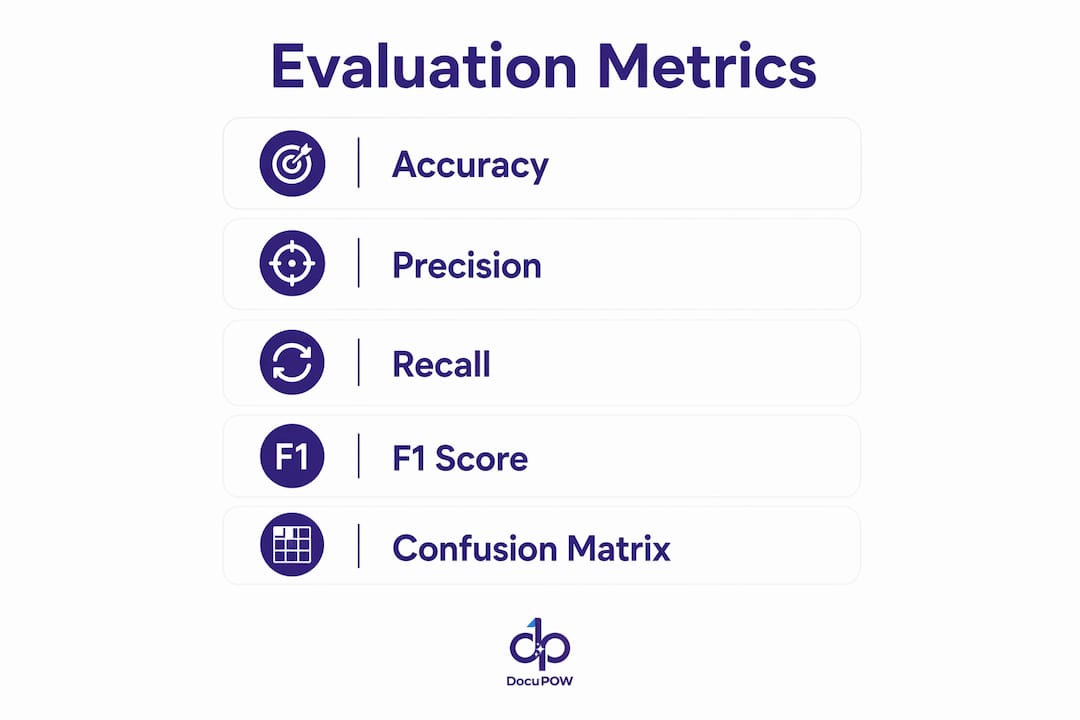
    Infographic showing document classification evaluation metrics

    Stage What happens Key governance decision
    Ingestion Documents enter the pipeline (email, upload, scan, API) Define accepted formats and reject/quarantine rules
    OCR / visual processing Scanned images and PDFs are converted to machine-readable text Choose OCR engine; set minimum DPI and quality thresholds
    Text normalization Tokenization, lowercasing, stopword removal, de-hyphenation Decide language handling and domain-specific vocabulary
    Feature extraction Text n-grams, layout coordinates, metadata fields Select feature set per model family
    Model inference Rules engine, ML model, or LLM assigns a candidate label Set confidence threshold and fallback behavior
    Confidence scoring Model outputs a probability or score per class Define routing tiers (auto-accept, review queue, reject)
    Tagging and routing Accepted labels trigger downstream actions Map labels to retention policies and access controls
    Audit and feedback Human corrections feed back into training data Schedule retraining cadence and ground-truth refresh

    One decision that catches teams off guard: whether to classify before or after ingestion. Classifying after ingestion is the default path of least resistance, but it creates a governance gap. Documents land in a shared repository without labels, which means access controls, retention policies, and downstream AI pipelines all operate on unlabeled data until the classifier catches up. Pre-ingestion classification closes that gap at the source.

    A production GenAI IDP experiment at Associa found that first-page-only classification with OCR raised accuracy from 91% to 95% while cutting per-document cost roughly in half. That result points to a broader principle: you rarely need to process the full document to get a reliable label.

    Pro Tip: Never classify after bulk ingestion if you can avoid it. Pre-ingestion labeling keeps your access controls and retention policies accurate from day one. Retrofitting labels onto an existing repository is expensive, error-prone, and often politically fraught.


    What types of document classification should you use?

    Choosing the right classification type is not a model question — it is an architecture question. The wrong taxonomy design will break a project even when the model itself performs well.

    Content-based, structure-based, and intent-based classification

    Content-based classification assigns labels based on what a document says. A legal brief, a medical record, and a financial statement each carry distinct vocabulary and semantic patterns that a trained model can separate reliably.

    Hands sorting documents by classification types

    Structure/type-based classification focuses on the document’s physical form: is it a form, a letter, a table-heavy spreadsheet, a scanned ID? Layout features (field positions, table structures, header patterns) drive the label rather than the text itself. This approach works well for invoice routing and claims processing, where the document type determines the downstream workflow regardless of content.

    Intent-based classification asks what the sender or author wants. A support ticket that says “my account is locked” has a clear intent (access recovery) even though the words vary wildly across customers. This type is common in customer service triage and procurement request handling.

    Single-label vs. multi-label, flat vs. hierarchical

    Single-label classification assigns one category per document. Multi-label allows several, which matters when a document genuinely belongs to more than one class — a contract addendum that is both a legal record and a financial commitment, for example.

    Flat taxonomies are simpler to train and evaluate. Hierarchical taxonomies (e.g., Financial > Invoices > Purchase Orders) give you more granular routing but require more labeled data per leaf node and more careful evaluation at each level.

    Document type Recommended classification type Taxonomy shape
    Vendor invoices Structure/type-based Flat or shallow hierarchy
    Legal contracts Content-based + multi-label Hierarchical
    Support tickets Intent-based Flat with escalation tiers
    Regulatory filings Content-based + multi-label Hierarchical
    Procurement documents Structure + intent-based Flat
    HR records Content-based Hierarchical

    Decision cheat-sheet:

    • High volume, low variability → rule-based or structure-based, flat taxonomy
    • High variability, compliance-sensitive → content-based ML, hierarchical taxonomy with human review
    • Mixed populations, rapid iteration needed → intent-based or LLM zero-shot, flat taxonomy to start

    How do you build an end-to-end ML workflow for document classification?

    Building a production classifier is a project management problem as much as a modeling problem. The labeling phase alone typically consumes 60–70% of total project time, and teams that underestimate it routinely miss their go-live dates.

    Young man coding ML workflow in home office

    Phase Key activities Realistic timeline
    Data collection Sample across environments (on-prem, cloud, archived); document provenance and consent 1 week
    Labeling Define label taxonomy, train annotators, measure inter-annotator agreement, resolve edge cases 3 weeks
    Train/val/test split 70/15 or 80/10 split; stratify by class; hold out test set until final evaluation 1 week
    Model development Baseline model, iterative improvement, cross-validation, staging evaluation
    Deployment API wrapping, confidence threshold tuning, routing integration, monitoring setup
    Monitoring Drift detection, retraining triggers, ground-truth refresh Ongoing

    Primary cost drivers:

    • Data labeling is almost always the largest line item. Professional annotation services charge per document or per label, and complex documents with ambiguous classes require senior annotators.
    • OCR tuning adds cost when source documents are low-quality scans, handwritten, or in non-standard layouts.
    • Integration with existing document stores, ERPs, or case management systems often takes longer than the modeling work itself.

    For labeling quality, inter-annotator agreement (measured with Cohen’s kappa or Krippendorff’s alpha) should exceed 0.8 before you trust the training set. Below that threshold, the disagreement between annotators will show up as noise in your model’s predictions. Resolve edge cases with a written label guide, not ad hoc judgment calls.

    A hybrid workflow that combines automated classification at scale with a suspect queue for low-confidence documents is the pattern that holds up in production. One large US bank project classified 35 million pages into 275 categories in 42 days using a combination of IDP, RPA, and AI with exactly this architecture.


    Which model should you use for document classification?

    The right model depends on how much labeled data you have, how much compute you can spend, and how explainable the output needs to be.

    Rule-based systems

    Rules engines use keyword lists, regex patterns, and field-position logic. They are fast, fully explainable, and require no training data. The catch: every new document variant requires a manual rule update. They work well when document formats are tightly controlled — a single vendor’s invoice template, a standardized government form — and when compliance teams need to audit exactly why a document received a given label.

    Classical ML: SVMs, Naive Bayes, and tree-based models

    Support Vector Machines and Naive Bayes classifiers train quickly on small labeled sets (a few hundred documents per class) and produce interpretable feature weights. They are the right starting point when you have limited labeled data and need fast iteration. Gradient-boosted trees (XGBoost, LightGBM) add more predictive power for structured feature sets without the compute overhead of deep learning.

    Strengths and weaknesses:

    • ✅ Fast to train, low compute, interpretable
    • ✅ Perform well on clean, structured text
    • ❌ Struggle with layout-heavy or visually complex documents
    • ❌ Require careful feature engineering

    Deep learning: CNNs, RNNs, and Transformer encoders

    Convolutional neural networks handle layout-aware classification well — they can learn from the spatial arrangement of text blocks on a page. Transformer encoders (BERT, RoBERTa, LayoutLM) push accuracy higher on complex documents by capturing long-range semantic dependencies. The trade-off is data hunger: you typically need thousands of labeled examples per class to see the benefit over classical ML.

    Strengths and weaknesses:

    • ✅ Higher accuracy on complex, variable documents
    • ✅ LayoutLM-style models handle both text and visual features
    • ❌ Need large labeled datasets and GPU compute
    • ❌ Less interpretable; harder to audit for compliance

    LLM and zero/few-shot approaches

    Large language models like GPT-4 or Claude can classify documents with no task-specific training data, using a prompt that describes the categories. This is the fastest path from zero to a working prototype — sometimes a matter of hours. The cost and latency per document are higher than a fine-tuned small model, and accuracy on domain-specific edge cases tends to lag behind a well-trained specialist model. Zero-shot LLMs are best used as a first-pass classifier or for rapid prototyping before you invest in labeling.

    Strengths and weaknesses:

    • ✅ No labeled data required; fast to prototype
    • ✅ Handles multimodal inputs (text + image) with newer models
    • ❌ Higher per-document cost and latency
    • ❌ Output consistency varies; harder to constrain for regulated workflows

    How do you evaluate a document classifier?

    Accuracy alone will mislead you. On a dataset where 90% of documents are invoices, a model that labels everything as “invoice” hits 90% accuracy while being completely useless for every other class.

    Metric What it measures When it matters most
    Accuracy Correct predictions / total predictions Balanced class distributions only
    Precision True positives / (true positives + false positives) When false positives are costly (e.g., misfiling a legal record)
    Recall True positives / (true positives + false negatives) When missing a document is costly (e.g., missing a compliance filing)
    F1 score Harmonic mean of precision and recall Imbalanced classes; general-purpose evaluation
    Macro F1 Average F1 across all classes, unweighted When every class matters equally regardless of frequency
    Micro F1 Aggregate TP/FP/FN across all classes When overall volume matters more than per-class balance

    A confusion matrix tells you where the model fails, not just how often. If your classifier consistently confuses “purchase orders” with “vendor quotes,” that is a labeling problem or a feature engineering problem — not a model architecture problem. Fix the upstream issue before tuning hyperparameters.

    For confidence calibration: a model that outputs 0.85 confidence should be correct roughly 85% of the time. If your model is systematically overconfident (outputs 0.9 but is only right 70% of the time), your routing thresholds will let too many errors through. Platt scaling or isotonic regression can recalibrate raw model scores.

    Reporting checklist for governance:

    • Dataset description: total documents, class distribution, date range, source systems
    • Holdout methodology: how the test set was constructed and whether it was touched during development
    • Sample sizes per class: flag any class with fewer than 50 test examples
    • Per-class precision, recall, and F1 (not just overall averages)
    • Calibration test results for the confidence threshold used in production

    Validate against a ground-truth set of 30–100 verified documents before production deployment. That sample size is enough to surface systematic failure modes without requiring a full annotation sprint.


    Where does document classification deliver real ROI?

    The use cases below are not theoretical. They represent the workflows where classification has moved from pilot to production across US enterprises, and where the volume and accuracy thresholds make automation genuinely worthwhile.

    • Invoice routing and AP automation: Classifying invoices by vendor, type, and approval tier before they enter an ERP cuts manual keying and routing time. AI-native IDP delivers high accuracy on mixed document populations with substantial per-document cost reductions compared to manual processing. At that accuracy level, the economics are straightforward for any AP team processing a considerable volume of invoices.
    • Insurance claims triage: Classifying first notice of loss documents, medical records, and supporting attachments by claim type and urgency routes documents to the right adjuster in seconds rather than hours. Accuracy thresholds above 90% per class are typically required before insurers will remove human review from the critical path.
    • Legal contract sorting: Contracts classified by type (NDA, MSA, SOW, amendment) and obligation category feed contract lifecycle management systems and trigger review deadlines. Multi-label classification handles documents that span multiple categories. For more on legal document governance, the complexity of contract portfolios makes hybrid classification the standard approach.
    • Support ticket categorization: Intent-based classification routes tickets to the right team without human triage. Even a modest improvement in first-contact routing reduces handle time and improves SLA compliance.
    • Records management and retention: Classifying documents by record type triggers the correct retention schedule automatically, reducing compliance risk from over-retention or premature deletion.
    • Procurement documents: Purchase orders, RFQs, and vendor quotes classified at ingestion feed procurement analytics and approval workflows without manual sorting.

    Volume threshold worth noting: automation typically becomes cost-justified at around 500 or more documents per month per document type, though that number drops quickly as document complexity increases.


    What are the most common implementation failures and how do you avoid them?

    Most classification projects that fail do not fail because of the model. They fail because of data quality, labeling inconsistency, or governance gaps that were never addressed before go-live.

    Poor OCR quality is the single most common root cause of classification errors. A model trained on clean digital text will degrade sharply when deployed against low-resolution scans, handwritten annotations, or documents with complex multi-column layouts. Always benchmark OCR quality on your actual document population before selecting a model architecture.

    Class imbalance skews training and evaluation. If 95% of your training documents are invoices and 5% are credit memos, the model will learn to predict “invoice” for ambiguous cases. Oversample minority classes, use class-weighted loss functions, and always evaluate per-class metrics rather than overall accuracy.

    Label drift happens when the real-world distribution of documents shifts after training. A classifier trained on 2023 invoices may struggle with a new vendor’s 2025 template. Continuous validation against a held-out ground-truth set catches this before it becomes a production incident.

    Ambiguous and unknown classes are the edge cases that break rule-based systems and confuse ML models alike. Build an explicit “unknown” or “other” class into your taxonomy and route those documents to human review rather than forcing a low-confidence label.

    Overfit to vendor benchmarks is a subtler failure mode. A vendor demo that shows 98% accuracy on their curated test set may perform at 70% on your actual documents. Always test on your own data before committing to a platform.

    Mitigation steps:

    • Run a sampling audit before labeling: pull 200 random documents and manually review them to understand the real distribution
    • Use confidence thresholds with explicit fallback queues rather than forcing every document to a label
    • Build human-in-the-loop review into the workflow from day one, not as an afterthought
    • Schedule retraining at a fixed cadence (quarterly is a reasonable starting point) and trigger ad hoc retraining when per-class F1 drops below your SLA threshold

    Security and privacy checklist:

    • Apply DLP scanning and PII redaction before documents enter the classification pipeline when handling sensitive data
    • Keep human review for documents that contain PHI, PII, or attorney-client privileged content until you have validated accuracy above your compliance threshold
    • Log every classification decision with the model version, confidence score, and timestamp for audit purposes

    Pro Tip: Build your confidence threshold tiers before you deploy, not after your first production incident. A three-tier system (auto-accept above 0.90, human review between 0.60 and 0.90, reject/escalate below 0.60) gives you a defensible governance structure from day one.


    What accuracy should you realistically expect in production?

    Enterprise-scale AI-only classification on complex, unstructured documents typically achieves around 70% accuracy. That 30% miss rate is not a rounding error — it is a governance risk that breaks downstream pipelines, misfires access controls, and creates compliance exposure.

    AI-native IDP approaches on mixed document populations reliably achieve 93–99% accuracy, but pure AI-only classification on complex or messy enterprise documents is capped at roughly 70%.

    Governance checklist for production deployments:

    • Maintain auditable label definitions with version history so you can trace why a document received a given label
    • Keep a live ground-truth test set that is refreshed quarterly with newly labeled documents
    • Run independent validation on the ground-truth set at each retraining cycle — do not let the team that built the model also validate it
    • Route all classification errors surfaced by human reviewers back into the training pipeline with corrected labels
    • Set a minimum per-class F1 threshold in your SLA and trigger a review when any class drops below it

    Operational recommendations:

    • Retraining cadence: quarterly for stable document populations, monthly for high-variability environments
    • Ground-truth sample size: a minimum of 30–100 verified documents per class for validation, with larger samples for high-stakes classes
    • Drift detection: monitor confidence score distributions weekly; a shift in the average confidence for a class is an early warning of distribution drift before accuracy degrades visibly

    The ML-only approach reaches practical limits on records classification in regulated environments. Combining data placement rules with targeted ML and human review is the more pragmatic path for compliance-sensitive workflows.


    What tools and integration patterns should you consider?

    Tool selection is less about finding the best product and more about matching capabilities to your constraints: data residency, SLA requirements, file type coverage, and the auditability your compliance team will accept.

    | Tool category | What it does | Key selection criteria |

    |—|—|—|
    | OCR / IDP platforms | Convert scanned documents to structured text; some include built-in classification | Accuracy on your document types; handwriting support; language coverage |
    | NLP model hubs | Host pre-trained and fine-tuned text classifiers (Hugging Face, AWS SageMaker) | Model card transparency; fine-tuning support; inference latency |
    | Multimodal LLM services | Zero/few-shot classification via API (OpenAI, Anthropic, Google Vertex AI) | Cost per document; rate limits; data residency and privacy terms |
    | Rules engines | Pattern-matching and field-extraction logic | Maintainability; version control; integration with downstream systems |
    | MLOps and monitoring | Track model performance, trigger retraining, log predictions (MLflow, Weights & Biases) | Drift detection; experiment tracking; audit log export |
    | Document stores and lineage | Store classified documents with metadata and classification history | Metadata schema flexibility; lineage tracking; retention policy integration |

    Integration patterns:

    Pre-ingestion classification intercepts documents before they enter a repository and assigns labels at the point of capture. This is the governance-first pattern and the right default for regulated industries.

    In-line inference classifies documents as they move through an existing pipeline without changing the ingestion architecture. Easier to deploy, but it leaves a window where documents are unlabeled.

    Event-driven routing uses classification labels as triggers for downstream actions — an invoice label fires an AP workflow, a legal record label fires a retention policy. This pattern works well with message queues (Apache Kafka, AWS SQS) and enterprise API integration.

    Human-review queues sit between the classifier and the downstream system, holding low-confidence documents for manual review before routing. Every production system needs this pattern.

    Vendor selection checklist:

    • What SLA does the vendor guarantee for classification accuracy on your document types?
    • Where is data processed and stored? Does it meet your residency requirements?
    • Can the vendor provide an independent validation report on a sample of your documents?
    • What file types are supported natively (PDF, TIFF, DOCX, MSG, ZIP)?
    • How are classification decisions logged and exported for audit?

    For AI automation service selection, the answers to those questions matter more than any benchmark score on a vendor’s marketing page.


    Key Takeaways

    A hybrid classification approach — rules for predictable formats, ML for variable ones, and human review for low-confidence outputs — consistently outperforms any single-method strategy in production enterprise environments.

    Point Details
    Start with a ground-truth set Validate against 30–100 verified documents per class before any production deployment.
    Expect ~70% AI-only accuracy Enterprise-scale AI-only classification on complex, unstructured documents consistently achieves around 70% accuracy.
    Pre-ingestion labeling matters Classifying before documents enter a repository keeps access controls and retention policies accurate from day one.
    Evaluate per-class, not overall Macro F1 and per-class precision/recall expose failure modes that overall accuracy hides.
    DocuPOW for production pipelines DocuPOW’s context-aware agents handle variable document formats without rigid templates, supporting auditable classification at scale.

    The part most guides skip: governance is the real bottleneck

    The technical side of document classification is largely a solved problem. Pre-trained transformer models, zero-shot LLMs, and mature IDP platforms have made it genuinely accessible. What derails projects is not the model — it is the organizational work that surrounds it.

    Most teams underinvest in three areas. First, label definitions. A taxonomy that looks obvious to the person who designed it will produce wildly inconsistent annotations when five different people apply it to ambiguous documents. The label guide is not a nice-to-have; it is the foundation of your training data quality. Second, confidence thresholds. Teams set a threshold once during development and never revisit it. As the document population shifts, that threshold becomes either too permissive (letting errors through) or too conservative (routing too much to human review). Third, retraining governance. Who owns the decision to retrain? Who validates the new model before it replaces the old one? Without clear answers, retraining either never happens or happens without proper validation.

    The candid warning: if your organization cannot answer those three questions before go-live, pause the automation. A classifier running without governance controls does not reduce risk — it automates it at scale. Start with a small pilot on a single document type, get the governance structure right, then expand. The organizations that get classification right are not the ones with the best models. They are the ones that treat labeling, thresholds, and retraining as first-class engineering concerns.


    DocuPOW turns classification complexity into production-ready workflows

    Skipping the months-long build cycle for a custom classifier is possible when the underlying platform already understands document context. DocuPOW’s autonomous agents read documents the way a trained analyst would — recognizing structure, intent, and content without needing a rigid template for every format variation.

    DocuPOW

    For operations teams running high-volume document processing, DocuPOW delivers three concrete outcomes:

    • Reduced manual effort: context-aware extraction replaces manual keying across invoice, contract, and procurement workflows
    • Faster routing: documents are classified and routed at ingestion, not after a human sorts the queue
    • Auditable outputs: every classification decision carries a confidence score and a traceable label, meeting the governance requirements that compliance teams actually enforce

    If you are evaluating whether to build internally or work with a vendor, the decision usually comes down to labeled data and integration complexity. When you have neither the labeled dataset nor the integration bandwidth, an internal pilot will take longer and cost more than most teams budget. See how DocuPOW’s platform works and decide whether it fits your timeline.


    Useful sources

    • Document classification — Wikipedia: Canonical definitions covering content-based vs. request-based classification and indexing approaches.
    • AI File Classification: Why 30% Miss Rate Breaks Pipelines — Ohalo: Measured ~70% accuracy for AI-only classification on complex enterprise files; explains governance implications.
    • AI Doc Processing 2026: 99% Accurate, 60–80% Cheaper — Stealth Agents: Industry research on AI-native IDP accuracy and per-document cost reduction benchmarks.
    • How Associa transforms doc classification with the GenAI IDP Accelerator and Amazon Bedrock — Analytics Campus: Production case study showing first-page-only classification raising accuracy from 91% to 95%.
    • 35+ Million Pages Case Study — Innovya Technologies: Large-scale hybrid classification project: 35M pages, 275 categories, 42 days.
    • Sorry, AI-Driven Machine Learning Is Not an Easy Button for Record Classification — Today’s General Counsel: Argues for hybrid data placement plus targeted ML over pure ML for records classification.
    • Understanding AI document classification — Softone Consultancy: Recommends constrained harness design and 30–100 document ground-truth validation before production.

    FAQ

    What are the four types of classified documents?

    “Classified documents” in a security context refers to sensitivity tiers — Top Secret, Secret, Confidential, and Restricted — which govern access control, not content categorization. This is a separate concept from ML-based document classification, which assigns topic or type labels.

    What are the main types of document classification in ML?

    The four main types are content-based, structure/type-based, intent-based, and metadata-based classification. Each targets a different signal in the document and suits different downstream workflows.

    How do I classify a document using machine learning?

    Collect a labeled sample of documents, split into train/validation/test sets, train a model (start with a classical ML baseline), evaluate per-class F1, set confidence thresholds, and deploy with a human-review queue for low-confidence outputs.

    What accuracy should I expect from an automated classifier?

    AI-only systems on complex, unstructured enterprise documents typically achieve around 70% accuracy. AI-native IDP on mixed but well-defined document populations can reach 93–99%, reflecting the substantial accuracy difference between pure AI-only and hybrid/IDP approaches.

    When does DocuPOW fit better than an internal build?

    DocuPOW fits best when you lack a large labeled dataset or the integration bandwidth for a custom pipeline. Its context-aware agents handle variable document formats without template engineering, which shortens the path from pilot to production.

  • Contract Review Automation: Finance & Ops Playbook

    Contract Review Automation: Finance & Ops Playbook

    Contract review automation uses AI to extract clauses, obligations, and key dates from supplier contracts, then syncs that data directly to ERP systems like SAP S/4HANA, Oracle Manufacturing Cloud, and NetSuite, cutting manual review time significantly while substantially reducing procurement error rates. If you run procurement, accounts payable, or plant finance for a global manufacturer, this is the capability that turns your contract repository from a legal archive into a live operational feed.

    What it delivers in practice:

    • Time savings: PO processing time reduces notably

    • Error reduction: Extraction error rates fall from ~12% to 1.8%

    • Continuous alerts: Renewal dates, price escalators, and volume minimums trigger proactive notifications before obligations are missed

    • ERP sync: Extracted terms map directly to BOMs, work orders, and production calendars

    Stat: Procurement teams that deploy contract intelligence significantly reduce the time spent on document review, freeing capacity for strategic sourcing and renegotiation.

    Pro Tip: Before you run a single extraction, confirm your contracts are digitally accessible. Scanned PDFs locked in shared drives are the single biggest delay in any pilot.

    Table of Contents

    Why does contract review automation matter for manufacturing?

    Deloitte estimates that businesses lose a noticeable percentage of contract value by not managing contracts efficiently, leading to significant financial losses for manufacturers with large annual supplier spend through missed discounts, uncaptured escalators, and auto-renewed terms nobody intended to keep.

    Infographic illustrating contract automation process steps

    The operational stakes are just as real. A missed force majeure clause, an expired quality certification flow-down, or a price escalator that triggers mid-production run can disrupt your supply chain faster than any demand shock. Manual review simply cannot keep pace with hundreds of active MSAs, OEM agreements, and distribution contracts renewing on staggered cycles.

    Continuous obligation tracking is where most teams underestimate the value. Extracting data once at contract signature is essential. Even more valuable is an alert system that notifies teams in advance of renewals, volume shortfalls, and pricing tier changes to manage financial impacts proactively.

    Cross-functional stakeholders who care about this:

    • Plant controllers: Cash-flow visibility tied to actual contract terms, not budget assumptions

    • Procurement leads: Faster PO creation, fewer exceptions, stronger renegotiation leverage

    • AP teams: Three-way match accuracy and early-pay discount capture

    • Engineering/quality: Regulatory flow-downs (ISO 9001, RoHS, ITAR) surfaced before production begins

    Pro Tip: Scope your first pilot around one contract type with high volume and predictable structure, like standard vendor MSAs. You will build a reusable playbook and prove ROI without touching complex bespoke agreements.

    What core capabilities must a contract automation system have?

    Manufacturing-specific extraction maps numerous distinct data points per contract and ties them to plant-floor context. A general-purpose document reader is not enough. Here is what the feature checklist should include:

    • Clause and obligation extraction: Pricing tiers, escalation triggers, renewal windows, warranty terms, MSA/amendment reconciliation

    • Regulatory clause detection: ISO 9001, RoHS, REACH, ITAR, and EPA compliance flow-downs flagged before production runs

    • Date and obligation monitoring: Continuous alerts for every dated commitment, not just signature-date archiving

    • Context-aware ERP mapping: Part numbers, BOM cross-references, and production calendar alignment via LLM-orchestrated automation

    • Three-way match orchestration: PO, invoice, and receipt reconciliation with exception routing

    • Confidence scores and audit trail: Every extracted field carries a confidence score; every human override is logged

    Extraction Element Expected Output
    Pricing tiers and escalators Structured table with trigger conditions and effective dates
    Renewal and expiration dates Calendar alerts with configurable lead times
    Regulatory compliance clauses Pass/flag status against current regulatory checklist
    Liability caps and indemnity Clause text plus deviation flag against playbook
    Part numbers and BOM references Mapped to ERP item master for downstream PO generation
    Volume commitments and minimums Running tracker against actual purchase history

    How do you implement contract automation in a manufacturing environment?

    A mid-market manufacturer typically runs several weeks from discovery to pilot cutover. Here is the cadence:

    1. Weeks 1–3: Document audit and ERP assessment. Inventory all active contracts by type and volume. Confirm digital accessibility. Map ERP fields (SAP, Oracle, NetSuite) that need to receive extracted data. Treat this step as a formal audit: you will surface expired renewals, inconsistent indemnity language, and hidden liabilities that nobody knew existed.

    2. Weeks 4–8: Model training and integration. Feed the AI with representative contract samples. Build ERP connectors. Define confidence thresholds for auto-routing versus human review. Establish approval hierarchies and exception rules.

    3. Weeks 9–12: Pilot, refine, and deploy. Run extractions against a live contract cohort. Validate outputs against a human-reviewed sample. Measure error rates, cycle time, and exception frequency. Adjust thresholds before scaling.

    Required inputs before you start: digital contract files, ERP system access with field-mapping documentation, sample POs and BOMs, and documented approval thresholds by contract value.

    Change management is not optional. Procurement and finance teams need to understand what the system decides automatically versus what it escalates. Engineering needs to know how regulatory clause alerts reach them.

    Collaborators reviewing contract automation implementation documents

    Pro Tip: Treat data migration as a formal audit, not a file transfer. The migration phase is your best opportunity to find hidden liabilities, expired renewals, and inconsistent indemnity language before they become production problems.

    How should you select an enterprise contract automation vendor?

    Demand evidence, not demos. Here is the decision matrix for manufacturing use cases:

    Dimension What to Request as Proof
    Extraction accuracy Pilot results on your contract types; before/after error rates
    ERP integration depth Pre-built connectors for SAP/Oracle/NetSuite; API documentation
    Continuous obligation tracking Alert configuration options; SLA for model refresh
    Throughput and scalability Documents processed per hour; batch processing limits
    Security and compliance SOC 2 Type II report; encryption in transit and at rest; data residency options
    Implementation timeline Week-by-week project plan; dedicated engineering resources
    Pricing model Per-document, per-seat, or enterprise license; overage terms

    Red flags to walk away from:

    • No audit trail on extracted fields or human overrides

    • No native ERP mapping (promises API access instead of pre-built connectors)

    • Opaque pricing with no pilot-phase cost clarity

    • No confidence scoring on extracted data

    • Inability to demonstrate regulatory clause detection for ISO, RoHS, or ITAR

    For AI automation services evaluation, weight extraction accuracy and ERP integration depth most heavily. A system that extracts accurately but cannot push data to your ERP creates a new manual step, not fewer.

    What pitfalls should you avoid when automating contract review?

    The most expensive mistake is automating a broken process. Finance leaders consistently note that automation executes existing workflows exactly as defined, including their flaws. Map and fix your approval and exception rules before you turn the system on.

    Governance controls that prevent the common failures:

    • Process mapping first: Document every approval step, exception path, and escalation rule before configuring the system

    • Confidence thresholds: Set a minimum score below which the system routes to human review, not auto-approval

    • Human-in-the-loop gates: High-risk clauses (liability caps, indemnity, regulatory flow-downs) require mandatory human sign-off regardless of confidence score

    • SLA for model refresh: Schedule quarterly reviews of extraction accuracy against new contract samples

    • Role-based access controls: Limit who can override extracted fields and log every change

    Pro Tip: Preserve human decision rights explicitly in your governance policy. Define which clause types always require human review, and document that list before go-live. It prevents scope creep and protects you in disputes.

    How do you measure success and prove ROI?

    Establish a baseline before the pilot starts. Without pre-automation numbers, you cannot prove the value that justifies scaling.

    KPI Baseline Measurement Target Frequency
    Contract cycle time Days from receipt to approval Aim to significantly reduce Weekly during pilot
    PO time-to-create Hours from contract term to PO Under 1 day Weekly
    Extraction error rate % of fields requiring manual correction Target low error rates Per batch
    Auto-routed orders % of POs requiring no human intervention Target a high proportion Monthly
    Early-pay discounts captured $ value of discounts realized Track against available Monthly
    Compliance events avoided Regulatory clause flags acted on pre-production All flagged items Per contract

    Stat: AI contract intelligence cuts manual processing time by over 80% and reduces error rates from ~12% to under 2% in manufacturing procurement workflows.

    Expected timeline to measurable ROI: most teams see meaningful cycle-time reduction within the 9–12 week pilot window. Full-scale ROI, including contract leakage recovery and compliance event avoidance, typically materializes in months 4–6 post-deployment.

    How does DocuPOW address manufacturing finance and ops requirements?

    DocuPOW’s template-free extraction approach means it reads contract context rather than matching fields to a fixed schema. That matters in manufacturing, where MSAs, amendments, and OEM agreements rarely follow a uniform structure.

    Feature-to-requirement mapping:

    • Template-free AI extraction: Handles non-standard supplier agreements without retraining for each new format

    • LLM orchestration layer: Maps extracted terms to ERP item masters, BOMs, and production calendars

    • Three-way match automation: Reconciles PO, invoice, and receipt data with exception routing built in

    • Real-time obligation alerts: Proactive notifications for renewals, escalators, and volume commitments

    • Audit trail and confidence scoring: Every extracted field is logged with its confidence score and any human override

    Dimension DocuPOW Capability Evidence
    Extraction accuracy Template-free, context-aware LLM extraction No rigid schema dependency
    ERP integration Connectors for SAP, Oracle, NetSuite Procurement solution page
    Three-way match PO-Invoice-Receipt orchestration Dedicated flow documentation
    Continuous tracking Real-time alerts on dated obligations Platform feature
    Security controls SOC 2-level access controls, audit trail Platform architecture
    Implementation support Structured pilot methodology 9–12 week deployment cadence

    Pro Tip: Start your DocuPOW pilot with one high-volume contract type and two ERP fields. Measure extraction accuracy and cycle time for four weeks before expanding scope. Narrow pilots produce the clearest ROI evidence for budget approval.

    How should you train finance and operations teams on contract automation tools?

    Training fails when it is treated as a one-time event. The teams who sustain adoption treat it as an ongoing competency, not a go-live checkbox.

    Procurement staff need to understand what the system extracts automatically, what it escalates, and how to interpret confidence scores. A two-hour session on extraction logic and exception handling is more valuable than a full-day platform walkthrough. Finance teams need to connect extracted contract terms to their forecasting models. The practical skill is knowing how to query obligation alerts and translate them into cash-flow adjustments.

    Engineering and quality teams have a narrower but critical need: understanding how regulatory clause flags reach them and what action is expected. A clear escalation path, documented before go-live, prevents flags from sitting unresolved in a queue.

    Role-specific training tracks work better than company-wide sessions. Build a short playbook for each function: what they see, what they decide, and what they escalate. Pair that with a 30-day post-go-live check-in to catch gaps before they become habits.

    What data privacy and security practices apply to contract data in automated systems?

    Contract data carries some of the most sensitive commercial information a manufacturer holds: pricing, liability exposure, supplier relationships, and regulatory obligations. The security architecture around automated systems needs to reflect that.

    KPMG’s CLM guidance specifies role-based access controls, least-privilege principles, single sign-on, and encryption in transit and at rest as foundational requirements. Data residency controls matter for manufacturers with cross-border supplier relationships subject to GDPR or state-level privacy laws.

    Specific practices for manufacturing contract data:

    • Tenant or departmental segregation for multi-plant environments

    • Field-level redaction for commercially sensitive terms during review routing

    • End-to-end audit trail covering clause lineage, version history, and approval activity

    • Legal-hold policies that extend to automated repositories and backups

    • Human-in-the-loop review for high-risk clauses, with confidence thresholds that prevent auto-approval of sensitive terms

    SOC 2 Type II certification is the minimum bar for any vendor handling contract data. ISO 27001 adds a useful layer for manufacturers with international operations.

    What do real manufacturing implementations look like?

    The pattern that repeats across successful deployments: start narrow, prove the number, then scale.

    One mid-market industrial components manufacturer ran a 12-week pilot on 200 standard vendor MSAs. Before automation, the procurement team spent roughly 60% of its time on document review. After the pilot, that figure dropped to around 15%, consistent with reported outcomes showing manual processing time cut by over 80%. The team redirected that capacity to supplier renegotiations, recovering pricing concessions that more than offset the platform cost.

    A second pattern involves AP automation integration. Manufacturers who connect contract extraction directly to their AP workflows capture early-pay discounts that were previously invisible because the payment terms lived in a PDF nobody checked. Three-way match automation catches invoice discrepancies against contract terms before payment runs, not after.

    The common thread: the ROI case is clearest when you measure a specific, pre-defined metric before and after. Teams that skip baseline measurement struggle to secure budget for the next phase.

    How do you integrate contract automation with legacy ERP systems?

    Legacy ERP environments are where most manufacturing automation projects stall. SAP ECC, older Oracle E-Business Suite instances, and on-premise Epicor deployments often lack the API surface that modern contract automation platforms expect.

    Pre-built ERP connectors reduce mapping errors and accelerate implementation significantly. When native connectors are not available, robotic process automation (RPA) bridges the gap until a native integration is feasible. That is a workable short-term solution, but it adds a maintenance dependency.

    Practical integration approach for legacy environments:

    • Field mapping documentation first: Before any connector work, document exactly which ERP fields need to receive extracted contract data and what format each field expects

    • Middleware layer: Use an integration platform (MuleSoft, Dell Boomi, or similar) to translate between the contract automation API and the ERP’s data model

    • Incremental rollout: Connect one ERP module at a time, starting with the procurement or purchasing module before touching finance or production planning

    • Data validation gates: Build a validation step that checks extracted data against ERP master data before writing, catching mismatches before they propagate

    The engineering effort concentrates in the integration layer, not the extraction engine. Budget accordingly, and require vendors to show reference ERP connectors during the selection process, not just API documentation.

    Key Takeaways

    Contract review automation delivers measurable ROI for manufacturing finance and ops teams when deployed with clear KPIs, a structured pilot, and ERP integration built in from the start.

    Point Details
    Start with a narrow pilot Focus on one high-volume contract type; measure cycle time and error rate before expanding.
    Baseline before you automate Capture pre-automation metrics or you cannot prove the value that justifies scaling.
    Continuous tracking beats one-time extraction Set alerts for renewals, escalators, and volume commitments to prevent contract leakage.
    ERP integration is the critical path Pre-built connectors for SAP, Oracle, or NetSuite determine whether extracted data reaches operations or stays in a silo.
    DocuPOW for manufacturing pilots DocuPOW’s template-free extraction and three-way match automation map directly to manufacturing procurement requirements.

    The part most teams get wrong about contract automation

    Most articles on this topic focus on the extraction accuracy number. That is the wrong thing to optimize first.

    The teams that get the most out of contract automation are the ones who spent two weeks before go-live fixing their approval workflows. Not configuring the software. Fixing the process. Because the software will execute whatever you tell it to, including the workarounds your procurement team built three years ago when the ERP was upgraded and nobody updated the approval matrix.

    The second thing teams consistently underestimate is the obligation tracking piece. Extraction at signature is easy to demo and easy to measure. Continuous monitoring of 400 active contracts, each with its own renewal window, escalation trigger, and volume commitment, is where the real financial exposure lives. A system that extracts well but does not alert proactively is a better filing cabinet, not a risk management tool.

    The change management reality: the internal objection you will hear most often is “the AI will make mistakes.” It will, occasionally. The answer is not to defend the AI. The answer is to show the error rate comparison: 1.8% versus 12%. Then ask which error rate the team is currently comfortable defending to the CFO.

    Sustaining adoption after the pilot comes down to one thing: make sure the people using the system can see, in their daily workflow, that it is saving them time. If the benefit is invisible to the end user, adoption stalls regardless of what the KPI dashboard shows.

    DocuPOW cuts contract processing time without the complexity

    Manufacturing finance and ops teams running hundreds of supplier agreements need extraction that works on real-world contracts, not sanitized demos. DocuPOW’s autonomous agents read contract context without rigid templates, map extracted terms directly to your ERP, and fire real-time alerts before a renewal or escalator catches your team off guard.

    DocuPOW

    The practical wins for manufacturing teams: template-free extraction handles non-standard MSAs and amendments, three-way match automation catches invoice discrepancies before payment runs, and obligation alerts keep procurement and finance aligned on what is actually owed and when. For teams ready to move from pilot to production, the enterprise workflow automation guide covers integration patterns and governance controls in detail. Start with a focused pilot on your highest-volume contract type and measure extraction accuracy and cycle time over four weeks. That is enough to build the internal ROI case for full deployment.

    FAQ

    What is contract review automation?

    Contract review automation uses AI to extract clauses, obligations, and key dates from contracts and route that data to ERP and procurement systems, replacing manual document reading with structured, auditable data flows.

    How long does a manufacturing contract automation pilot take?

    A mid-market manufacturer typically runs 9–12 weeks from document audit to pilot cutover, with ERP integration consuming the most engineering time in weeks 4–8.

    What error rate can I expect after deploying AI contract extraction?

    Reported outcomes from manufacturing deployments show extraction error rates dropping from approximately 12% to 1.8%, with PO processing time falling from 3–4 days to under one day.

    How does DocuPOW handle non-standard supplier agreements?

    DocuPOW uses template-free, context-aware extraction, so it reads contract language directly rather than matching fields to a fixed schema, making it effective on MSAs, amendments, and OEM agreements that do not follow a uniform structure.

    What security certifications should a contract automation vendor have?

    SOC 2 Type II is the minimum standard for vendors handling contract data. Look for role-based access controls, encryption in transit and at rest, data residency options, and a full audit trail covering every extracted field and human override.

  • AI Form Processing for Enterprise Document Workflows

    AI Form Processing for Enterprise Document Workflows


    TL;DR:

    • Form processing in enterprises involves AI-powered extraction, validation, and routing of data from various forms into business systems. It improves accuracy, speed, and compliance by handling diverse document layouts and low-quality inputs without relying on rigid templates. Successful deployments require scoped problems, built-in governance, human-in-the-loop training, and seamless ERP integration.

    What form processing actually means in an AI-driven enterprise

    Form processing, in its modern enterprise context, is the automated extraction, validation, and routing of structured data from digital and physical forms into downstream business systems. The industry term for the broader discipline is Intelligent Document Processing (IDP), and it sits at the intersection of OCR, natural language processing, and machine learning. What separates today’s AI-driven approach from legacy rule-based systems is contextual understanding: the AI reads a supplier invoice the way a trained analyst would, not the way a barcode scanner would.

    The core technologies at work:

    • Optical Character Recognition (OCR): Converts printed or handwritten text into machine-readable data, including low-quality scans and photographed documents.
    • Natural Language Processing (NLP): Interprets field meaning and document context, not just character strings, enabling accurate extraction even when layouts vary.
    • Machine learning models: Learn from corrections and exceptions over time, continuously improving extraction accuracy without manual rule updates.
    • ERP and CRM integration: Validated data flows directly into SAP, Oracle, Salesforce, or similar platforms via AI-powered integration, eliminating manual re-entry.

    The forms enterprises process most frequently include sales orders, supplier invoices, purchase orders, bills of lading, customs declarations, HR onboarding packets, and compliance certificates. Each carries structured data that, when trapped in a PDF or paper form, creates bottlenecks across finance, operations, and procurement.

    DocuPOW approaches this differently from template-dependent platforms. Its autonomous agents understand document context without requiring rigid field mappings, which means a supplier who changes their invoice layout does not break the extraction pipeline.

    Table of Contents

    Why enterprise form processing keeps failing without AI

    Most enterprises underestimate how many distinct failure modes exist in document workflows. The problems compound each other, and fixing one without addressing the others produces limited gains.

    The most common challenges, and what AI actually does about them:

    • Diverse document layouts: A single enterprise may receive invoices from hundreds of suppliers, each formatted differently. Legacy OCR and rule-based RPA systems break when a template changes. AI models trained on variable layouts adapt contextually rather than failing silently.
    • Poor master data quality: Extracted data is only as useful as the master data it validates against. Mismatched vendor IDs, inconsistent cost center codes, and duplicate material numbers cause downstream errors that no extraction engine can fix on its own.
    • Manual validation bottlenecks: When exceptions pile up in a shared inbox, the throughput gains from automation evaporate. Human reviewers become the constraint.
    • Handwritten and low-quality scans: Warehouse receiving logs, field inspection sheets, and signed approval forms often arrive as poor-quality images. Modern AI models handle these; most legacy OCR engines do not.
    • Governance and compliance gaps: Regulated industries require full audit trails, sensitivity labeling, and access controls on every document that passes through the system. Bolting these on after deployment is expensive and unreliable.
    • Integration complexity: Connecting a document processing layer to an ERP system that was not designed for real-time API calls requires careful architecture. Many projects stall here.

    The deeper issue with legacy approaches is that rule-based RPA treats every document as a known template. The moment reality diverges from the template, the process breaks and someone gets an alert at 2 AM. AI-driven form data extraction handles variance as a normal operating condition, not an exception.

    Best practices that separate successful AI deployments from stalled ones

    Colleagues collaborating on AI document processing

    The enterprises that move from pilot to production fastest share a few habits that have nothing to do with technology selection.

    Infographic outlining AI form processing workflow steps

    Start with a funded, measurable problem. Broad AI initiatives with vague ROI targets stall. The projects that reach production anchor on a specific process: supplier invoice automation for a business unit processing 10,000 invoices per month, or sales order intake for a product line with high manual rework rates. A funded, scoped problem gives the team a clear definition of success and a budget owner who cares about the outcome.

    Do not wait for perfect data. The instinct to clean up master data before deploying AI is understandable but counterproductive. Starting without perfect data surfaces the actual quality issues faster than any data audit would. The AI’s exception queue becomes a diagnostic report on where your business rules are inconsistent.

    Build governance in from day one. Permissions, metadata tagging, and sensitivity labeling are not features to add in phase two. Built-in governance controls prevent data leakage and build the trust of finance and compliance teams who will otherwise block the rollout.

    Use native platform capabilities. Custom-built extraction pipelines take months to stabilize. Platforms with prebuilt connectors to SAP, Oracle, and Salesforce compress deployment timelines significantly.

    Design human-in-the-loop checkpoints deliberately. Every exception that a human reviewer resolves is a training signal. Human-in-the-loop exception management is not a fallback for when AI fails; it is the mechanism by which the AI gets better.

    Pro Tip: Treat your first document automation deployment as a diagnostic tool. The exceptions it surfaces will tell you more about your master data and business rule inconsistencies than any internal audit has.

    What enterprises actually gain from automating form processing at scale

    The operational improvements from AI-driven form processing are measurable, and the metrics that matter most are throughput, accuracy, and labor cost.

    • Accuracy: AI models trained on enterprise document types consistently outperform manual data entry on error rates, particularly for high-volume, repetitive forms like purchase orders and invoices.
    • Throughput: Automated workflows integrated directly with ERP systems process documents in minutes rather than days. The queue does not grow overnight.
    • Labor reallocation: Finance and operations teams stop spending hours on data entry and exception chasing. That capacity shifts to analysis and vendor relationship management.
    • Compliance and audit readiness: Every extraction is logged, timestamped, and traceable. Audit preparation that previously took weeks can be completed in hours.
    • Scalability: Volume spikes, such as month-end close or a supplier onboarding wave, do not require temporary headcount. The system scales with the workload.

    One production deployment documented in SAP Insider achieved a 90% reduction in manual effort per order, with over 70% of sales orders processed automatically without human intervention. Those numbers represent a structural change in how the operations team spends its time, not a marginal efficiency gain.

    DocuPOW’s prebuilt Order-to-Pay automations address exactly this use case, with financial workflow templates that reduce configuration time and deliver accuracy improvements from the first week of operation.

    Enterprises that automate high-volume document processing also gain a compounding advantage: as the AI model accumulates more corrected examples, accuracy improves and the exception rate drops, which further reduces labor costs over time.

    What AI-driven form processing looks like in production

    Global manufacturer, sales order automation: A manufacturer receiving thousands of customer purchase orders per month across email, EDI, and portal submissions deployed an AI extraction layer connected to SAP S/4HANA. Within 60 days, the team processed the majority of orders without manual touch, with exceptions routed to a review queue that averaged under 30 seconds per item. The finance team gained real-time visibility into order status without waiting for end-of-day batch updates.

    Financial services, supplier invoice processing: A financial services firm processing invoices across multiple legal entities and currencies used AI-driven extraction to validate invoice data against purchase orders and goods receipts before posting. The three-way match, previously a manual process prone to delays, ran automatically for the majority of invoices. Discrepancies flagged by the AI were resolved faster because the reviewer saw the extracted data alongside the source document, not a transcribed summary.

    Manufacturing compliance documentation: A manufacturer subject to ITAR and RoHS requirements deployed AI document extraction to process incoming supplier certificates. The system flagged restricted substances and controlled components in real time, reducing compliance findings during audits. Compliance teams shifted from reactive document review to proactive exception management.

    These deployments share a common pattern: the AI handles the volume, humans handle the judgment calls, and the system learns from every judgment call made.

    DocuPOW turns complex document workflows into a competitive advantage

    Most enterprises spend more time managing document exceptions than they realize. The hours are invisible because they are scattered across inboxes, spreadsheets, and manual ERP entries, but they add up to a measurable drag on throughput and financial close cycles.

    Docupow

    DocuPOW eliminates that drag by deploying autonomous AI agents that read documents the way your best analyst would, without templates, without brittle rules, and without the maintenance overhead that comes with rule-based automation. The platform connects directly to your existing ERP and CRM systems, so extracted data lands where it belongs from the first day of operation. For enterprises managing AI workflow automation across finance, procurement, and operations, DocuPOW’s prebuilt flows for Order-to-Pay and financial document processing mean you are not starting from scratch.

    The concrete difference: your team stops chasing paper and starts making decisions with real-time data. See how DocuPOW fits your document workflows at docupow.ai.

    FAQ

    What is form processing in an enterprise context?

    Form processing is the automated extraction, validation, and routing of structured data from business forms, such as invoices, purchase orders, and compliance documents, into ERP or CRM systems. AI-enhanced platforms handle variable layouts and handwritten inputs that legacy OCR cannot.

    How does AI improve form data extraction accuracy?

    AI models trained on enterprise document types use NLP and machine learning to understand field context, not just character patterns, which allows them to extract data accurately even when document layouts change or scan quality is poor.

    What forms do enterprises typically automate first?

    High-volume, high-value forms deliver the fastest ROI: supplier invoices, sales orders, purchase orders, and compliance certificates are the most common starting points because errors in these documents carry direct financial and regulatory consequences.

    How does DocuPOW handle documents without fixed templates?

    DocuPOW uses autonomous agents that understand document context rather than matching fields to a predefined template. This means a supplier who reformats their invoice does not break the extraction pipeline or require manual rule updates.

    What governance controls are needed for AI form processing?

    Built-in permissions, metadata consistency, and sensitivity labeling are required from day one to prevent data leakage and satisfy audit requirements. Governance added after deployment is significantly harder to enforce and creates compliance gaps.

    Key Takeaways

    AI-driven form processing delivers measurable enterprise ROI only when governance, human-in-the-loop design, and ERP integration are built in from the start, not added later.

    Point Details
    AI technologies at the core OCR, NLP, and machine learning enable accurate extraction from variable layouts, including handwritten and low-quality scans.
    Start with a funded problem Scoped deployments with measurable financial targets reach production faster and avoid stalled initiatives.
    90% manual effort reduction One production case achieved a 90% reduction in manual effort per order, with over 70% of orders processed automatically.
    Governance from day one Built-in permissions and sensitivity labeling prevent data leakage and build compliance team trust before rollout.
    DocuPOW’s approach DocuPOW uses template-free autonomous agents and prebuilt Order-to-Pay flows to deliver accuracy and ERP integration from week one.
  • Due Diligence Automation for Manufacturers: 2026 Guide

    Due Diligence Automation for Manufacturers: 2026 Guide

    What is due diligence automation and why does it matter for manufacturers?

    Due diligence automation applies AI to replace manual document review, supplier data collection, and risk scoring with continuous, structured workflows. For global manufacturers juggling thousands of suppliers across multiple jurisdictions, that shift is not incremental. It is the difference between catching a supplier’s financial distress early and reacting only after costly expedited freight bills impact your operations.

    The core benefits for manufacturing operations:

    • Speed: AI-driven risk assessment cuts evaluation time significantly compared to traditional manual methods.
    • Accuracy: Automated extraction eliminates transcription errors from PDFs, scanned certificates, and multilingual filings.
    • Continuous monitoring: Systems track financial stability, regulatory compliance, and operational metrics around the clock, not just at quarterly review cycles.
    • Scalability: Manual monitoring by a team of analysts can only cover a limited number of suppliers. Automation extends coverage to many more without adding headcount.
    • Audit readiness: Every data point links back to its source document, giving you a defensible trail for regulators and stakeholders.
    • Compliance coverage: Automated systems handle ESG reporting requirements, sanctions screening, and evolving regulatory frameworks simultaneously.

    DocuPOW is built specifically for this problem. Its autonomous AI agents extract contextual data from unstructured manufacturing documents without relying on rigid templates, giving manufacturers real-time visibility into supplier and operational risk.

    Table of Contents

    How AI and document data extraction reshape the due diligence process

    AI brings three capabilities to manufacturing due diligence that manual processes simply cannot replicate at scale: pattern recognition, predictive risk scoring, and anomaly detection.

    Hands sorting manufacturing documents

    Machine learning models trained on supplier data recognize combinations of signals that precede failures. A drop in payment timeliness, a spike in workforce turnover mentions in news filings, and a shift in ESG disclosure language can collectively flag a supplier months before a formal default. Natural language processing reads those signals from PDFs, scanned compliance certificates, financial records, and supplier disclosures simultaneously, transforming unstructured content into structured, auditable data.

    Automated due diligence platforms continuously monitor supplier risk factors including financial stability, operational metrics, and regulatory compliance, using predictive scoring to surface problems before they escalate. Anomaly detection catches inconsistencies that manual reviewers miss at volume: a supplier whose emissions data contradicts its stated production capacity, or a compliance certificate whose date does not align with the audit period it covers.

    • Extract data from technical reports, financial filings, compliance certificates, and supplier questionnaires automatically.
    • Classify and structure thousands of unstructured documents in near real time.
    • Flag illogical declaration combinations and policy inconsistencies before they pass through review.
    • Generate complete audit trails linking every response back to its source document.
    • Reduce due diligence questionnaire completion from extended periods to much shorter timelines.

    Pro Tip: Clean your supplier master data before deploying any AI model. Improving master data quality before scoring begins is critical to earning analyst trust and minimizing false positives. That cleanup earned analyst trust. A model built on stale records produces false positives that kill adoption within weeks.

    Balancing AI automation with human expertise in manufacturing workflows

    Infographic of due diligence automation steps

    AI does not replace your procurement analysts. It changes what they spend their time on.

    By pre-processing large volumes of supplier data, AI enables prioritization at scale. Routine submissions get handled automatically. Exceptions, high-risk flags, and complex geopolitical exposures get routed to the humans who can actually interpret context and make judgment calls. That reallocation is where the real productivity gain lives.

    Integrating automation with machine PLCs takes this further for technical due diligence. Direct PLC data access bypasses manual maintenance logs entirely, giving you a live, unvarnished view of equipment health rather than a spreadsheet someone filled in last quarter. That live data feeds directly into risk models, improving the accuracy of technical assessments during acquisitions or supplier audits.

    Key collaboration strategies that work in practice:

    • Map AI output to existing risk playbooks so analysts receive findings in a format they already trust.
    • Build role-based escalation rules that route flagged cases to the right reviewer automatically.
    • Maintain a human feedback loop to correct false positives and retrain models over time.
    • Use transparent risk scoring with visible data quality metrics so analysts understand why a supplier was flagged.
    • Reserve human review for low-data jurisdictions where AI confidence is explicitly lower.

    How DocuPOW’s AI platform improves manufacturing due diligence

    DocuPOW’s autonomous agents understand document context without needing predefined templates. That matters in manufacturing, where documents arrive in dozens of formats across multiple languages and regulatory regimes.

    DocuPOW’s platform automates data extraction from technical reports, compliance certificates, financial records, and operational filings, reducing manual entry and the errors that come with it. Real-time analytics and predictive insights let teams move from reactive firefighting to proactive risk management, spotting supplier stress signals before they become operational crises.

    The traceability layer is what makes the output defensible. Every extracted data point links back to its source document, satisfying audit committee requirements and meeting investment-grade standards for regulatory compliance.

    Metric Before Automation After Automation
    Analyst time per supplier review significantly decreases after automation.
    Supplier base under active monitoring expands substantially with automation.
    Master data staleness is greatly reduced through diligent data cleaning before applying AI models.
    Risk coverage expands considerably beyond baseline levels with automation.

    74% reduction in analyst time per supplier review — with recovered hours reallocated to second-source qualification and contract renegotiation, generating $4.8M in annualized cost reductions.

    Strategic advice for implementing due diligence automation

    The manufacturers who get the most from automation treat it as a phased build, not a one-time deployment.

    Start with master data. Clean and deduplicate your supplier records before any model touches them. Then define your risk dimensions explicitly: financial distress, geopolitical exposure, single-source concentration, ESG event risk, delivery performance. Name the framework. Giving procurement leadership a labeled, documented methodology produces a defensible artifact they can present to audit committees.

    Layer AI capabilities progressively. Early-stage automation handles document classification and data extraction. Later stages add predictive scoring, anomaly detection, and LLM-powered query interfaces that let analysts ask plain-language questions and get ranked, cited results.

    Strategic recommendations for decision-makers:

    • Prioritize data quality over model sophistication in the first phase.
    • Build escalation rules and risk playbooks before going live.
    • Customize automation tools to your specific supplier geography and document types.
    • Monitor false-positive rates actively and set realistic targets (under 35% is achievable within four months).
    • Plan for AI workflow integration with existing ERP and procurement systems from day one.

    Integration challenges and best practices for manufacturing environments

    The hardest part of implementing due diligence automation is not the AI. It is connecting the AI to your existing systems without inheriting their problems.

    Legacy ERP data, inconsistent supplier master records, and siloed document repositories all create friction. The practical fix is a phased approach: scope your risk dimensions first, clean your data second, and build scoring models third. Rushing to deploy a model on dirty data produces the false positives that destroy analyst trust and stall adoption.

    For AI readiness in manufacturing contexts, the organizational side matters as much as the technical side. Assign internal owners for model retraining, false-positive feedback loops, and playbook updates. Without that ownership, models drift and analysts stop trusting the output. API integration with procurement platforms and ERP systems should be scoped early so automation outputs flow directly into existing workflows rather than creating a parallel reporting layer.

    Data security and compliance in automated due diligence systems

    Automated due diligence systems handle sensitive supplier financials, compliance records, and operational data. That concentration of sensitive information requires enterprise-grade security architecture.

    Role-based access controls limit who can view which supplier records. Encryption at rest and in transit protects documents moving through extraction pipelines. Audit trails, already built into well-designed due diligence platforms, double as security logs showing who accessed what and when. For manufacturers operating across the EU, UK, and US, compliance frameworks including GDPR, the UK Modern Slavery Act, and evolving supply chain due diligence directives require that automated reporting systems produce traceable, auditable outputs. AI-powered platforms that aggregate supplier assessments and generate consistent audit trails meet that bar more reliably than manual processes, which vary by analyst and review cycle.

    DocuPOW gives manufacturers a faster path to defensible due diligence

    Docupow

    Manual due diligence at global manufacturing scale is a losing proposition. The document volumes are too high, the supplier geographies too diverse, and the regulatory requirements too fast-moving for spreadsheet-driven review to keep pace.

    DocuPOW’s autonomous AI agents extract, structure, and analyze supplier and operational data from any document format, without templates, without manual re-entry, and with full traceability back to source files. Manufacturers get real-time risk visibility, predictive analytics, and audit-ready outputs that hold up to regulatory scrutiny. The document process automation DocuPOW delivers translates directly into faster supplier onboarding, fewer line stoppages, and procurement teams focused on strategic decisions rather than data wrangling. See what DocuPOW’s platform can do for your manufacturing due diligence workflows at docupow.ai.

    Key Takeaways

    AI-powered due diligence automation cuts analyst time per supplier review by 74% while expanding active risk coverage across entire supplier bases, making it the most practical path to defensible, scalable oversight for global manufacturers.

    Point Details
    Speed and scale Automated risk assessment cuts evaluation time significantly compared to traditional manual methods.
    Data quality first Reducing master data staleness from 14% to under 2% is the non-negotiable foundation before any model goes live.
    Human-AI balance AI surfaces exceptions and prioritizes cases; human analysts retain judgment on complex and low-data situations.
    Traceability Every extracted data point links to its source document, satisfying audit committee and regulatory requirements.
    DocuPOW DocuPOW’s template-free autonomous agents extract and structure manufacturing documents for real-time risk visibility and audit-ready due diligence outputs.

    FAQ

    What is due diligence automation?

    Due diligence automation uses AI and machine learning to replace manual supplier data collection, document review, and risk scoring with continuous, structured workflows. It enables manufacturers to monitor thousands of suppliers in real time rather than relying on periodic manual audits.

    How much time can automation save in supplier reviews?

    Leading manufacturers have achieved a 74% reduction in analyst time per supplier review by automating risk assessments and data processing at scale.

    Does automation replace human analysts in due diligence?

    No. AI strengthens governance by handling volume-intensive tasks and surfacing high-risk cases, while human analysts retain responsibility for interpretation, escalation, and final decisions.

    How does DocuPOW support manufacturing due diligence?

    DocuPOW’s autonomous AI agents extract contextual data from unstructured manufacturing documents without rigid templates, delivering real-time analytics, predictive risk insights, and full traceability to source files for audit-ready compliance.

    What is the biggest implementation risk for due diligence automation?

    Deploying AI models on stale or inaccurate supplier master data. Cleaning and deduplicating records before scoring begins is what determines whether analysts trust the output or reject it within weeks.

  • Legal Document Analysis for Enterprise Teams in 2026

    Legal Document Analysis for Enterprise Teams in 2026


    TL;DR:

    • AI automates the extraction, classification, validation, and summarization of legal documents, reducing drafting time significantly.
    • It enhances operational capacity by allowing small teams to handle larger volumes with improved consistency and traceability.

    Legal document analysis is the process of extracting, classifying, validating, and summarizing key information from contracts, policies, filings, and other legal papers. Traditionally, that work fell entirely on attorneys reading line by line. AI changes the equation by automating the repetitive parts, leaving lawyers to focus on judgment calls rather than page counts.

    The core functions AI handles today include:

    • Extraction: Pulling specific clauses, dates, parties, and obligations from unstructured text
    • Classification: Identifying document type (NDA, MSA, DPA, regulatory filing) to route it correctly
    • Validation: Checking extracted data against internal standards or playbooks
    • Summarization: Producing plain-English overviews for business stakeholders

    According to Thomson Reuters, AI automation lets lawyers generate first drafts up to 72% faster than manual drafting. Lawyers without automation spend up to 56% of their time on drafting alone. Enterprise document review now spans a wide taxonomy: NDAs, commercial agreements, data processing addenda, employment contracts, board materials, regulatory letters, and vendor security questionnaires. A platform that handles only two or three of those document types leaves real gaps in a legal team’s week.

    Deploying AI for legal document review is not plug-and-play. A 2026 systematic review ranked data quality as the top technical challenge in legal AI adoption, ahead of security and complexity. Poor data quality directly undermines the reliability of any automated analysis.

    The main barriers enterprise teams encounter:

    • Data quality: Duplicate files, scanned images without OCR, and fragmented storage across shared drives and email inboxes make it nearly impossible for AI to build an accurate picture of a commercial relationship
    • Context window limits: When an LLM operates near its maximum context capacity, accuracy degrades and hallucinations increase, which is why long contracts require staged, multi-pass pipelines rather than a single prompt
    • Hallucinations: An AI might confidently state a termination clause requires 90 days’ notice when the actual requirement is 30 days. That kind of error carries real financial and legal risk
    • Legal interpretation complexity: Tasks like distinguishing ratio decidendi from obiter dicta, or resolving conflicts between a master agreement and its amendments, require reasoning that goes well beyond standard NLP
    • Security and integration: Privileged material carries confidentiality obligations that disqualify many cloud-only tools, and a platform that does not connect to existing document management systems adds steps rather than removing them

    Pro Tip: Break long document analysis into discrete pipeline stages: classify first, then map evidence, then extract field by field. This approach bounds hallucination risk because the extraction model only sees the passages already identified as relevant, not the entire document.

    How much do enterprises actually gain from AI-driven document review?

    The efficiency gains are measurable and arrive faster than most legal teams expect. The 72% reduction in drafting time cited by Thomson Reuters is the headline number—lawyers without automation spend up to 56% of their time on drafting alone—but the operational impact runs deeper than speed.

    AI enables small legal teams to absorb volume spikes that would otherwise require new hires. A real example: with AI-assisted review, a lean in-house team handled a 30% spike in contract volume without expanding headcount or compromising accuracy. That kind of throughput flexibility is what makes AI a structural change rather than a productivity tweak.

    Standardization is the other major gain. When every agreement runs through the same playbook, junior associates and interns apply the same criteria as senior counsel. Risk flags do not depend on who happened to review a document on a given afternoon. For enterprises managing multiple brands or business units, that consistency is difficult to achieve any other way. Freed from repetitive review, legal teams shift toward business counseling, deal structuring, and proactive risk management.

    Standard NLP gets you part of the way there. For the harder problems in legal document analysis, you need more.

    Hands highlighting text on legal documents

    Large language models augmented with legal-specific prompting and playbooks handle routine review well. A precise prompt specifying indemnification caps, uncapped IP indemnification, and audit rights without notice returns output a lawyer can act on immediately. A vague prompt returns vague output. The discipline of prompt engineering is underestimated by most enterprise teams starting out.

    For genuinely complex legal reasoning, neuro-symbolic AI and multi-agent systems address what LLMs alone cannot. These architectures integrate symbolic reasoning into probabilistic models, allowing the system to enforce legal hierarchies, manage conflicting provisions, and apply burden-of-proof rules correctly. That matters when you are analyzing a 100-page subscription agreement with five amendment layers.

    Multi-stage pipelines are the practical implementation of these principles:

    Pipeline stage Function Why it matters
    Parse Convert PDF to addressable text with layout preserved Enables accurate clause-level retrieval
    Classify Identify document type and apply correct schema Misclassification cascades through every later stage
    Evidence map Locate source passages for each expected field Bounds hallucination to mapped evidence only
    Extract Run LLM on each field with its evidence pointers Produces typed, structured data with provenance
    Validate Cross-field consistency checks Flags errors without rejecting the whole document

    Infographic illustrating AI legal document analysis pipeline stages

    Character-level citation ties every AI output back to the exact passage in the source document. Platforms that paraphrase without source pointers force lawyers to re-read the document to verify every claim, which eliminates the time savings the AI was supposed to deliver. Traceability is not a nice feature. It is the condition under which a legal team can actually trust the output.

    DocuPOW’s AI integration applies these principles through autonomous agents that understand document context without relying on rigid templates, a practical implementation of the multi-stage, context-aware approach described above.

    DocuPOW’s approach starts where most platforms fall short: it does not require pre-built templates to extract data from a document. Its autonomous agents read context directly, which means a novel contract structure does not break the extraction workflow.

    Key platform capabilities:

    • Template-free extraction: Agents interpret document context rather than matching fields to fixed positions
    • Real-time analytics: Legal teams see document status, risk flags, and extraction results as they happen, not in batch reports
    • Predictive insights: The platform shifts teams from reactive review to proactive risk identification before issues escalate
    • Workflow integration: DocuPOW connects with existing enterprise IT infrastructure, including global manufacturers’ operational systems
    • Financial visibility: Extracted data feeds directly into financial reporting, reducing the lag between contract execution and business decision-making

    DocuPOW’s real-time analytics and predictive capabilities reduce errors and costs by giving teams the information they need before a problem surfaces. The platform is recognized among the Top 3 Best Automated Document Processing Services in 2026, a distinction that reflects both technical capability and enterprise deployment track record.

    For teams managing high volumes of contracts across multiple business units, the combination of template-free extraction and predictive analytics represents a meaningful shift in how legal operations run day to day.

    Technology adoption in legal is slower than in most enterprise functions, and for good reason. The stakes of a missed clause or a misread obligation are high. A structured change management approach reduces that risk considerably.

    Start with a workflow audit before selecting a modern way to manage contracts platform. Map how documents move from receipt to review today, where bottlenecks occur, and which document types consume the most attorney time. That map tells you where AI delivers the fastest return and where human oversight remains non-negotiable.

    Training needs to cover two distinct audiences. Attorneys need to understand AI limitations, particularly hallucination risk and the importance of verifying citations against source documents. Non-legal business users who interact with contract outputs need enough context to recognize when a summary requires attorney review rather than direct action. Both groups benefit from AI workflow guidance that is specific to their role rather than generic platform training.

    Governance matters as much as training. Establish clear policies on which document types AI can process autonomously, which require attorney sign-off, and how AI outputs are stored and audited. The American Bar Association’s guidelines on AI in legal practice provide a useful framework for firms building these policies. Pilot on lower-stakes document types first, measure accuracy against known outputs, and expand scope as confidence builds. Teams that treat AI adoption as an architectural decision rather than a software purchase tend to see faster and more durable results.

    Legal teams processing high volumes of contracts, filings, and policies face a real operational problem: the document load grows faster than headcount can. DocuPOW addresses that directly by automating document workflows without requiring your team to build or maintain extraction templates.

    Docupow

    Where other approaches require clean, structured input to function reliably, DocuPOW’s autonomous agents handle the messy reality of enterprise document repositories: varied formats, complex clause structures, and multi-document hierarchies. The result is faster extraction, fewer manual corrections, and financial data that reaches decision-makers in hours rather than days. For global manufacturers and multi-entity enterprises managing contract volume across business units, that speed translates directly into better cash flow visibility and fewer compliance gaps. Explore how DocuPOW’s AI automation services fit your document processing workflow, or see the platform applied to high-volume processing at enterprise scale.

    Key Takeaways

    AI-powered legal document analysis cuts drafting time by up to 72% (lawyers without automation spend up to 56% of their time on drafting) and lets lean teams absorb volume spikes without adding headcount, but only when data quality, pipeline design, and governance are treated as prerequisites, not afterthoughts.

    Point Details
    Data quality is the foundation Poor data quality ranked first among technical challenges in a 2026 systematic review, undermining even well-designed AI systems.
    72% faster drafting Thomson Reuters data shows AI automation reduces first-draft time by up to 72% compared to manual creation, with lawyers without automation spending up to 56% of their time on drafting alone.
    Volume without headcount AI-assisted review enabled one legal team to handle a 30% contract volume spike without expanding staff.
    Multi-stage pipelines reduce errors Separating classification, evidence mapping, and extraction bounds hallucination risk and improves output traceability.
    DocuPOW Recognized among the Top 3 Best Automated Document Processing Services in 2026, DocuPOW uses template-free autonomous agents for enterprise legal document workflows.

    FAQ

    Legal document analysis covers extraction, classification, validation, and summarization across the full range of enterprise documents: NDAs, commercial agreements, data processing addenda, employment contracts, board materials, regulatory filings, and vendor questionnaires.

    A 2026 systematic review ranked data quality as the top technical challenge in legal AI adoption. Duplicates, unreadable scans, and fragmented storage cause AI to analyze irrelevant or outdated documents, producing unreliable outputs.

    How do multi-stage pipelines reduce AI hallucinations in contract review?

    By separating classification, evidence mapping, and field extraction into discrete steps, the extraction model only processes passages already identified as relevant. This bounds hallucination risk because the AI cannot generate claims from unspecified parts of the document.

    Neuro-symbolic AI and multi-agent systems integrate symbolic reasoning into probabilistic models, enabling the system to enforce legal hierarchies, resolve conflicting provisions, and handle tasks like distinguishing binding legal holdings from non-binding commentary.

    How does DocuPOW differ from template-based document processing tools?

    DocuPOW uses autonomous agents that read document context directly, without requiring pre-built templates. This means varied contract structures and novel document formats do not break the extraction workflow, which is a common failure point for template-dependent platforms.

  • Employee Efficiency: A Manager’s Guide to Measurable Results

    Employee Efficiency: A Manager’s Guide to Measurable Results

    What is employee efficiency and why does it matter more than productivity?

    Employee efficiency is the ability to produce high-quality work while minimizing wasted time, energy, and resources. It’s not the same as productivity, which simply measures how much output someone generates. A team can be highly productive and deeply inefficient at the same time, cranking out volume while burning through budget, redoing work, and missing the point entirely.

    The distinction matters because efficiency requires doing tasks right, not just doing more of them. A call center rep who closes many tickets a day but generates a high callback rate is productive by volume and a liability by efficiency. The goal is quality output per unit of input, not raw throughput.

    Here’s what separates efficiency from productivity in practice:

    • Output quality: Efficiency tracks error rates, revision frequency, and rework costs. Productivity tracks units completed.
    • Resource use: Efficient teams accomplish goals without overspending time or budget. Productive teams may hit targets while burning excess resources.
    • Strategic alignment: Efficiency applied to the wrong task is still a failure. Doing the wrong thing faster doesn’t help.
    • Business impact: Improved efficiency reduces costs, raises customer satisfaction, and builds competitive advantage. Productivity gains alone can lead to burnout and quality decline.
    • Measurement depth: Efficiency KPIs include utilization rate, error rate, and task completion quality. Productivity KPIs stop at volume.

    Two types of efficiency shape organizational health. Static efficiency means refining existing processes and products to reduce waste within current conditions. Dynamic efficiency means continuously developing new approaches so that profitability improves over time. The strongest teams pursue both.


    12 proven strategies to improve employee efficiency at work

    1. Build a work environment that removes friction

    Physical and digital clutter slows people down before they even start a task. Audit your team’s workspace for unnecessary interruptions, fragmented tools, and unclear processes. When employees spend time hunting for files, switching between disconnected apps, or waiting on approvals, that’s friction you can eliminate. Integrated platforms that centralize communication and data cut context-switching fatigue and let people focus on execution.

    Infographic showing 12 steps to improve employee efficiency

    2. Match tasks to individual strengths

    Assigning work based on availability rather than skill fit is one of the most common efficiency killers. When people work in their areas of strength, they complete tasks faster, make fewer errors, and stay more engaged. Use performance data and regular one-on-ones to understand where each team member genuinely excels, then allocate accordingly. Data-driven task assignment puts the right people on the right work without guesswork.

    Team collaborating on skills matching strategy

    3. Set SMART goals and clear expectations

    Vague goals produce vague results. SMART goals (Specific, Measurable, Achievable, Relevant, Time-bound) give employees a clear target and a way to know when they’ve hit it. Automating repetitive workflows and setting SMART goals are among the most direct levers for focusing employee effort. Every task should have a defined outcome, a deadline, and a quality standard attached to it.

    4. Establish clear communication channels

    Poor communication generates rework, missed deadlines, and duplicated effort. Set explicit norms for when to use email, chat, or a meeting. Real-time collaboration tools reduce the volume of status-update meetings and keep information accessible without requiring someone to ask for it. Transparent workflows mean fewer surprises and faster handoffs between teams.

    Manager typing on keyboard for team communications

    5. Automate repetitive tasks

    Routine data entry, status updates, and report generation don’t require human judgment. They do require human time, and that’s time taken away from strategic work. Top-performing teams prioritize automating routine data processes as a primary efficiency lever because removing inefficiencies often yields bigger gains than simply working faster. Start with the tasks your team repeats most often and automate from there.

    6. Run shorter, more purposeful meetings

    Meetings without agendas are productivity sinkholes. Every meeting should have a stated purpose, a defined list of attendees, and a clear outcome. If a decision can be made asynchronously, make it that way. Reducing redundant meetings frees up focused work time and signals to your team that their time is respected.

    7. Provide the right tools and training

    Employees working with outdated software or without proper training spend more time compensating for tool limitations than doing actual work. Audit your tech stack annually. Identify where people are working around tools rather than with them. Targeted training on the tools your team already uses often delivers faster efficiency gains than adopting new platforms.

    8. Stop micromanaging

    Micromanagement signals distrust and kills autonomy, two things that directly reduce engagement and output quality. When managers hover over every decision, employees stop taking initiative and wait for approval before acting. Set clear expectations, define the outcome, and then get out of the way. Psychological safety, the confidence that people can take smart risks without punishment, is a prerequisite for the kind of creative and strategic work that drives real efficiency.

    9. Use incentives and give regular feedback

    Incentivizing positive behavior with bonuses, paid time off, and raises reinforces the work patterns you want to see more of. Feedback should be specific, timely, and tied to observable outcomes rather than general impressions. Annual reviews are too infrequent to change behavior. Monthly or even weekly check-ins on specific goals keep people calibrated and motivated.

    10. Offer flexible work arrangements

    Rigid 9-to-5 schedules don’t account for the fact that people have different peak performance windows. Policies focused on output rather than presence let employees work during their most productive hours. Flexibility builds trust and reduces the low-grade stress that comes from forcing high-focus work into low-energy time slots.

    11. Align individual work to organizational goals

    When employees can draw a direct line from their daily tasks to the company’s broader objectives, their motivation increases and wasted effort on low-impact work decreases. Goal alignment ensures efficiency gains translate into business success rather than just local optimization. Make the connection explicit in team meetings and performance conversations.

    12. Track and eliminate workflow bottlenecks

    Bottlenecks don’t always look like bottlenecks. They often show up as high revision rates, missed handoffs, or tasks that consistently take longer than estimated. Tracking estimated versus actual task time variance reveals where the real friction lives, whether that’s unclear instructions, poor tooling, or a process step that no longer makes sense. Fix the system, not the person.


    How to measure employee efficiency accurately

    Measuring efficiency requires more than counting completed tasks. True efficiency measurement captures quality alongside quantity, tracks trends over time, and distinguishes between time spent working and time spent producing value.

    Key metrics to track:

    • Utilization rate: The percentage of working time spent on billable or productive tasks. Delivery roles often benchmark at 75–80% as a healthy target.
    • Task completion rate: The percentage of assigned tasks completed on time and within scope.
    • Error and revision rates: How often work requires correction before it meets quality standards.
    • Time on non-work activities: Time spent on personal email, social media, or other non-work tasks during scheduled hours.
    • Employee Net Promoter Score (eNPS): A proxy for engagement, which correlates with sustained efficiency over time.
    • Realized Project Value (RPV): Calculated by dividing the percentage of work completed by the approved project budget, this flags efficiency problems that pure productivity metrics miss.

    Three formulas for calculating efficiency:

    Calculating employee efficiency uses the ratio of productive or task-focused time to total time at work. Three formulas cover different angles:

    Metric Formula Example
    Productive Time Efficiency (Total Productive Time / Total Time at Work) × 100 6 hrs / 8 hrs × 100 = 75%
    Task Time Efficiency (Total Time Spent on Tasks / Total Time at Work) × 100 5 hrs / 8 hrs × 100 = 62%
    Task Assignment Efficiency (Assigned Task Time / Total Time at Work) × 100 7 hrs / 8 hrs × 100 = 88%

    Single-point measurements give you a snapshot. The real value comes from longitudinal tracking over months and quarters, where you can see whether efficiency ratios improve as you retain strong performers, refine processes, and address training gaps. A one-time calculation tells you where you are. A trend line tells you whether what you’re doing is working.

    Pro Tip: Establish baseline standards before you start tracking. Create separate benchmarks for every role and project type, because a 75–80% utilization rate is healthy for delivery and service roles, while targets may differ for creative versus data-entry functions.


    How skills management drives team efficiency

    Skills management is the practice of identifying what your people are genuinely good at and building workflows around those strengths rather than around org-chart titles. It’s one of the most underused efficiency levers available to managers.

    When employees work in roles and on tasks that match their competencies, they complete work faster, produce fewer errors, and stay more engaged over time. Mismatched assignments create the opposite: slower output, higher revision rates, and the kind of quiet frustration that eventually becomes turnover.

    Practical approaches that work:

    • Regular performance reviews with a skills lens: Go beyond “met targets” and ask which tasks each person completed with the least friction and the highest quality. That’s where their real strengths live.
    • Tailored task assignment: Use what you learn in reviews to deliberately route work toward people’s strengths. This isn’t just good for efficiency; it’s good for morale.
    • Cross-training for resilience: When only one person knows how to do a critical task, you have a bottleneck waiting to happen. Cross-training builds redundancy and exposes skills you didn’t know existed on your team.
    • Skills gap analysis: Compare what your team can do today against what your goals require. The gap tells you where to invest in training and where to hire.

    The connection between skills management and goal alignment is direct. When people work in their areas of strength on tasks tied to meaningful objectives, efficiency gains compound. They’re not just working faster; they’re working on the right things in the right way.


    Common pitfalls that quietly destroy employee efficiency

    Most efficiency problems aren’t caused by lazy employees. They’re caused by management practices and system design that create friction, misalignment, or the wrong incentives.

    The most common traps:

    • Measuring activity instead of outcomes: Tracking keystrokes, login times, and email volume tells you how busy people look, not how much value they produce. Outcome-based performance management is more effective than activity surveillance for driving real efficiency.
    • Surveillance overreach: Monitoring that feels invasive decreases morale and increases turnover, particularly among the creative and strategic workers who are hardest to replace. Track workflow friction points like high revision rates, not individual keystrokes.
    • Goal misalignment: Efficiency applied to the wrong task is waste with extra steps. If your team is executing brilliantly on work that doesn’t move the company’s priorities forward, you have an alignment problem, not an efficiency win.
    • Poor communication: Unclear instructions generate rework. Rework is one of the most expensive and invisible efficiency drains in any organization.
    • Ignoring bottlenecks: When a process step consistently produces delays or errors, the instinct is often to push harder. The better move is to examine the step itself. Estimated versus actual task time variance is one of the clearest signals that a bottleneck exists.
    • Data without context: Raw numbers mislead. A high task completion rate means nothing if the tasks completed were low priority. Always pair efficiency metrics with context about what was actually accomplished.
    • Micromanagement: Beyond the morale damage, micromanagement creates a decision bottleneck at the manager level. Every approval that has to flow through one person is a delay.

    The fix for most of these pitfalls is the same: shift from monitoring inputs to measuring outcomes, give people clear goals and the autonomy to pursue them, and fix the systems that create friction before blaming the people working within them.


    How AI and automation transform employee efficiency in modern workplaces

    Automation’s biggest efficiency contribution isn’t speed. It’s removing the category of work that requires human time but not human judgment. Data entry, document processing, status updates, report generation, and routine approvals all fall into this category. When those tasks are automated, employees redirect their attention to work that actually requires thinking.

    AI goes further by adding intelligence to the automation layer. Rather than simply executing predefined rules, AI-powered tools can forecast demand, flag anomalies, prioritize tasks based on deadlines and dependencies, and surface bottlenecks before they become visible to a manager. That shift from reactive to proactive management is where the real efficiency gains live.

    Where AI-driven automation delivers the most impact:

    • Intelligent document processing: Extracting data from invoices, contracts, and forms manually is slow and error-prone. AI agents that understand document context eliminate manual entry and reduce processing errors. DocuPOW’s AI-driven document automation exemplifies this, using autonomous agents to extract data without rigid templates, giving operations teams real-time financial visibility.
    • Workflow management: Automated routing assigns work to the right person based on skills, capacity, and priority rather than whoever happens to be available.
    • Forecasting and load balancing: AI-driven forecasting helps balance workloads to prevent burnout while avoiding overstaffing, one of the more expensive inefficiencies in knowledge work.
    • Bottleneck identification: Real-time dashboards flag where work is stalling before delays cascade downstream.
    • Decision fatigue reduction: Standardized, automated processes give teams a clear path for recurring work, cutting the mental overhead of deciding how to handle routine situations.

    Before deploying AI tools in your workflows, it’s worth thinking carefully about how they’re introduced. Enterprises should consider how to think about agentic AI before it enters workflows to ensure smooth adoption and maximize efficiency gains. Enterprises adopting agentic AI need clear governance frameworks that respect employee autonomy and maintain transparency about what is being monitored and why. Automation that employees understand and trust gets used. Automation that feels opaque or threatening gets worked around.

    DocuPOW’s approach to back-office automation is built on this principle: AI agents handle the extraction and processing work, while employees focus on the decisions and relationships that require human judgment.


    How employee well-being and work-life balance affect efficiency

    Sustained efficiency requires sustained energy. Teams that consistently operate beyond their capacity don’t just slow down; they produce lower-quality work, make more errors, and eventually leave. The relationship between well-being and output quality is direct and well-documented.

    Burnout is the most visible symptom of a well-being problem, but it’s rarely the first sign. Watch for rising revision rates, increasing absenteeism, and declining eNPS scores. These metrics often signal a well-being issue before anyone names it as one.

    Flexible work arrangements address one of the most common well-being friction points: the mismatch between when people are required to work and when they actually perform best. Output-focused policies that measure results rather than hours worked let employees manage their energy, not just their schedule. The efficiency gains from this shift are real because people doing focused work during their peak hours produce better output in less time than people grinding through low-energy periods.

    Recovery time matters too. Teams that take adequate breaks, use their vacation time, and have reasonable workloads maintain higher efficiency over quarters and years than teams running at maximum capacity every sprint. Sustainable productivity comes from smart systems, not from individuals consistently working beyond their limits.


    How leadership style shapes employee efficiency

    The manager is the single biggest variable in team efficiency. Not the tools, not the process, not the office layout. The manager. Research consistently shows that engaged managers who connect with their teams and focus on outcomes produce more efficient teams than managers who monitor inputs and enforce compliance.

    Leaders who focus on quantity of work rather than quality create operational waste despite high activity levels. They optimize for looking busy rather than producing value. The shift to outcome-based evaluation, where success is defined by results rather than hours logged or tasks completed, is the most direct leadership change available to most managers.

    Psychological safety is the other critical leadership variable. When people feel safe raising problems, admitting mistakes, and proposing new approaches without fear of punishment, they surface bottlenecks earlier and solve problems faster. Teams without psychological safety hide inefficiencies until they become crises.

    Specific leadership practices that improve team efficiency:

    • Define success clearly before work begins, not after.
    • Remove obstacles rather than adding oversight.
    • Give feedback on outcomes, not methods.
    • Treat errors as system signals, not individual failures.
    • Delegate decisions to the level closest to the work.

    The command-and-control management style that dominated 20th-century workplaces is a direct efficiency tax in knowledge work environments. Every decision that has to escalate to a manager is a delay. Every employee who waits for approval before acting is a bottleneck.


    Which technology and software tools actually improve efficiency?

    Technology improves efficiency when it reduces friction, automates low-value work, and gives managers better data for decisions. It creates inefficiency when it adds complexity, requires constant maintenance, or generates data that no one acts on.

    The most impactful categories of tools for workforce efficiency:

    Time tracking and workflow visibility: Tools that capture how time is actually spent, across tasks, projects, and non-work activities, give managers the data they need to identify bottlenecks and reallocate resources. The key is using this data to fix systems, not to surveil individuals.

    Project and task management platforms: Centralized platforms for assigning tasks, setting deadlines, and tracking progress reduce the coordination overhead that eats into focused work time. When everyone can see what’s in progress and what’s blocked, handoffs happen faster and fewer things fall through the cracks.

    Communication and collaboration tools: Platforms like Slack, Microsoft Teams, and Google Workspace reduce email volume and make information accessible without requiring someone to ask for it. The efficiency gain comes from setting clear norms about which channel to use for what, not from adopting the tool itself.

    Performance management software: Tools that connect individual goals to team and organizational objectives, track progress, and facilitate regular feedback cycles keep employees aligned and give managers early warning when someone is off track.

    AI-powered document processing: For organizations handling high volumes of invoices, contracts, or forms, document process automation eliminates the manual extraction work that consumes hours of staff time weekly. DocuPOW’s platform uses autonomous AI agents to process documents without templates, reducing both processing time and error rates.

    The selection principle is simple: choose tools that reduce the work required to do work. If a tool requires more administration than it saves, it’s not an efficiency gain.


    Real-world examples of successful efficiency improvements

    Manufacturing: Eliminating manual data extraction

    A global manufacturer was processing hundreds of supplier invoices weekly through manual data entry. Staff spent hours per day keying figures into ERP systems, with error rates that required additional review cycles. By deploying AI-powered document processing, the team eliminated the manual entry step entirely. Processing time dropped, error rates fell, and the staff previously doing data entry shifted to exception handling and vendor relationship management, higher-value work that the business had been underinvesting in.

    Professional services: Cutting meeting overhead

    A mid-size consulting firm tracked how its project teams spent time and found that roughly a third of the workweek was consumed by internal status meetings. The firm implemented a policy requiring all status updates to be posted asynchronously in a shared project management platform before any meeting could be scheduled. Within two months, meeting volume dropped substantially and project completion rates improved, not because people worked more hours, but because they had more uninterrupted time to do the work.

    Operations: Fixing a bottleneck through variance analysis

    A logistics company noticed that certain shipment documentation tasks consistently ran over their estimated completion time. Rather than assuming the staff were underperforming, the operations manager ran an estimated-versus-actual variance analysis and found that the delays traced back to a single approval step that required a specific manager’s sign-off. Redistributing that approval authority to two additional team members cut the average task completion time significantly and removed a recurring source of downstream delays.

    These examples share a common thread: the efficiency gain came from fixing a system, not from pushing people harder. That’s the pattern worth replicating.


    Key Takeaways

    Employee efficiency, the ability to produce high-quality output while minimizing wasted time and resources, drives cost reduction, customer satisfaction, and competitive advantage more directly than raw productivity volume.

    Point Details
    Efficiency vs. productivity Efficiency measures quality output per unit of input; productivity measures volume. Tracking both gives the full picture.
    Three efficiency formulas Productive Time, Task Time, and Task Assignment Efficiency all divide focused time by total time at work, then multiply by 100.
    Utilization rate benchmark Delivery roles typically target a 75–80% utilization rate as a healthy efficiency KPI.
    Biggest leadership lever Shifting from activity-based to outcome-based evaluation removes waste and improves strategic work quality.
    Automation’s core value Automating routine data extraction and repetitive workflows frees employees for higher-value work, not just faster execution.

    FAQ

    What is the meaning of employee efficiency?

    Employee efficiency is the ability to produce high-quality work while using the minimum necessary time, energy, and resources. It differs from productivity, which measures raw output volume, by accounting for quality, waste, and whether the work actually needed to be done.

    How do you measure employee efficiency?

    The standard formula divides productive or task-focused time by total time at work, then multiplies by 100. For example, six productive hours out of an eight-hour shift equals a 75% efficiency rate. Multi-dimensional KPIs, including error rates, revision frequency, and task completion rates, give a more complete picture than time-based calculations alone.

    How do you improve employee efficiency?

    The highest-impact actions are setting SMART goals, automating repetitive tasks, eliminating redundant meetings, matching work to individual strengths, and shifting performance evaluation from activity monitoring to outcome measurement. Fixing workflow bottlenecks through estimated-versus-actual task time analysis often delivers faster gains than any motivational intervention.

    What is the average efficiency rate for an employee?

    There is no universal benchmark because efficiency targets vary by role, industry, and task type. For delivery and service roles, a utilization rate in the 75–80% range is commonly cited as a healthy target. The more useful question is whether your team’s efficiency rate is improving over time relative to your own baseline.

    Does micromanagement hurt employee efficiency?

    Yes. Micromanagement creates decision bottlenecks at the manager level, reduces employee autonomy, and damages the psychological safety that enables creative and strategic work. Surveillance-style monitoring also increases turnover, which is one of the most expensive efficiency losses an organization can absorb.

  • Document Security: The 2026 Guide for Organizations

    Document Security: The 2026 Guide for Organizations

    What is document security, and why does it matter?

    Document security is the practice of protecting physical and digital documents from unauthorized access, tampering, theft, and misuse across their entire lifecycle. That lifecycle runs from the moment a document is created through storage, transmission, use, and final destruction. Getting any stage wrong creates exposure.

    The stakes are concrete. A misfiled contract, an unencrypted email attachment, or a shared drive with open permissions can each trigger a data breach, a regulatory penalty, or a lawsuit. The FTC Safeguards Rule requires organizations to protect customer information through documented, tested security programs. HIPAA mandates equivalent protections for health data. ISO 22388:2023 sets the bar for physical document security. These are not optional frameworks.

    Three reasons drive most organizations to prioritize document protection:

    • Confidentiality: Sensitive data, whether financial records, personnel files, or client contracts, must stay visible only to those with a legitimate need.
    • Compliance: Regulations carry real penalties for failures. Undocumented controls can be treated as seriously as an actual breach.
    • Risk mitigation: Proactive protection costs far less than breach response, litigation, and reputational repair.

    Secure document management is not a single tool or policy. It is a coordinated system of controls spanning people, processes, and technology.

    The five pillars of document security

    Document security rests on five pillars drawn from information assurance: confidentiality, integrity, availability, authentication, and nonrepudiation. Together, they cover every phase of a document’s life.

    • Confidentiality means only authorized people can read a document. Encryption is the primary technical control here. A file encrypted with AES-256 at rest and TLS in transit stays unreadable even if intercepted.
    • Integrity means the document has not been altered without authorization. Cryptographic hashing and digital signatures detect tampering. Under the HIPAA Security Rule, regulated entities must implement electronic measures to confirm that health data has not been improperly altered or destroyed.
    • Availability means authorized users can access what they need, when they need it. Redundant storage, backup schedules, and disaster recovery plans keep documents accessible without sacrificing control.
    • Authentication confirms that the person requesting access is who they claim to be. Multi-factor authentication (MFA) is the current baseline standard under both the FTC Safeguards Rule and NIST guidance.
    • Nonrepudiation ensures that a party cannot later deny creating, sending, or receiving a document. Audit trails and automatic logging are decisive here, providing timestamped proof of every action for compliance audits and legal proceedings.

    No single pillar is sufficient on its own. An organization with strong encryption but no audit logs can prove confidentiality but not accountability.

    What threats put your documents at risk?

    Infographic showing five pillars of document security

    Threats to confidential information security come from both outside and inside the organization. Knowing the attack surface is the first step toward defending it.

    Hands on PC surrounded by cybersecurity tools

    External threats include phishing attacks that trick employees into surrendering credentials, malware that exfiltrates files silently, and direct hacking attempts targeting document management systems. Physical theft of laptops, USB drives, or printed files remains a persistent risk, particularly in industries that handle paper-heavy workflows.

    Insider threats are often underestimated. A disgruntled employee downloading client records before resignation, or a well-meaning staff member emailing a contract to a personal account for convenience, both create real exposure. The distinction between malicious and accidental insider risk matters for response planning, but both require the same preventive controls.

    Human error is the most common root cause of document breaches. Misdirected emails, misconfigured sharing permissions, and failure to shred sensitive printouts all fall into this category. Training reduces frequency; monitoring catches what training misses.

    Improper disposal is a specific and often overlooked risk. Documents discarded without shredding or secure digital deletion can be recovered. The FTC’s privacy and security guidance explicitly requires documented disposal procedures for both physical and digital records.

    The legal and financial consequences of these threats are not abstract. Regulatory fines, civil litigation, and the cost of breach notification and remediation add up quickly. Organizations that treat document protection as a cost center rather than a risk control tend to discover the real cost the hard way.

    Best practices for implementing document security

    Effective implementation requires controls at every layer: technical, physical, and administrative. The FTC’s information security program requirements provide a useful checklist that applies well beyond financial institutions.

    • Role-based access control (RBAC): Limit document access to what each role genuinely needs. A billing clerk does not need access to HR files. Least-privilege access reduces the blast radius of any single compromised account.
    • Multi-factor authentication: The FTC Safeguards Rule requires MFA for any individual accessing an information system unless an equivalent control is approved in writing. NIST SP 800-63B provides detailed technical requirements for authentication assurance levels.
    • Encryption: Encrypt all sensitive documents at rest and in transit. For digital transmission, TLS is the standard. For stored files, AES-256 is widely adopted. Where encryption is technically infeasible, the FTC requires documented compensating controls reviewed by a qualified security officer.
    • Physical document controls: Locked filing cabinets, clean-desk policies, visitor access logs, and secure print release (where documents only print when the authorized user is physically present at the printer) all reduce physical exposure. ISO 22388:2023 guides risk assessment and security feature selection for physical documents.
    • Secure disposal: Shred paper documents using cross-cut or micro-cut shredders. For digital files, use certified data wiping or degaussing. The FTC requires disposal procedures to be documented and periodically reviewed.
    • Zero Trust architecture: NIST SP 800-207 defines Zero Trust as a model that continuously evaluates user and device security posture on every access request, rejecting the assumption that anything inside the network perimeter is trustworthy. Applied to documents, this means every access attempt is verified, not just the initial login.
    • Continuous monitoring: Log all access to sensitive documents. Automated alerts for anomalous behavior, such as a user downloading hundreds of files at 2 AM, catch threats that periodic reviews miss.
    • Regular risk assessments: Assess threats, evaluate existing controls, and document findings. The FTC Safeguards Rule requires these assessments to be written and periodically repeated as the threat environment changes.

    Pro Tip: When deploying RBAC, audit existing permissions before adding new ones. Most organizations discover that access has drifted far beyond what roles actually require, often because permissions were granted for a project and never revoked.

    Document security policies and compliance standards

    Policy without enforcement is theater. The organizations that fare best in regulatory audits are those that treat documentation of their security program as seriously as the controls themselves. Failure to document can be treated as critically as a security breach from a legal perspective.

    FTC Safeguards Rule (16 CFR Part 314) applies to financial institutions and requires a written information security program covering risk assessment, access controls, encryption, secure disposal, monitoring, and service provider oversight. The rule mandates a designated Qualified Individual responsible for the program, and requires that program to be evaluated and adjusted in response to testing results and operational changes.

    HIPAA Security Rule requires administrative, physical, and technical safeguards for electronic protected health information. HIPAA’s access control requirements mandate that only authorized persons can access ePHI, with audit controls to record and examine system activity. Documentation must be retained for six years from creation or last effective date.

    ISO 22388:2023 addresses physical document security specifically, guiding organizations through risk assessment, document classification, and the introduction of security features for documents that validate transactions or prove compliance.

    NIST frameworks provide the technical backbone for most American organizations. NIST SP 800-171 Rev. 3 covers protection of Controlled Unclassified Information in nonfederal systems. The NIST Cybersecurity Framework 2.0 offers a broader risk management structure applicable across industries.

    Service provider management is a compliance requirement that organizations frequently underestimate. Both the FTC Safeguards Rule and HIPAA require that contracts with third-party vendors include explicit security obligations. A vendor handling your documents inherits your compliance obligations by contract.

    For organizations tracking how audit trails support ISO 27001 compliance, the connection between logging practices and regulatory defensibility is direct: a well-maintained audit trail is often the difference between passing an audit and failing one.

    How should you train employees on document security?

    Technical controls fail when people bypass them, and people bypass them when they do not understand why the controls exist. Employee training is the connective tissue between policy and practice.

    Diverse employees collaborating in security training session

    Effective training programs cover three areas. First, recognition: employees need to identify phishing emails, suspicious file requests, and social engineering attempts. Second, procedure: staff must know exactly how to handle sensitive documents, from creation to disposal, including what to do when they receive a misdirected file or discover a potential breach. Third, accountability: employees who understand that access logs exist and that anomalous behavior triggers alerts tend to follow procedures more consistently.

    Training should not be a one-time onboarding event. Quarterly refreshers, simulated phishing exercises, and role-specific training for employees who handle particularly sensitive documents all improve retention. The FTC Safeguards Rule explicitly lists employee training and management as a required component of the risk assessment process.

    One underused approach is scenario-based training. Walking an employee through a realistic situation, such as receiving an email that appears to be from a colleague asking for a contract to be forwarded, is more effective than a slide deck about phishing. The scenario forces a decision, and the debrief explains why the correct choice matters.

    How to conduct a document security risk assessment

    A risk assessment is not a checkbox. It is the foundation on which every other security decision rests. The FTC Safeguards Rule requires written risk assessments that identify threats, evaluate existing safeguards, and describe how identified risks will be mitigated or accepted.

    A practical assessment follows these steps:

    1. Inventory your documents. Catalog what sensitive documents exist, where they are stored (physical and digital), who can access them, and how they move through the organization.
    2. Identify threats. For each document category, list realistic threats: unauthorized access, accidental disclosure, theft, ransomware, improper disposal.
    3. Evaluate existing controls. Assess whether current safeguards adequately address each threat. Document gaps explicitly.
    4. Assign risk ratings. Prioritize by likelihood and potential impact. A gap in access controls for payroll data ranks higher than a gap in controls for public marketing materials.
    5. Define remediation actions. For each gap, specify the control to be implemented, the owner, and the deadline.
    6. Document everything. The written record is what regulators review. An undocumented control is, from a compliance standpoint, a missing control.
    7. Schedule reassessment. Threats evolve. The FTC requires periodic reassessment; HIPAA requires evaluation whenever the security environment changes. Annual reassessment is a reasonable baseline for most organizations, with triggered reviews after incidents or major operational changes.

    Ongoing monitoring bridges the gap between formal assessments. Automated log review, user behavior analytics, and periodic penetration testing catch threats that a point-in-time assessment cannot anticipate.

    What to do when a document security breach occurs

    Speed and structure are what separate a manageable incident from a catastrophic one. Organizations without a documented incident response plan tend to improvise under pressure, and improvisation during a breach compounds the damage.

    A document-specific incident response plan should include:

    Immediate containment. Isolate the affected system or document repository. Revoke access credentials for any account suspected of compromise. If physical documents are involved, secure the area and restrict further access.

    Assessment. Determine what documents were accessed, by whom, and for how long. Identify whether the breach involved regulated data (ePHI, customer financial information, personally identifiable information) because that determination drives notification obligations.

    Notification. HIPAA requires breach notification to affected individuals and the Department of Health and Human Services within 60 days of discovery for breaches affecting 500 or more individuals. The FTC and state breach notification laws impose their own timelines. Legal counsel should be involved from the moment regulated data is confirmed as compromised.

    Remediation. Close the vulnerability that enabled the breach. Update access controls, patch software, retrain staff, or revise procedures as the root cause analysis dictates.

    Documentation. Record every action taken, every decision made, and every finding from the investigation. This documentation serves two purposes: it guides future prevention, and it demonstrates to regulators that the organization responded appropriately. Regulatory audits following a breach focus heavily on the quality of the incident record.

    Post-incident review. Within 30 days of resolution, conduct a formal review. What failed? What worked? Update the risk assessment and security program accordingly. Security is an ongoing process that must adapt to new threats, not a fixed state achieved once and maintained passively.


    DocuPOW’s AI-driven document intelligence platform is built with security at its core, giving organizations the controls they need to protect sensitive data while eliminating the manual bottlenecks that create exposure. Whether you’re managing high-volume document workflows or need tighter access governance across your operations, DocuPOW’s document automation gives your team the visibility and control to stay compliant and move fast.

    https://docupow.ai


    Key Takeaways

    Effective document security requires coordinated controls across people, processes, and technology, grounded in written policies and tested against real threats throughout the document lifecycle.

    Point Details
    Five pillars framework Confidentiality, integrity, availability, authentication, and nonrepudiation cover every stage of a document’s lifecycle.
    Compliance is documented Undocumented controls can be treated as seriously as a breach under FTC and HIPAA standards.
    Zero Trust for access NIST SP 800-207 requires continuous verification of user and device posture on every document access request.
    Training closes the gap Scenario-based, role-specific training reduces the human error that technical controls alone cannot prevent.
    Reassess regularly Risk assessments must be written, periodically repeated, and updated after incidents or major operational changes.

    FAQ

    What is the meaning of document security?

    Document security is the practice of protecting physical and digital documents from unauthorized access, tampering, theft, and misuse across their entire lifecycle, from creation through secure destruction.

    What are the four types of information security?

    Information security is typically organized around administrative, physical, technical, and operational safeguards. Together, these categories cover policy, physical access, technology controls, and day-to-day procedures for handling sensitive information.

    What are the four types of security?

    Security programs generally address physical security (protecting facilities and physical documents), network security (protecting digital infrastructure), information security (protecting data and documents), and operational security (protecting processes and procedures from exploitation).

    How do I secure my documents?

    Start with role-based access controls and multi-factor authentication, encrypt files at rest and in transit, implement secure disposal procedures for both paper and digital records, and conduct a written risk assessment to identify and close gaps. Train employees on procedures and monitor access logs continuously.

    What compliance standards govern document security in the United States?

    The primary frameworks are the FTC Safeguards Rule (16 CFR Part 314), the HIPAA Security Rule for health data, and NIST publications including SP 800-171 and the Cybersecurity Framework 2.0. ISO 22388:2023 applies specifically to physical document security.